> For the complete documentation index, see [llms.txt](https://docs.heeler.com/mrecEO40m5D6bt7Pq5pE/llms.txt). Markdown versions of documentation pages are available by appending `.md` to page URLs; this page is available as [Markdown](https://docs.heeler.com/mrecEO40m5D6bt7Pq5pE/get-started/registries-and-artifacts/github-container-registry.md).

# GitHub Container Registry

Connect GitHub Container Registry (ghcr.io) so Heeler can pull and analyze the container images you run.

Heeler connects to **GitHub Container Registry (`ghcr.io`)** to pull and analyze the container images running in your environment. It authenticates with a **GitHub Personal Access Token (classic)** that has the `read:packages` scope.

{% hint style="info" %}
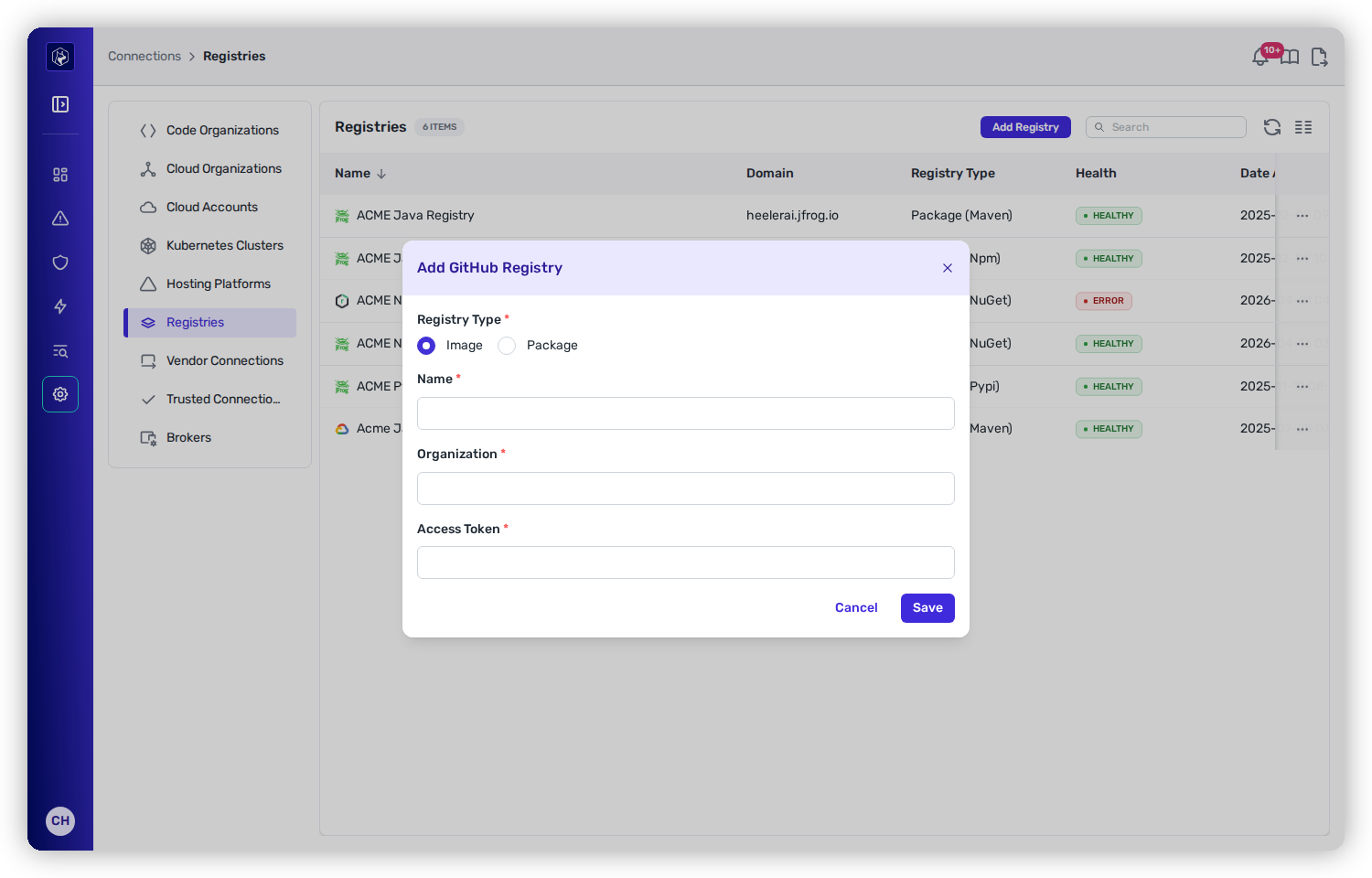
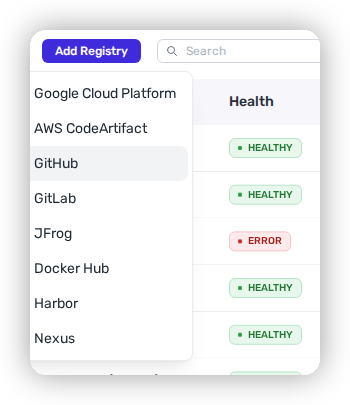
GitHub Container Registry and [GitHub Packages](/mrecEO40m5D6bt7Pq5pE/get-started/registries-and-artifacts/github-packages.md) share the **GitHub** entry on the **Add Registry** menu — you choose between them with the **Registry Type** radio (**Image** for the container registry). This page covers **Image**.
{% endhint %}

## Before you start

* **Administrator** role in Heeler.
* A GitHub account with access to the organization's packages, able to create a **Personal Access Token (classic)** with the `read:packages` scope.

## Step 1 — Create a GitHub PAT

1. In GitHub, go to your profile → **Settings → Developer settings → Personal access tokens → Tokens (classic)** → **Generate new token (classic)**.
2. Give it a note (e.g. `Heeler GitHub Images`) and an expiration per your policy.
3. Under **Select scopes**, check **`read:packages`**.
4. **Generate** and copy the token — you won't see it again.

## Step 2 — Add the registry in Heeler

{% stepper %}
{% step %}

### Open the modal

Go to **Connections → Registries → Add Registry → GitHub**.

<figure><img src="https://414480750-files.gitbook.io/~/files/v0/b/gitbook-x-prod.appspot.com/o/spaces%2FXP3dp2kecwKA2KvYkntz%2Fuploads%2Fgit-blob-c99f27e35403c7121aca057f9e91d53df9b18862%2Fcc-gs-reg-github-menu.png?alt=media" alt="The Add Registry menu in Heeler with the GitHub option selected."><figcaption><p>Choose <strong>GitHub</strong> from the Add Registry menu.</p></figcaption></figure>
{% endstep %}

{% step %}

### Configure it

* **Registry Type** — select **Image**.
* **Name** — any label for the connection.
* **Organization** — your GitHub organization slug (from `https://github.com/<your-org>`).
* **Access Token** — the PAT from Step 1.

<figure><img src="https://414480750-files.gitbook.io/~/files/v0/b/gitbook-x-prod.appspot.com/o/spaces%2FXP3dp2kecwKA2KvYkntz%2Fuploads%2Fgit-blob-ef2231d3063f341fa2a98d1e3a6ef67004954cbc%2Fcc-gs-reg-ghcr-form.png?alt=media" alt="The Add Registry modal for GitHub with Registry Type set to Image, and Name, Organization, and Access Token fields."><figcaption><p>GitHub Container Registry: choose <strong>Image</strong>, then enter your org and PAT.</p></figcaption></figure>

Click **Save**.
{% endstep %}

{% step %}

### Verify

Confirm the registry shows **Healthy** under **Connections → Registries**.
{% endstep %}
{% endstepper %}

## You're done when…

* [ ] The registry shows **Healthy** under **Connections → Registries**.
* [ ] Container images from your organization correlate in the [Catalog](/mrecEO40m5D6bt7Pq5pE/catalog.md).
* [ ] Findings begin populating — see [Quickstart](/mrecEO40m5D6bt7Pq5pE/get-started/quickstart.md).

## Troubleshooting

<table><thead><tr><th width="300">Symptom</th><th>Fix</th></tr></thead><tbody><tr><td>Connection shows <strong>Unhealthy</strong></td><td>The PAT is missing the <code>read:packages</code> scope or has expired. Regenerate a classic token with <code>read:packages</code> and re-enter it.</td></tr><tr><td>No images appear in the Catalog</td><td>Confirm the <strong>Organization</strong> slug matches <code>https://github.com/&#x3C;your-org></code> and that its packages are visible to the token's account.</td></tr></tbody></table>

## Related

* [GitHub Packages](/mrecEO40m5D6bt7Pq5pE/get-started/registries-and-artifacts/github-packages.md) — for first-party package artifacts (the **Package** mode of the same entry).
* [Connect Registries and Artifacts](/mrecEO40m5D6bt7Pq5pE/get-started/registries-and-artifacts.md) — the common flow.


---

# Agent Instructions
This documentation is published with GitBook. GitBook is the documentation platform designed so that both humans and AI agents can read, navigate, and reason over technical content effectively. Learn more at gitbook.com.

## Querying This Documentation
If you need additional information that is not directly available in this page, you can query the documentation dynamically by asking a question.

Perform an HTTP GET request on the current page URL with the `ask` query parameter, and the optional `goal` query parameter:

```
GET https://docs.heeler.com/mrecEO40m5D6bt7Pq5pE/get-started/registries-and-artifacts/github-container-registry.md?ask=<question>&goal=<endgoal>
```

`ask` is the immediate question: it should be specific, self-contained, and written in natural language.
`goal` is optional and describes the broader end goal you are ultimately trying to accomplish on behalf of the user. GitBook uses it to tailor the answer towards what is most useful for that goal.

The response will contain a direct answer to the question and relevant excerpts and sources from the documentation.

Use this mechanism when the answer is not explicitly present in the current page, you need clarification or additional context, or you want to retrieve related documentation sections.