> For the complete documentation index, see [llms.txt](https://docs.heeler.com/mrecEO40m5D6bt7Pq5pE/llms.txt). Markdown versions of documentation pages are available by appending `.md` to page URLs; this page is available as [Markdown](https://docs.heeler.com/mrecEO40m5D6bt7Pq5pE/operate/campaigns.md).

# Campaigns

Declare one or more CVEs as a campaign and track every affected instance in your estate through to closure.

A campaign names one or more CVEs, optionally limits them to chosen repositories, and tracks every place those CVEs appear until each one is closed. Use it when a single advisory becomes a piece of programme work with a deadline and an owner.

{% hint style="info" %}
**Who this is for:** security programme owners running a coordinated response. Creating, editing, excluding and deleting are **Administrator** actions; everyone else can read the campaign.
{% endhint %}

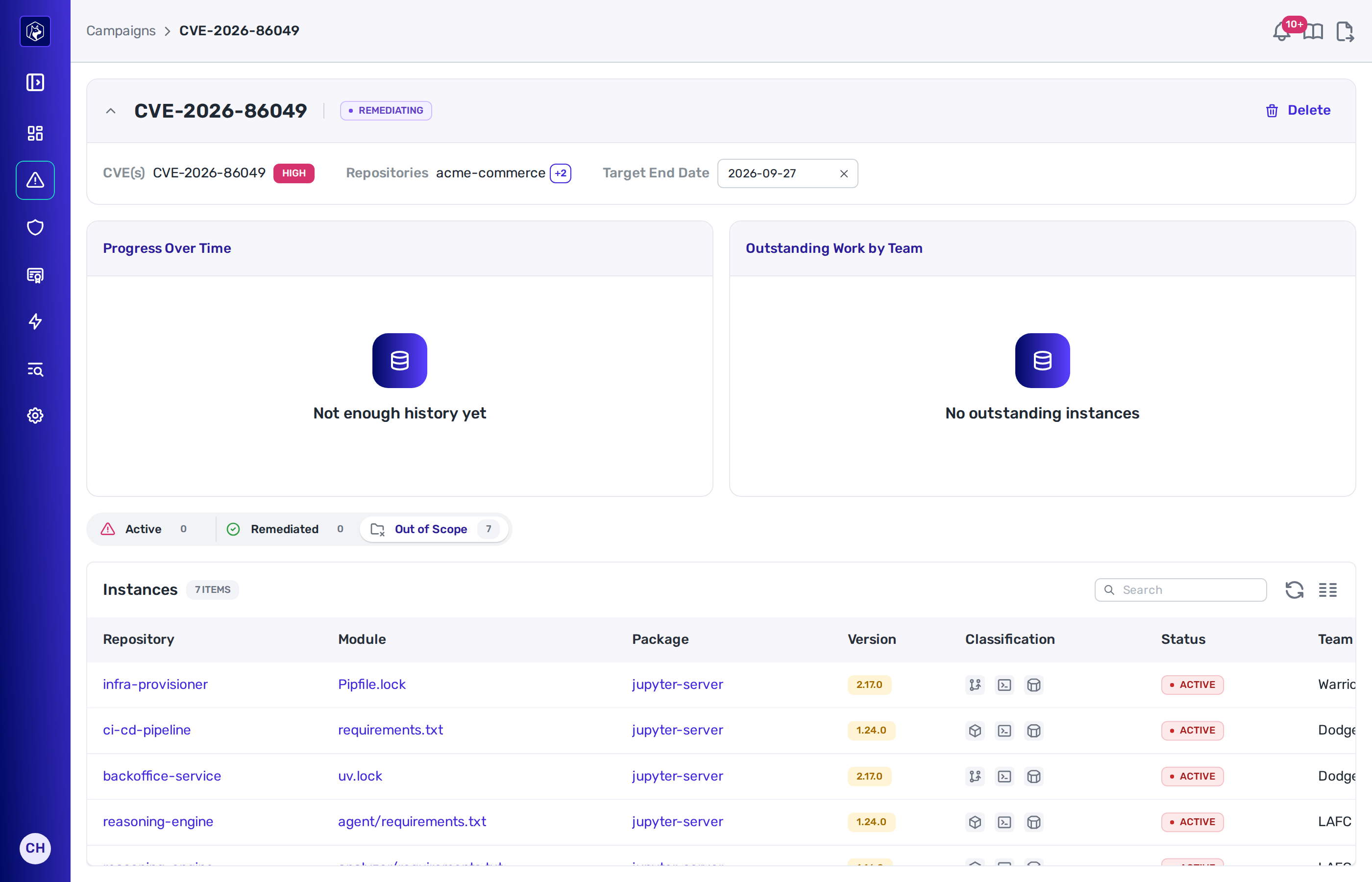
<figure><img src="https://414480750-files.gitbook.io/~/files/v0/b/gitbook-x-prod.appspot.com/o/spaces%2FXP3dp2kecwKA2KvYkntz%2Fuploads%2Fgit-blob-03475129b6818131847adeea3b32fb7eeef123fd%2Fcc-campaigns-list.png?alt=media" alt="The Campaigns list, each row showing the campaign name, its CVEs, severity, status, remediated progress, who created it, when, and the target end date, with the Create Campaign button above."><figcaption><p>The <strong>Campaigns</strong> list. Each row tracks one declared set of CVEs and how far it has been remediated.</p></figcaption></figure>

## The campaigns list

**Security → Campaigns** lists your campaigns, newest first.

| Column              | What it shows                                                          |
| ------------------- | ---------------------------------------------------------------------- |
| **Name**            | The campaign name, linking to its page.                                |
| **CVEs**            | The declared CVEs.                                                     |
| **Severity**        | The highest severity among them.                                       |
| **Status**          | **Remediating** or **Completed**.                                      |
| **Remediated**      | A progress bar and the count of remediated instances out of the total. |
| **Created By**      | Who declared the campaign.                                             |
| **Created At**      | When it was declared.                                                  |
| **Target End Date** | The date set for the campaign, when there is one.                      |

Filter the list by **Status**.

## Creating a campaign

Select **Create Campaign**.

| Field               | Required | Notes                                                                                                       |
| ------------------- | -------- | ----------------------------------------------------------------------------------------------------------- |
| **CVE IDs**         | Yes      | Pick from the vulnerabilities Heeler already knows. Type to search; the picker shows ten matches at a time. |
| **Name**            | Yes      | Filled with the CVEs you selected until you type your own.                                                  |
| **Repositories**    | No       | Leave blank to include all repositories.                                                                    |
| **Target End Date** | No       | Today or later.                                                                                             |

On save, Heeler finds every instance of the declared CVEs and builds the campaign from them. This takes a moment on a large estate.

Repositories and CVEs are fixed once the campaign exists. The target end date can be changed afterwards.

## The campaign page

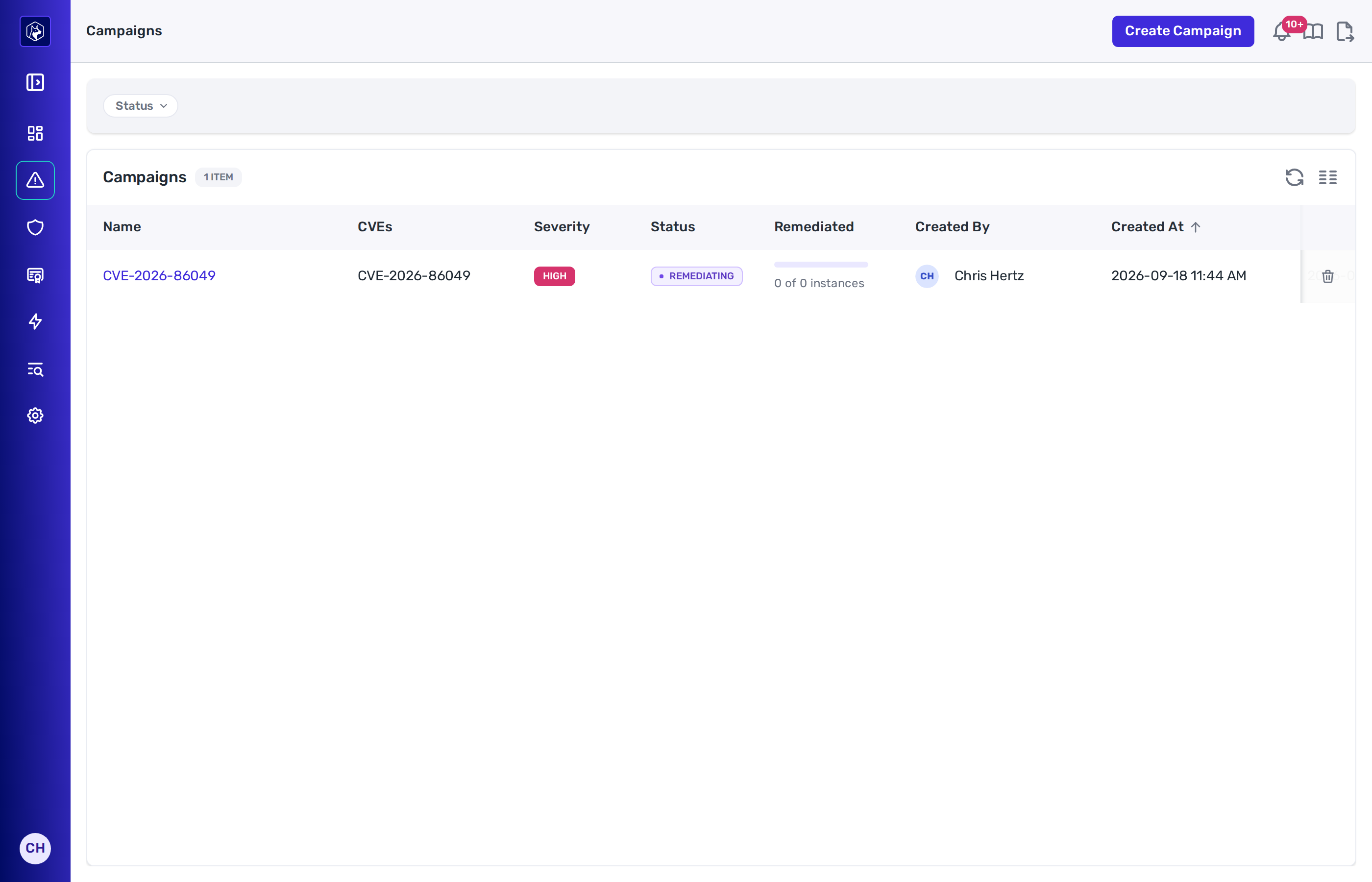
The header carries the campaign name, its status, the **CVE(s)** with their severities, the **Repositories** it covers — or **All repositories** — and the **Target End Date**. Administrators can set or clear the date in place.

Three tabs split the work, each with a live count.

| Tab              | What it holds                                                                                                                           |
| ---------------- | --------------------------------------------------------------------------------------------------------------------------------------- |
| **Active**       | Instances with no fix yet, and instances whose dependency is upgraded but not yet gone from every deployed environment.                 |
| **Remediated**   | Instances gone from all deployed environments, and instances you excluded.                                                              |
| **Out of Scope** | Modules that match a declared CVE but sit in a repository the campaign does not cover. Empty when the campaign covers all repositories. |

<figure><img src="https://414480750-files.gitbook.io/~/files/v0/b/gitbook-x-prod.appspot.com/o/spaces%2FXP3dp2kecwKA2KvYkntz%2Fuploads%2Fgit-blob-92a4e00341d608857c5a68011e84440f6f585a8f%2Fcc-campaigns-detail.png?alt=media" alt="A campaign page showing the CVEs, repositories and target end date, the progress and outstanding-work cards, the Active, Remediated and Out of Scope tabs with counts, and the instance table listing repository, module, package, version, classification, status and team."><figcaption><p>A campaign page. The tabs separate instances still active from those remediated and those outside the declared scope.</p></figcaption></figure>

### The instance table

| Column             | What it shows                                                                                                                      |
| ------------------ | ---------------------------------------------------------------------------------------------------------------------------------- |
| **Repository**     | The repository, linking to it.                                                                                                     |
| **Module**         | The module inside the repository, linking to it.                                                                                   |
| **Package**        | The affected package. Where a remediation exists for it, the name links to that remediation; otherwise it links to the dependency. |
| **Version**        | The installed version.                                                                                                             |
| **Classification** | Icons for how the dependency is used — direct or transitive, open source, first or third party, unpinned, compromised.             |
| **Status**         | **Active**, **Fixed**, **Remediated**, or **Excluded**.                                                                            |
| **Team**           | The team owning the repository, or **Unassigned**.                                                                                 |
| **Tech Lead**      | The module's tech lead.                                                                                                            |

Filter the **Active** and **Remediated** tabs by **Classification**, **Repository** and **Status**.

Where agentic remediation is available to you, select instances and choose **Remediate** to open pull requests for them. Every selected instance needs a linked remediation, and none can be excluded.

## Excluding an instance

An instance that does not belong in the campaign can be taken out of it. Choose **Exclude** on a row, or select several rows and use the **Exclude** action.

The dialog lists what you are excluding and offers an optional **Reason**. The reason is kept with the record.

An excluded instance moves to the **Remediated** tab with an **Excluded** badge, and counts toward the campaign's remediated total.

To put it back, choose **Re-include** on the row. This clears the recorded reason.

## The cards

| Card                         | What it plots                                                                                                                                                          |
| ---------------------------- | ---------------------------------------------------------------------------------------------------------------------------------------------------------------------- |
| **Progress Over Time**       | Two lines — **Affected** and **Remediated** — against the campaign's history. It reads **Not enough history yet** until the campaign has more than one recorded point. |
| **Outstanding Work by Team** | A bar per team, sized by the instances that team still has open. Up to five teams, and repositories with no team appear as **Unassigned**.                             |

## Completion

A campaign reads **Completed** once every affected instance is remediated or excluded. A completed campaign stops taking on new instances.

## Deleting a campaign

Administrators can delete a campaign from its page or from the list's row menu. The confirmation names the campaign, and the deletion cannot be undone.

## Related

* [Remediation Workbench](/mrecEO40m5D6bt7Pq5pE/operate/dashboards/remediation-workbench.md) — the remediations a campaign's instances link to.
* [Open Source (SCA)](/mrecEO40m5D6bt7Pq5pE/findings/open-source-sca.md) — the findings a campaign draws on.
* [Agent Executions](/mrecEO40m5D6bt7Pq5pE/fix/agent-executions.md) — following the pull requests the Remediate action opens.


---

# Agent Instructions
This documentation is published with GitBook. GitBook is the documentation platform designed so that both humans and AI agents can read, navigate, and reason over technical content effectively. Learn more at gitbook.com.

## Querying This Documentation
If you need additional information that is not directly available in this page, you can query the documentation dynamically by asking a question.

Perform an HTTP GET request on the current page URL with the `ask` query parameter, and the optional `goal` query parameter:

```
GET https://docs.heeler.com/mrecEO40m5D6bt7Pq5pE/operate/campaigns.md?ask=<question>&goal=<endgoal>
```

`ask` is the immediate question: it should be specific, self-contained, and written in natural language.
`goal` is optional and describes the broader end goal you are ultimately trying to accomplish on behalf of the user. GitBook uses it to tailor the answer towards what is most useful for that goal.

The response will contain a direct answer to the question and relevant excerpts and sources from the documentation.

Use this mechanism when the answer is not explicitly present in the current page, you need clarification or additional context, or you want to retrieve related documentation sections.