> For the complete documentation index, see [llms.txt](https://docs.heeler.com/mrecEO40m5D6bt7Pq5pE/llms.txt). Markdown versions of documentation pages are available by appending `.md` to page URLs; this page is available as [Markdown](https://docs.heeler.com/mrecEO40m5D6bt7Pq5pE/operate/dashboards/cloud-posture.md).
# Cloud Posture
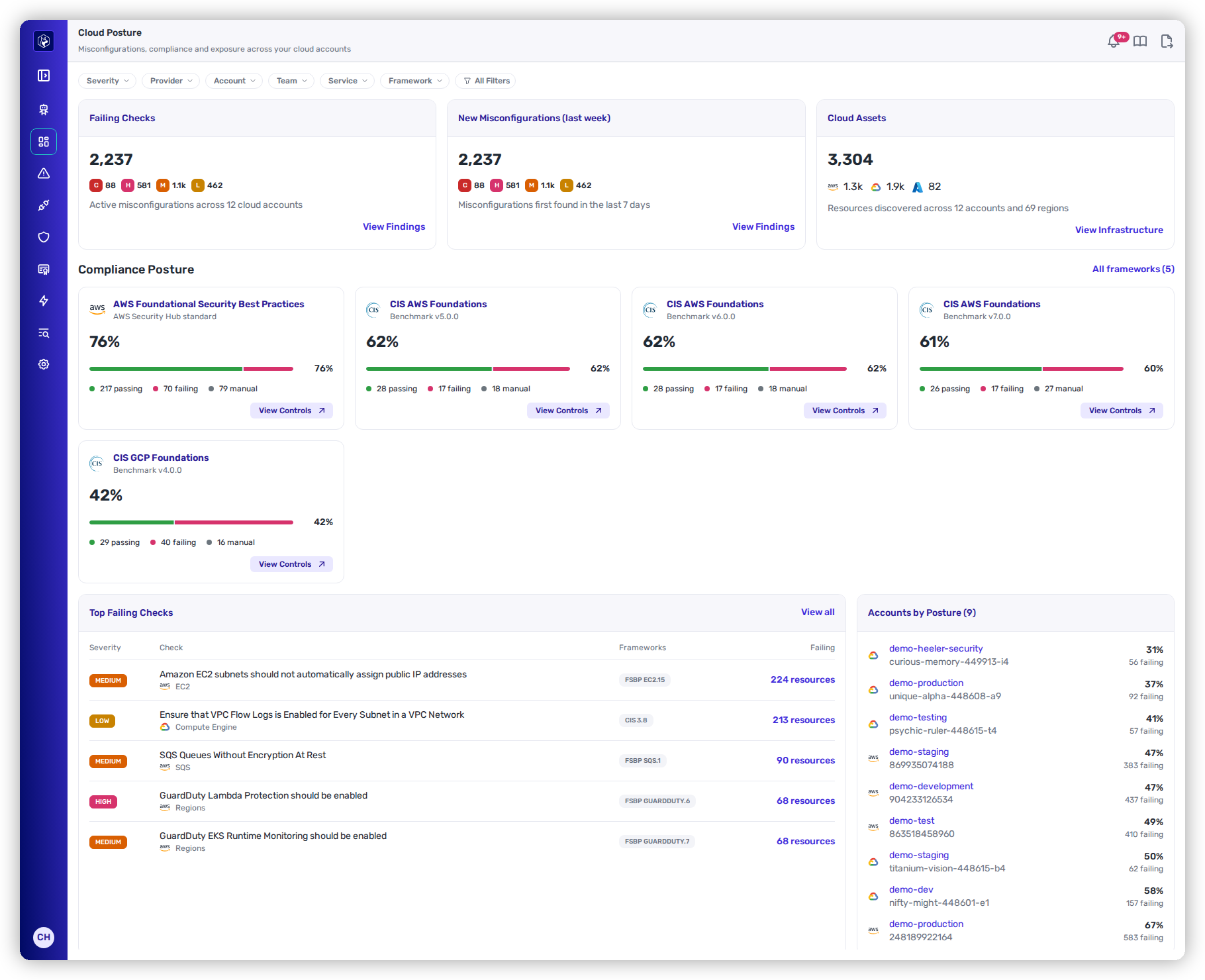
The Cloud Posture dashboard: failing checks, new misconfigurations, cloud assets, framework scores and the accounts with the lowest posture.
**Dashboards → Cloud Posture** shows the state of every cloud account you can see, measured by the checks Heeler evaluates and the frameworks you adopted.
Dashboards → Cloud Posture.
## Filters
The filter bar applies to every card on the page. The filters do not carry over to or from the other dashboards.
| Filter | Values |
| ------------- | ------------------------------------------------------------------------------------------- |
| **Account** | Cloud accounts, grouped by cloud. |
| **Framework** | Adopted frameworks, labelled with their version, for example **CIS AWS Foundations 4.0.0**. |
| **Provider** | The clouds that have checks. |
| **Service** | The cloud service of the resource, for example **S3** or **Cloud SQL**. |
| **Severity** | **Critical**, **High**, **Medium**, **Low**. |
| **Team** | Teams that own a cloud account, and **No team**. |
**All Filters** adds **Resource Type** and **Check**.
## Summary cards
| Card | What it counts |
| ------------------------------------- | ------------------------------------------------------------------------------------------------------------------------------------------------------------------------ |
| **Failing Checks** | Failing check and resource pairs, by severity. A resource failing three checks counts three times. The caption reads "Active misconfigurations across N cloud accounts". |
| **New Misconfigurations (last week)** | Failures first identified in the last 7 days, by severity. |
| **Cloud Assets** | Every cloud resource Heeler discovered, with a count per cloud. The caption reads "Resources discovered across N accounts and M regions". |
**View Findings** on **Failing Checks** and **New Misconfigurations (last week)** opens [Cloud Findings](/mrecEO40m5D6bt7Pq5pE/findings/cloud/findings.md) (**Security → Cloud → Findings by Resource**) with the page's filters applied. **View Infrastructure** on **Cloud Assets** opens [Infrastructure](/mrecEO40m5D6bt7Pq5pE/catalog/infrastructure.md) (**Catalog → Infrastructure**).
The trend on **Failing Checks** compares the count with the latest daily snapshot that is at least 7 days old, and names that snapshot's date. An increase in failures shows as a negative trend.
Failures that an approved **All frameworks** [exemption](/mrecEO40m5D6bt7Pq5pE/findings/cloud/exemptions.md) covers are not counted.
## Compliance posture
One card per adopted framework, with:
* The framework score and its trend against the 7-day-old snapshot.
* A score bar with the number of passing, failing and manual controls.
* **View Controls**, which opens the framework's [Controls tab](/mrecEO40m5D6bt7Pq5pE/standards-and-compliance/cloud-frameworks.md#controls-tab).
**All frameworks (N)** opens **Standards**, where the [cloud frameworks](/mrecEO40m5D6bt7Pq5pE/standards-and-compliance/cloud-frameworks.md) are listed in the **Cloud** section. With no framework adopted, the section reads "No frameworks adopted yet. Add the ones your organization follows in Program › Standards." **Program › Standards** opens **Administration → Program → Standards**.
## Top failing checks
The five failing checks with the most failing resources.
| Column | What it shows |
| -------------- | ------------------------------------------------ |
| **Severity** | The check's severity. |
| **Check** | The check name, its cloud and its service. |
| **Frameworks** | Up to two framework controls that map the check. |
| **Failing** | **N resources**. |
Select the check name to open the [check drawer](/mrecEO40m5D6bt7Pq5pE/findings/cloud/checks.md#check-drawer), or the count to open it on **Failing Resources**. **View all** opens [Cloud Checks](/mrecEO40m5D6bt7Pq5pE/findings/cloud/checks.md) (**Security → Cloud**).
## Accounts by posture
The ten accounts with the lowest posture. Each row shows the cloud, the account name and ID, the posture percentage and the number of failing resources. The account name opens [Cloud Findings](/mrecEO40m5D6bt7Pq5pE/findings/cloud/findings.md) filtered to that account.
**Account posture** is the share of evaluated resources that pass, across the account's active checks:
```
posture = (resources evaluated − resources failing) ÷ resources evaluated × 100
```
Resources that an approved **All frameworks** exemption covers do not count as failing. An account with nothing evaluated shows 100%.
## Related
* [Cloud](/mrecEO40m5D6bt7Pq5pE/findings/cloud.md) — coverage, cadence and who sees what.
* [Cloud Frameworks](/mrecEO40m5D6bt7Pq5pE/standards-and-compliance/cloud-frameworks.md) — how framework scores are calculated.
* [Cloud Exemptions](/mrecEO40m5D6bt7Pq5pE/findings/cloud/exemptions.md) — how exemptions change these figures.
---
# Agent Instructions
This documentation is published with GitBook. GitBook is the documentation platform designed so that both humans and AI agents can read, navigate, and reason over technical content effectively. Learn more at gitbook.com.
## Querying This Documentation
If you need additional information that is not directly available in this page, you can query the documentation dynamically by asking a question.
Perform an HTTP GET request on the current page URL with the `ask` query parameter, and the optional `goal` query parameter:
```
GET https://docs.heeler.com/mrecEO40m5D6bt7Pq5pE/operate/dashboards/cloud-posture.md?ask=&goal=
```
`ask` is the immediate question: it should be specific, self-contained, and written in natural language.
`goal` is optional and describes the broader end goal you are ultimately trying to accomplish on behalf of the user. GitBook uses it to tailor the answer towards what is most useful for that goal.
The response will contain a direct answer to the question and relevant excerpts and sources from the documentation.
Use this mechanism when the answer is not explicitly present in the current page, you need clarification or additional context, or you want to retrieve related documentation sections.