> For the complete documentation index, see [llms.txt](https://docs.heeler.com/mrecEO40m5D6bt7Pq5pE/llms.txt). Markdown versions of documentation pages are available by appending `.md` to page URLs; this page is available as [Markdown](https://docs.heeler.com/mrecEO40m5D6bt7Pq5pE/operate/dashboards/remediation-workbench.md).
# Remediation Workbench
Plan the burn-down at scale — see what Heeler can auto-fix for you, the SLO days you'd save, and the highest-impact fixes to tackle by hand.
The findings and remediations lists are where you work individual issues. The **Remediation Workbench** (**Dashboards → Remediation Workbench**) is where you plan the campaign — a single view that answers "where does my remediation effort go furthest?" It splits your backlog into what Heeler can **fix for you automatically** and what's worth your team's time by hand, and quantifies the payoff.
{% hint style="info" %}
**For:** AppSec teams and dependency owners planning a burn-down. The counts populate only once the [operating loop is connected](/mrecEO40m5D6bt7Pq5pE/get-started.md) — code, cloud, and runtime — so remediations are ranked by real exposure.
{% endhint %}
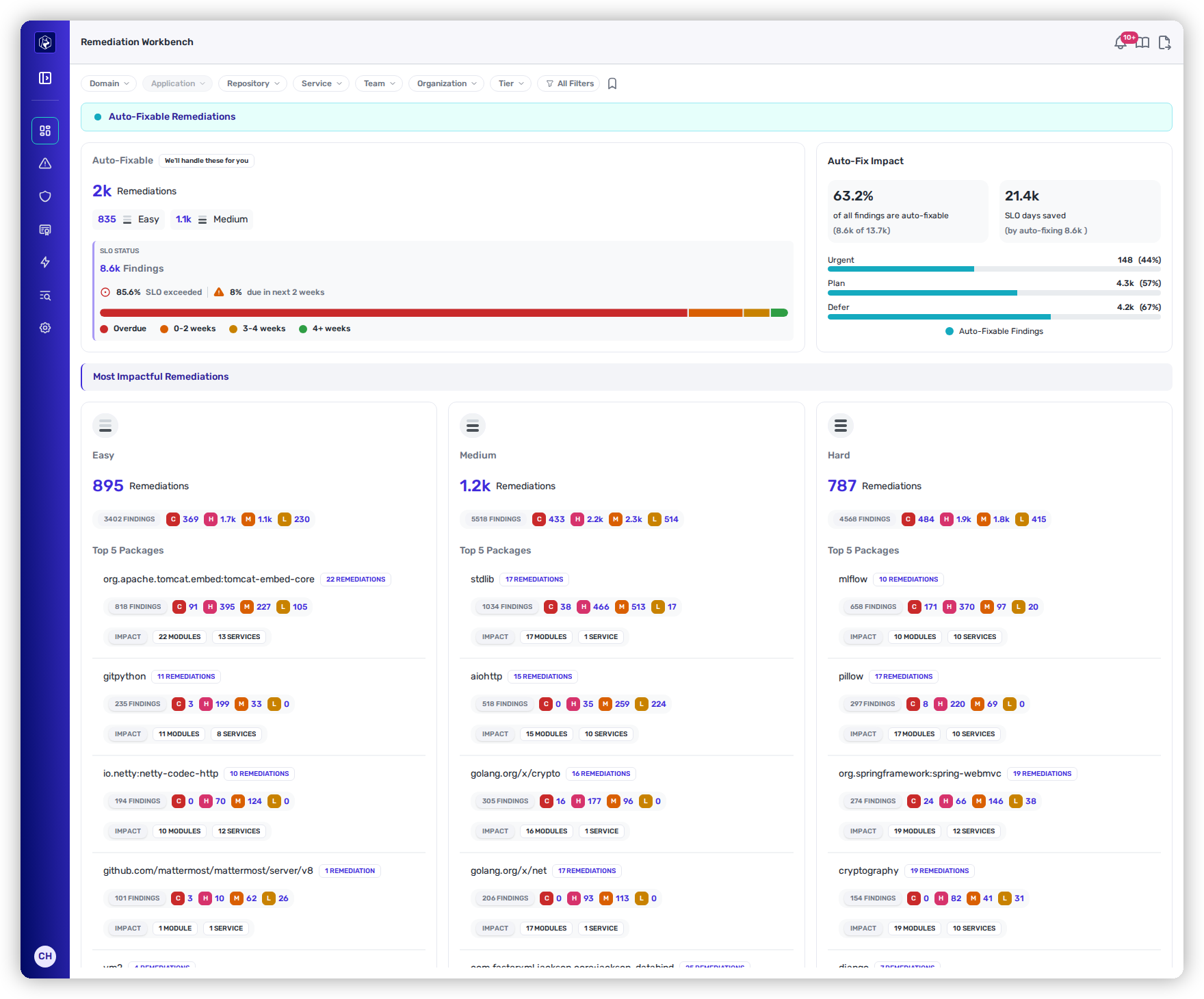
The Remediation Workbench — what's auto-fixable, the SLO days you'd save, and the highest-impact work by complexity.
## Auto-Fixable Remediations
The top panel is the fast win: everything Heeler can resolve for you.
| Metric | What it shows | Act on it |
| ------------------- | ----------------------------------------------------------------------------------------------------------------------------------------------------------------------------------------------------- | -------------------------------------------------------------------------------------------------------------------------------------------------------------- |
| **Auto-Fixable** | How many remediations Heeler can handle for you, split by **Easy** and **Medium** complexity. | Send them to [SCA Auto-Fix](/mrecEO40m5D6bt7Pq5pE/fix/sca-auto-fix.md), or stand up a hands-off [workflow](/mrecEO40m5D6bt7Pq5pE/fix/automate-remediation.md). |
| **SLO Status** | The deadline pressure across affected findings — the share already **SLO-exceeded**, how many are **due in the next two weeks**, and a bar breaking findings into **Overdue / 0–2 / 3–4 / 4+ weeks**. | Clear the Overdue and near-due bands first. |
| **Auto-Fix Impact** | The **percentage of all findings that are auto-fixable**, the **SLO days you'd save** by auto-fixing them, and how those findings distribute across the **Urgent / Plan / Defer** bands. | Use the SLO-days-saved figure to justify turning automated fixing on. |
{% hint style="success" %}
This is the "fix everything, in the right order" story in one screen: it shows how much of the backlog you can clear automatically, and how many days of SLO exposure that removes — before anyone touches a keyboard.
{% endhint %}
*Empty state: when nothing in the current scope is auto-fixable, the panel shows zero counts, which means no auto-fixable work rather than a data problem.*
## Most Impactful Remediations
Below that, the work that needs a person is ranked by **fixability complexity**:
| Metric | What it shows | Act on it |
| ---------- | ------------------------------------------------------------------------------------------ | ------------------------------------------------------------ |
| **Easy** | A minor or patch version bump with no breaking changes. | Start here — the most findings cleared for the least effort. |
| **Medium** | A major version bump, or a change that touches multiple modules and may need extra review. | Schedule alongside regular work; budget for review. |
| **Hard** | Deep transitive dependencies, or fixes that require application-code changes. | Plan as focused projects rather than quick wins. |
Each complexity card shows the number of **remediations** and **findings** in the bucket, a **Critical / High / Medium / Low** severity breakdown, and the **Top 5 packages** driving the most remediations. Each package row carries its own **remediation and finding counts, severity breakdown, and impact scope** — how many modules and services it affects, which identifies the upgrades that clear the most findings.
Starting with the **Easy** column clears the most findings for the least effort; the top packages show where one upgrade resolves many issues at once.
## Scoping the view
The Remediation Workbench respects the same [global filters](/mrecEO40m5D6bt7Pq5pE/operate/dashboards/filtering-and-exports.md#the-global-filter-bar) as every dashboard — **Application, Repository, Service, Team, Organization, Tier**, and the full **All Filters** set — so a team can narrow the whole workbench to just its own burn-down. Save a scoped view with the bookmark (**Presets**) to return to it.
## From the workbench to action
The workbench tells you *what* to do; you act from the linked surfaces:
* **Auto-fix the easy wins** — send auto-fixable remediations to [SCA Auto-Fix](/mrecEO40m5D6bt7Pq5pE/fix/sca-auto-fix.md), or stand up a [workflow](/mrecEO40m5D6bt7Pq5pE/fix/automate-remediation.md) so they're fixed automatically as they appear.
* **Work the rest by impact** — drill into a complexity bucket or a top package to reach the [Remediations](/mrecEO40m5D6bt7Pq5pE/findings/open-source-sca/remediations.md) behind it and open fixes or tickets.
## Related
* [Priorities](/mrecEO40m5D6bt7Pq5pE/operate/dashboards/priorities.md) — what needs attention right now, before you plan the burn-down.
* [Fix → Prioritize (Heeler Risk)](/mrecEO40m5D6bt7Pq5pE/fix/prioritize-heeler-risk.md) — sequencing the backlog by risk.
* [SCA Auto-Fix](/mrecEO40m5D6bt7Pq5pE/fix/sca-auto-fix.md) · [Automate Remediation](/mrecEO40m5D6bt7Pq5pE/fix/automate-remediation.md)
---
# Agent Instructions
This documentation is published with GitBook. GitBook is the documentation platform designed so that both humans and AI agents can read, navigate, and reason over technical content effectively. Learn more at gitbook.com.
## Querying This Documentation
If you need additional information that is not directly available in this page, you can query the documentation dynamically by asking a question.
Perform an HTTP GET request on the current page URL with the `ask` query parameter, and the optional `goal` query parameter:
```
GET https://docs.heeler.com/mrecEO40m5D6bt7Pq5pE/operate/dashboards/remediation-workbench.md?ask=&goal=
```
`ask` is the immediate question: it should be specific, self-contained, and written in natural language.
`goal` is optional and describes the broader end goal you are ultimately trying to accomplish on behalf of the user. GitBook uses it to tailor the answer towards what is most useful for that goal.
The response will contain a direct answer to the question and relevant excerpts and sources from the documentation.
Use this mechanism when the answer is not explicitly present in the current page, you need clarification or additional context, or you want to retrieve related documentation sections.