> For the complete documentation index, see [llms.txt](https://docs.heeler.com/mrecEO40m5D6bt7Pq5pE/llms.txt). Markdown versions of documentation pages are available by appending `.md` to page URLs; this page is available as [Markdown](https://docs.heeler.com/mrecEO40m5D6bt7Pq5pE/operate/exceptions-and-overrides.md).

# Exceptions and Overrides

The register of every risk and SLO exception in your program — who granted it, why, and when it lapses.

Recording an exception happens on the finding, while you're triaging it. **Reviewing** exceptions is a different job: someone has to be able to answer *what have we accepted, who accepted it, and is any of it stale?* — across the whole program, not one finding at a time.

That's what these two registers are for. **Risk Overrides** lists findings whose risk has been overridden; **SLO Overrides** lists findings given a custom remediation deadline. Both are read-and-manage views over decisions made elsewhere — nothing is granted from here.

Both live under **Security → Overrides**. **Risk** and **SLO** are pills at the top left; the scope toggle at the top right switches between the finding types that register covers and carries a count for each.

{% hint style="info" %}
**To grant an exception, go to the finding.** See [Recording an exception](/mrecEO40m5D6bt7Pq5pE/findings/open-source-sca/findings.md#recording-an-exception) for dependencies, or [the SAST equivalent](/mrecEO40m5D6bt7Pq5pE/findings/code-security-sast/findings.md#recording-an-exception) for code. This page is about the registers those actions feed.
{% endhint %}

## What each register covers

| Register           | Scopes                                                                             |
| ------------------ | ---------------------------------------------------------------------------------- |
| **Risk Overrides** | **SCA** — dependency findings. **File** — findings on agent and instruction files. |
| **SLO Overrides**  | **SCA** — dependency findings. **SAST** — code findings.                           |

{% hint style="warning" %}
**SAST risk overrides don't appear in a register.** You can override the risk on a SAST finding — the action is on the row and the detail page — but there's no central SAST risk list to review them in. To audit those, filter the SAST findings list by **Mitigation**, setting it to **Any Active Mitigation** or to a specific reason.
{% endhint %}

An override leaves the register when its finding is remediated. These are lists of **live** exceptions — accepted risk you're still carrying — not a permanent history of every exception ever granted. If you need the history for a specific finding, it's in that finding's notes.

## Risk Overrides

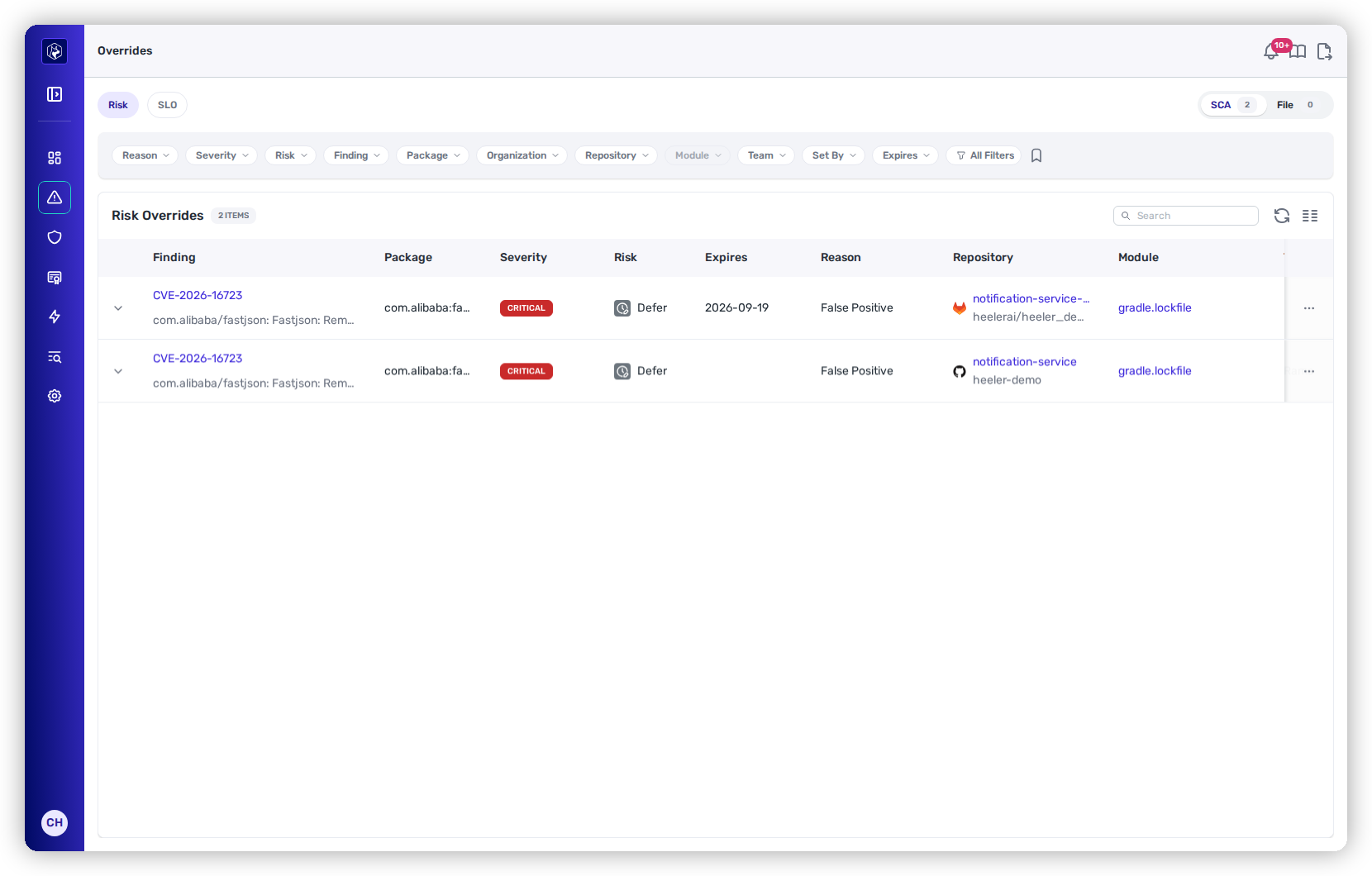
| Column                      | What it shows                                                                                            |
| --------------------------- | -------------------------------------------------------------------------------------------------------- |
| **Finding**                 | The vulnerability ID with its title beneath, linking to the finding in its module.                       |
| **Package**                 | The affected package.                                                                                    |
| **Severity**                | The finding's severity.                                                                                  |
| **Risk**                    | The Heeler Risk band the finding would carry.                                                            |
| **Expires**                 | When the override lapses. Empty means it stands until someone removes it.                                |
| **Reason**                  | Not Reachable · Unpinned Version · False Positive · Environment Configuration · Risk Acceptance · Other. |
| **Repository** · **Module** | Where the finding lives.                                                                                 |
| **Team**                    | The teams owning that repository.                                                                        |
| **Set By**                  | Who granted it.                                                                                          |

<figure><img src="https://414480750-files.gitbook.io/~/files/v0/b/gitbook-x-prod.appspot.com/o/spaces%2FXP3dp2kecwKA2KvYkntz%2Fuploads%2Fgit-blob-f23997c0458515a52da70d66d59a39713e96c0e8%2Fcc-ovr-risk.png?alt=media" alt="The Risk Overrides register with its filter chips."><figcaption><p>Risk Overrides — every live risk exception, with its reason, expiry, and who set it.</p></figcaption></figure>

The same reason travels with the finding into the **Dependency Findings** and **Source Findings** CSV exports, in a `risk_override_reason` column. That is how a report separates findings held open as accepted risk from those covered by a mitigation of another kind — see [Filtering and Exports](/mrecEO40m5D6bt7Pq5pE/operate/dashboards/filtering-and-exports.md#risk-override-reason-in-the-findings-exports).

## SLO Overrides

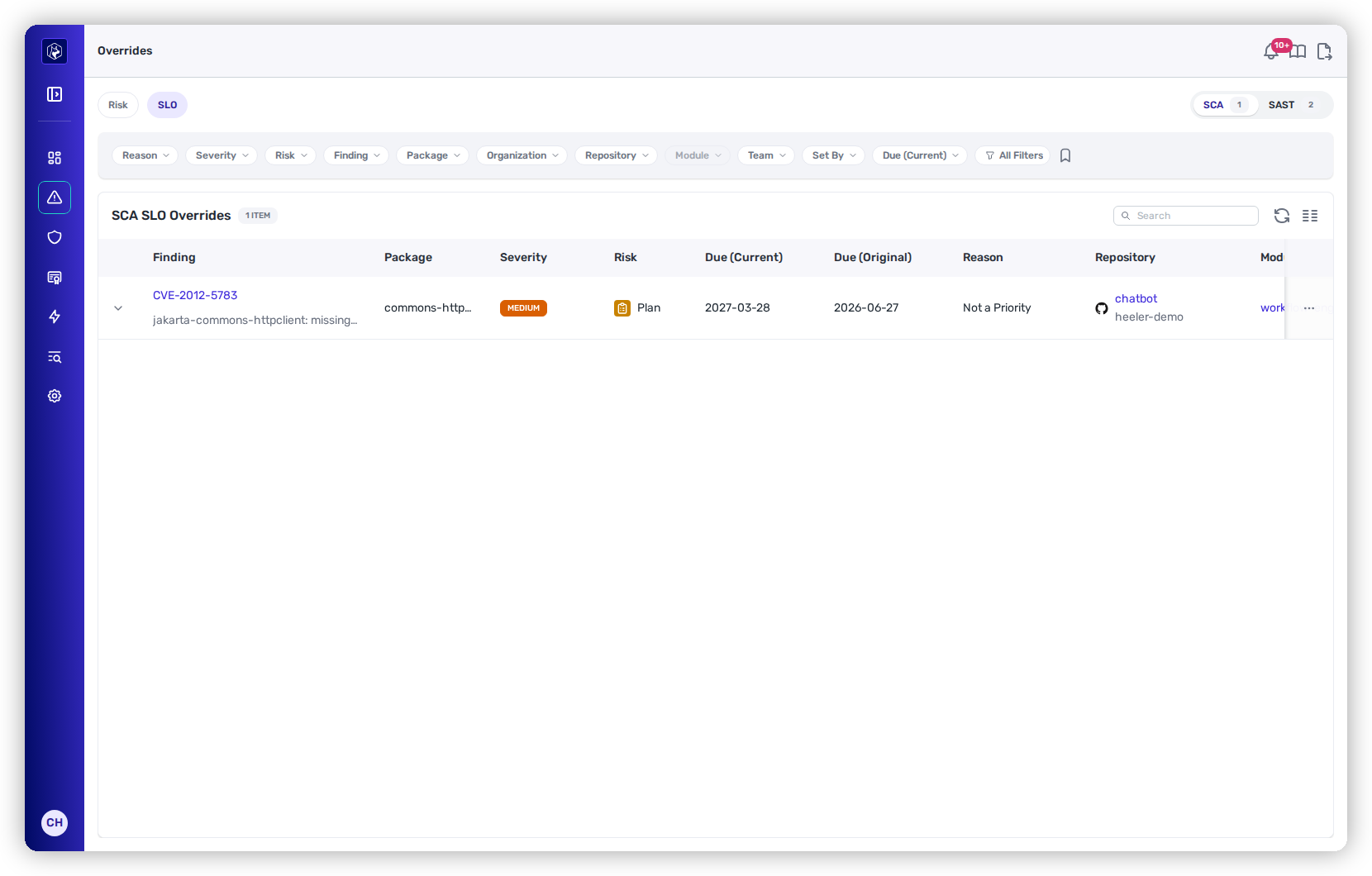
The **SCA** tab carries the same **Finding**, **Package**, **Severity**, **Risk**, **Repository**, **Module**, **Team**, and **Set By** columns as above, and swaps the expiry for the two dates that matter on a deadline exception:

| Column             | What it shows                                                                      |
| ------------------ | ---------------------------------------------------------------------------------- |
| **Due (Current)**  | The custom deadline now in force.                                                  |
| **Due (Original)** | The deadline Heeler had calculated, so you can see how far the exception moved it. |

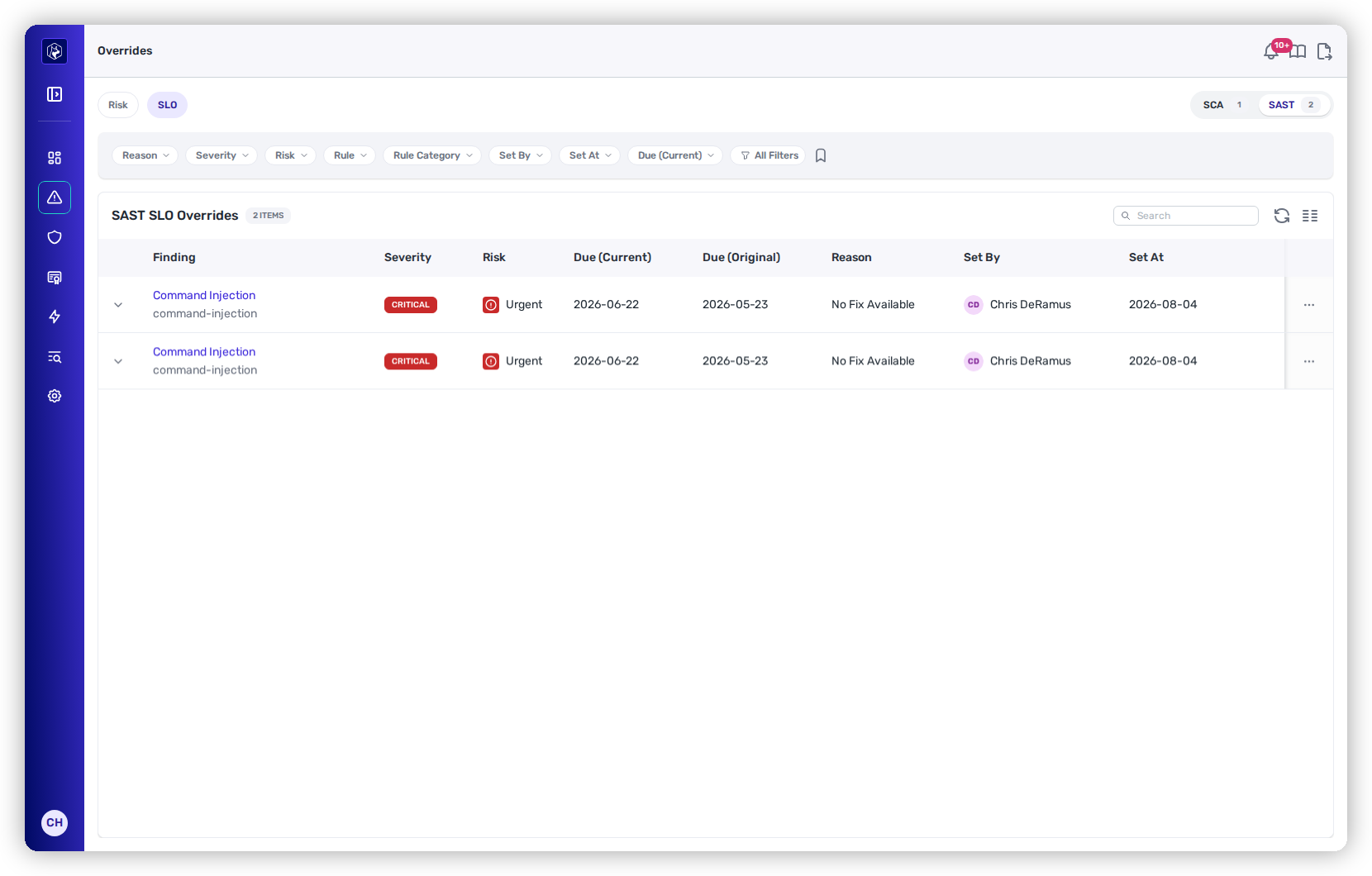
The **SAST** tab is narrower, because SAST SLO overrides aren't scoped to a package or module: **Finding** (the rule name with its rule ID beneath, linking to the finding), **Severity**, **Risk**, **Due (Current)**, **Due (Original)**, **Reason**, **Set By**, and **Set At**.

<figure><img src="https://414480750-files.gitbook.io/~/files/v0/b/gitbook-x-prod.appspot.com/o/spaces%2FXP3dp2kecwKA2KvYkntz%2Fuploads%2Fgit-blob-9678fbfcebea217613e2af4d55b5525df38f0bd8%2Fcc-ovr-slo-sast.png?alt=media" alt="The SAST tab of the SLO Overrides register."><figcaption><p>The SAST tab — no package or module, and <strong>Set At</strong> in their place.</p></figcaption></figure>

On both tabs, **Reason** is No Fix Available · Fix Complexity · Not a Priority · Other.

<figure><img src="https://414480750-files.gitbook.io/~/files/v0/b/gitbook-x-prod.appspot.com/o/spaces%2FXP3dp2kecwKA2KvYkntz%2Fuploads%2Fgit-blob-d63056da9f7afd7daf82e24db8b9a3c3a1abfcf6%2Fcc-ovr-slo.png?alt=media" alt="The SLO Overrides register with the SCA and SAST toggle above the table."><figcaption><p>SLO Overrides — the SCA / SAST toggle sits above the table, and both due dates are shown, which records how far the exception moved the deadline.</p></figcaption></figure>

## Working the registers

Both open sorted by when the override was set, most recent first.

Every row carries an expand control on its left. Opening a row shows the override's **Description** — the free-text rationale whoever granted it wrote at the time. **Reason** in the table is the fixed category; the Description is the argument, and it is the thing to read when you are deciding whether an exception still holds.

Filter by **Reason**, **Severity**, **Risk**, **Set By**, and the relevant date — **Expires** on Risk Overrides, **SLO Due Date** on SLO Overrides. The SCA views add **Finding**, **Package**, **Repository**, **Module**, **Organization**, and **Team**; the SAST tab offers **Rule**, **Rule Category**, and **Set At** instead.

Two filters do most of the governance work:

* **Set By** answers "what has this person accepted?" — the review you want when someone changes roles or leaves.
* The **date** filter answers "what's about to lapse, or already has?" — a risk override past its expiry means the finding is back on the books whether or not anyone noticed.

## Changing or removing an exception

Each row has **Edit override** and **Remove override**.

**Edit override** reopens the same modal used to grant it, pre-filled, to revise the reason, description or date without removing and re-granting.

**Remove override** asks for confirmation and then returns the finding to its automatic treatment — its computed risk for a risk override, its calculated due date for an SLO override. The finding reappears in the normal queues immediately, so remove one only when you're ready for it to be worked.

## Related

* [Service Level Objectives (SLOs)](/mrecEO40m5D6bt7Pq5pE/operate/service-level-objectives-slos.md) — how the default deadlines an SLO override replaces are set.
* [Recording an exception (SCA)](/mrecEO40m5D6bt7Pq5pE/findings/open-source-sca/findings.md#recording-an-exception) · [Recording an exception (SAST)](/mrecEO40m5D6bt7Pq5pE/findings/code-security-sast/findings.md#recording-an-exception) — where exceptions are granted.
* [Prioritize (Heeler Risk)](/mrecEO40m5D6bt7Pq5pE/fix/prioritize-heeler-risk.md) — the risk model an override departs from.


---

# Agent Instructions
This documentation is published with GitBook. GitBook is the documentation platform designed so that both humans and AI agents can read, navigate, and reason over technical content effectively. Learn more at gitbook.com.

## Querying This Documentation
If you need additional information that is not directly available in this page, you can query the documentation dynamically by asking a question.

Perform an HTTP GET request on the current page URL with the `ask` query parameter, and the optional `goal` query parameter:

```
GET https://docs.heeler.com/mrecEO40m5D6bt7Pq5pE/operate/exceptions-and-overrides.md?ask=<question>&goal=<endgoal>
```

`ask` is the immediate question: it should be specific, self-contained, and written in natural language.
`goal` is optional and describes the broader end goal you are ultimately trying to accomplish on behalf of the user. GitBook uses it to tailor the answer towards what is most useful for that goal.

The response will contain a direct answer to the question and relevant excerpts and sources from the documentation.

Use this mechanism when the answer is not explicitly present in the current page, you need clarification or additional context, or you want to retrieve related documentation sections.