> For the complete documentation index, see [llms.txt](https://docs.heeler.com/mrecEO40m5D6bt7Pq5pE/llms.txt). Markdown versions of documentation pages are available by appending `.md` to page URLs; this page is available as [Markdown](https://docs.heeler.com/mrecEO40m5D6bt7Pq5pE/operate/service-level-objectives-slos.md).

# Service Level Objectives (SLOs)

Turn priority into deadlines — how SLOs set remediation windows by risk or severity and track every finding against them.

SLOs turn priority into **deadlines**. An SLO sets how long a finding of a given risk or severity may remain open before it's overdue, and Heeler tracks every finding against it — surfacing what's on track, due soon, and overdue across the product, including the Remediation Workbench.

{% hint style="info" %}
**Who sets these:** SLO policies are configured by an **Administrator** under **Administration → Program**. Everyone else works against the deadlines they set.
{% endhint %}

## How the clock works

* **The clock starts** when Heeler **first detects** the finding — statically or at runtime.
* **The due date** is that start plus the number of days your policy allows for the finding's bucket.
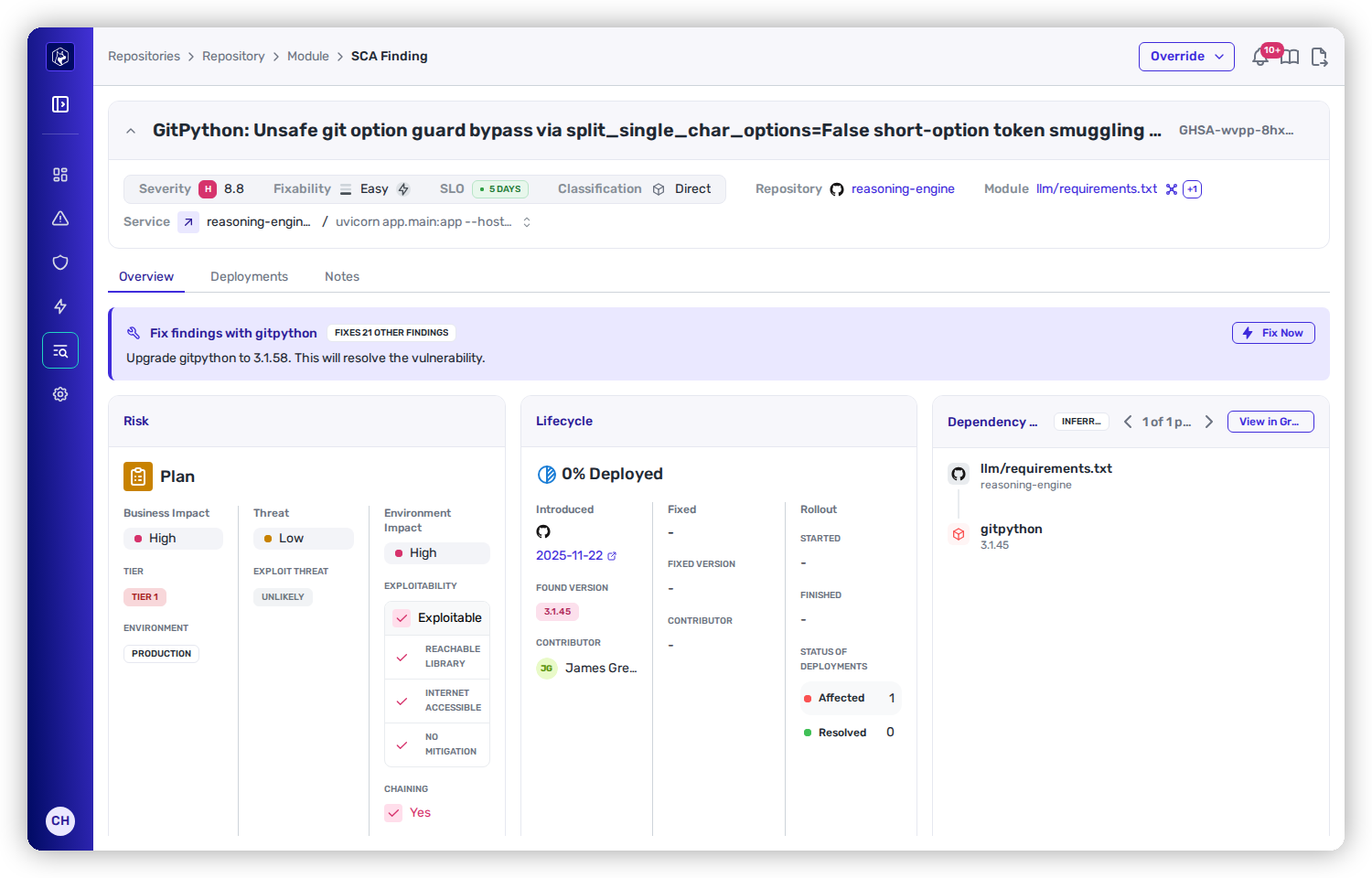
* **The clock stops** when the finding is resolved — fixed in code and, ultimately, **Deployed** to every running instance.

## Strategies

**SCA** and **SAST** each carry their own SLOs, and for each you pick the strategy that decides a finding's bucket, then set the days-to-fix per bucket.

### Dependencies (SCA)

| Strategy          | How the bucket is chosen                                                                                                                                                                                         |
| ----------------- | ---------------------------------------------------------------------------------------------------------------------------------------------------------------------------------------------------------------- |
| **Heeler Risk**   | The finding's calculated Heeler Risk priority — **Urgent / Plan / Defer** — combining severity, exploitability, runtime reachability, and business impact. Use it when timelines should track *real-world risk*. |
| **CVSS Severity** | The finding's CVSS severity band, regardless of exploitability or runtime. Use it when a compliance program (SOC 2, ISO 27001, FedRAMP, PCI DSS) ties timelines to CVSS.                                         |

Under **CVSS Severity**, buckets follow the standard CVSS v3 ranges:

| Bucket       | CVSS score |
| ------------ | ---------- |
| **Critical** | 9.0 – 10.0 |
| **High**     | 7.0 – 8.9  |
| **Medium**   | 4.0 – 6.9  |
| **Low**      | 0.1 – 3.9  |

### Code security (SAST)

| Strategy          | How the bucket is chosen                                                                                                                            |
| ----------------- | --------------------------------------------------------------------------------------------------------------------------------------------------- |
| **Heeler Risk**   | The SAST risk pipeline's priority — **Urgent / Plan / Defer** — incorporating rule severity, exploitability of the code path, and business context. |
| **Rule Severity** | The **intrinsic severity declared by the SAST rule** (Critical / High / Medium / Low) — set by the rule definition, **not** derived from CVSS.      |

{% hint style="warning" %}
Under the **Rule Severity** strategy, findings whose rule severity is **INFO**, **NONE**, or **UNKNOWN** get **no SLO** — there's no deadline to track for them.
{% endhint %}

SLO status feeds automation: [SLO Guardrails](/mrecEO40m5D6bt7Pq5pE/prevent/pr-guardrails/guardrail-types/slo-guardrails.md) can gate pull requests when a repository has overdue findings, and [SLO-expiring workflow triggers](/mrecEO40m5D6bt7Pq5pE/operate/workflows/triggers.md) fire before a deadline lapses.

## Default windows

Out of the box, both SCA and SAST use the **Heeler Risk** strategy with the windows below. An Admin can change any window — or switch strategy — under **Administration → Program**.

| Priority band | Default days to fix |
| ------------- | ------------------- |
| **Urgent**    | 14                  |
| **Plan**      | 60                  |
| **Defer**     | 120                 |

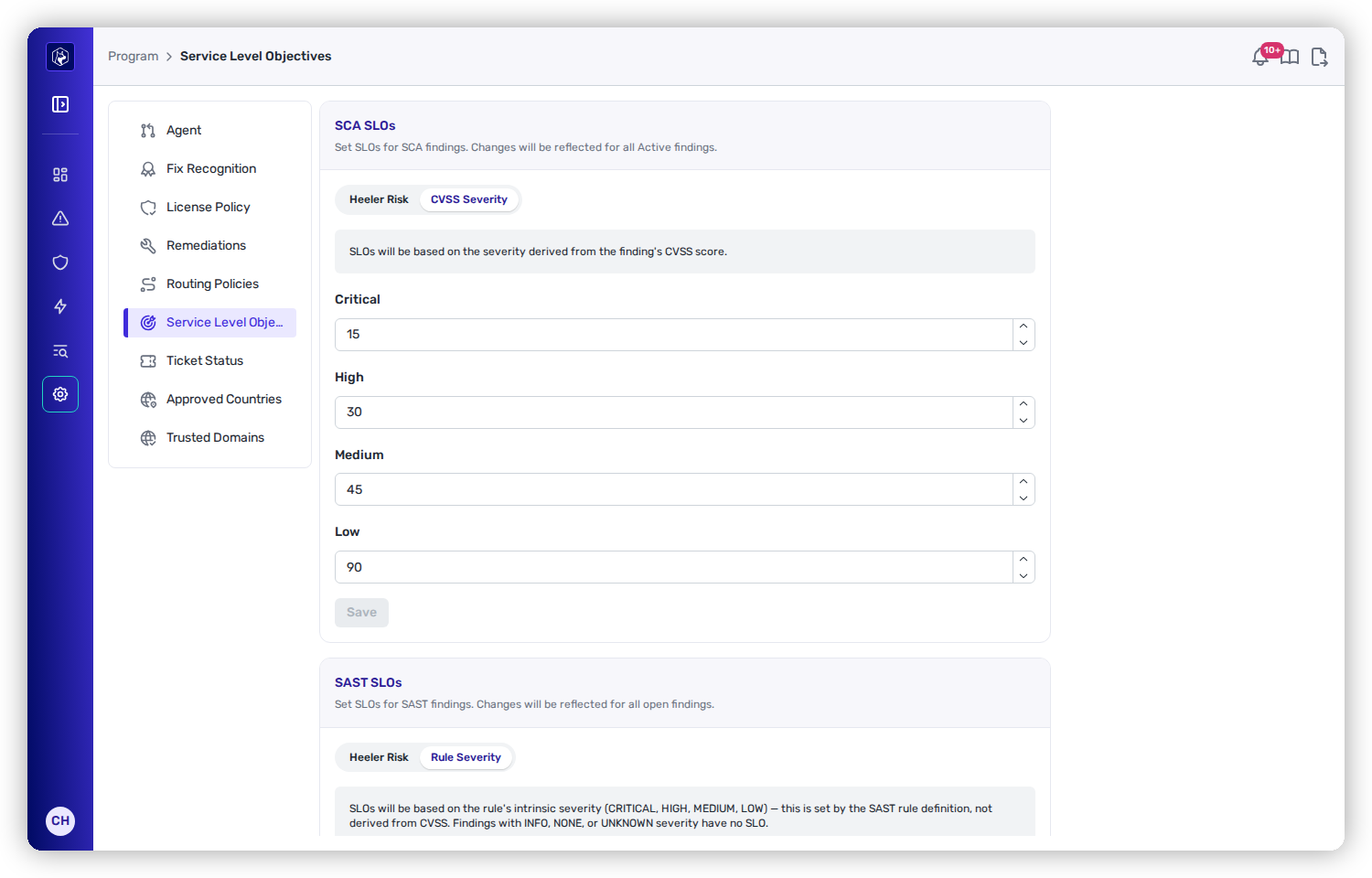
If you switch a type to its severity-based strategy — **CVSS Severity** for SCA, **Rule Severity** for SAST — the default windows are:

| Severity     | Default days to fix |
| ------------ | ------------------- |
| **Critical** | 15                  |
| **High**     | 30                  |
| **Medium**   | 45                  |
| **Low**      | 90                  |

<figure><img src="https://414480750-files.gitbook.io/~/files/v0/b/gitbook-x-prod.appspot.com/o/spaces%2FXP3dp2kecwKA2KvYkntz%2Fuploads%2Fgit-blob-1da3c3143ccb8225a474643c62735a5fd983aec3%2Fam-program-slos.png?alt=media" alt="SLO policy under Administration → Program → Service Level Objectives, with the SCA policy on the CVSS Severity strategy showing Critical 15, High 30, Medium 45, Low 90 day windows."><figcaption><p>SLO windows under <strong>Administration → Program → Service Level Objectives</strong> — here the SCA policy uses the CVSS Severity strategy.</p></figcaption></figure>

<figure><img src="https://414480750-files.gitbook.io/~/files/v0/b/gitbook-x-prod.appspot.com/o/spaces%2FXP3dp2kecwKA2KvYkntz%2Fuploads%2Fgit-blob-01ace7c3b345414039d4e0be19338229cf1de1fc%2Fcc-fix-heeler-risk-detail.png?alt=media" alt="A finding detail summary bar showing an SLO badge reading -249 DAYS in red, indicating the finding is overdue against its SLO."><figcaption><p>An overdue finding — the red <strong>SLO</strong> badge (here <strong>-249 days</strong>) flags remediation past its deadline.</p></figcaption></figure>

## Scope, overrides, and recalculation

* **Scope is tenant-wide.** SLOs apply across the whole tenant — there's no per-team or per-service SLO. For exceptions, use a **per-finding SLO Override** (extend or set a due date with a reason).
* **Changing a policy recalculates in place.** When you save a change, Heeler re-computes the due date for every open finding of that type. A finding's **First Seen** timestamp never moves — only its due date shifts to reflect the new policy.

## Related

* [How Heeler triages findings](/mrecEO40m5D6bt7Pq5pE/findings.md#how-heeler-triages-findings)
* [Respond & Govern](/mrecEO40m5D6bt7Pq5pE/administer-and-monitor/program-policy.md) — managing SLOs and overrides.


---

# Agent Instructions
This documentation is published with GitBook. GitBook is the documentation platform designed so that both humans and AI agents can read, navigate, and reason over technical content effectively. Learn more at gitbook.com.

## Querying This Documentation
If you need additional information that is not directly available in this page, you can query the documentation dynamically by asking a question.

Perform an HTTP GET request on the current page URL with the `ask` query parameter, and the optional `goal` query parameter:

```
GET https://docs.heeler.com/mrecEO40m5D6bt7Pq5pE/operate/service-level-objectives-slos.md?ask=<question>&goal=<endgoal>
```

`ask` is the immediate question: it should be specific, self-contained, and written in natural language.
`goal` is optional and describes the broader end goal you are ultimately trying to accomplish on behalf of the user. GitBook uses it to tailor the answer towards what is most useful for that goal.

The response will contain a direct answer to the question and relevant excerpts and sources from the documentation.

Use this mechanism when the answer is not explicitly present in the current page, you need clarification or additional context, or you want to retrieve related documentation sections.