> For the complete documentation index, see [llms.txt](https://docs.heeler.com/mrecEO40m5D6bt7Pq5pE/llms.txt). Markdown versions of documentation pages are available by appending `.md` to page URLs; this page is available as [Markdown](https://docs.heeler.com/mrecEO40m5D6bt7Pq5pE/operate/workflows/building-a-workflow.md).

# Building a Workflow

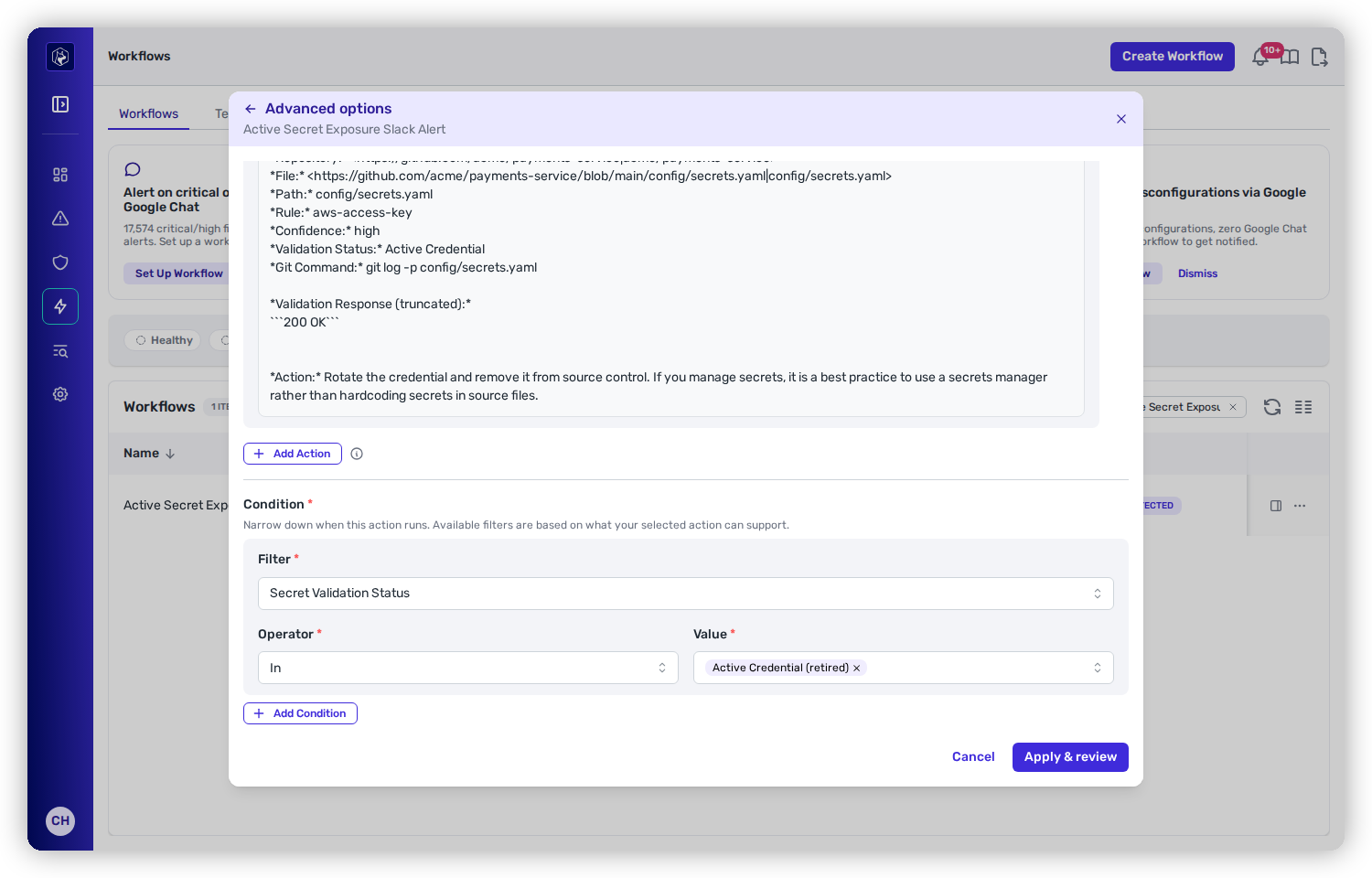
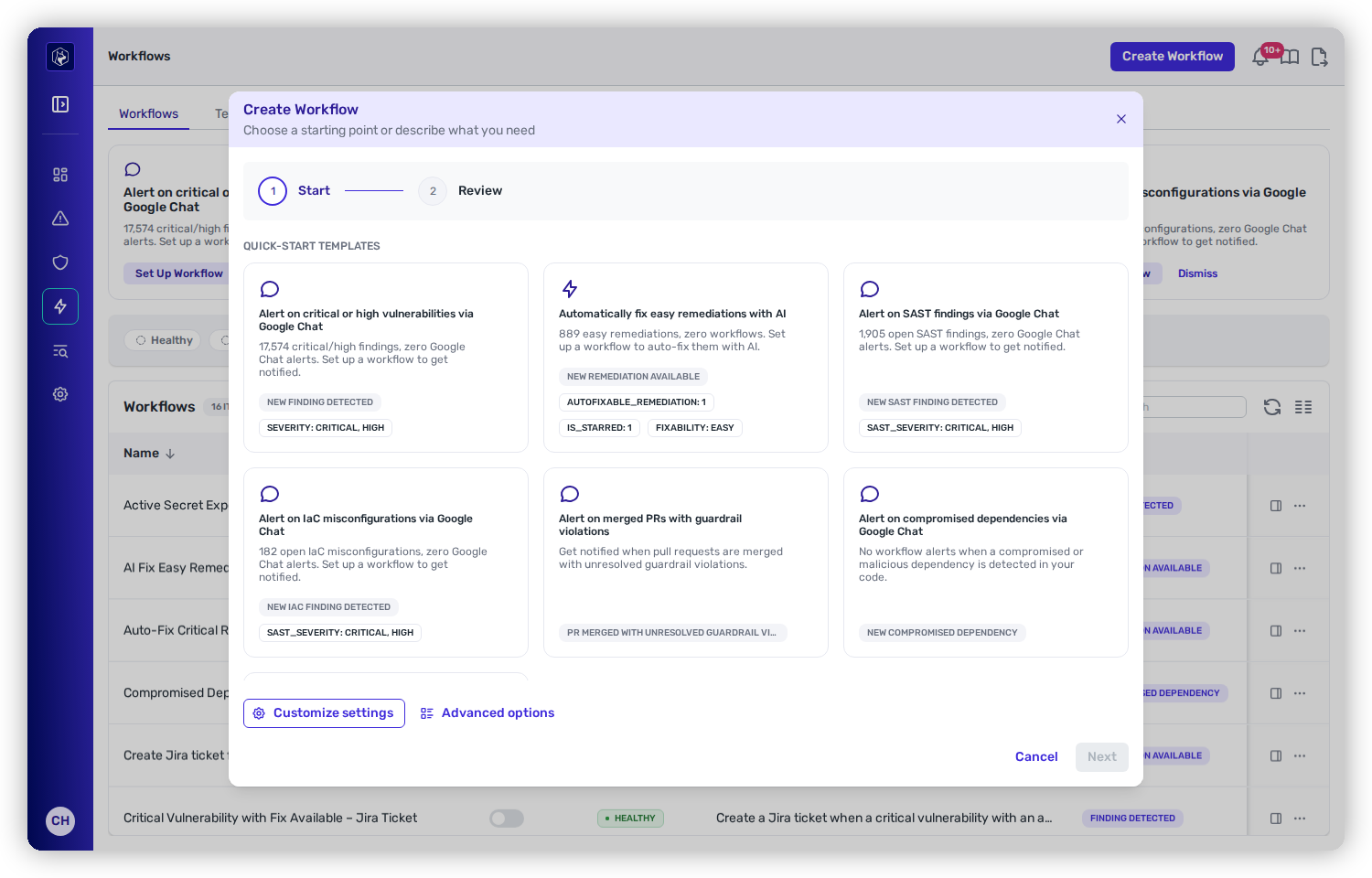
The Create Workflow wizard — quick-start templates, a plain-language description, the simplified settings tier, and full Advanced options.

**Create Workflow** opens a two-step wizard — **Start**, then **Review**. On the Start step you choose how much you want to specify, from a one-click template to the full editor. Whichever route you take, you land on Review before anything is saved.

| On the Start step          | Gives you                                                                                         |
| -------------------------- | ------------------------------------------------------------------------------------------------- |
| A **quick-start template** | A workflow pre-filled from a gap Heeler found, with its trigger and conditions shown on the card. |
| **Describe your own**      | Heeler generates the settings from your sentence when you continue.                               |
| **Customize settings**     | A simplified form: one trigger, one action, and when it should run.                               |
| **Advanced options**       | The full editor — trigger, chained actions, and per-filter conditions.                            |

Both middle tiers finish with **Apply & review**, which takes you to the Review step rather than saving directly.

{% hint style="info" %}
**For anyone automating the response loop.** Actions that reach an external system — Slack, Jira, Linear, GitHub, a webhook — need that **integration connected** first; the action's targets only populate once it is.
{% endhint %}

<figure><img src="https://414480750-files.gitbook.io/~/files/v0/b/gitbook-x-prod.appspot.com/o/spaces%2FXP3dp2kecwKA2KvYkntz%2Fuploads%2Fgit-blob-99f092a8adda3dfa84d8b3a9d8a47157c9408514%2Fcc-wf-trigger.png?alt=media" alt="The Create Workflow wizard on its Start step, showing quick-start template cards above a describe-your-own box, with Customize settings and Advanced options below."><figcaption><p>The Start step — pick a quick-start template, describe what you want, or drop into Customize settings or Advanced options.</p></figcaption></figure>

## Describe it in plain English

Click **Create Workflow**, then type what you want under **Describe your own**. Heeler generates the settings when you continue:

{% hint style="success" %}
*"Alert the security team on Slack when a new critical vulnerability with an available fix is detected in a Tier 1 service"*
{% endhint %}

Heeler assembles the whole workflow — trigger, conditions, actions, name, and description — and drops you into the builder with everything filled in. **Nothing is saved until you review and save it**, so treat the result as a first draft: check the trigger is the one you meant, tighten the conditions, and confirm the action targets.

{% hint style="info" %}
A couple of limits worth knowing: the description is capped at **500 characters**, and generation is rate-limited to **10 requests per minute**. Conditions that depend on specific records — a named repository, team, or person — can't be generated (Heeler can't guess the internal IDs), so add those by hand after generating.
{% endhint %}

**Example descriptions** that work well:

| You describe…                                                            | Heeler configures                                                      |
| ------------------------------------------------------------------------ | ---------------------------------------------------------------------- |
| "Alert me on Slack when a critical vulnerability is found"               | New Vulnerability Finding · filter Critical · Slack message            |
| "Create a Jira ticket and Teams message for high-severity SAST findings" | New SAST Finding · filter Critical + High · Jira issue + Teams message |
| "Notify when secrets are found in our code"                              | New Secret Detected · Slack message                                    |
| "Email when a fix becomes available for an existing vulnerability"       | New Fix Available · email                                              |
| "Alert when a PR is merged with unresolved guardrail violations"         | PR Merged with Guardrail Violations · Slack message                    |

**Tips:** name the **severity** ("critical," "high"); name the **integration** ("Slack," "Teams," "Jira," "Linear," "email"); **combine** up to three actions; and mention the **event type** ("vulnerability," "secret," "SAST," "remediation," "guardrail") so Heeler picks the right trigger.

## Start from a quick-start template

The Start step leads with **quick-start templates** — cards for the automations Heeler can see you are missing, each showing the trigger and any conditions it would set as badges. They are gap-driven, so the set you see reflects your own findings and connected integrations, and it changes as you close those gaps.

These are the same suggestions as the [Suggested Workflows](/mrecEO40m5D6bt7Pq5pE/operate/workflows.md#suggested-workflows) cards on the Workflows list; the difference is only where you meet them.

## Start from a suggestion

The **Suggested Workflows** cards on the [Workflows page](/mrecEO40m5D6bt7Pq5pE/operate/workflows.md#suggested-workflows) each have a **Set Up Workflow** button that opens the builder pre-filled with that suggestion's trigger and conditions. It's the same builder — you can adjust anything before saving. Heeler surfaces a card when it spots a gap:

| Suggestion                             | When it appears                                                                             |
| -------------------------------------- | ------------------------------------------------------------------------------------------- |
| Alert on critical/high vulnerabilities | You have open high/critical findings and a messaging integration, but no alerting workflow. |
| Create tickets for vulnerabilities     | A ticketing integration (Jira, Linear) is connected but no ticket-creation workflow exists. |
| Alert on detected secrets              | Secrets have been found but no workflow alerts on new detections.                           |
| Alert on SAST findings                 | SAST findings exist but no workflow notifies on new results.                                |
| Alert on guardrail violations          | No workflow watches for PRs merged with unresolved guardrail violations.                    |

## Build it yourself

**Customize settings** is the simplified form. It asks three questions — **What starts the workflow?** (one trigger), **What should happen?** (one action), and **When should it happen?** (**Every time**, or **Custom** to add conditions). Choosing **Custom** for either the action or the condition opens Advanced options.

**Advanced options** is the full editor, and the four things it asks for are the four parts of any workflow:

{% stepper %}
{% step %}

### Trigger

Choose the single event that starts the workflow — the picker lists every available [trigger](/mrecEO40m5D6bt7Pq5pE/operate/workflows/triggers.md). Exactly one trigger per workflow.
{% endstep %}

{% step %}

### Actions

Choose what the workflow does. Pick a **Type**, fill in its fields, and use **Add Action** to chain up to three. The list of available action types depends on the trigger you picked. See [Actions](/mrecEO40m5D6bt7Pq5pE/operate/workflows/actions.md).

<figure><img src="https://414480750-files.gitbook.io/~/files/v0/b/gitbook-x-prod.appspot.com/o/spaces%2FXP3dp2kecwKA2KvYkntz%2Fuploads%2Fgit-blob-271f594695e27f47664b59c3e342c0eea8450f03%2Fcc-wf-action-types.png?alt=media" alt="The Actions step with the Type dropdown open, listing Send Email, Create Jira Issue, Create Linear Issue, Send Webhook, Send Slack Message, Send Teams Message, and more."><figcaption><p>The Actions step of the builder. The action types on offer depend on the trigger you chose.</p></figcaption></figure>
{% endstep %}

{% step %}

### Condition

Add the filters that decide which events proceed. Combine as many as you need — they're joined with AND. Leave it at the catch-all **Accept All** filter to fire on every matching event. See [Conditions](/mrecEO40m5D6bt7Pq5pE/operate/workflows/conditions.md).

<figure><img src="https://414480750-files.gitbook.io/~/files/v0/b/gitbook-x-prod.appspot.com/o/spaces%2FXP3dp2kecwKA2KvYkntz%2Fuploads%2Fgit-blob-b85681d3f3994d96d048f678c2096a48062b39b6%2Fcc-wf-condition.png?alt=media" alt="The Condition step showing a locked Auto-Fixable filter with an Operator of Is and a Value of True, above an Add Condition button."><figcaption><p>The Condition step narrows what the workflow acts on. Add as many filters as you need — they are joined with AND.</p></figcaption></figure>
{% endstep %}

{% step %}

### Review

**Apply & review** takes you to the Review step. Confirm the name, description and owner, then save. It's created **enabled** and starts watching for its trigger immediately.
{% endstep %}
{% endstepper %}

**Expected result:** on save you land back on the **Workflows** list with the new row present, toggled **Enabled**, and showing **Healthy**. If it later shows an unhealthy state, see [Execution and Management](/mrecEO40m5D6bt7Pq5pE/operate/workflows/execution-and-management.md#health) for what the health states mean and how to fix them.

{% hint style="info" %}
The builder puts **Actions before Conditions** — pick what the workflow does, then narrow what it acts on. Some actions pre-set a condition for you: adding **Fix with Heeler Agent** locks an **Auto-Fixable** condition on, because the agent only fixes findings it can validate. See [action-locked conditions](/mrecEO40m5D6bt7Pq5pE/operate/workflows/conditions.md#conditions-an-action-sets-for-you).
{% endhint %}

## Related

* [Triggers](/mrecEO40m5D6bt7Pq5pE/operate/workflows/triggers.md) · [Conditions](/mrecEO40m5D6bt7Pq5pE/operate/workflows/conditions.md) · [Actions](/mrecEO40m5D6bt7Pq5pE/operate/workflows/actions.md)
* [Automate Remediation](/mrecEO40m5D6bt7Pq5pE/fix/automate-remediation.md) — a worked example: the workflow that auto-fixes easy remediations.


---

# Agent Instructions
This documentation is published with GitBook. GitBook is the documentation platform designed so that both humans and AI agents can read, navigate, and reason over technical content effectively. Learn more at gitbook.com.

## Querying This Documentation
If you need additional information that is not directly available in this page, you can query the documentation dynamically by asking a question.

Perform an HTTP GET request on the current page URL with the `ask` query parameter, and the optional `goal` query parameter:

```
GET https://docs.heeler.com/mrecEO40m5D6bt7Pq5pE/operate/workflows/building-a-workflow.md?ask=<question>&goal=<endgoal>
```

`ask` is the immediate question: it should be specific, self-contained, and written in natural language.
`goal` is optional and describes the broader end goal you are ultimately trying to accomplish on behalf of the user. GitBook uses it to tailor the answer towards what is most useful for that goal.

The response will contain a direct answer to the question and relevant excerpts and sources from the documentation.

Use this mechanism when the answer is not explicitly present in the current page, you need clarification or additional context, or you want to retrieve related documentation sections.