> For the complete documentation index, see [llms.txt](https://docs.heeler.com/mrecEO40m5D6bt7Pq5pE/llms.txt). Markdown versions of documentation pages are available by appending `.md` to page URLs; this page is available as [Markdown](https://docs.heeler.com/mrecEO40m5D6bt7Pq5pE/overview/the-context-model.md).

# The Context Model

The six inputs Heeler's model of your software is built from, how it is kept current without sensors or code changes, and how each layer reads from it.

{% columns %}
{% column %}
Heeler evaluates each artifact against a model of your whole software estate rather than in isolation. The model records what a repository builds, which services run that build, where those services are deployed, whether they are reachable from the internet, what data they handle, and which team owns them.

That is what allows a finding to be scored by its real exposure, a fix to be validated against the way the repository actually builds, and a workflow to route work to a named owner.
{% endcolumn %}

{% column %}
{% hint style="info" %}
**The model behind every finding.** Heeler calls this connected model ProductDNA. See [Prevent, Fix and Operate](/mrecEO40m5D6bt7Pq5pE/overview/three-layers-one-model.md) for how each layer reads from it.
{% endhint %}
{% endcolumn %}
{% endcolumns %}

## The six inputs

<table><thead><tr><th width="160">Input</th><th>What it contributes</th></tr></thead><tbody><tr><td><strong>Agent</strong></td><td>Agent instruction files, skills, MCP configuration and agent policy.</td></tr><tr><td><strong>Code</strong></td><td>Repositories, modules, dependencies, reachability, code patterns and commit history.</td></tr><tr><td><strong>Cloud</strong></td><td>Running services, internet exposure, resource configuration and deployment state.</td></tr><tr><td><strong>Business</strong></td><td>Service tier, compliance scope and risk tolerance, as you define them.</td></tr><tr><td><strong>Ownership</strong></td><td>Team mapping, down to the individual dependency.</td></tr><tr><td><strong>Threat</strong></td><td>CVE feeds, exploit availability and vulnerability research.</td></tr></tbody></table>

```mermaid
%%{init: {'theme':'base','themeVariables':{'lineColor':'#9aa0b5','primaryColor':'#eef1f8','primaryTextColor':'#10163a','primaryBorderColor':'#c2c7de','fontSize':'14px'}}}%%
flowchart LR
    A[Agent] --> DNA
    C[Code] --> DNA
    L[Cloud] --> DNA
    B[Business] --> DNA
    W[Ownership] --> DNA
    T[Threat] --> DNA
    DNA["ProductDNA<br/>one connected model"]:::anchor --> P[Prevent]
    DNA --> F[Fix]
    DNA --> O[Operate]
    classDef anchor fill:#5A3FFF,color:#ffffff,stroke:#3a2ad0,stroke-width:1px;
```

## ProductDNA

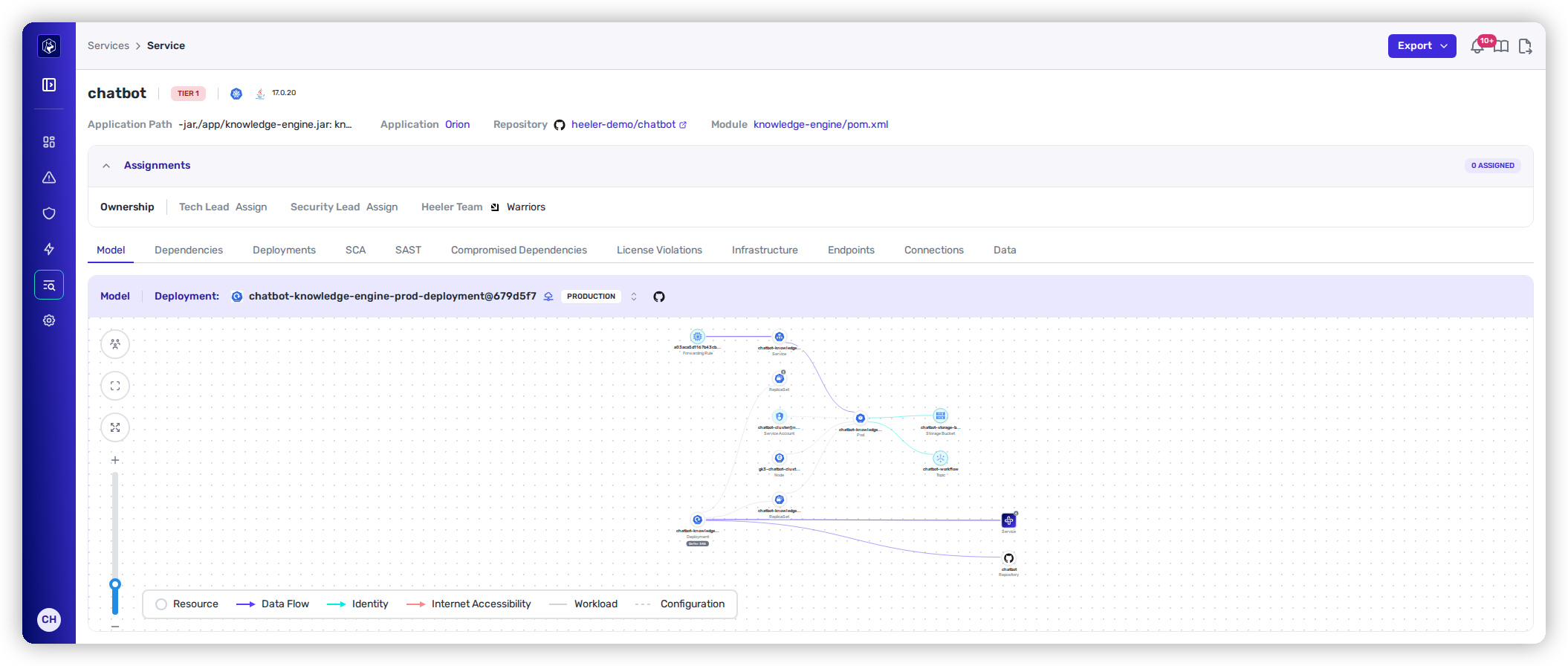
Together these inputs form ProductDNA — a connected model of your repositories, services, deployments and applications. It updates as your code and cloud change, and every part of the product reads from it.

<figure><img src="https://414480750-files.gitbook.io/~/files/v0/b/gitbook-x-prod.appspot.com/o/spaces%2FXP3dp2kecwKA2KvYkntz%2Fuploads%2Fgit-blob-0043d2539e47809285e2d77c0fd66c17b7a81f21%2Fcc-cat-service-detail.png?alt=media" alt="A service&#x27;s model in Heeler — a code-to-cloud topology graph linking the repository through its deployments to cloud resources, data flows, and internet exposure, with risk badges."><figcaption><p>The code-to-cloud model for one service: the repository, its deployments, the cloud resources behind them, and the data each handles.</p></figcaption></figure>

## Where the model is applied

* **Prevent** — your policy, approved versions, service tier and exposure data reach the coding agent, the CLI and the pull-request check, so a guardrail can evaluate a change by the exposure of the service it affects rather than by CVSS alone.
* **Fix** — because the model records how a repository builds and where it runs, Heeler computes a specific change, validates it against your CI, and opens a pull request. It also bands each finding **Urgent**, **Plan** or **Defer** from reachability, runtime presence and exposure, so the same CVE can be Urgent on one service and Defer on another. Both bands stay open and both carry an SLO.
* **Operate** — the model supplies the owning team and the service tier, so findings route automatically and carry an SLO that reflects exposure. A finding closes when the fix is observed in every running deployment.

## How the model is kept current

Heeler builds the model **without sensors, code tagging or build-pipeline changes**. It connects read-only to source control, cloud and registries: cloud changes are picked up within about a minute, and code is re-analyzed on every push. For on-premise artifact registries and Kubernetes clusters, an [on-premises broker](/mrecEO40m5D6bt7Pq5pE/get-started/registries-and-artifacts/on-premises-broker.md) runs the analysis inside your network, so that data does not leave your environment.

## Related

* [Prevent, Fix and Operate](/mrecEO40m5D6bt7Pq5pE/overview/three-layers-one-model.md) — what each layer does with the model.
* [Get Started](/mrecEO40m5D6bt7Pq5pE/get-started.md) — connect your environment and populate the model.
* [Supported Technologies](/mrecEO40m5D6bt7Pq5pE/supported-technologies.md) — what Heeler can analyze.


---

# Agent Instructions
This documentation is published with GitBook. GitBook is the documentation platform designed so that both humans and AI agents can read, navigate, and reason over technical content effectively. Learn more at gitbook.com.

## Querying This Documentation
If you need additional information that is not directly available in this page, you can query the documentation dynamically by asking a question.

Perform an HTTP GET request on the current page URL with the `ask` query parameter, and the optional `goal` query parameter:

```
GET https://docs.heeler.com/mrecEO40m5D6bt7Pq5pE/overview/the-context-model.md?ask=<question>&goal=<endgoal>
```

`ask` is the immediate question: it should be specific, self-contained, and written in natural language.
`goal` is optional and describes the broader end goal you are ultimately trying to accomplish on behalf of the user. GitBook uses it to tailor the answer towards what is most useful for that goal.

The response will contain a direct answer to the question and relevant excerpts and sources from the documentation.

Use this mechanism when the answer is not explicitly present in the current page, you need clarification or additional context, or you want to retrieve related documentation sections.
