> For the complete documentation index, see [llms.txt](https://docs.heeler.com/mrecEO40m5D6bt7Pq5pE/llms.txt). Markdown versions of documentation pages are available by appending `.md` to page URLs; this page is available as [Markdown](https://docs.heeler.com/mrecEO40m5D6bt7Pq5pE/prevent/pr-guardrails/building-guardrails/ai-guardrail-assistant.md).
# AI Guardrail Assistant
Let Heeler help you build guardrails — describe one in plain language, or set up the guardrails Heeler proactively suggests for gaps in your coverage.
Heeler helps you build guardrails two ways: it can **turn a plain-language description into a guardrail**, and it can **proactively suggest** guardrails you're missing.
## Describe a guardrail in plain language
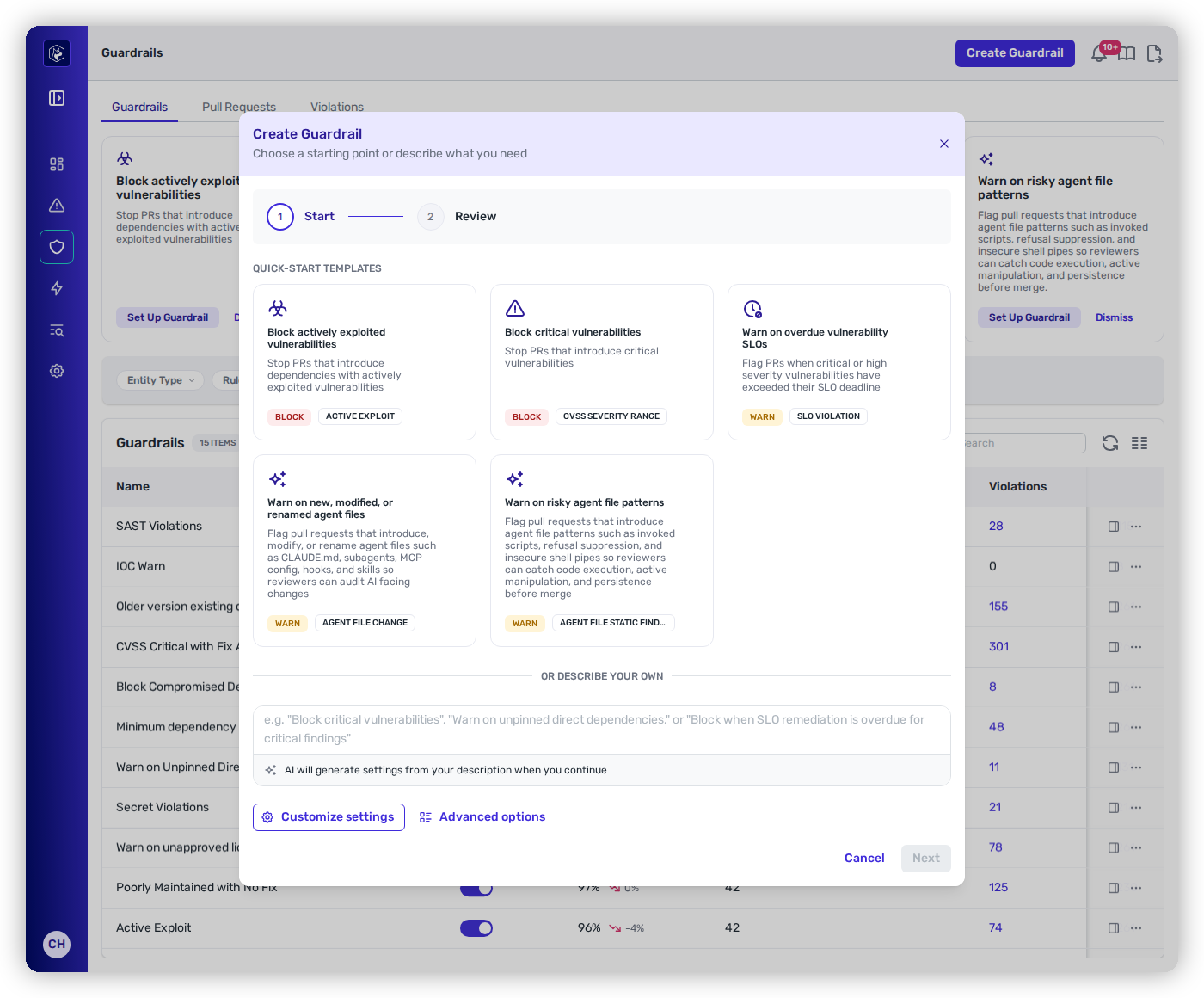
In the **Create Guardrail** dialog, under **Describe your own**, type what you want:
{% hint style="info" %}
*"Block critical vulnerabilities," "Warn on unpinned direct dependencies," or "Block when SLO remediation is overdue for critical findings."*
{% endhint %}
Start from a template, or describe the guardrail you want.
The assistant then:
* generates the matching **rules and parameters** (**up to 5 rules** per guardrail),
* picks an **action** — **Observe / Warn / Block** — defaulting to **Warn** when your wording doesn't make the action clear,
* sets a **title**, and
* defaults the **scope** to Global, which you can narrow.
Everything it produces is **editable before you save** — switch to **Customize settings** or **Advanced options** to review, use **Regenerate** to try again from a revised description, then step through **Review** to confirm.
Once you save, the generated guardrail appears on the **Guardrails** tab and begins evaluating new pull requests in its scope — just like one you built by hand.
**Example descriptions** that work well:
| You describe… | Heeler configures |
| --------------------------------------------------- | ---------------------------------------------------------------------- |
| "Block PRs that introduce critical vulnerabilities" | **Block** · CVSS Critical Vulnerability + Fix Version Available |
| "Warn on compromised or unmaintained dependencies" | **Warn** · Compromised Dependency + Unmaintained Dependency (OSSF) |
| "Block the log4j package in our Java projects" | **Block** · Unapproved Dependency (package `log4j`, ecosystem `maven`) |
| "Warn on high and critical vulnerabilities" | **Warn** · CVSS Critical + CVSS High |
| "Block dependencies with active exploits" | **Block** · Active Exploit |
**Tips for the best result:** name the **action** ("block" / "warn" / "notify" — it defaults to Warn if unclear); name **severity levels** ("critical," "high," "medium"); mention the **concern** ("exploited," "compromised," "unmaintained," "license," "deprecated"); name the **package and ecosystem** when blocking a specific one ("log4j in Java"); and **combine** up to **5 rules** in one guardrail.
{% hint style="info" %}
**Limits & privacy.** Descriptions can be up to **500 characters** and generation is **rate-limited to 10 requests per minute per user**; dynamic filters that need database-resolved IDs are excluded from AI-generated workflows. The assistant does **not** read your repositories or vulnerability data — it works only from a generic catalog of rule definitions — so it's safe to use without exposing your code.
{% endhint %}
## Suggested Guardrails
Above the guardrail list, Heeler surfaces **Suggested Guardrails** — cards recommending policies you don't have yet, based on your existing guardrails, your vulnerability data, and whether your guardrails are even enabled.
Each card is **prioritized by a colored left border**:
* 🔴 **Red** — high priority.
* 🟡 **Yellow** — medium priority.
* ⚪ **Gray** — lower priority.
On any card you can:
* **Set Up Guardrail** — opens the Create dialog **pre-populated** with the suggested rules, action, and scope, ready to review and save.
* **Dismiss** — hides it permanently, **per user** (a teammate still sees the suggestion).
{% hint style="info" %}
**A card offering *****Review Bundle***** instead of *****Set Up Guardrail***** is a bundle**, not a single guardrail — it creates several at once, one per control of an ASVS level. See [Guardrail Bundles](/mrecEO40m5D6bt7Pq5pE/standards-and-compliance/guardrail-bundles.md).
{% endhint %}
Suggestions **disappear on their own** once a guardrail covers them, and — unlike plain-language generation — the proactive cards have **no rate limit**.
The suggestions, and when each appears:
| Priority | Suggestion | When it appears |
| --------- | --------------------------------------------- | ----------------------------------------------------------------------------------------------------------------- |
| 🔴 High | Block actively exploited vulnerabilities | Nothing blocks PRs introducing dependencies with active exploits. |
| 🔴 High | Block critical vulnerabilities | Critical vulnerabilities exist but no guardrail blocks them in PRs. |
| 🔴 High | Block compromised packages | No guardrail prevents compromised or malicious packages entering via PRs. |
| 🟡 Medium | Warn on high-severity vulnerabilities | High-severity vulnerabilities exist but no guardrail covers them. |
| 🟡 Medium | Warn on unapproved licenses | No guardrail monitors for unapproved licenses. |
| 🟡 Medium | Warn on dependency downgrades | No guardrail flags PRs that downgrade a dependency. |
| 🟡 Medium | Enable your guardrails | Guardrails are configured but none are enabled. |
| 🟡 Medium | Warn on overdue vulnerability SLOs | Critical or high findings have passed their SLO deadline and no guardrail flags it. |
| 🟡 Medium | Warn on new, modified, or renamed agent files | No guardrail flags pull requests that introduce, change or rename an agent file. |
| 🟡 Medium | Warn on risky agent file patterns | No guardrail flags agent-file patterns such as invoked scripts, dynamic context commands or insecure shell pipes. |
| ⚪ Low | Warn on unmaintained dependencies | No guardrail flags unmaintained dependencies with unpatched vulnerabilities. |
| ⚪ Low | Warn on very new dependency versions | No guardrail enforces a minimum release age (supply-chain-attack prevention). |
## Related
* [Creating and Scoping a Guardrail](/mrecEO40m5D6bt7Pq5pE/prevent/pr-guardrails/building-guardrails/creating-and-scoping-a-guardrail.md) — the manual builder.
* [Recommended and Quick-Start Guardrails](/mrecEO40m5D6bt7Pq5pE/prevent/pr-guardrails/building-guardrails/recommended-and-quick-start-guardrails.md) — the baseline to aim for.
---
# Agent Instructions
This documentation is published with GitBook. GitBook is the documentation platform designed so that both humans and AI agents can read, navigate, and reason over technical content effectively. Learn more at gitbook.com.
## Querying This Documentation
If you need additional information that is not directly available in this page, you can query the documentation dynamically by asking a question.
Perform an HTTP GET request on the current page URL with the `ask` query parameter, and the optional `goal` query parameter:
```
GET https://docs.heeler.com/mrecEO40m5D6bt7Pq5pE/prevent/pr-guardrails/building-guardrails/ai-guardrail-assistant.md?ask=&goal=
```
`ask` is the immediate question: it should be specific, self-contained, and written in natural language.
`goal` is optional and describes the broader end goal you are ultimately trying to accomplish on behalf of the user. GitBook uses it to tailor the answer towards what is most useful for that goal.
The response will contain a direct answer to the question and relevant excerpts and sources from the documentation.
Use this mechanism when the answer is not explicitly present in the current page, you need clarification or additional context, or you want to retrieve related documentation sections.