> For the complete documentation index, see [llms.txt](https://docs.heeler.com/mrecEO40m5D6bt7Pq5pE/llms.txt). Markdown versions of documentation pages are available by appending `.md` to page URLs; this page is available as [Markdown](https://docs.heeler.com/mrecEO40m5D6bt7Pq5pE/prevent/pr-guardrails/building-guardrails/creating-and-scoping-a-guardrail.md).
# Creating and Scoping a Guardrail
Build a guardrail by hand — entity, conditions, scope, and enforcement.
To build a guardrail by hand, go to **Guardrails** → **Create Guardrail**. Start from a template or describe your own, then refine with **Customize settings** or **Advanced options**.
{% hint style="info" %}
**Before you begin.**
* Creating, editing, and enabling guardrails requires the **Administrator** role (see [Roles and Permissions](/mrecEO40m5D6bt7Pq5pE/get-started/users-and-access/roles-and-permissions.md)).
* A guardrail set to **Block** only prevents a merge if your source control is configured to require the check — turn on **branch protection** (GitHub), **external status checks** (GitLab), or **branch restrictions** (Bitbucket) for the target branch. Without it, Block still fails the check and records the violation, but the merge isn't held.
{% endhint %}
## The builder
{% stepper %}
{% step %}
### Choose the rule type
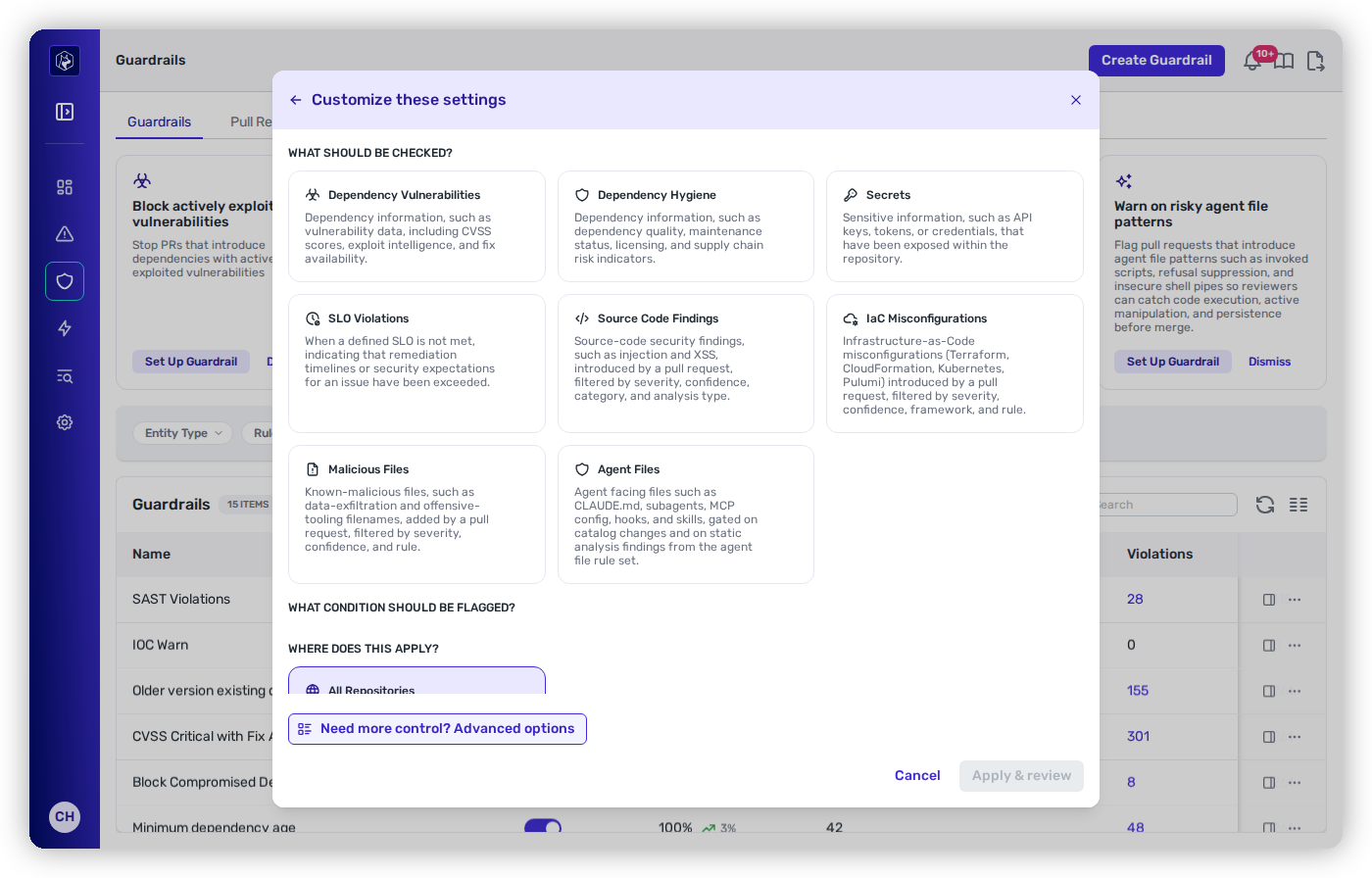
Pick the check type: Dependency Vulnerabilities, Dependency Hygiene, Secrets, SLO Violations, Source Code Findings, IaC Misconfigurations, Malicious Files, or Agent Files.
{% endstep %}
{% step %}
### Condition
Choose the specific rule(s) — e.g. *Active Exploit* or a *CVSS Severity Range*. Dependency rules combine and are **ANDed** together.
{% endstep %}
{% step %}
### Set the scope
Set the [scope](#scope-where-a-guardrail-applies).
{% endstep %}
{% step %}
### Set the thresholds
Choose **Observe**, **Warn**, or **Block**.
{% endstep %}
{% step %}
### Review
**Apply & review** takes you to the Review step. Confirm and save — ideally in **Observe** first.
{% endstep %}
{% endstepper %}
{% columns %}
{% column %}
Customize settings.
{% endcolumn %}
{% column %}
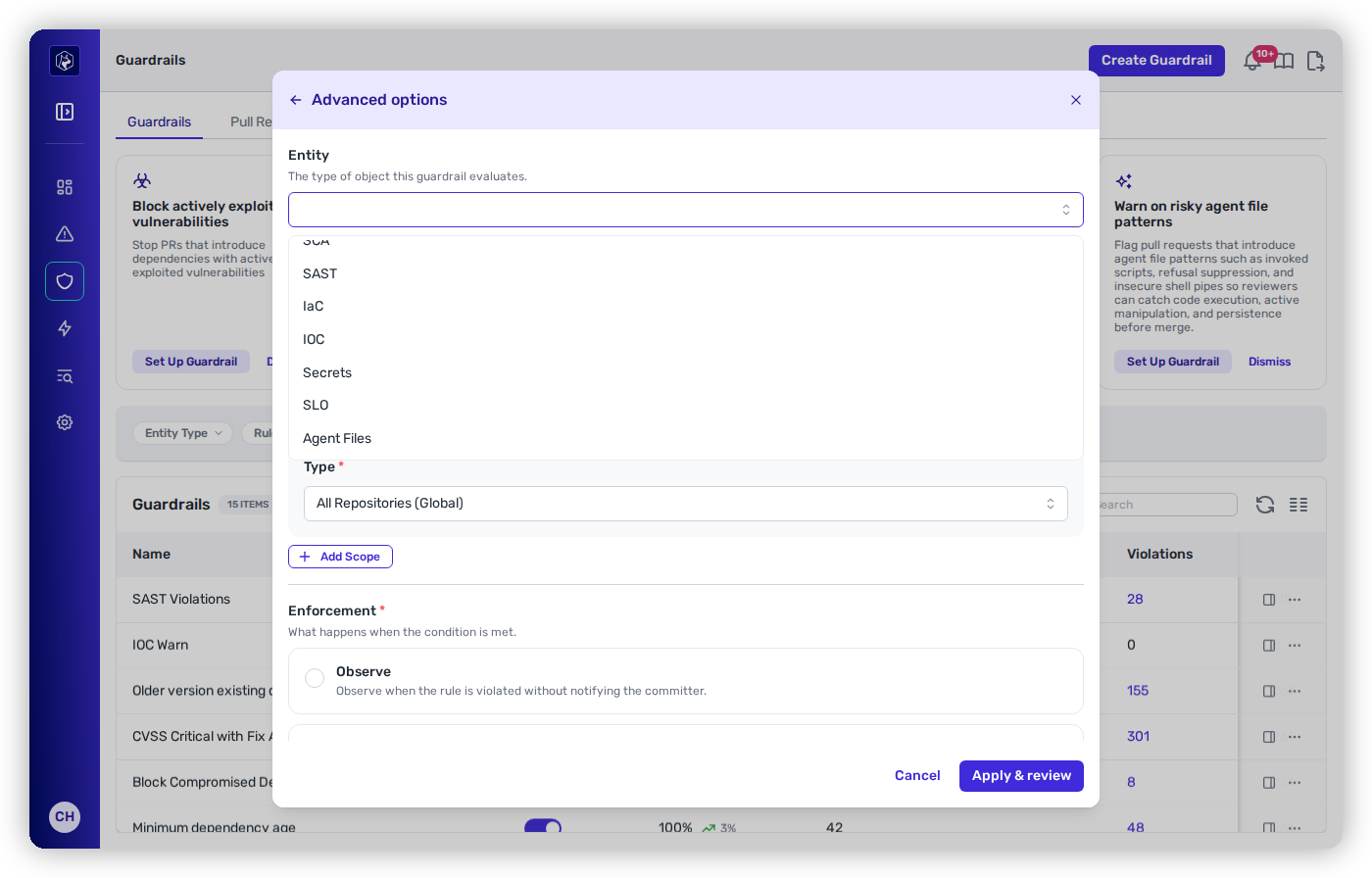
Advanced options.
{% endcolumn %}
{% endcolumns %}
### Expected result
After you save, the new guardrail appears on the **Guardrails** tab with its action shown as **Observe** (assuming you followed the recommended rollout). From that moment it evaluates new pull requests that fall in its scope.
### How to verify
Open the **Pull Requests** tab and confirm the guardrail is listed against PRs opened or updated after you saved it — that's how you know it's live and evaluating. While it's in **Observe**, watch the **Pull Requests** and **Violations** tabs to size its impact before you promote it to **Warn**, then **Block**.
## Entity type: one kind of check per guardrail
Every guardrail has a single **entity type** that determines its available rules:
| Entity | Covers | Combinable? |
| -------------- | ---------------------------------------------------------------- | ----------------------- |
| **Dependency** | Vulnerability + Hygiene | ✅ multiple rules, ANDed |
| **Code** | Source Code (SAST), IaC Misconfigurations, Malicious Files (IOC) | ⛔ dedicated |
| **Repository** | Secret Scanning, Repository Secrets, SLO Violations | ⛔ dedicated |
| **Agent File** | Agent File Static Findings, Agent File Change | ⛔ dedicated |
## Rules that take parameters
Some rules need a value before they can be added:
| Rule | You provide |
| ---------------------------------------------- | ------------------------------------------------------------------------------------------------------------------------------------------------------------------------------------------------------------------------------------------------------------------------------------- |
| **OSSF Scorecard checks** (incl. Unmaintained) | a **threshold 0–10** and an operator |
| **CVSS Severity Range** | a severity level and an operator |
| **Dependency Version Minimum Age** | a number of **days** |
| **Unapproved Dependency** | a **package name + ecosystem** (npm, pypi, maven, go, nuget, rubygems, cargo) |
| **Deprecated Dependency** | a package name, ecosystem, and a **version constraint** |
| **Agent File Static Findings** | optionally **Included Rules**, **Included Asset Kinds**, and **Excluded Paths** — every field is a filter, and leaving one empty means it doesn't filter |
| **Repository Secrets** | optionally a **secret type** (one detection rule), one or more **detection confidences**, and one or more **validation statuses** (the five action buckets) — every field is a filter, and leaving one empty means it doesn't filter. The rule must be the only rule on its guardrail |
## Scope: where a guardrail applies
Scopes combine on one guardrail for precise targeting:
* **All Repositories (Global)** — every repo and service (default).
* **Repository** — by name, source, or org/group.
* **Service Runtime Context** — by tier, application, or internet accessibility.
* **Branch** — by branch type.
The scope card is annotated **New changes only**, a reminder that a guardrail judges what the pull request introduces rather than the repository's existing backlog. There are two exceptions: **SLO Violations**, which evaluates the repository's whole open state — see [SLO Guardrails](/mrecEO40m5D6bt7Pq5pE/prevent/pr-guardrails/guardrail-types/slo-guardrails.md) — and **Repository Secrets**, which evaluates the repository's whole secret inventory, including git history — see [Secrets Guardrails](/mrecEO40m5D6bt7Pq5pE/prevent/pr-guardrails/guardrail-types/secrets-guardrails.md#repository-secrets).
Scope types can be combined on a single guardrail.
### Development and CI dependencies
Dependency guardrails carry their own **development / CI dependency** option, set per guardrail in the editor rather than tenant-wide. It controls whether dependencies used only for development or continuous integration — test frameworks, linters, build plugins — are matched by that guardrail.
Leave it off to keep a guardrail focused on the dependencies that reach production, which is usually what you want for a blocking rule. Turn it on where the risk is real regardless of where the dependency runs, for example a malicious-package check. Because the option belongs to the guardrail, one guardrail can block on production dependencies while another reports on everything.
## Common problems
| Symptom | Likely cause | Fix |
| -------------------------------------------------------------------------- | ---------------------------------------------------------------------------------------------------------------------------------------------------------- | ---------------------------------------------------------------------------------------------------------------------------------------------------------------------------- |
| The guardrail isn't firing on PRs you expected | The **scope** doesn't match those repositories or services, or (for a SAST, IaC, or IOC guardrail) no **default-branch baseline** has been established yet | Widen or correct the scope on the **Guardrails** tab; confirm a scan of the default branch has completed so there's a baseline to compare against. |
| An Agent Files guardrail passes on a PR that clearly changed an agent file | Agent Files guardrails **fail open** — if analysis can't complete, the check records an advisory pass rather than blocking | Check [Operational Health](/mrecEO40m5D6bt7Pq5pE/administer-and-monitor/operational-health.md) for analysis errors on that repository. A pass isn't proof that analysis ran. |
| **Block** fails the check but the PR still merges | **Branch protection isn't enforcing the check** on the SCM side | Turn on branch protection (GitHub) / external status checks (GitLab) / branch restrictions (Bitbucket) for the target branch and require Heeler's check. |
| The guardrail records nothing at all | It's still set to **Observe**, or it's **disabled** | Confirm it's enabled and check the **Pull Requests** tab; Observe records silently rather than surfacing on the PR. |
## Related
* [Recommended and Quick-Start Guardrails](/mrecEO40m5D6bt7Pq5pE/prevent/pr-guardrails/building-guardrails/recommended-and-quick-start-guardrails.md) — start from the high-signal set instead of from scratch.
* [AI Guardrail Assistant](/mrecEO40m5D6bt7Pq5pE/prevent/pr-guardrails/building-guardrails/ai-guardrail-assistant.md) — generate a guardrail from a plain-language sentence.
* [Guardrail Types](/mrecEO40m5D6bt7Pq5pE/prevent/pr-guardrails/guardrail-types.md) — what each check enforces.
---
# Agent Instructions
This documentation is published with GitBook. GitBook is the documentation platform designed so that both humans and AI agents can read, navigate, and reason over technical content effectively. Learn more at gitbook.com.
## Querying This Documentation
If you need additional information that is not directly available in this page, you can query the documentation dynamically by asking a question.
Perform an HTTP GET request on the current page URL with the `ask` query parameter, and the optional `goal` query parameter:
```
GET https://docs.heeler.com/mrecEO40m5D6bt7Pq5pE/prevent/pr-guardrails/building-guardrails/creating-and-scoping-a-guardrail.md?ask=&goal=
```
`ask` is the immediate question: it should be specific, self-contained, and written in natural language.
`goal` is optional and describes the broader end goal you are ultimately trying to accomplish on behalf of the user. GitBook uses it to tailor the answer towards what is most useful for that goal.
The response will contain a direct answer to the question and relevant excerpts and sources from the documentation.
Use this mechanism when the answer is not explicitly present in the current page, you need clarification or additional context, or you want to retrieve related documentation sections.