> For the complete documentation index, see [llms.txt](https://docs.heeler.com/mrecEO40m5D6bt7Pq5pE/llms.txt). Markdown versions of documentation pages are available by appending `.md` to page URLs; this page is available as [Markdown](https://docs.heeler.com/mrecEO40m5D6bt7Pq5pE/prevent/pr-guardrails/guardrail-types/agent-files-guardrails.md).

# Agent Files Guardrails

Gate a pull request on the agent files it adds or changes — new static findings on a skill, instruction, hook, or MCP config, an LLM review of the file's risk, or the fact that an agent file changed a

AI coding agents run on files that ship in your repository — **instructions, skills, subagents, hook scripts, and configuration**. Those files are executable intent, and a pull request is where they enter. Agent Files guardrails are the gate: they evaluate the agent files a PR touches and can **Observe**, **Warn**, or **Block** on what they find.

This is the PR-time counterpart to [Agent Files findings](/mrecEO40m5D6bt7Pq5pE/findings/agentic-supply-chain-agent-files.md), which inventories and scores every agent file already in your repositories. Findings tell you what you have; a guardrail stops the next bad one from landing.

Agent Files guardrails use the `Agent File` entity, so an agent files guardrail is **dedicated** — it holds exactly **one** rule and can't be combined with dependency, code, secrets, or SLO rules.

## Creating one

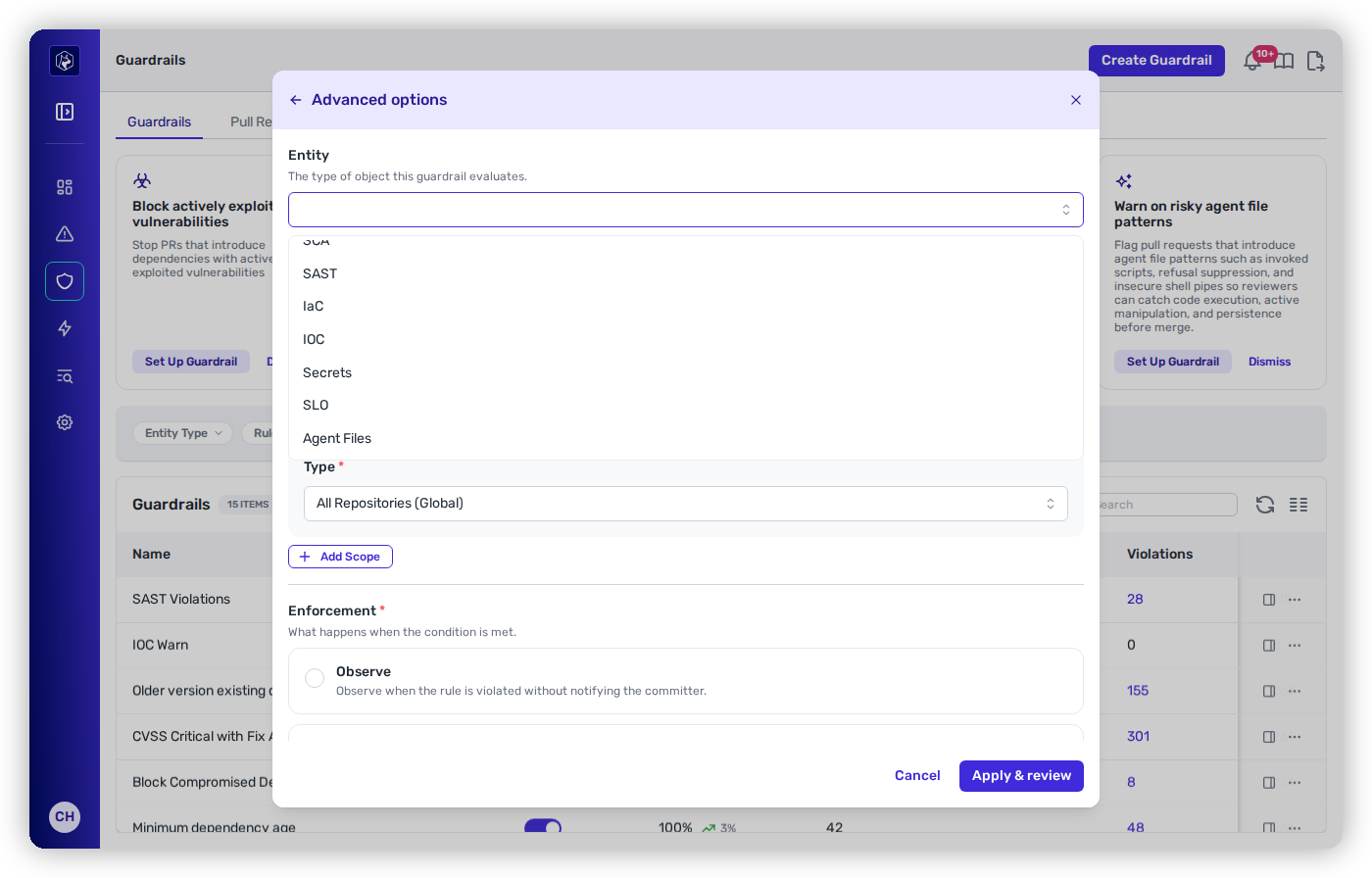
In the guardrail builder, open **Advanced options**, choose **Agent Files** from the **Entity** dropdown, then pick the rule you want as the **Condition**. Scope and enforcement work the same as any other guardrail — see [Creating and Scoping a Guardrail](/mrecEO40m5D6bt7Pq5pE/prevent/pr-guardrails/building-guardrails/creating-and-scoping-a-guardrail.md).

<figure><img src="https://414480750-files.gitbook.io/~/files/v0/b/gitbook-x-prod.appspot.com/o/spaces%2FXP3dp2kecwKA2KvYkntz%2Fuploads%2Fgit-blob-deb9ac6badb71a1d587f97a75185d10f17661544%2Fadvanced-options.png?alt=media" alt="The Advanced options step of the guardrail builder with the Entity dropdown open. The dropdown offers seven entity types — SCA, SAST, IaC, IOC, Secrets, SLO, and Agent Files — and is scrolled to Agent Files."><figcaption><p><strong>Agent Files</strong> in the <strong>Advanced options</strong> Entity dropdown.</p></figcaption></figure>

## The four checks

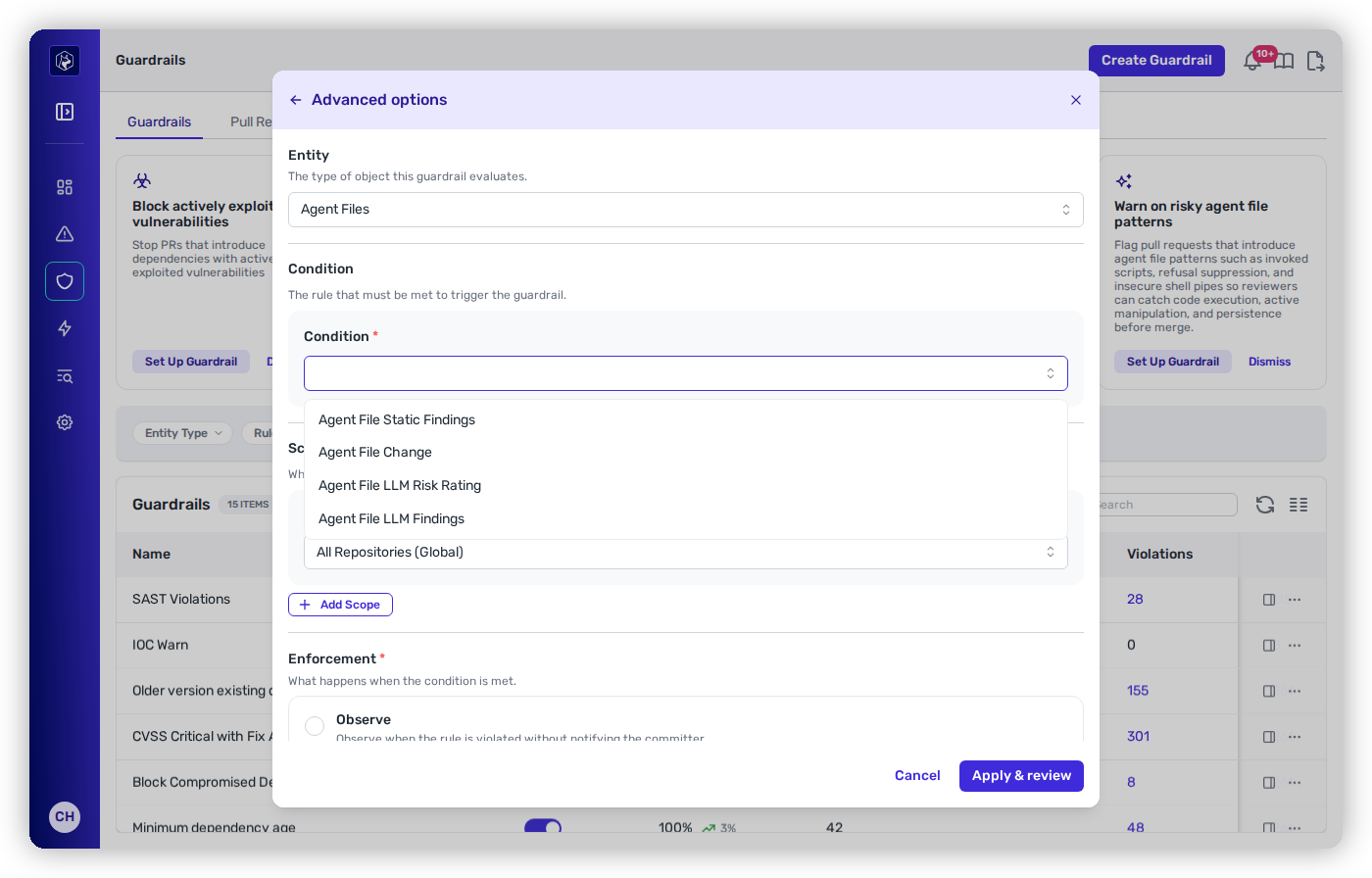
The Agent Files family offers four rule types, each answering a different question. Most teams run more than one.

<table data-view="cards"><thead><tr><th></th><th></th><th></th></tr></thead><tbody><tr><td><strong>Agent File Static Findings</strong></td><td><em>"Is this agent file dangerous?"</em></td><td>Flags <strong>new</strong> static findings on the agent files a PR introduces or modifies — a preprocessing command, a persistence mechanism, a <code>curl | bash</code> pipe, an over-broad permission.</td></tr><tr><td><strong>Agent File LLM Risk Rating</strong></td><td><em>"How does a reviewer rate this file overall?"</em></td><td>An LLM reviews each agent file the PR introduces or changes and rates its risk. Flags files rated <strong>Suspicious</strong> or <strong>Malicious</strong>.</td></tr><tr><td><strong>Agent File LLM Findings</strong></td><td><em>"What specifically is wrong with it?"</em></td><td>Flags <strong>new</strong> reviewed risk findings on a changed agent file — prompt injection, data exfiltration, and the other categories below.</td></tr><tr><td><strong>Agent File Change</strong></td><td><em>"Did an agent file change at all?"</em></td><td>Flags the <strong>introduction, modification, or rename</strong> of an agent file, regardless of whether anything looks wrong. A review-routing gate, not a threat detector.</td></tr></tbody></table>

{% hint style="info" %}
**Why the second one exists.** Agent files change what your assistants are allowed to do, and a perfectly clean-looking edit to `.mcp.json` or a `SKILL.md` still deserves a human's eyes. A **Warn**-action Agent File Change guardrail is the low-friction way to guarantee those edits never merge unnoticed, without asserting that anything is wrong.
{% endhint %}

## Agent File Static Findings

Flags **new** static findings on agent files the pull request introduced or modified. "New" is the load-bearing word: a finding that already exists on an agent file in your baseline doesn't fire here, so an inherited backlog of agent-file issues never blocks an unrelated PR.

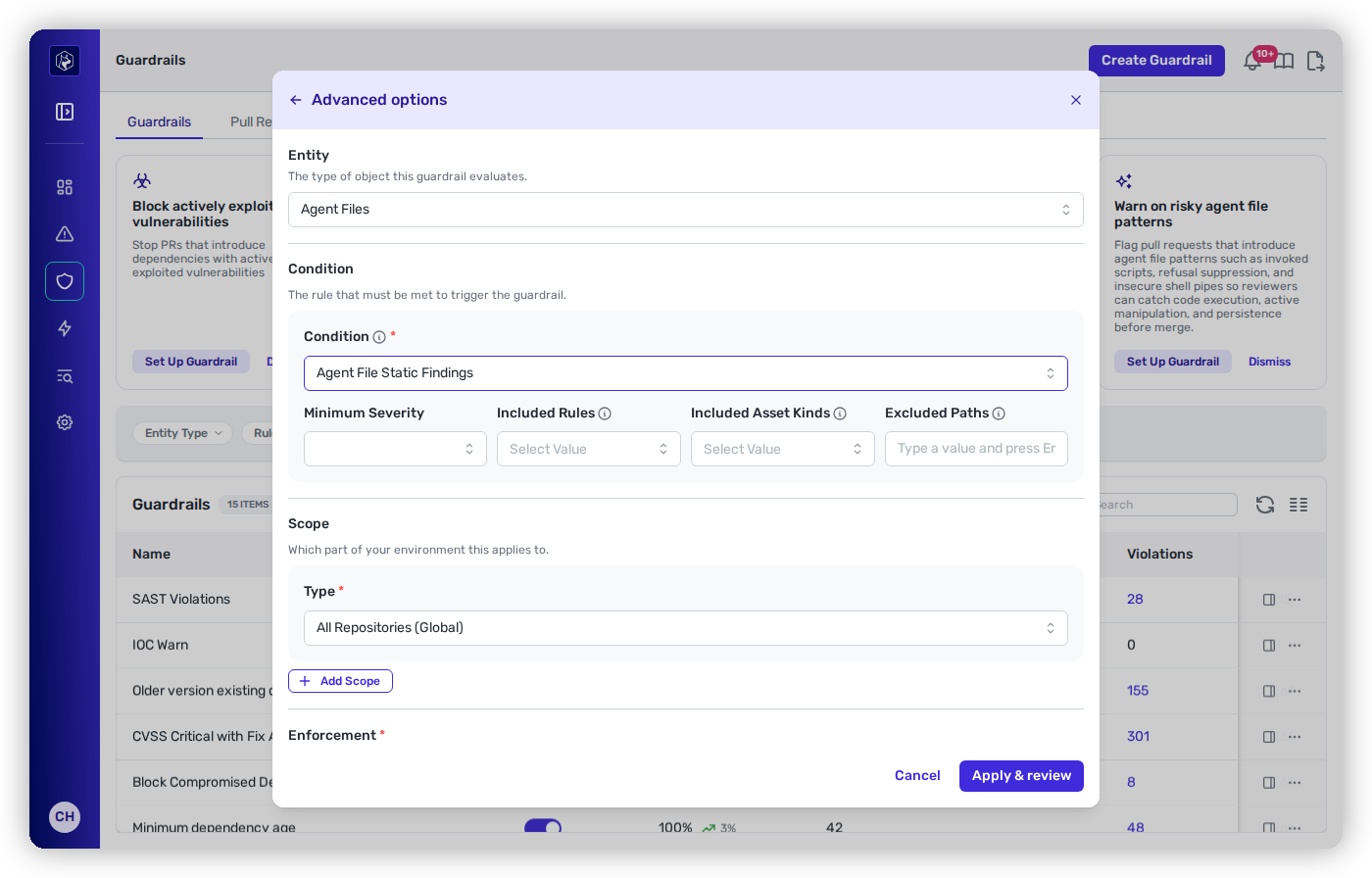
Every filter below is optional, and **leaving one empty means it doesn't filter**. A finding has to pass *every* filter you do set before it's flagged.

| Filter                   | Values                                                                                                                               |
| ------------------------ | ------------------------------------------------------------------------------------------------------------------------------------ |
| **Minimum Severity**     | Only gate on findings at or above this severity. Each rule's severity is listed below. Empty means all severities gate.              |
| **Included Rules**       | Restrict to specific detections (below). Empty means all rules gate.                                                                 |
| **Included Asset Kinds** | Restrict to Command, Config, Hook Script, Instructions, Skill, or Subagent. Empty means all kinds gate.                              |
| **Excluded Paths**       | Glob patterns — e.g. `docs/**`, `tests/fixtures/**`. A file matching any pattern is skipped entirely. Empty means no path exclusion. |

<figure><img src="https://414480750-files.gitbook.io/~/files/v0/b/gitbook-x-prod.appspot.com/o/spaces%2FXP3dp2kecwKA2KvYkntz%2Fuploads%2Fgit-blob-e62c746b3103eb704707d72087f03426308d8bc5%2Fgr-agent-files-static-params.png?alt=media" alt="The Advanced options step with Entity set to Agent Files and Condition set to Agent File Static Findings, showing the Minimum Severity, Included Rules, Included Asset Kinds, and Excluded Paths fields."><figcaption><p>An <strong>Agent File Static Findings</strong> condition — filter by severity, rule, asset kind, and excluded path.</p></figcaption></figure>

### The rules you can target

**Included Rules** picks from Heeler's deterministic agent-file detections. Each carries a fixed severity, so the same file content always produces the same result:

| Rule                          | Severity      | What it flags                                                                                                                                             |
| ----------------------------- | ------------- | --------------------------------------------------------------------------------------------------------------------------------------------------------- |
| **Dynamic Context Command**   | High          | A command that runs during preprocessing, **before the model ever sees the rendered instructions** — so the agent can't inspect or refuse it.             |
| **Session Persistence**       | High          | A mechanism to persist across sessions: a cron schedule, `systemctl enable`, `launchctl` registration, a shell-profile write, or an `rc.local` reference. |
| **Skill Integrity Drift**     | High          | A skill whose content no longer matches the SHA-256 recorded for it in a skills lockfile — evidence of tampering after locking.                           |
| **Insecure Shell Pipe**       | High / Medium | A remote-fetch-and-execute pattern (`curl … \| bash`). **Medium** when the host is a reputable canonical installer origin, **High** otherwise.            |
| **Encoded Blob**              | Medium        | Large Base64/hex content that decodes primarily into **readable text** — often hidden instructions.                                                       |
| **Wildcard Permission**       | Medium / Low  | An over-broad permission grant in agent configuration. **Low** when the wildcard is anchored to a directory path.                                         |
| **External System Reference** | Info          | An external URL or domain the file reaches. Not automatically unsafe — review whether each is expected.                                                   |
| **Invoked Script**            | Info          | A script or shell command the agent file may execute.                                                                                                     |

{% hint style="success" %}
**A sane starting point.** In **Included Rules**, select the three unambiguous attack patterns — **Dynamic Context Command**, **Session Persistence**, and **Skill Integrity Drift** — and leave the other filters empty. All three are High severity with no benign reading, so they're safe to **Block** early. Add **Insecure Shell Pipe** next; leave **External System Reference** and **Invoked Script** out of a blocking guardrail, since they're Info-level inventory rules that fire on ordinary files.
{% endhint %}

{% hint style="info" %}
**Refusal Suppression, HTML Comment Hidden Content, and Invisible Unicode are retired.** These three static rules tried to infer intent from phrase and character patterns, and in practice they flagged ordinary writing-style guidance and descriptive header comments far more often than real attacks. Heeler no longer produces them, so they can't be selected and leaving **Included Rules** empty doesn't bring them back. Hidden instructions, refusal-bypass wording, and concealed content are covered by the LLM review instead: use **Agent File LLM Findings** scoped to **Prompt Injection**, **Obfuscation**, and **Deception**, or **Agent File LLM Risk Rating**.
{% endhint %}

Each rule is documented in full, with its detection detail, on [Agent Files findings](/mrecEO40m5D6bt7Pq5pE/findings/agentic-supply-chain-agent-files.md#static-findings-deterministic).

{% hint style="info" %}
**This rule is the deterministic half.** It gates only on the fixed detections above, so the same file content always produces the same verdict. To gate on the **LLM-assessed** risk rating or the reviewed findings behind it, use **Agent File LLM Risk Rating** or **Agent File LLM Findings** below.
{% endhint %}

<figure><img src="https://414480750-files.gitbook.io/~/files/v0/b/gitbook-x-prod.appspot.com/o/spaces%2FXP3dp2kecwKA2KvYkntz%2Fuploads%2Fgit-blob-b1ebf70cf199514e99a0be3b67b1dd35bd4879f0%2Fcc-guardrail-agent-file-llm-rules.png?alt=media" alt="The Advanced options modal with Entity set to Agent Files and the Condition dropdown open, listing Agent File Static Findings, Agent File Change, Agent File LLM Risk Rating, and Agent File LLM Findings."><figcaption><p>The four agent-file rule types in the <strong>Condition</strong> picker, with <strong>Entity</strong> set to Agent Files.</p></figcaption></figure>

## Agent File LLM Risk Rating

An LLM reviews each agent file the pull request introduces or changes and rates its overall risk. This rule flags the files whose rating is bad enough to act on.

A **modified** file has to have gotten *worse* than its base version to flag — a file that was already rated Suspicious before the PR doesn't fire on every subsequent edit.

| Filter                   | Values                                                                                                                      |
| ------------------------ | --------------------------------------------------------------------------------------------------------------------------- |
| **Minimum Risk Rating**  | **Suspicious** (flags files rated Suspicious or Malicious) or **Malicious** (flags only Malicious). Defaults to Suspicious. |
| **Included Asset Kinds** | Restrict to Command, Config, Hook Script, Instructions, Skill, or Subagent. Empty means all kinds gate.                     |
| **Excluded Paths**       | Glob patterns. A file matching any pattern is skipped. Empty means no path exclusion.                                       |

## Agent File LLM Findings

Flags **new** reviewed risk findings on the agent files a pull request changed — the specific problems behind a rating, rather than the rating itself. As with static findings, "new" means the finding arrived with this pull request; an existing one in your baseline doesn't fire.

| Filter                   | Values                                                                                                                                                                                                                                |
| ------------------------ | ------------------------------------------------------------------------------------------------------------------------------------------------------------------------------------------------------------------------------------- |
| **Minimum Severity**     | Minimum severity to gate on. Empty means all severities gate.                                                                                                                                                                         |
| **Minimum Confidence**   | Minimum confidence to gate on. Empty means all confidences gate.                                                                                                                                                                      |
| **Included Categories**  | Prompt Injection, Data Exfiltration, Destructive Action, Privilege Escalation, Secrets Exposure, Code Execution, Remote Code Execution, Obfuscation, Deception, Unsafe External Reference, or Other. Empty means all categories gate. |
| **Included Asset Kinds** | Restrict to Command, Config, Hook Script, Instructions, Skill, or Subagent. Empty means all kinds gate.                                                                                                                               |
| **Excluded Paths**       | Glob patterns. A file matching any pattern is skipped. Empty means no path exclusion.                                                                                                                                                 |

{% hint style="info" %}
**What the reviewer saw is on the violation.** The violation row carries the review's summary and the per-finding detail behind it — category, severity, and what the reviewer objected to — and the PR check comment links through to the file, so whoever has to act on the check can judge the call rather than take it on trust. Credential-shaped strings are stripped from that evidence before it is stored or displayed.
{% endhint %}

## Agent File Change

Flags agent files by the **fact that they changed**, with no judgment about content. Severity is always **Info** — the guardrail's **action** is what carries the weight here, so a Change guardrail is meaningful precisely because you set it to Warn or Block.

| Filter                   | Values                                                                                                                                                                                                                       |
| ------------------------ | ---------------------------------------------------------------------------------------------------------------------------------------------------------------------------------------------------------------------------- |
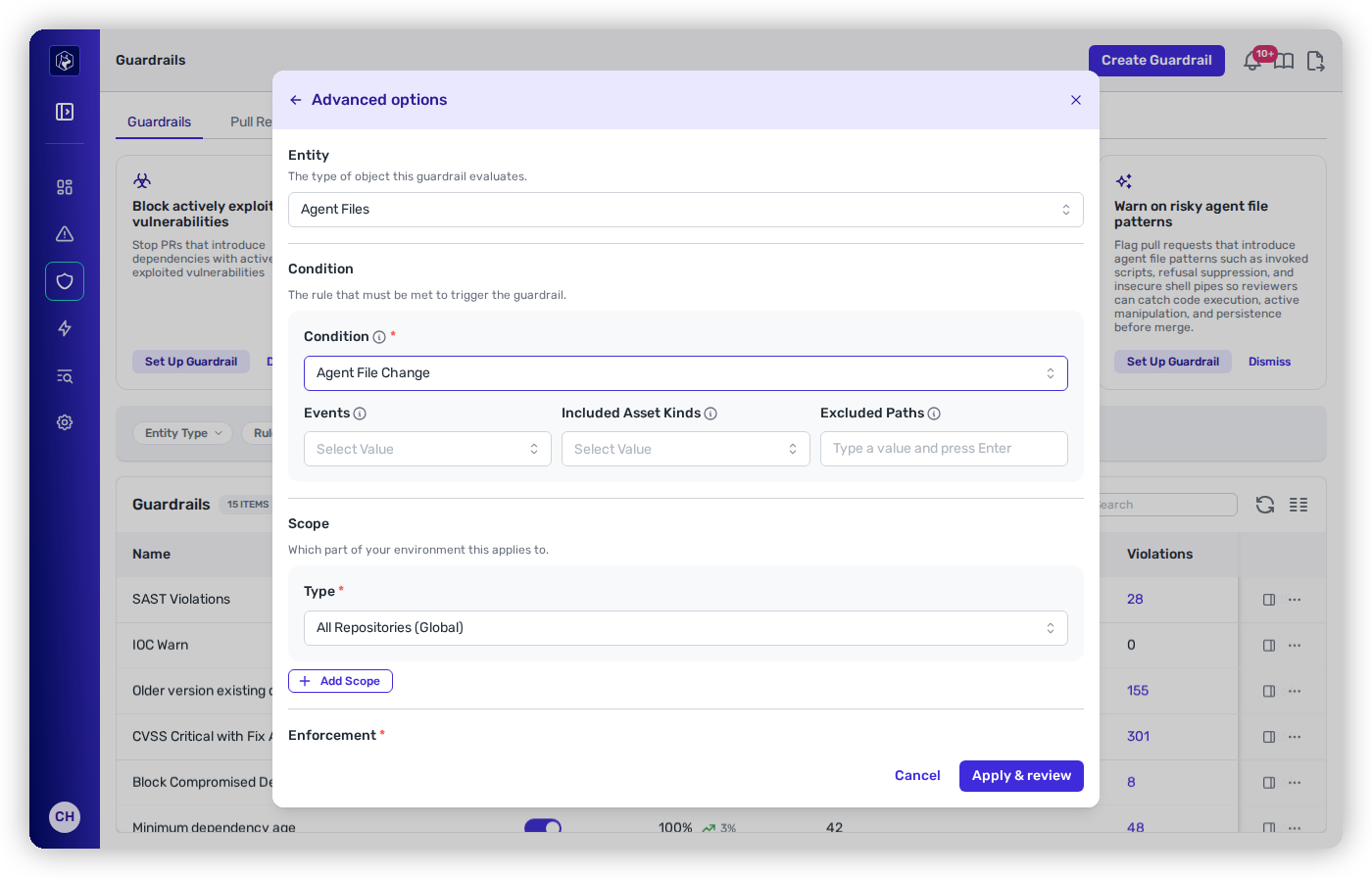
| **Events**               | **Introduced** (the file is new) · **Modified** (an existing agent file changed) · **Renamed** (an existing agent file moved). Empty means **all three**. A rename violation shows the file's previous path as its evidence. |
| **Included Asset Kinds** | Restrict to Command, Config, Hook Script, Instructions, Skill, or Subagent. Empty means all kinds.                                                                                                                           |
| **Excluded Paths**       | Glob patterns. A file matching any pattern is skipped. Empty means no path exclusion.                                                                                                                                        |

<figure><img src="https://414480750-files.gitbook.io/~/files/v0/b/gitbook-x-prod.appspot.com/o/spaces%2FXP3dp2kecwKA2KvYkntz%2Fuploads%2Fgit-blob-79012c54bd99148dfcaaf36545c19fdcfd7f6855%2Fgr-agent-files-change-params.png?alt=media" alt="The Advanced options step with Condition set to Agent File Change, showing the Events, Included Asset Kinds, and Excluded Paths fields."><figcaption><p>An <strong>Agent File Change</strong> condition — gate on the event, the asset kind, and the path.</p></figcaption></figure>

{% hint style="info" %}
**Scoping by asset kind is the useful move.** "Any new **Skill** or **Config**" is a much sharper gate than "any agent file changed" — a skill and an MCP config grant capability, while an edit to `CLAUDE.md` prose usually doesn't. Set **Included Asset Kinds** to `Skill` + `Config` + `Hook Script` and you gate the files that actually change what an agent can do.
{% endhint %}

## What developers see on the PR

Violations render **grouped by agent file** on the pull request. Under each file, each violation expands to show:

* **Severity** — on static findings (a catalog change has none to show).
* **Asset kind** — the friendly label: Command, Config, Hook Script, Instructions, Skill, or Subagent.
* **Evidence** — the specific detail behind the flag, such as `wildcard value "Bash(*)" in permission declaration at line 9`.

Static findings and catalog changes are visually distinguished, so a reviewer can tell "this file looks dangerous" from "this file changed". On **GitHub** and **GitLab**, the file location links straight into the PR diff at the flagged line.

Under **Block**, the status check fails and — with branch protection enabled — the merge is held until the agent file is corrected or removed. Actions and scope are the standard **Observe / Warn / Block** across the [scope model](/mrecEO40m5D6bt7Pq5pE/prevent/pr-guardrails.md#scope-where-each-guardrail-applies).

## How evaluation behaves

A few behaviors worth knowing before you set one to **Block**:

* **Evaluated once per repository.** Agent files are a repository-level concern, so the check runs once against the PR — not once per module.
* **The baseline is the target branch, computed on every PR.** Heeler scans the whole repository twice: once at the PR's head commit and once at the commit the PR branched from. No earlier Heeler scan is needed, so a guardrail works on the first PR after you create it.
* **Only agent files the PR changed are evaluated.** A file whose content is identical on both sides is skipped, however many findings it carries. For a file the PR **introduces**, every finding is new.
* **"New" ignores line numbers.** On a **modified** file, a finding is new only if the same rule wasn't already matching the same subject in the base version. Editing one line of a file doesn't resurface an older finding elsewhere in it, even though the edit shifts its line.
* **Every file in a skill counts on its own.** A skill is its `SKILL.md` plus the scripts and assets in its directory, and each of those files is evaluated as a **Skill** file in its own right. A PR that edits only a script evaluates that script — its static findings, the LLM review, and an Agent File Change **Modified** event — while an unchanged `SKILL.md` isn't evaluated again.
* **It fails open.** If Heeler can't complete its analysis of the PR's agent files — for example, the target-branch side can't be scanned — every agent files guardrail on the check records an **advisory pass** rather than blocking. The LLM rules also pass when the LLM review can't run, or when a file is too large or not valid UTF-8 to review. A guardrail you set to Block won't wedge your pipeline on an infrastructure hiccup — but it also means a pass isn't proof that analysis ran.
* **An advisory pass is recorded as Pass.** The execution result is **Pass** with no findings, the same as a clean evaluation, and it doesn't carry a reason. Watch [Operational Health](/mrecEO40m5D6bt7Pq5pE/administer-and-monitor/operational-health.md) if you're relying on the guardrail as a control.
* **One failure doesn't stop the rest.** If a single guardrail's evaluation errors, that one is recorded as an error and every other agent files guardrail still evaluates.

## Related

* [Agent Files findings](/mrecEO40m5D6bt7Pq5pE/findings/agentic-supply-chain-agent-files.md) — the inventory and safety score for every agent file already in your repositories.
* [Creating and Scoping a Guardrail](/mrecEO40m5D6bt7Pq5pE/prevent/pr-guardrails/building-guardrails/creating-and-scoping-a-guardrail.md) — the wizard, and how scope decides where a guardrail applies.
* [Secure AI Coding Agents](/mrecEO40m5D6bt7Pq5pE/solutions-and-use-cases/secure-your-ai-coding-agents.md) — the full playbook these guardrails belong to.


---

# Agent Instructions
This documentation is published with GitBook. GitBook is the documentation platform designed so that both humans and AI agents can read, navigate, and reason over technical content effectively. Learn more at gitbook.com.

## Querying This Documentation
If you need additional information that is not directly available in this page, you can query the documentation dynamically by asking a question.

Perform an HTTP GET request on the current page URL with the `ask` query parameter, and the optional `goal` query parameter:

```
GET https://docs.heeler.com/mrecEO40m5D6bt7Pq5pE/prevent/pr-guardrails/guardrail-types/agent-files-guardrails.md?ask=<question>&goal=<endgoal>
```

`ask` is the immediate question: it should be specific, self-contained, and written in natural language.
`goal` is optional and describes the broader end goal you are ultimately trying to accomplish on behalf of the user. GitBook uses it to tailor the answer towards what is most useful for that goal.

The response will contain a direct answer to the question and relevant excerpts and sources from the documentation.

Use this mechanism when the answer is not explicitly present in the current page, you need clarification or additional context, or you want to retrieve related documentation sections.