> For the complete documentation index, see [llms.txt](https://docs.heeler.com/mrecEO40m5D6bt7Pq5pE/llms.txt). Markdown versions of documentation pages are available by appending `.md` to page URLs; this page is available as [Markdown](https://docs.heeler.com/mrecEO40m5D6bt7Pq5pE/prevent/pr-guardrails/guardrail-types/iac-guardrails.md).
# IaC Guardrails
Gate a pull request on infrastructure misconfigurations the branch introduces — in Terraform, OpenTofu, CloudFormation, Pulumi, or Kubernetes.
IaC guardrails gate a pull request on **infrastructure misconfigurations the branch introduces** — a bucket made public, a security group opened to the world, a container granted more privilege than it needs. Heeler compares the branch's results against the repository's **default-branch baseline**, so only misconfigurations the change actually adds can fire; your existing infrastructure backlog never blocks a PR.
This is the PR-time counterpart to [IaC findings](/mrecEO40m5D6bt7Pq5pE/findings/iac.md). It's the cheapest place to catch a misconfiguration, because the definition hasn't been applied yet — nothing has been stood up wrong.
IaC guardrails use the `Code` entity, so an IaC guardrail is **dedicated** — it can't be combined with dependency or hygiene rules. It's a separate rule type from [SAST](/mrecEO40m5D6bt7Pq5pE/prevent/pr-guardrails/guardrail-types/sast-guardrails.md), even though both sit on the same entity: an IaC guardrail only ever matches findings Heeler classifies as infrastructure misconfigurations, and a SAST guardrail only ever matches source-code weaknesses. Neither can accidentally fire on the other's findings.
## Creating one
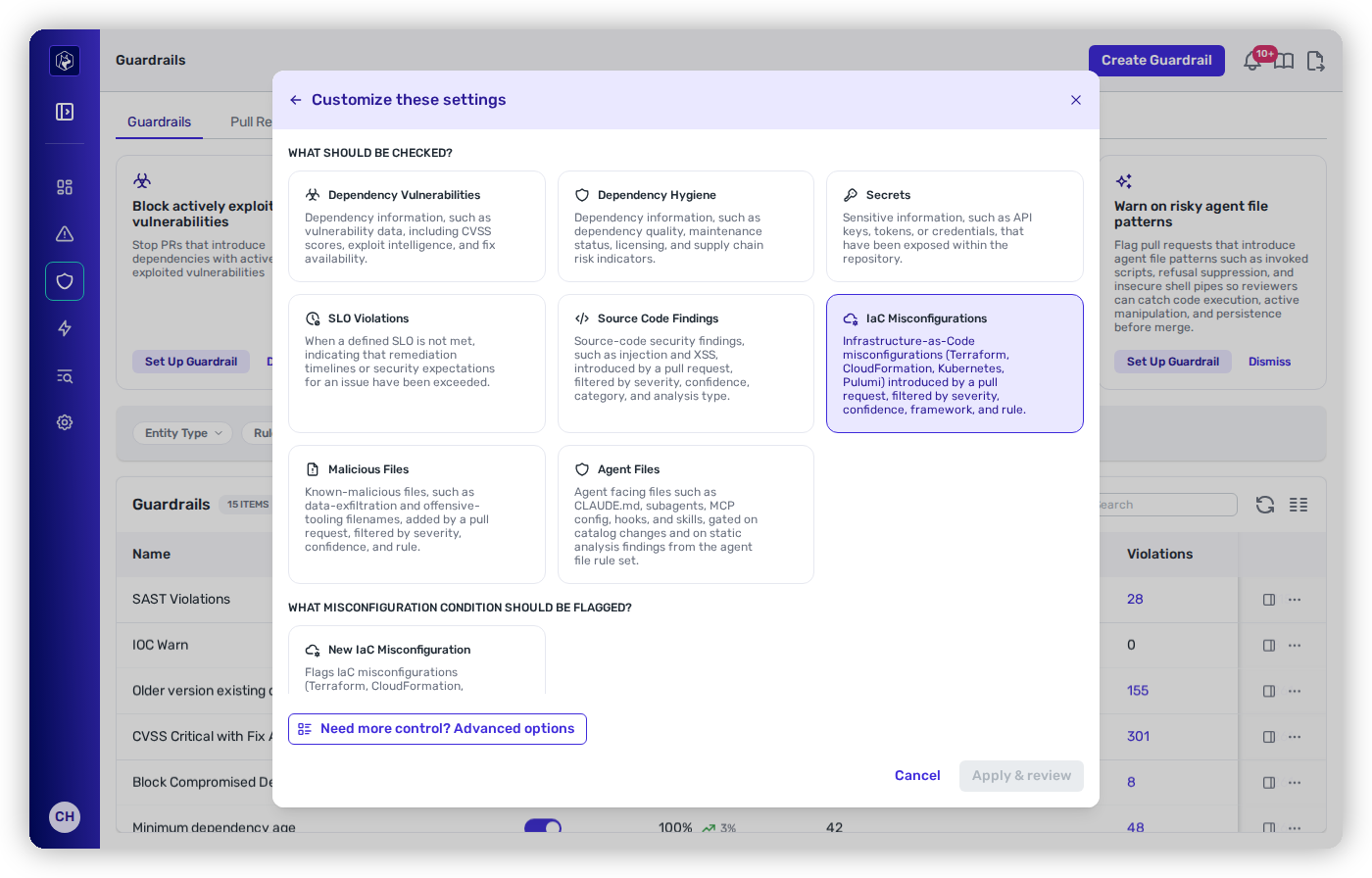
In the guardrail builder, choose **IaC Misconfigurations** as the check type, then its **New IaC Misconfiguration** condition. Scope and enforcement work the same as any other guardrail — see [Creating and Scoping a Guardrail](/mrecEO40m5D6bt7Pq5pE/prevent/pr-guardrails/building-guardrails/creating-and-scoping-a-guardrail.md).
Choosing IaC Misconfigurations in the guardrail builder.
## Conditions
Match the misconfigurations you care about with any combination of the four filters. Each is an **OR set** — several values in one filter widen it — and **leaving a filter empty means it doesn't filter at all**.
| Filter | Values |
| -------------- | ------------------------------------------------------------------------------------ |
| **Severity** | Critical, High, Medium, Low, Info. Empty means all severities. |
| **Confidence** | High, Medium, Low. Empty means all confidences. |
| **Frameworks** | Terraform, OpenTofu, CloudFormation, Pulumi, Kubernetes. Empty means all frameworks. |
| **Rule IDs** | Specific checks, by ID (for example `ckv-aws-19`). Empty means all rules. |
{% hint style="success" %}
**Frameworks is the filter that makes rollout practical.** Teams rarely adopt IaC gating everywhere at once. Scope a **Block** guardrail to **Terraform** where your definitions are mature and reviewed, and run a separate **Warn** guardrail for **Kubernetes** while manifests are still churning — same policy, two different levels of confidence, no all-or-nothing decision.
{% endhint %}
**Rule IDs** is the precision instrument: once the [IaC Rules view](/mrecEO40m5D6bt7Pq5pE/findings/iac/rules.md) shows you which check has the worst reach across your estate, gating that specific ID stops the bleeding while you work through the backlog it already created.
## Requirements
{% hint style="warning" %}
**Baseline required.** An IaC guardrail needs a completed scan of the repository's **default branch** to establish the baseline before it can enforce. It's evaluated once per repository (not per code root).
{% endhint %}
{% hint style="info" %}
**On GitLab, a CI pipeline is required.** Heeler waits for a CI pipeline to run on the commit before it scans a merge request. A repository with **no pipeline** won't be evaluated — a minimal `.gitlab-ci.yml` is enough to enable scanning.
{% endhint %}
IaC and SAST guardrails share the same PR-time scan, so a repository already set up for [SAST guardrails](/mrecEO40m5D6bt7Pq5pE/prevent/pr-guardrails/guardrail-types/sast-guardrails.md) needs nothing further for IaC.
## What developers see on the PR
When an IaC guardrail matches, each misconfiguration renders **inline on the pull request** with its severity, the check that fired, the **definition file and line**, and the misconfiguration's detail — so the reviewer sees the offending declaration rather than a policy name.
Under **Block**, the status check fails and — with branch protection enabled — the merge is held until the definition is corrected. Actions and scope are the standard **Observe / Warn / Block** across the [scope model](/mrecEO40m5D6bt7Pq5pE/prevent/pr-guardrails.md#scope-where-each-guardrail-applies).
## Related
* [IaC findings](/mrecEO40m5D6bt7Pq5pE/findings/iac.md) — the misconfigurations already in your definitions, and the resource each one configures.
* [SAST Guardrails](/mrecEO40m5D6bt7Pq5pE/prevent/pr-guardrails/guardrail-types/sast-guardrails.md) — the same entity, the other rule type: source-code weaknesses.
* [Creating and Scoping a Guardrail](/mrecEO40m5D6bt7Pq5pE/prevent/pr-guardrails/building-guardrails/creating-and-scoping-a-guardrail.md) — the wizard, and how scope decides where a guardrail applies.
---
# Agent Instructions
This documentation is published with GitBook. GitBook is the documentation platform designed so that both humans and AI agents can read, navigate, and reason over technical content effectively. Learn more at gitbook.com.
## Querying This Documentation
If you need additional information that is not directly available in this page, you can query the documentation dynamically by asking a question.
Perform an HTTP GET request on the current page URL with the `ask` query parameter, and the optional `goal` query parameter:
```
GET https://docs.heeler.com/mrecEO40m5D6bt7Pq5pE/prevent/pr-guardrails/guardrail-types/iac-guardrails.md?ask=&goal=
```
`ask` is the immediate question: it should be specific, self-contained, and written in natural language.
`goal` is optional and describes the broader end goal you are ultimately trying to accomplish on behalf of the user. GitBook uses it to tailor the answer towards what is most useful for that goal.
The response will contain a direct answer to the question and relevant excerpts and sources from the documentation.
Use this mechanism when the answer is not explicitly present in the current page, you need clarification or additional context, or you want to retrieve related documentation sections.