> For the complete documentation index, see [llms.txt](https://docs.heeler.com/mrecEO40m5D6bt7Pq5pE/llms.txt). Markdown versions of documentation pages are available by appending `.md` to page URLs; this page is available as [Markdown](https://docs.heeler.com/mrecEO40m5D6bt7Pq5pE/prevent/pr-guardrails/guardrail-types/ioc-guardrails.md).
# IOC Guardrails
Gate a pull request on known-malicious files it introduces — data-exfiltration scripts, web shells, and the implants attacks persist and spread with.
IOC guardrails gate a pull request on **known-malicious files the change introduces** — indicators of compromise (IOCs) such as an environment-variable dumper, a web shell, or the implants a supply-chain worm spreads with. These files aren't the residue of an attack; they're its **working parts**. A web shell *is* the attacker's remote access, a dumper *does* the credential exfiltration, and an implant is how the attacker **persists and propagates**. Every other guardrail asks *is this change risky?* An IOC guardrail asks *is this change an attack?* — presence alone is the alarm, and blocking the file cuts off the access, exfiltration, or persistence it would have provided.
That distinction matters because the sharpest attacks on the development lifecycle don't arrive as vulnerabilities; they arrive as commits. A compromised developer token, a malicious package's install script, a poisoned CI workflow, or an over-trusting AI agent all land attack tooling the same way — as an ordinary-looking change. A file named `dump_env.js` will never carry a CVE, but it has exactly one purpose: harvesting environment secrets for exfiltration. The pull request is the last point where it can be stopped before it ships.
Only files the pull request **adds** can fire the guardrail — anything already in the repository never blocks a PR (it surfaces for investigation among your code findings instead).
## What it detects
The guardrail evaluates the PR against Heeler's curated library of compromise indicators. Detections are deliberately high-signal — patterns and filenames that no ordinary code carries — and every one maps to MITRE ATT\&CK techniques with concrete response guidance.
| Detection family | What it catches |
| --------------------------- | ------------------------------------------------------------------------------------------------------------------------------------------------------------------------------------------------------------------------------------ |
| **Forensic indicators** | Reverse shells, web shells, credential-store access, cloud-metadata credential harvesting, persistence implants, anti-forensics, encoded-payload execution, data staging, DNS exfiltration, and files carrying offensive-tool names. |
| **npm worm campaigns** | Self-propagating npm supply-chain campaigns (Shai-Hulud): campaign markers, malicious preinstall hooks, memory-scraping payloads, exfiltration dead drops, C2 domains, and AI-assistant/IDE poisoning. |
| **CI workflow worms** | GitHub Actions worm tradecraft: dropped implant scripts, phantom build-tool payloads, AI-agent poisoning, and skip-CI payload references. |
| **Targeted campaign lures** | Fake "coding challenge" and job-interview repositories: hidden global accessors and obfuscated payloads. |
As an example of the precision, the offensive-tool-name rule (`forensic-suspicious-tool-name`) matches only basenames that legitimate modules never use:
```
**/{backdoor,reverse_shell,revshell,webshell,mimikatz,keylogger,
dump_env,env_dump,dumpenv,envdump,creddump,dump_creds,
c2_client,c2_server,bind_shell}
.{py,sh,ps1,rb,pl,php,js,go,exe,bat,cmd,mjs,cjs,ts}
```
## Creating one
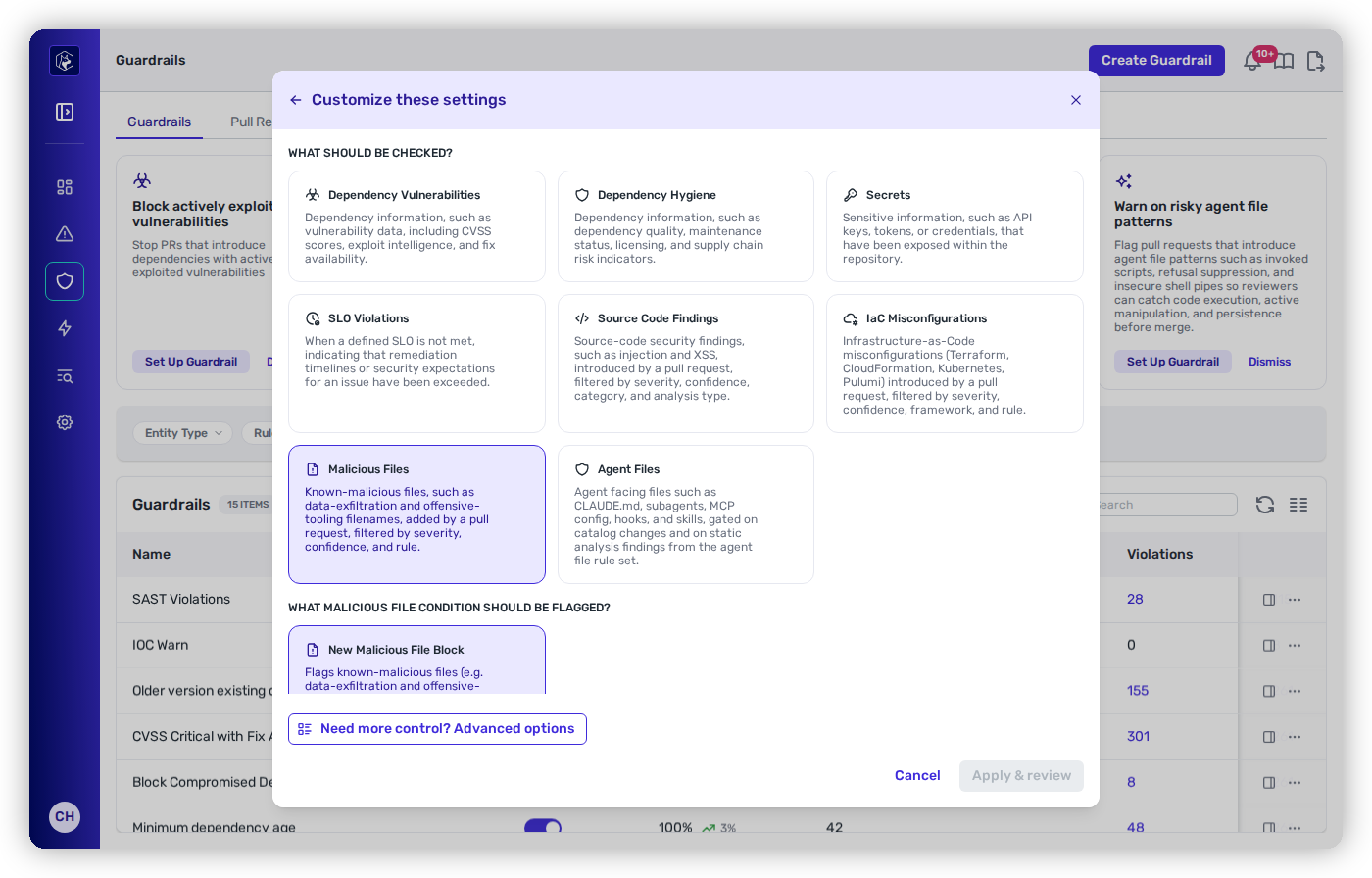
In the guardrail builder, choose **Malicious Files** as the check type, then its **New Malicious File Block** condition. Scope and enforcement work the same as any other guardrail — see [Creating and Scoping a Guardrail](/mrecEO40m5D6bt7Pq5pE/prevent/pr-guardrails/building-guardrails/creating-and-scoping-a-guardrail.md).
Choosing Malicious Files in the guardrail builder.
IOC guardrails use the `Code` entity, so an IOC guardrail is **dedicated** — it can't be combined with dependency or hygiene rules. It's the third rule type on that entity, alongside [SAST](/mrecEO40m5D6bt7Pq5pE/prevent/pr-guardrails/guardrail-types/sast-guardrails.md) and [IaC](/mrecEO40m5D6bt7Pq5pE/prevent/pr-guardrails/guardrail-types/iac-guardrails.md): each only ever matches its own findings, so none can fire on another's.
## Conditions
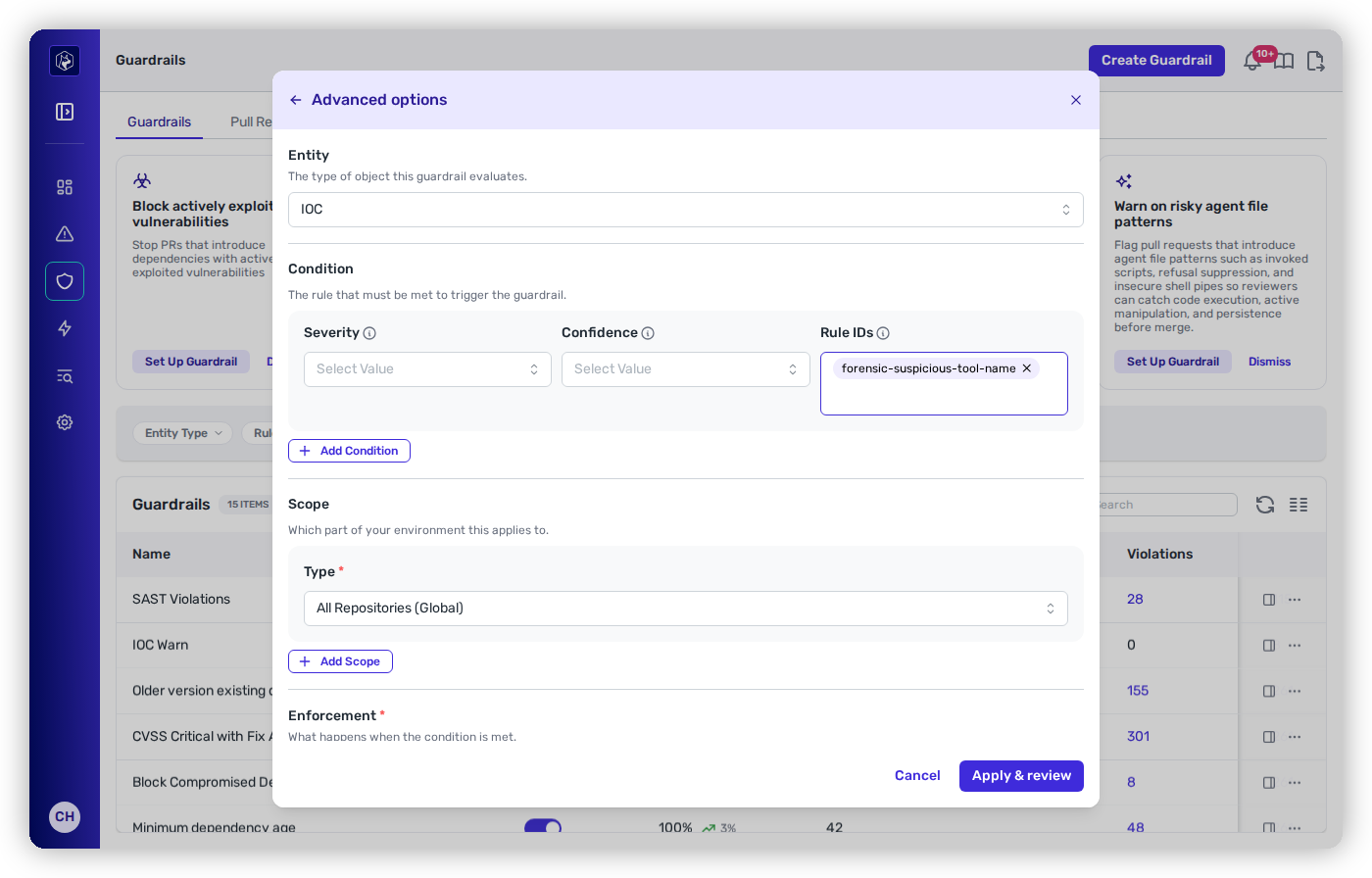
Match the detections you care about with any combination of the three filters. Each is an **OR set**, and **leaving a filter empty means it doesn't filter at all**.
| Filter | Values |
| -------------- | ------------------------------------------------------------------------------------------------ |
| **Severity** | Critical, High, Medium, Low, Info. Empty means all severities. |
| **Confidence** | High, Medium, Low. Empty means all confidences. |
| **Rule IDs** | Specific detections, by ID (for example `forensic-suspicious-tool-name`). Empty means all rules. |
The condition filters in Advanced options — here narrowed to the offensive-tool-name rule.
{% hint style="success" %}
**Leave the filters empty and set it to Block.** Most guardrails earn their way from Observe to Block as you size their impact — but IOC matches are rare, high-signal, and never something you want merged. The default configuration (the full detection library, no filters) in **Block** mode is the right starting point for almost every team. Narrow with **Rule IDs** only when you need to phase in a specific detection.
{% endhint %}
## Requirements
{% hint style="warning" %}
**Baseline required.** An IOC guardrail needs a completed scan of the repository's **default branch** to establish the baseline before it can enforce. It's evaluated once per repository (not per code root).
{% endhint %}
{% hint style="info" %}
**On GitLab, a CI pipeline is required.** Heeler waits for a CI pipeline to run on the commit before it scans a merge request. A repository with **no pipeline** won't be evaluated — a minimal `.gitlab-ci.yml` is enough to enable scanning.
{% endhint %}
IOC, SAST, and IaC guardrails share the same PR-time scan, so a repository already set up for [SAST guardrails](/mrecEO40m5D6bt7Pq5pE/prevent/pr-guardrails/guardrail-types/sast-guardrails.md) needs nothing further for IOC.
## What developers see on the PR
When an IOC guardrail matches, the finding renders **inline on the pull request** with its severity, the detection that fired, and the **file that triggered it**. Under **Block**, the status check fails and — with branch protection enabled — the merge is held.
{% hint style="danger" %}
**Treat a hit as a potential incident, not a code-review comment.** A matched IOC means attack tooling reached a pull request. Don't just delete the file and re-push — establish how it got there. Check who authored the commit and whether they recognize it, review the account's recent activity for signs of a compromised token, and if a dependency's install script or an AI agent produced the change, trace what else it touched. Each detection's finding carries response guidance and MITRE ATT\&CK references to start from.
{% endhint %}
## Related
* [SAST Guardrails](/mrecEO40m5D6bt7Pq5pE/prevent/pr-guardrails/guardrail-types/sast-guardrails.md) and [IaC Guardrails](/mrecEO40m5D6bt7Pq5pE/prevent/pr-guardrails/guardrail-types/iac-guardrails.md) — the other two rule types on the `Code` entity.
* [Dependency (SCA) Guardrails](/mrecEO40m5D6bt7Pq5pE/prevent/pr-guardrails/guardrail-types/dependency-sca-guardrails.md) — block the compromised *package*; IOC blocks the attack's own tooling arriving as *files*.
* [Build a Supply Chain Security Program](/mrecEO40m5D6bt7Pq5pE/solutions-and-use-cases/building-a-proactive-supply-chain-security-program.md) — where IOC gating fits in the wider program.
* [Creating and Scoping a Guardrail](/mrecEO40m5D6bt7Pq5pE/prevent/pr-guardrails/building-guardrails/creating-and-scoping-a-guardrail.md) — the wizard, and how scope decides where a guardrail applies.
---
# Agent Instructions
This documentation is published with GitBook. GitBook is the documentation platform designed so that both humans and AI agents can read, navigate, and reason over technical content effectively. Learn more at gitbook.com.
## Querying This Documentation
If you need additional information that is not directly available in this page, you can query the documentation dynamically by asking a question.
Perform an HTTP GET request on the current page URL with the `ask` query parameter, and the optional `goal` query parameter:
```
GET https://docs.heeler.com/mrecEO40m5D6bt7Pq5pE/prevent/pr-guardrails/guardrail-types/ioc-guardrails.md?ask=&goal=
```
`ask` is the immediate question: it should be specific, self-contained, and written in natural language.
`goal` is optional and describes the broader end goal you are ultimately trying to accomplish on behalf of the user. GitBook uses it to tailor the answer towards what is most useful for that goal.
The response will contain a direct answer to the question and relevant excerpts and sources from the documentation.
Use this mechanism when the answer is not explicitly present in the current page, you need clarification or additional context, or you want to retrieve related documentation sections.