> For the complete documentation index, see [llms.txt](https://docs.heeler.com/mrecEO40m5D6bt7Pq5pE/llms.txt). Markdown versions of documentation pages are available by appending `.md` to page URLs; this page is available as [Markdown](https://docs.heeler.com/mrecEO40m5D6bt7Pq5pE/solutions-and-use-cases/building-a-proactive-supply-chain-security-program.md).
# Build a Supply Chain Security Program
Get ahead of supply-chain risk — malicious packages and files, immature versions, compromised CI actions, license exposure — with posture management, prevention at every stage, and an automated respon
Most dependency programs are reactive: a CVE is disclosed, and you scramble to find and patch it. The sharpest supply-chain attacks today aren't disclosed CVEs at all — they're **malicious packages**, **compromised releases of trusted projects**, **poisoned CI actions**, and the **attack tooling they drop as files**. And they run the moment they're pulled in, not when an advisory says so.
A proactive program meets the attack where it actually happens, in three layers: **posture management** hardens the repositories attackers target, **prevention** blocks the attack at every stage code moves — during code generation, on the developer workstation, at the pull request — and **response** takes over when new research lands, raising the finding and running the response automatically: ticket, owner, and a validated fix, without anyone having to check whether you're exposed.
{% hint style="info" %}
**For:** AppSec and platform teams running a dependency and supply-chain program. **Prerequisites:** source control connected so Heeler resolves your dependencies; cloud & runtime connected so it can prioritize by real exposure; package registries connected so it can resolve internal packages.
{% endhint %}
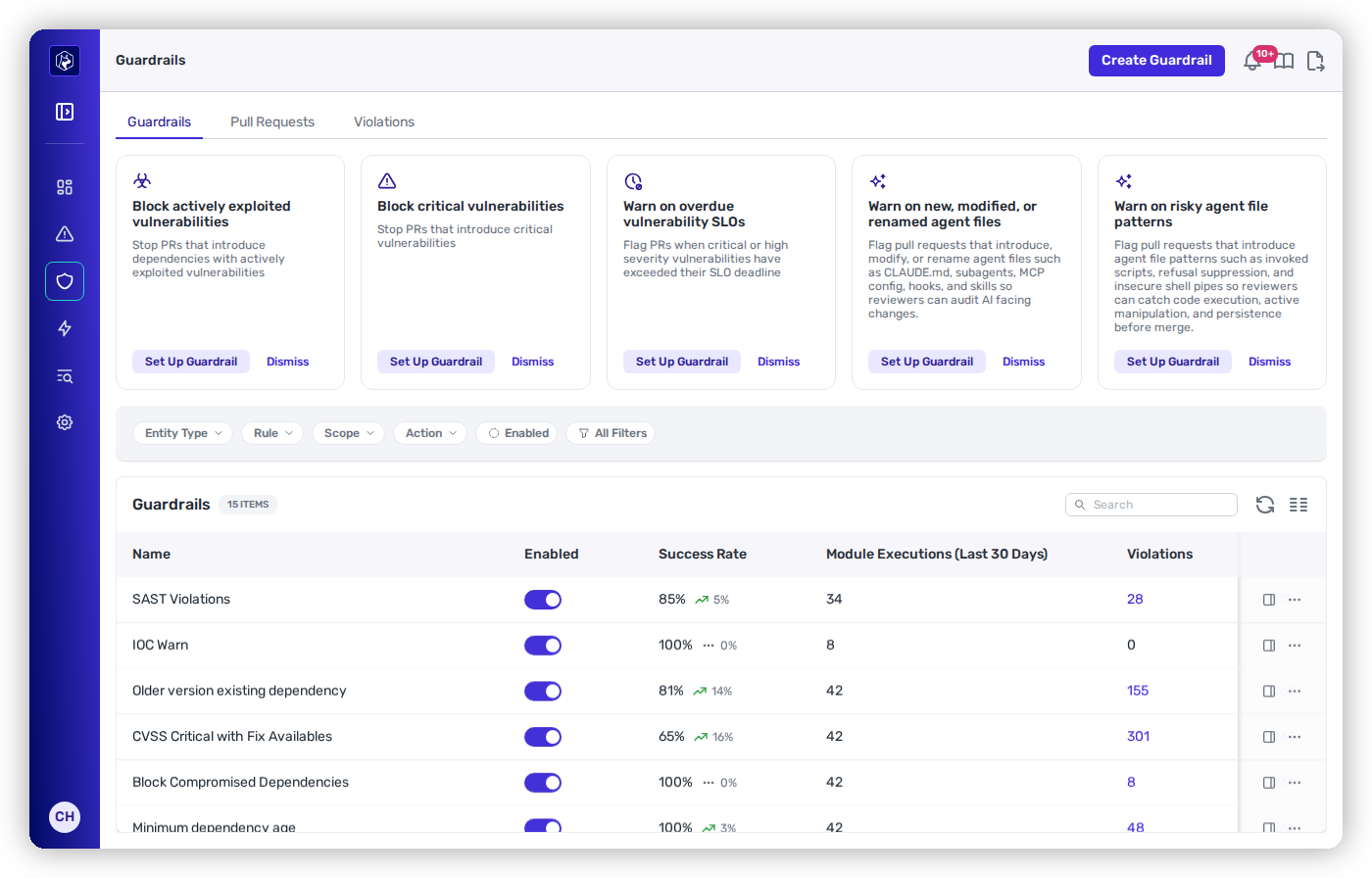
Guardrails stop risky dependencies at the pull request — before they ever land.
## 01 · Posture management
Harden what attackers target before any specific threat exists — know what you have, score it, and watch the activity around it.
{% stepper %}
{% step %}
### Know what you actually depend on
Connect your code and Heeler builds a live dependency inventory across every ecosystem — direct and transitive — tied to the services and deployments that use each package. "Where is this dependency running?" becomes a lookup, not an investigation. This inventory is the foundation everything else builds on. See [Dependencies](/mrecEO40m5D6bt7Pq5pE/catalog/dependencies.md) and [Open Source (SCA)](/mrecEO40m5D6bt7Pq5pE/findings/open-source-sca.md).
{% endstep %}
{% step %}
### Score your own repositories with OSSF Scorecard
You judge dependencies on their supply-chain practices — the [OSSF Scorecard](/mrecEO40m5D6bt7Pq5pE/catalog/repositories/ossf-scorecard.md) applies that standard to your own code. Every repository Heeler analyzes carries a scorecard: **17 checks** covering branch protection, code review, pinned dependencies, dangerous workflows, token permissions, and signed releases, each with the reason it passed or failed. The score ships in the **repositories CSV export**, which ranks the whole estate — the tier-one services with unprotected default branches first.
{% endstep %}
{% step %}
### Monitor GitHub activity with Behavioral Checks
Some supply-chain attacks never change a file you could scan: a compromised account quietly weakens branch protection, or rips through a repository with destructive administrative actions. [Behavioral Checks](/mrecEO40m5D6bt7Pq5pE/findings/behavioral-checks.md) read the **GitHub audit log** for your connected organizations and raise findings from the patterns in it — a critical security control changed, a destructive-activity burst — with the underlying events attached as evidence, so the finding shows you exactly *who did what, when*.
{% endstep %}
{% endstepper %}
## 02 · Prevention
Block the attack at every stage code moves — in the agent, on the developer workstation, and at the pull request.
{% stepper %}
{% step %}
### Stop bad packages before they're committed
The PR check is the backstop — the cheapest catch is earlier still, and it happens at two distinct stages:
* **During code generation** — [Agent Skills](/mrecEO40m5D6bt7Pq5pE/prevent/agent-skills.md) run *inside your coding agent as it writes*: `heeler-malicious-package-scan` screens a new dependency for typosquats, hijacks, and known-malicious packages the moment the agent adds it, and `heeler-recommended-version` steers it to the safest version — the most widely-adopted one with no active vulnerabilities, not just the latest tag. The [MCP server](/mrecEO40m5D6bt7Pq5pE/prevent/mcp.md) feeds the same live package intelligence — where a package is used, its open findings, its safest version — to any assistant, so supply-chain risk is reasoned about *while the code is being generated*.
* **On the developer workstation and in the pipeline** — the [CLI](/mrecEO40m5D6bt7Pq5pE/prevent/cli.md) runs `heelercli detect-malicious-packages` as a pre-commit hook or CI step, so a poisoned package fails before a pull request is ever opened, and the [package-manager cooldown](/mrecEO40m5D6bt7Pq5pE/prevent/package-manager-cooldown.md) stops a too-new release from **installing on the workstation at all**.
Same policy at every stage — a risky package is stopped where it's introduced: in the agent, at the keyboard, or in the pipeline — not just where it merges.
{% endstep %}
{% step %}
### Block risky dependencies at the pull request
Turn on [dependency guardrails](/mrecEO40m5D6bt7Pq5pE/prevent/pr-guardrails/guardrail-types/dependency-sca-guardrails.md) so risky dependencies fail the PR check instead of landing:
* **Compromised / malicious packages** — block a known-bad or typosquatted package outright.
* **Minimum release age (cooldown)** — require a new version to have been public for N days, so a freshly published (possibly compromised) release has to age before anyone can adopt it. Enforce the same window client-side too — see [Package-Manager Cooldown](/mrecEO40m5D6bt7Pq5pE/prevent/package-manager-cooldown.md).
* **Unpinned dependencies** — an unpinned dependency resolves to whatever is newest at install time, so a compromised release can land with **no diff and no review**. The **Unpinned Dependency** rule flags or blocks a PR that introduces one (direct, transitive, or both) — and the ones already in your estate are a one-click **Unpinned** classification filter in the [dependency inventory](/mrecEO40m5D6bt7Pq5pE/catalog/dependencies.md).
* **License policy** — block packages under a denied license.
Blocking at the PR is the cheapest point of control: a package that never lands never has to be found, triaged, or removed.
{% endstep %}
{% step %}
### Extend it to your CI supply chain
Your GitHub Actions are dependencies too — and a compromised action (the `tj-actions/changed-files` and `reviewdog` incidents are recent examples) runs with your pipeline's privileges. Heeler inventories the actions your workflows use and flags compromised or risky ones, so a poisoned action is caught the same way a poisoned package is. Pinning applies here too: a tag like `@v3` or `@main` can change under you, so Heeler ranks **unpinned actions** by how much you're trusting the source — and a guardrail can block a PR that introduces one. See [GitHub Actions analysis](/mrecEO40m5D6bt7Pq5pE/findings/open-source-sca/github-actions.md).
{% endstep %}
{% step %}
### Block known-malicious files (IOC)
A compromised account or a malicious install script doesn't only add packages — it drops **files**, and those files aren't inert residue: they're the attack's working parts. A web shell *is* the attacker's remote access; an environment-variable dumper like `dump_env.js` *does* the exfiltration; a worm's implants are how it **persists and propagates**. Turn on an [IOC guardrail](/mrecEO40m5D6bt7Pq5pE/prevent/pr-guardrails/guardrail-types/ioc-guardrails.md) so a pull request that introduces a **known-malicious file** fails the check before merge — cutting off the access, exfiltration, or persistence that file would have provided. The detection library covers general forensic indicators — reverse shells, credential harvesting, data staging, DNS exfiltration — and named campaigns, including the self-propagating npm worms, so when the next campaign breaks, its indicators are already enforced on every PR.
{% endstep %}
{% endstepper %}
## 03 · Response
When new research lands, the response runs without an operator: detect, ticket, fix.
{% stepper %}
{% step %}
### Monitor for newly compromised dependencies and automate the response
A package that was clean when it merged can be compromised later, or exposed by intelligence that lands months after the fact. Heeler keeps evaluating the dependencies **already in your estate**, so when the next campaign breaks, **no one has to go check whether you're exposed** — an affected package surfaces as a finding on its own, the moment it's known-bad.
The response is automated too, not just the detection: a [workflow](/mrecEO40m5D6bt7Pq5pE/operate/workflows.md) on the **New Compromised Dependency** trigger opens a ticket **auto-assigned to the owning team** and messages your security channel the moment the finding is raised. Heeler runs that response around the clock — your team's first touch is *fixing it*, not discovering it.
{% endstep %}
{% step %}
### Remediate a compromised dependency with a validated fix
The fix for a compromised dependency isn't triage — it's **getting off the bad version**. Heeler's priority model treats a malicious or compromised package as **actively exploited**, top of the queue regardless of any CVSS score, and [agentic remediation](/mrecEO40m5D6bt7Pq5pE/fix/automate-remediation.md) computes the move: a known-good version that clears your policy, delivered as a **validated upgrade PR**. Pair it with a [workflow](/mrecEO40m5D6bt7Pq5pE/operate/workflows.md) to generate that PR without an operator, so the upgrade starts in the same pass that raised the finding.
{% endstep %}
{% endstepper %}
## Prove provenance on demand
Generate CycloneDX [**SBOMs**](/mrecEO40m5D6bt7Pq5pE/catalog/sbom.md) for any repository, service, or deployment when a customer or auditor asks "what's in this?" — grounded in the same live inventory, not a stale manifest.
## The outcome
{% columns %}
{% column %}
### Before
* A CVE is disclosed → you scramble to find where it lives.
* A campaign breaks → someone checks every repo, hoping you're not exposed.
* A malicious package is discovered **after** its install script has run.
* Unpinned installs drift silently onto compromised releases.
* Repository posture is audited by hand, occasionally.
* Rotation and cleanup depend on whoever noticed.
{% endcolumn %}
{% column %}
### After
* Risky packages are stopped **in the agent, on the workstation, and at the PR**.
* A newly flagged package raises its own finding — ticket opened, owner assigned, automatically.
* Known-malicious **files** fail the check before merge.
* Pinning is enforced; new releases wait out a cooldown — and can't install on a laptop.
* Every repository carries a **Scorecard**; audit-log patterns raise findings.
* The fix is a **validated PR** to a known-good version.
{% endcolumn %}
{% endcolumns %}
The program scales with how fast your teams pull in code, instead of falling behind it.
## Validate success
* A test PR that adds a known-malicious package, a too-new version, or a denied license **fails the guardrail**.
* A test PR that adds a file with a known offensive-tool name (say, `dump_env.js`) **fails the IOC guardrail**.
* The repositories CSV export ranks your estate by **OSSF Scorecard** score — and weakening a branch protection raises a **behavioral finding**.
* A flagged compromised dependency carries a **remediation** — a validated PR moving to a known-good version.
* You can produce an SBOM for any deployment on demand.
## Where to go next
* [Dependency Guardrails](/mrecEO40m5D6bt7Pq5pE/prevent/pr-guardrails/guardrail-types/dependency-sca-guardrails.md) · [IOC Guardrails](/mrecEO40m5D6bt7Pq5pE/prevent/pr-guardrails/guardrail-types/ioc-guardrails.md) · [Open Source (SCA)](/mrecEO40m5D6bt7Pq5pE/findings/open-source-sca.md) · [Automate Remediation](/mrecEO40m5D6bt7Pq5pE/fix/automate-remediation.md)
* [OSSF Scorecard](/mrecEO40m5D6bt7Pq5pE/catalog/repositories/ossf-scorecard.md) · [Behavioral Checks](/mrecEO40m5D6bt7Pq5pE/findings/behavioral-checks.md) — your own repositories' posture, and the activity around them.
* [Secure AI Coding Agents](/mrecEO40m5D6bt7Pq5pE/solutions-and-use-cases/secure-your-ai-coding-agents.md) — the newest supply-chain surface.
* [Evidence for a Security Audit](/mrecEO40m5D6bt7Pq5pE/solutions-and-use-cases/prove-your-security-posture.md) — turn this program into evidence.
---
# Agent Instructions
This documentation is published with GitBook. GitBook is the documentation platform designed so that both humans and AI agents can read, navigate, and reason over technical content effectively. Learn more at gitbook.com.
## Querying This Documentation
If you need additional information that is not directly available in this page, you can query the documentation dynamically by asking a question.
Perform an HTTP GET request on the current page URL with the `ask` query parameter, and the optional `goal` query parameter:
```
GET https://docs.heeler.com/mrecEO40m5D6bt7Pq5pE/solutions-and-use-cases/building-a-proactive-supply-chain-security-program.md?ask=&goal=
```
`ask` is the immediate question: it should be specific, self-contained, and written in natural language.
`goal` is optional and describes the broader end goal you are ultimately trying to accomplish on behalf of the user. GitBook uses it to tailor the answer towards what is most useful for that goal.
The response will contain a direct answer to the question and relevant excerpts and sources from the documentation.
Use this mechanism when the answer is not explicitly present in the current page, you need clarification or additional context, or you want to retrieve related documentation sections.