> For the complete documentation index, see [llms.txt](https://docs.heeler.com/mrecEO40m5D6bt7Pq5pE/llms.txt). Markdown versions of documentation pages are available by appending `.md` to page URLs; this page is available as [Markdown](https://docs.heeler.com/mrecEO40m5D6bt7Pq5pE/solutions-and-use-cases/contain-a-leaked-secret.md).
# Contain a Leaked Secret
A credential landed in a repository. Confirm whether it's live, rotate and revoke it, and put guardrails in place so it can't happen again.
A secret in source control is a live-until-proven-otherwise incident. The instinct is to delete the line and move on — but the commit history still has it, and you don't yet know whether the credential is active or already being used. This use case runs the containment properly: **confirm whether it's live, rotate and revoke it, then close the door** so the next one is caught before it ever lands.
{% hint style="info" %}
**For:** security and incident-response teams. **Prerequisites:** source control connected. To prevent recurrence, you'll enable a PR guardrail and (optionally) the CLI pre-commit hook — see the steps below.
{% endhint %}
## What makes this work
* **Live validation.** Heeler doesn't just pattern-match a secret; for supported types it checks whether the credential is **actually active**, so you triage a working AWS key ahead of a long-dead test token.
* **Rotation, not deletion.** The moment a secret is committed and pushed, it's in Git history and effectively public — deleting the line doesn't un-expose it. Containment always means **rotating and revoking** the credential at its provider.
* **Prevention in layers.** The only place to stop exposure entirely is *before* the commit. A PR guardrail and a workflow don't prevent the leak — they make sure one that does happen is caught and responded to fast.
## Walk through it
{% stepper %}
{% step %}
### Triage by what's live
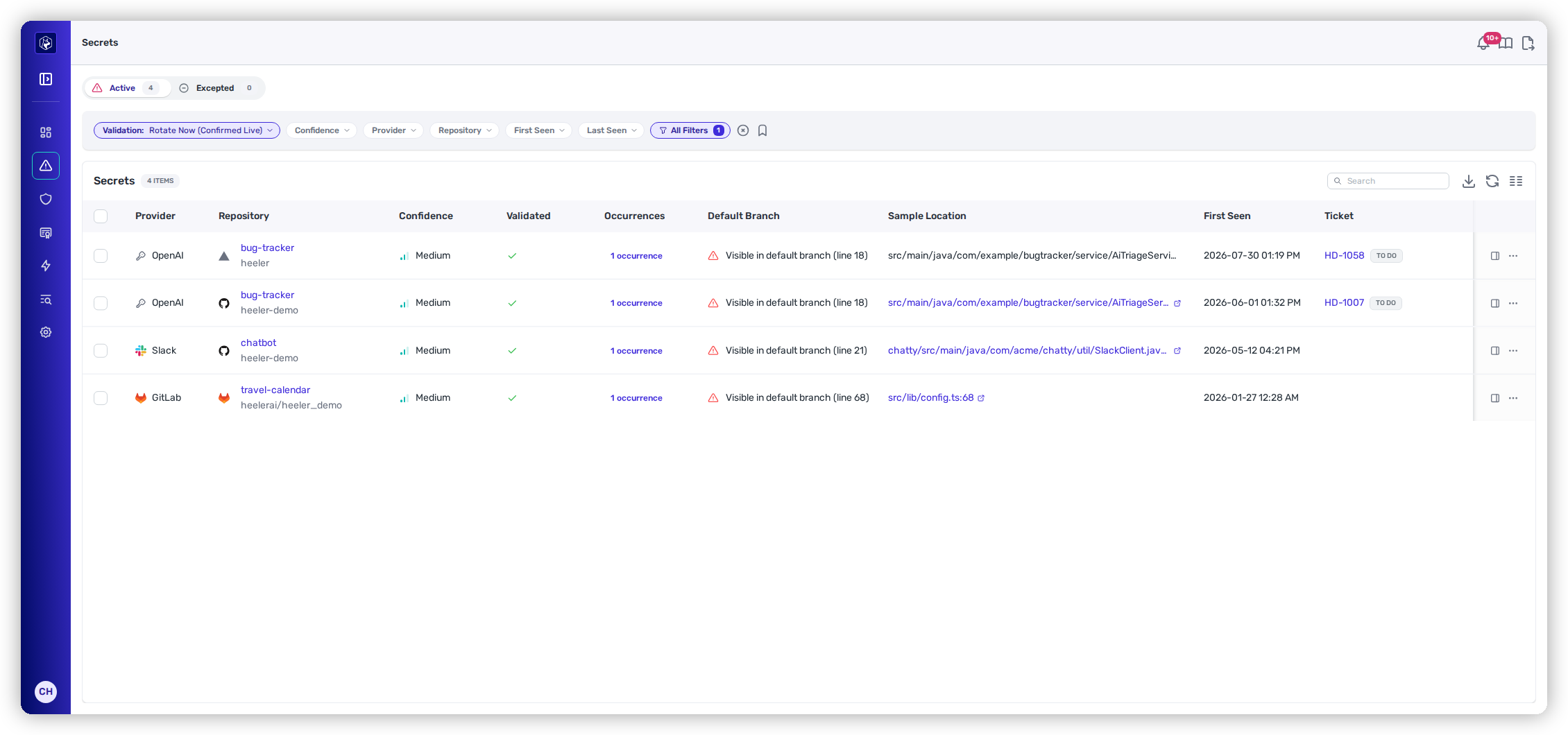
Open **Secrets** findings. The list opens on **Validation: Rotate Now** — the credentials Heeler has confirmed live — and orders everything behind it by action bucket: **Rotate Now**, then **Rotate**, **Triage**, **No Action**, **Expected**. A confirmed-live AWS access key committed to `AiTriageService.java` is an incident and goes first; an expired token in an old test fixture still gets cleaned up, just not this minute. Clear the filter to see every active secret. See [Secrets findings](/mrecEO40m5D6bt7Pq5pE/findings/secrets.md).
Secrets, triaged by action bucket — confirmed-live credentials first.
{% endstep %}
{% step %}
### Rotate and revoke at the source
Containment happens at the **provider**, not in Git: rotate the credential and revoke the leaked value so it stops working, even though it's still in history. (Removing it from history is good hygiene, but revocation is what actually contains the exposure.)
{% endstep %}
{% step %}
### Record it as handled
Mark the finding resolved — for a secret you've rotated, record an exception on the **Excepted** tab with a reason, so it's documented and drops off the active list with an audit trail. See [Secrets Findings](/mrecEO40m5D6bt7Pq5pE/findings/secrets/findings.md).
{% endstep %}
{% step %}
### Prevent exposure before the commit
The only layer that stops a leak *before* it happens is on the developer's machine. Install the [CLI as a pre-commit hook](/mrecEO40m5D6bt7Pq5pE/get-started/set-up-developer-tooling/cli.md), or use Heeler's [agent skills](/mrecEO40m5D6bt7Pq5pE/prevent/agent-skills.md) so an AI coding agent checks its own work — either way a secret is caught at `git commit` and never reaches the remote. This is the highest-value prevention.
{% endstep %}
{% step %}
### Add friction at the pull request
Turn on the secret-detection [PR guardrail](/mrecEO40m5D6bt7Pq5pE/prevent/pr-guardrails.md). Set it to **Warn** to flag the author (merge still allowed) or **Block** for more friction (the status check fails), and the finding surfaces to the reviewer as well. This can't undo the exposure — the credential is already public once pushed — but it makes the leak impossible to miss and keeps the change from merging as-is.
{% endstep %}
{% step %}
### Automate the response
Because a secret is exposed the instant it's pushed, response speed matters more than any dashboard. Build a [workflow](/mrecEO40m5D6bt7Pq5pE/operate/workflows.md) on the **New Secret Detected** trigger that automatically opens a ticket, assigns it to the team that owns the repository, and posts a message to that team to **rotate the credential** — so containment starts within minutes, with no one watching a screen.
{% endstep %}
{% endstepper %}
## The outcome
The leaked credential is **inactive**, documented, and off your active list. Going forward, a pre-commit hook stops most leaks before they happen, a PR guardrail catches any that reach a pull request, and a workflow automatically tickets, assigns, and routes a real leak for rotation.
## Validate success
* Re-checking the credential shows it **no longer validates**. A live credential is automatically re-verified **daily** (every other verdict weekly), and the finding's [**Re-check**](/mrecEO40m5D6bt7Pq5pE/findings/secrets/findings.md#re-checking-a-credential) action confirms a rotation **on demand** — so a rotated credential flips to inactive within a day, or immediately when you ask.
* The next time a secret is detected, your workflow opens the ticket and notifies the owning team on its own — no manual watching required.
## Where to go next
* [Secrets](/mrecEO40m5D6bt7Pq5pE/findings/secrets.md) · [Supported Secret Types](/mrecEO40m5D6bt7Pq5pE/reference/supported-secret-types.md) — coverage and validation detail.
* [Install the CLI](/mrecEO40m5D6bt7Pq5pE/get-started/set-up-developer-tooling/cli.md) · [PR Guardrails](/mrecEO40m5D6bt7Pq5pE/prevent/pr-guardrails.md) · [Workflows](/mrecEO40m5D6bt7Pq5pE/operate/workflows.md) — the prevention-and-response layers.
---
# Agent Instructions
This documentation is published with GitBook. GitBook is the documentation platform designed so that both humans and AI agents can read, navigate, and reason over technical content effectively. Learn more at gitbook.com.
## Querying This Documentation
If you need additional information that is not directly available in this page, you can query the documentation dynamically by asking a question.
Perform an HTTP GET request on the current page URL with the `ask` query parameter, and the optional `goal` query parameter:
```
GET https://docs.heeler.com/mrecEO40m5D6bt7Pq5pE/solutions-and-use-cases/contain-a-leaked-secret.md?ask=&goal=
```
`ask` is the immediate question: it should be specific, self-contained, and written in natural language.
`goal` is optional and describes the broader end goal you are ultimately trying to accomplish on behalf of the user. GitBook uses it to tailor the answer towards what is most useful for that goal.
The response will contain a direct answer to the question and relevant excerpts and sources from the documentation.
Use this mechanism when the answer is not explicitly present in the current page, you need clarification or additional context, or you want to retrieve related documentation sections.