> For the complete documentation index, see [llms.txt](https://docs.heeler.com/mrecEO40m5D6bt7Pq5pE/llms.txt). Markdown versions of documentation pages are available by appending `.md` to page URLs; this page is available as [Markdown](https://docs.heeler.com/mrecEO40m5D6bt7Pq5pE/solutions-and-use-cases/determine-exploitability-in-production.md).

# Determine Exploitability in Production

A critical CVE just dropped. Instead of patching everywhere at once, find the handful of instances that are actually reachable, running, and exposed.

A new critical CVE lands — say a remote-code-execution flaw in a widely used library — and the questions come fast: *Are we affected? Where? Do we drop everything?* Scanning by CVSS alone tells you every place the package appears, which on a large estate can be hundreds of repositories, most of them harmless. This use case shows how to narrow that to the instances that are **reachable in code, running in a deployment, and exposed** — the ones to work first. The rest stay open on their own SLOs.

{% hint style="info" %}
**For:** security and AppSec teams triaging a newly disclosed vulnerability. **Prerequisites:** source control connected (so Heeler resolves your dependencies and traces reachability) and **cloud & runtime connected** (so it knows what's actually deployed and internet-facing). Without runtime, you still get reachability and business context, but not the "running in production" signal.
{% endhint %}

## What makes this work

Heeler scores every finding on three axes of real-world risk and rolls them into an **Exploit Threat** verdict — **Confirmed**, **Probable**, or **Unlikely** — and a priority band. The signals you'll lean on here:

* **Reachability** — does your code actually reach the vulnerable function (code reachability), and is the library loaded in a running deployment (runtime reachability)? A vulnerable-but-unreachable library isn't exploitable.
* **Internet accessibility** — is the service or endpoint reachable from the public internet?
* **Threat intelligence** — is the CVE in CISA/VulnCheck **KEV**, does it have a high **EPSS**, is there known ransomware use?

## Walk through it

{% stepper %}
{% step %}

### Find every instance of the CVE

Search your findings for the CVE ID (for example, in the **Security** view or by package). Heeler shows every repository, service, and deployment where the vulnerable package resolves — direct and transitive. This is your raw blast radius before filtering. See [Open Source (SCA) findings](/mrecEO40m5D6bt7Pq5pE/findings/open-source-sca/findings.md).
{% endstep %}

{% step %}

### Filter to what's reachable and running

Narrow to findings that are **reachable** and **loaded in a running deployment**. This is usually where a list of 200 collapses to a handful — the instances where the vulnerable code path can actually execute against live traffic. See [prioritization](/mrecEO40m5D6bt7Pq5pE/findings/open-source-sca/prioritization.md).
{% endstep %}

{% step %}

### Read the Risk panel to confirm *why*

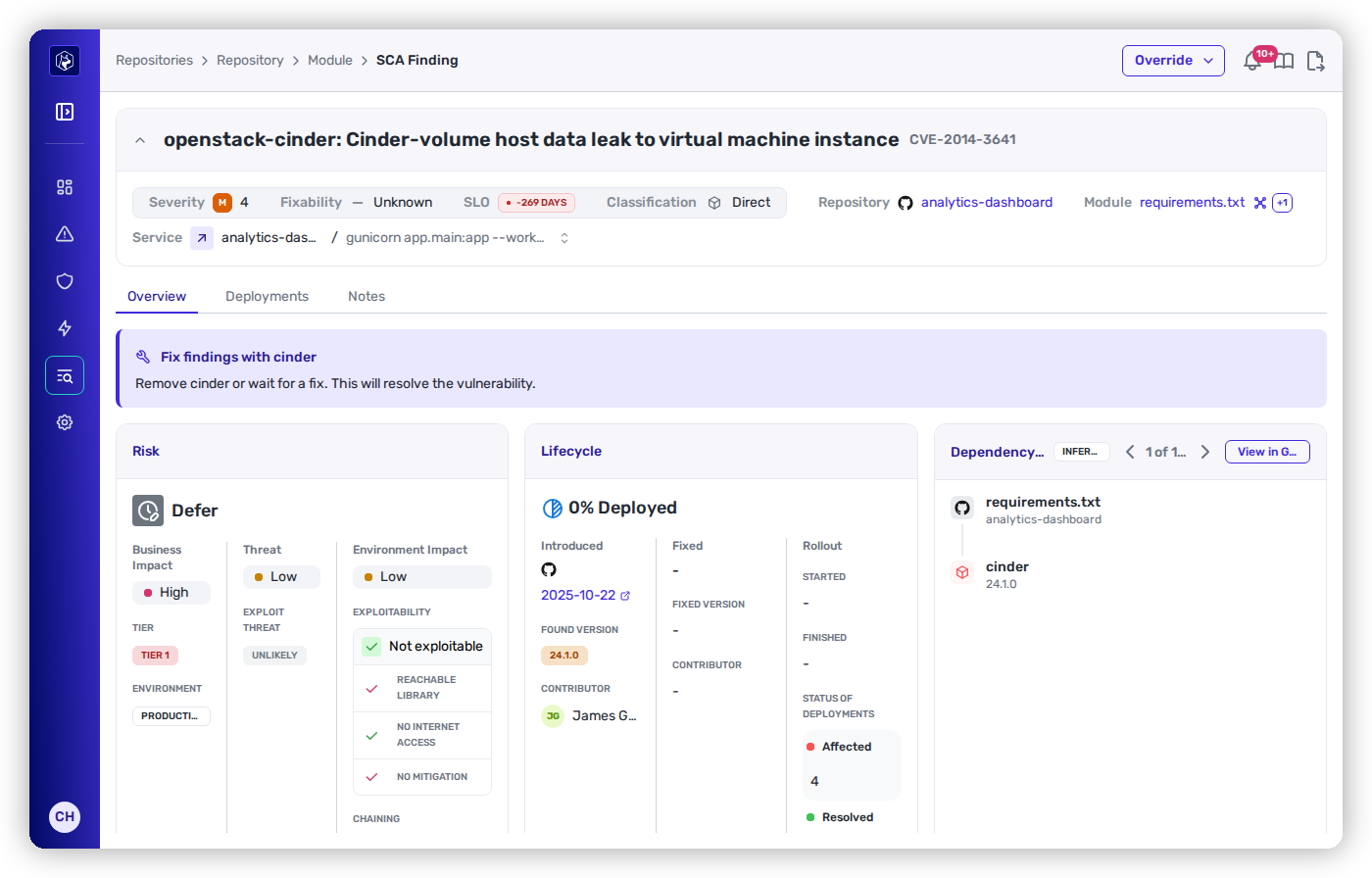
Open one of the survivors and read its Risk panel. It lays out the business impact (the service's [tier](/mrecEO40m5D6bt7Pq5pE/administer-and-monitor/organization-model/environments.md) and environment), the environment impact (reachable, internet-accessible, chained to other systems), and the threat signals (KEV/EPSS), then bands the finding **Urgent / Plan / Defer**. A high-CVSS CVE on a Tier 1 production service can still be **Defer** if it isn't reachable — and the panel shows you exactly that reasoning.

<figure><img src="https://414480750-files.gitbook.io/~/files/v0/b/gitbook-x-prod.appspot.com/o/spaces%2FXP3dp2kecwKA2KvYkntz%2Fuploads%2Fgit-blob-fc38433e56a4adac90254c014be83a7b16ff3bef%2Fcc-risk-detail.png?alt=media" alt="A finding&#x27;s Risk panel: a high-business-impact CVE banded Defer because it is not exploitable — not a reachable library, not internet-accessible, no mitigation needed."><figcaption><p>Why a scary CVE can be <strong>Defer</strong>: high business impact, but <strong>not exploitable</strong> — the Risk panel shows the reasoning, not just the CVSS.</p></figcaption></figure>
{% endstep %}

{% step %}

### Trace it to the exact deployments

For the exploitable ones, follow the finding to the **services and deployments** it runs in — the code-to-cloud link tells you which environment, account, and internet-facing endpoint is at risk, so you know precisely what you're protecting. See [Services](/mrecEO40m5D6bt7Pq5pE/catalog/services.md) and [Deployments](/mrecEO40m5D6bt7Pq5pE/catalog/deployments.md).
{% endstep %}
{% endstepper %}

## The outcome

You can state, with evidence, **exactly which instances are exploitable in production** and which are not, and hand the exploitable set straight into remediation. The rest stay open and keep their SLO; the evidence tells you what to fix first, not what to skip.

## Validate success

* The filtered list is the small set of reachable, running, exposed instances — and each one's Risk panel shows **Confirmed** or **Probable** exploitation with the specific signals behind it.
* The deferred instances each carry a clear reason (not reachable / not running / not exposed), so a skeptical stakeholder can see why they wait.

## Where to go next

* [Fix a Vulnerable Dependency and Verify It's Deployed](/mrecEO40m5D6bt7Pq5pE/solutions-and-use-cases/fix-and-verify-in-production.md) — take the exploitable set straight into remediation.
* [Open Source (SCA)](/mrecEO40m5D6bt7Pq5pE/findings/open-source-sca.md) · [prioritization](/mrecEO40m5D6bt7Pq5pE/findings/open-source-sca/prioritization.md) — the model behind the bands.
* [Determine whether a fix reached production](/mrecEO40m5D6bt7Pq5pE/solutions-and-use-cases/fix-and-verify-in-production.md) — closing the loop.


---

# Agent Instructions
This documentation is published with GitBook. GitBook is the documentation platform designed so that both humans and AI agents can read, navigate, and reason over technical content effectively. Learn more at gitbook.com.

## Querying This Documentation
If you need additional information that is not directly available in this page, you can query the documentation dynamically by asking a question.

Perform an HTTP GET request on the current page URL with the `ask` query parameter, and the optional `goal` query parameter:

```
GET https://docs.heeler.com/mrecEO40m5D6bt7Pq5pE/solutions-and-use-cases/determine-exploitability-in-production.md?ask=<question>&goal=<endgoal>
```

`ask` is the immediate question: it should be specific, self-contained, and written in natural language.
`goal` is optional and describes the broader end goal you are ultimately trying to accomplish on behalf of the user. GitBook uses it to tailor the answer towards what is most useful for that goal.

The response will contain a direct answer to the question and relevant excerpts and sources from the documentation.

Use this mechanism when the answer is not explicitly present in the current page, you need clarification or additional context, or you want to retrieve related documentation sections.
