> For the complete documentation index, see [llms.txt](https://docs.heeler.com/mrecEO40m5D6bt7Pq5pE/llms.txt). Markdown versions of documentation pages are available by appending `.md` to page URLs; this page is available as [Markdown](https://docs.heeler.com/mrecEO40m5D6bt7Pq5pE/solutions-and-use-cases/fix-and-verify-in-production.md).
# Fix a Vulnerable Dependency and Verify It's Deployed
Take a vulnerable dependency from finding to a validated pull request, routed to the team that owns it, and confirm the fix actually reached production.
Finding a vulnerability is the easy part. The hard part is getting the *right team* to fix it, making sure the fix actually builds and passes tests, and confirming it reached **production** — not just `main`. This use case runs that whole loop: from an exploitable finding to a validated, owned pull request, to proof the corrected version is deployed everywhere it runs.
{% hint style="info" %}
**For:** AppSec teams and the developers who own the code. **Prerequisites:** source control connected; ownership configured (CODEOWNERS, a `dependency_owners.json`, or team mappings); and cloud & runtime connected so Heeler can confirm the **Deployed** state. To open pull requests automatically, the remediation agent must be enabled.
{% endhint %}
## What makes this work
* **Ownership routing** assigns each new remediation to the team that actually owns the code — no manual triage.
* **Agentic remediation** doesn't just bump a version string: it generates the fix, then **builds it and runs your tests**, iterating until they pass, before opening a PR.
* The **Active → Fixed → Deployed** lifecycle, powered by runtime correlation, tells you the difference between "merged" and "actually running in production."
## Walk through it
{% stepper %}
{% step %}
### Start from an exploitable finding
Pick a finding that's reachable and running — ideally one you've already triaged (see [Determine Exploitability in Production](/mrecEO40m5D6bt7Pq5pE/solutions-and-use-cases/determine-exploitability-in-production.md)). Say it's a vulnerable `org.apache.tomcat.embed:tomcat-embed-core` pulled in by a Spring service.
{% endstep %}
{% step %}
### Confirm who owns it
Heeler has already assigned the remediation to an owning team based on your [routing rules](/mrecEO40m5D6bt7Pq5pE/administer-and-monitor/program-policy/remediation-assignment-and-routing.md). Confirm the **Suggested Assignee** / owning team is right; if ownership has drifted, that page shows you where.
{% endstep %}
{% step %}
### Let the agent generate and validate the fix
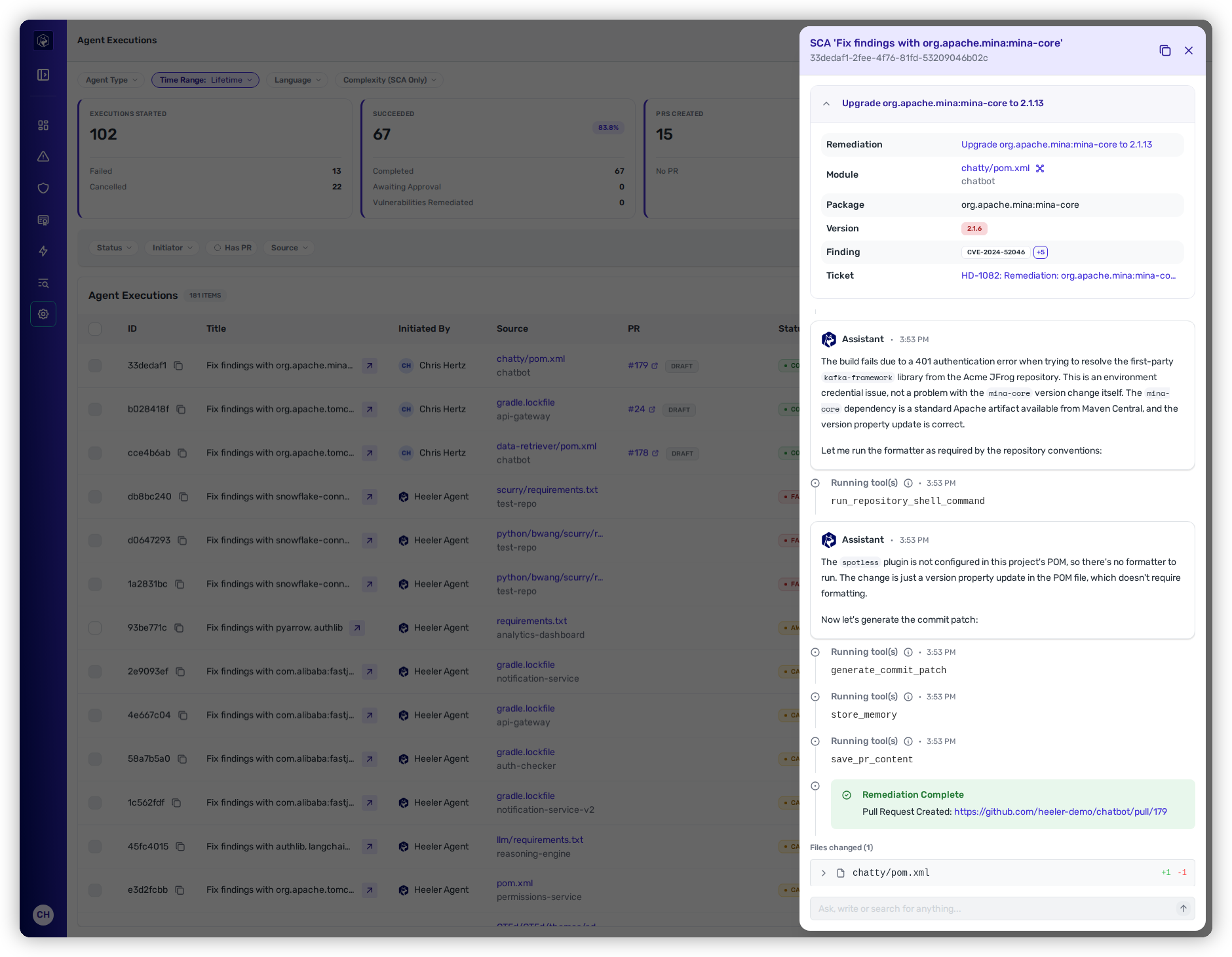
Trigger **Fix Now** (or let a [workflow](/mrecEO40m5D6bt7Pq5pE/operate/workflows.md) do it automatically for high-confidence cases). The agent proposes the upgrade, then runs the **CI testing loop** — building the change and running your tests, revising up to several times until they pass — so the PR that lands is already green. See [Automate Remediation](/mrecEO40m5D6bt7Pq5pE/fix/automate-remediation.md) and [Validate and Merge-Ready](/mrecEO40m5D6bt7Pq5pE/fix/validate-and-merge-ready.md).
The agent's run: it plans, edits, validates, and opens a pull request — with the files it changed.
{% endstep %}
{% step %}
### Review and merge
The PR follows your [PR template](/mrecEO40m5D6bt7Pq5pE/administer-and-monitor/program-policy/remediation-agent.md) and links back to the finding. Review it like any other change and merge. The finding moves from **Active** to **Fixed**.
{% endstep %}
{% step %}
### Verify it reached production
This is the step most tools skip. Once the corrected version rolls out, Heeler correlates the running deployments and moves the finding to **Deployed** — with a per-deployment breakdown that shows partial rollouts. Only now is the risk actually gone from production, and the [ticket auto-closes](/mrecEO40m5D6bt7Pq5pE/administer-and-monitor/organization-model/ticket-closing.md) if you've set it to.
{% endstep %}
{% endstepper %}
## The outcome
A vulnerability went from detection to a validated, owned pull request to a **confirmed production deployment** — with the ticket closed — and, for the high-confidence cases, most of it happened without a human in the loop.
## Validate success
* The finding shows **Deployed**, with every active deployment resolved (not just **Fixed**).
* The [Agent Executions](/mrecEO40m5D6bt7Pq5pE/fix/agent-executions.md) trail shows the run **Completed** with a merged PR.
* The tracker ticket has moved to your done state.
## Where to go next
* [Fix](/mrecEO40m5D6bt7Pq5pE/fix.md) · [SCA Auto-Fix](/mrecEO40m5D6bt7Pq5pE/fix/sca-auto-fix.md) — how the agent builds and validates fixes.
* [Remediation Assignment and Routing](/mrecEO40m5D6bt7Pq5pE/administer-and-monitor/program-policy/remediation-assignment-and-routing.md) — set ownership so this stage needs no operator.
* [Run an SLO-driven AppSec program](/mrecEO40m5D6bt7Pq5pE/solutions-and-use-cases/run-an-slo-driven-appsec-program.md) — do this at scale, on a clock.
---
# Agent Instructions
This documentation is published with GitBook. GitBook is the documentation platform designed so that both humans and AI agents can read, navigate, and reason over technical content effectively. Learn more at gitbook.com.
## Querying This Documentation
If you need additional information that is not directly available in this page, you can query the documentation dynamically by asking a question.
Perform an HTTP GET request on the current page URL with the `ask` query parameter, and the optional `goal` query parameter:
```
GET https://docs.heeler.com/mrecEO40m5D6bt7Pq5pE/solutions-and-use-cases/fix-and-verify-in-production.md?ask=&goal=
```
`ask` is the immediate question: it should be specific, self-contained, and written in natural language.
`goal` is optional and describes the broader end goal you are ultimately trying to accomplish on behalf of the user. GitBook uses it to tailor the answer towards what is most useful for that goal.
The response will contain a direct answer to the question and relevant excerpts and sources from the documentation.
Use this mechanism when the answer is not explicitly present in the current page, you need clarification or additional context, or you want to retrieve related documentation sections.