> For the complete documentation index, see [llms.txt](https://docs.heeler.com/mrecEO40m5D6bt7Pq5pE/llms.txt). Markdown versions of documentation pages are available by appending `.md` to page URLs; this page is available as [Markdown](https://docs.heeler.com/mrecEO40m5D6bt7Pq5pE/solutions-and-use-cases/run-an-slo-driven-appsec-program.md).
# Run an SLO-Driven AppSec Program
Put every finding on a clock, route it to an owner automatically, drive it with workflows, and gate new risk at the PR — so the backlog drains instead of growing.
A small security team can't manually triage, assign, and chase thousands of findings across hundreds of repos — and if they try, the backlog wins. The way out isn't more people; it's an **operating model**: every finding gets an owner and a deadline automatically, automation does the chasing, and new risk is gated out at the pull request so the queue drains instead of refilling. This use case wires that model together.
{% hint style="info" %}
**For:** AppSec leaders and program owners running security across many teams. **Prerequisites:** source control and cloud & runtime connected; your organization mapped (teams, ownership, environments); ticketing and messaging connected for automation.
{% endhint %}
## What makes this work
Four pieces run the program without an operator: **SLOs** set the deadline, **routing** sets the owner, **workflows** do the communicating and fixing, and **guardrails** gate the inflow.
## Walk through it
{% stepper %}
{% step %}
### Put every finding on a clock
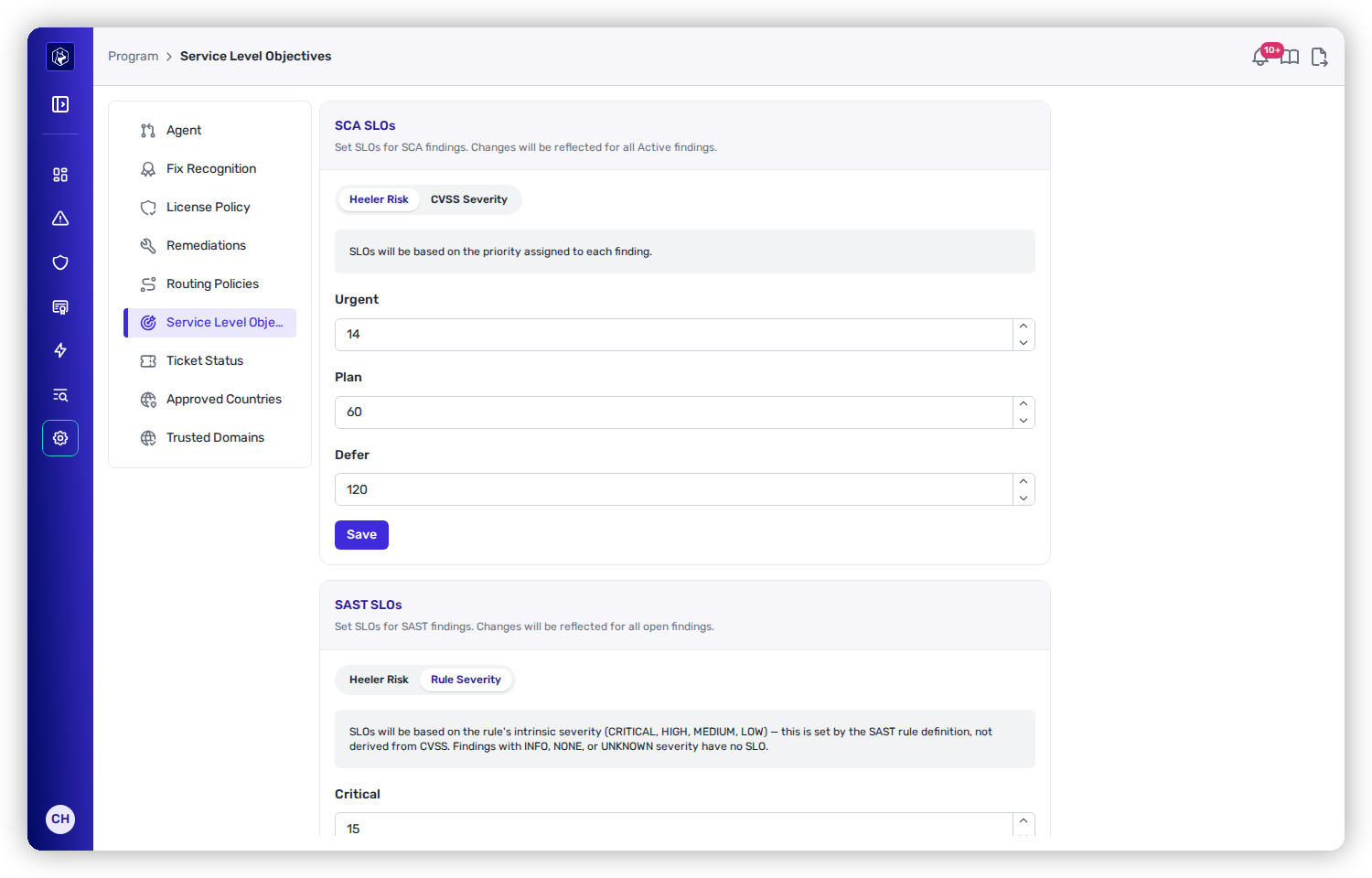
Set [Service Level Objectives](/mrecEO40m5D6bt7Pq5pE/administer-and-monitor/program-policy/service-level-objectives.md) so each finding has a deadline based on its Heeler Risk — the defaults are Urgent 14 / Plan 60 / Defer 120 days. Now "how long has this been open?" has a defined answer, and overdue work is unambiguous.
SLOs give every finding a deadline — the clock the whole program runs on.
{% endstep %}
{% step %}
### Route every finding to an owner
Configure [remediation assignment and routing](/mrecEO40m5D6bt7Pq5pE/administer-and-monitor/program-policy/remediation-assignment-and-routing.md) so new findings land on the owning team automatically — from CODEOWNERS, a `dependency_owners.json`, or team mappings. No central triage bottleneck; the work shows up where it belongs.
{% endstep %}
{% step %}
### Automate the communicating and fixing
Build [workflows](/mrecEO40m5D6bt7Pq5pE/operate/workflows.md) that fire on the events you care about — *New Finding Detected*, *New Finding Fix Available*, *Finding Override Expiration* — and take action: open a Jira ticket, post to the team's Slack channel, or trigger an agentic fix for the high-confidence ones. This is the chasing your team no longer does by hand.
{% endstep %}
{% step %}
### Track attainment
Use [Dashboards](/mrecEO40m5D6bt7Pq5pE/operate/dashboards.md) to track what matters at the program level: SLO attainment, overdue and due-soon counts, and trend over time. You're managing the *system* — where is it slipping? — not individual tickets.
{% endstep %}
{% step %}
### Gate new risk at the pull request
None of the above keeps up if new risk pours in faster than you fix it. Turn on [PR Guardrails](/mrecEO40m5D6bt7Pq5pE/prevent/pr-guardrails.md) so new vulnerabilities, secrets, and denied licenses fail the check before they merge. Now the backlog drains instead of refilling.
{% endstep %}
{% endstepper %}
## The outcome
Every finding is owned and on a clock, automation handles routing and follow-up, leadership sees attainment on a dashboard, and the inflow is capped at the PR — a program that a small team can actually run across a large estate.
## Validate success
* Overdue findings trend **down** and SLO attainment trends **up** on the dashboard.
* New findings appear already assigned to a team, with a ticket opened by a workflow.
* A PR that introduces new risk is blocked by a guardrail — the inflow is capped.
## Where to go next
* [Operate](/mrecEO40m5D6bt7Pq5pE/operate.md) — the workflows, SLOs, and dashboards this program runs on.
* [Set Program Policy](/mrecEO40m5D6bt7Pq5pE/administer-and-monitor/program-policy.md) — SLOs, routing and the remediation agent.
* [Evidence for a Security Audit](/mrecEO40m5D6bt7Pq5pE/solutions-and-use-cases/prove-your-security-posture.md) — turn attainment into evidence.
---
# Agent Instructions
This documentation is published with GitBook. GitBook is the documentation platform designed so that both humans and AI agents can read, navigate, and reason over technical content effectively. Learn more at gitbook.com.
## Querying This Documentation
If you need additional information that is not directly available in this page, you can query the documentation dynamically by asking a question.
Perform an HTTP GET request on the current page URL with the `ask` query parameter, and the optional `goal` query parameter:
```
GET https://docs.heeler.com/mrecEO40m5D6bt7Pq5pE/solutions-and-use-cases/run-an-slo-driven-appsec-program.md?ask=&goal=
```
`ask` is the immediate question: it should be specific, self-contained, and written in natural language.
`goal` is optional and describes the broader end goal you are ultimately trying to accomplish on behalf of the user. GitBook uses it to tailor the answer towards what is most useful for that goal.
The response will contain a direct answer to the question and relevant excerpts and sources from the documentation.
Use this mechanism when the answer is not explicitly present in the current page, you need clarification or additional context, or you want to retrieve related documentation sections.