> For the complete documentation index, see [llms.txt](https://docs.heeler.com/mrecEO40m5D6bt7Pq5pE/llms.txt). Markdown versions of documentation pages are available by appending `.md` to page URLs; this page is available as [Markdown](https://docs.heeler.com/mrecEO40m5D6bt7Pq5pE/solutions-and-use-cases/secure-your-ai-coding-agents.md).
# Secure AI Coding Agents
The skills, MCP servers, and agent files your developers install run with their access. Discover them, score how dangerous they are, and govern what's allowed to execute.
Every skill, MCP server, and agent configuration your developers install is **an actor operating with their access** — it can read the repo, run commands, and reach the network. And these artifacts get trusted on sight: pulled from a marketplace or a teammate, dropped into `.claude/`, `.cursor/`, or `.mcp.json`, and run without review. One injected line turns a helpful skill into an exfiltration tool. New agents, skills, and servers appear across an org faster than anyone catalogs them. This use case brings that surface under control — **discover it, score it, and govern what's allowed to run** — without slowing your developers down.
{% hint style="info" %}
**For:** platform and AppSec teams enabling AI coding agents (Claude, Cursor, Gemini, Codex, OpenCode) across the org. **Prerequisites:** source control connected — Heeler finds and scores agent files automatically in the repositories it can see.
{% endhint %}
## What makes this work
Heeler treats agent artifacts as a supply chain of their own, with three moves:
* **Discover & score** — inventory every agent file across your repos and give each a **0–100 safety score** (higher is safer; below 70 is **At Risk**).
* **Detect** — two passes on every artifact: a deterministic static read of the literal content, and an isolated model that reasons about **intent** — returning a verdict (**Benign / Suspicious / Malicious**) with verbatim evidence.
* **Govern** — approve the external domains you trust, and gate new or changed artifacts — at the pull request with guardrails, or in CI with the CLI or API: **block, warn, or record**.
## Walk through it
{% stepper %}
{% step %}
### Discover what's already running
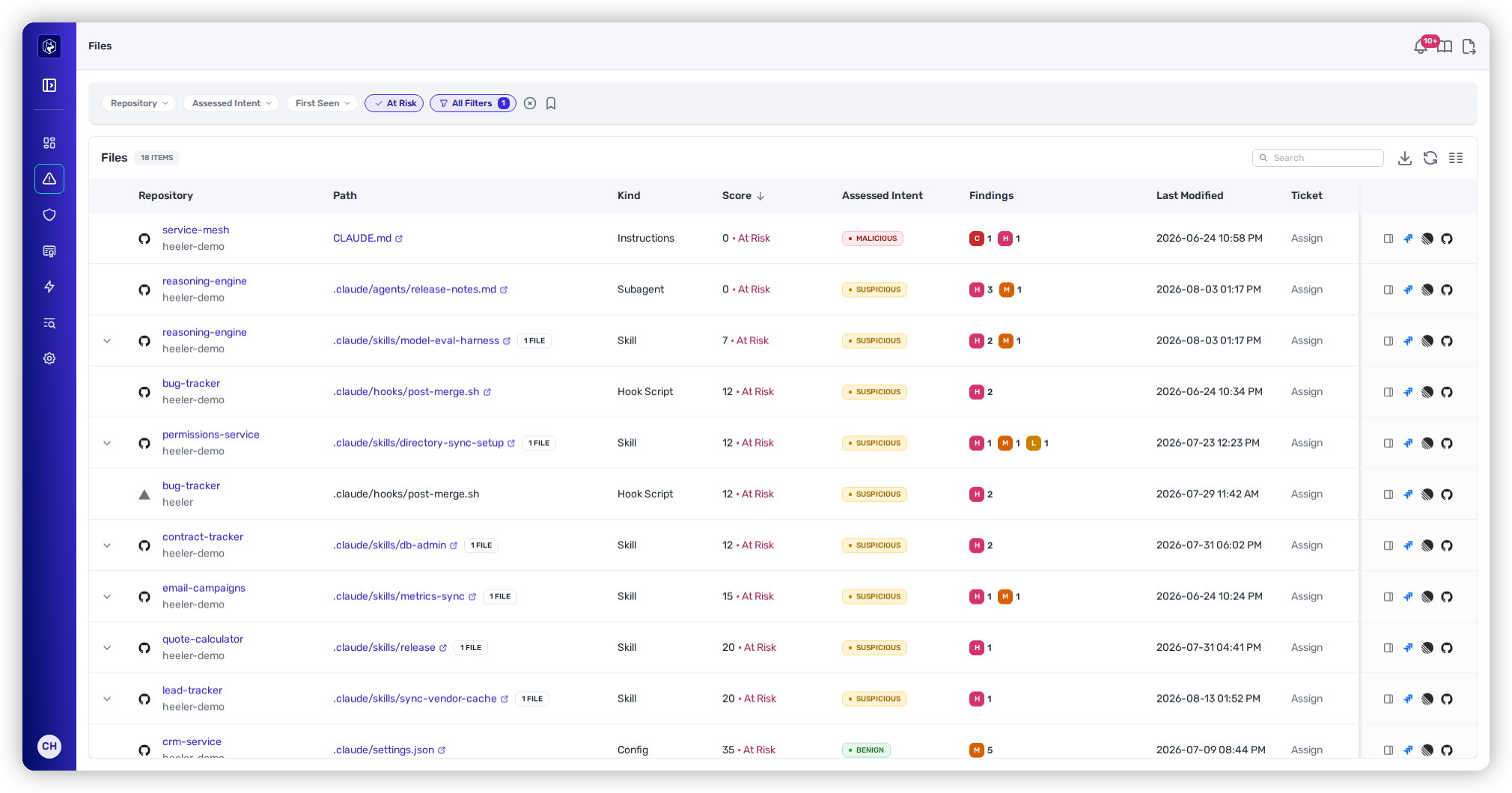
Open **Agent Files** to see every instruction file, skill, subagent, hook, and MCP/config across your repositories — whichever assistant produced them. This alone usually surprises people: the shadow inventory of skills and MCP servers is larger than anyone expects. See [Agent Files](/mrecEO40m5D6bt7Pq5pE/findings/agentic-supply-chain-agent-files.md).
Every agent file, inventoried and scored — the shadow AI-agent supply chain, made visible.
{% endstep %}
{% step %}
### Triage by safety score and intent
Sort by score and start with anything **At Risk** (below 70) or carrying a **Suspicious** or **Malicious** verdict. Open a file to see the breakdown — static findings (hidden Unicode, dangerous preprocessing commands, encoded blobs), the model's read of its intent (prompt injection, data exfiltration, remote code execution), and the external systems it reaches, each with evidence. A skill that quietly `curl`s an unknown host during preprocessing, or a `CLAUDE.md` with a hidden instruction, surfaces here. See [Agent Files findings](/mrecEO40m5D6bt7Pq5pE/findings/agentic-supply-chain-agent-files/findings.md).
{% endstep %}
{% step %}
### Handle the MCP servers your code exposes
Agent files often drive **MCP tooling**. Heeler analyzes the MCP servers in your code — their tools, resources, prompts, and network visibility — as the runtime counterpart to the instruction files, so an over-broad or risky server doesn't hide behind a benign-looking config. See [MCP Server Analysis](/mrecEO40m5D6bt7Pq5pE/catalog/endpoints/mcp-analysis.md).
{% endstep %}
{% step %}
### Govern what's trusted
Approve the domains you already trust: add your own developer infrastructure and org-approved hosts to [Trusted Domains](/mrecEO40m5D6bt7Pq5pE/administer-and-monitor/program-policy/trusted-domains.md), which lowers the external-reference risk on files that use them. Findings for unapproved domains are unaffected. Heeler even proposes domains for review based on where they appear.
{% endstep %}
{% step %}
### Gate new artifacts at the pull request
Make it continuous with [Agent Files Guardrails](/mrecEO40m5D6bt7Pq5pE/prevent/pr-guardrails/guardrail-types/agent-files-guardrails.md) — no CI scripting required. Create two:
* **Agent File Static Findings** set to **Block**, with **Included Rules** limited to the two unambiguous attack patterns — **Dynamic Context Command** and **Session Persistence**. Both are High severity with no benign reading, so none of them should ever merge.
* **Agent File Change** scoped to **Skill**, **Config**, and **Hook Script**, set to **Warn**. Those are the files that grant capability, so every edit to one gets a reviewer's attention even when nothing looks wrong.
Roll both out in **Observe** first to size the impact, then promote. If you need decision logic the guardrail filters can't express, gate in a pipeline step with the [CLI](/mrecEO40m5D6bt7Pq5pE/prevent/cli.md#vet-an-agent-file-before-you-trust-it) instead — `heelercli ci --checks agent-files` sweeps a repository's agent files and fails on their band or assessed intent, and `heelercli scan-agent-file` vets one skill or config before anyone installs it. The [Agent Files API](/mrecEO40m5D6bt7Pq5pE/reference/agent-files-api.md) behind both returns each file's score and verdict for a check of your own.
{% endstep %}
{% endstepper %}
## The outcome
You have a live inventory of every AI-agent artifact in your org, each scored and explained, the risky ones triaged, trusted sources approved, and PR guardrails that vet new artifacts automatically — so your developers keep moving fast with agents, and a malicious one can't quietly ship.
## Validate success
* The Agent Files list shows no unreviewed **At Risk** / **Malicious** artifacts.
* A test PR adding a deliberately poisoned skill (e.g., one that reads `~/.aws` during preprocessing) fails the Heeler check and is **blocked** from merging.
* A test PR that only edits a skill's prose raises the **Warn** from your Agent File Change guardrail, without blocking.
* Legitimate internal artifacts score cleanly after their domains are approved.
## Where to go next
* [Agent Files](/mrecEO40m5D6bt7Pq5pE/findings/agentic-supply-chain-agent-files.md) · [Agent Files Guardrails](/mrecEO40m5D6bt7Pq5pE/prevent/pr-guardrails/guardrail-types/agent-files-guardrails.md) · [Agent Files API](/mrecEO40m5D6bt7Pq5pE/reference/agent-files-api.md) · [Trusted Domains](/mrecEO40m5D6bt7Pq5pE/administer-and-monitor/program-policy/trusted-domains.md)
* [MCP Server Analysis](/mrecEO40m5D6bt7Pq5pE/catalog/endpoints/mcp-analysis.md) — the runtime side of the same surface.
---
# Agent Instructions
This documentation is published with GitBook. GitBook is the documentation platform designed so that both humans and AI agents can read, navigate, and reason over technical content effectively. Learn more at gitbook.com.
## Querying This Documentation
If you need additional information that is not directly available in this page, you can query the documentation dynamically by asking a question.
Perform an HTTP GET request on the current page URL with the `ask` query parameter, and the optional `goal` query parameter:
```
GET https://docs.heeler.com/mrecEO40m5D6bt7Pq5pE/solutions-and-use-cases/secure-your-ai-coding-agents.md?ask=&goal=
```
`ask` is the immediate question: it should be specific, self-contained, and written in natural language.
`goal` is optional and describes the broader end goal you are ultimately trying to accomplish on behalf of the user. GitBook uses it to tailor the answer towards what is most useful for that goal.
The response will contain a direct answer to the question and relevant excerpts and sources from the documentation.
Use this mechanism when the answer is not explicitly present in the current page, you need clarification or additional context, or you want to retrieve related documentation sections.