> For the complete documentation index, see [llms.txt](https://docs.heeler.com/mrecEO40m5D6bt7Pq5pE/llms.txt). Markdown versions of documentation pages are available by appending `.md` to page URLs; this page is available as [Markdown](https://docs.heeler.com/mrecEO40m5D6bt7Pq5pE/standards-and-compliance/cloud-frameworks.md).
# Cloud Frameworks
Adopt cloud compliance frameworks, read each framework's controls and heatmap, and see how framework scores and control statuses are calculated.
Cloud compliance frameworks are standards for your cloud accounts. They are listed under **Standards**, in the **Cloud** section, beside the standards your applications are assessed against. Each framework maps its controls to Heeler's cloud checks, and its score is the share of decided controls that pass.
An Administrator adopts and removes cloud frameworks under **Administration → Program → Standards**, together with the application standards. See [Standards](/mrecEO40m5D6bt7Pq5pE/administer-and-monitor/program-policy/standards.md).
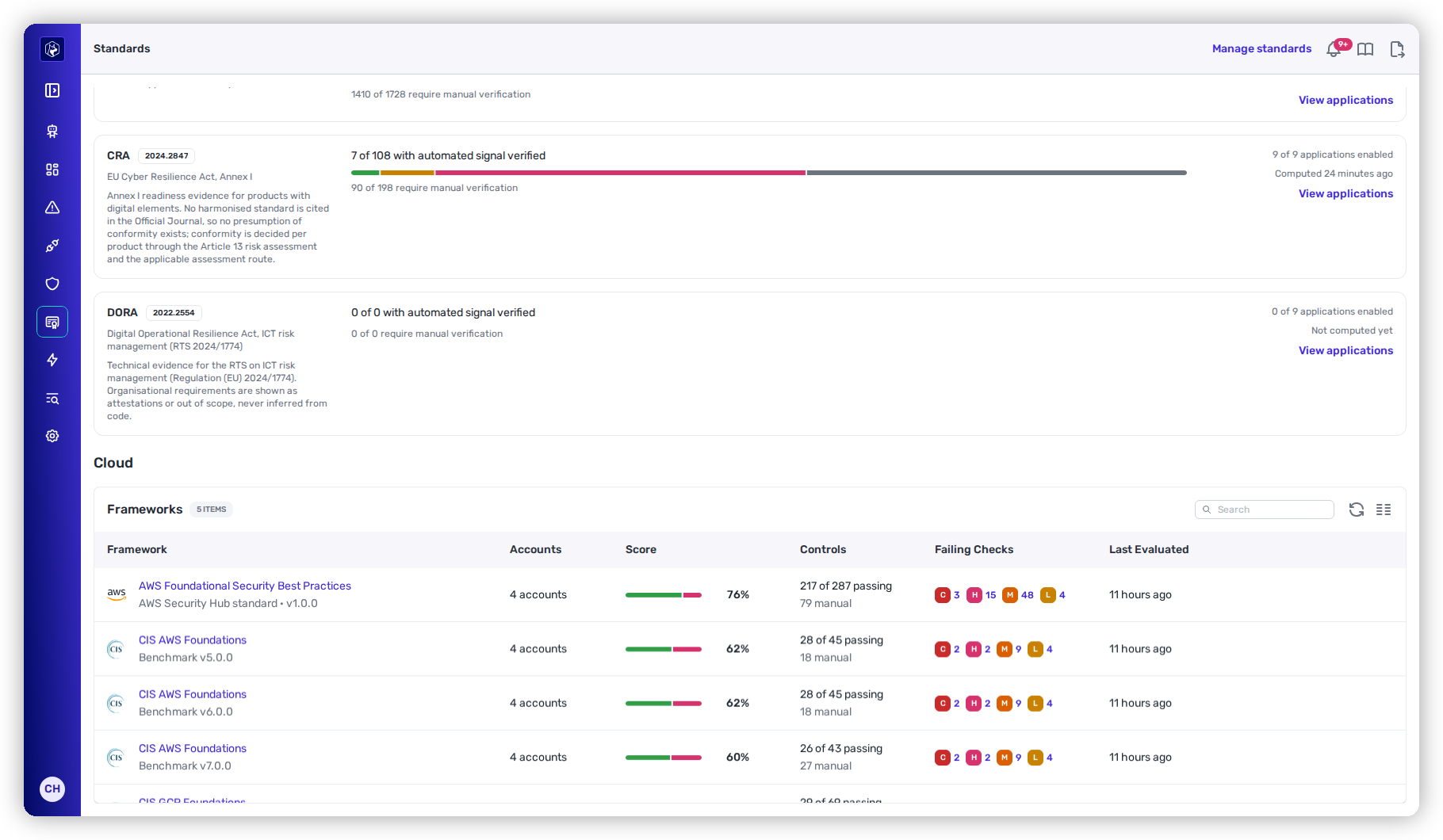
The cloud framework list — adopted frameworks with their scores.
## Built-in frameworks
| Framework | Version | Cloud | Controls | Automated | Manual |
| -------------------------------------------- | ------- | ------------ | -------- | --------- | ------ |
| **AWS Foundational Security Best Practices** | 1.0.0 | AWS | 366 | 287 | 79 |
| **CIS AWS Foundations** | 3.0.0 | AWS | 62 | 43 | 19 |
| **CIS AWS Foundations** | 4.0.0 | AWS | 64 | 45 | 19 |
| **CIS AWS Foundations** | 5.0.0 | AWS | 63 | 45 | 18 |
| **CIS AWS Foundations** | 6.0.0 | AWS | 63 | 45 | 18 |
| **CIS AWS Foundations** | 7.0.0 | AWS | 70 | 43 | 27 |
| **CIS GCP Foundations** | 4.0.0 | Google Cloud | 85 | 69 | 16 |
| **CIS OCI Foundations** | 3.1.1 | Oracle Cloud | 54 | 47 | 7 |
An automated control is decided by one or more checks. A manual control needs evidence outside Heeler and shows **Needs evidence**.
To build your own framework, or to change a built-in one, see [Custom Frameworks](/mrecEO40m5D6bt7Pq5pE/standards-and-compliance/custom-frameworks.md).
## Add a framework
Frameworks start unadopted. Adopting one adds it to **Standards** and to the **Compliance Posture** cards on [Cloud Posture](/mrecEO40m5D6bt7Pq5pE/operate/dashboards/cloud-posture.md#compliance-posture). It does not change which checks run.
**Prerequisite:** the **Administrator** role.
{% stepper %}
{% step %}
### Open the Standards settings
Go to **Administration → Program → Standards**.
{% endstep %}
{% step %}
### Choose frameworks
Select **Add standard**. The **Add standards** dialog lists every standard your organization has not adopted, in two groups: **Application & code** and **Cloud**. Each cloud framework shows its subtitle and number of controls.
To narrow the list, select **Cloud**, or type in **Search standards**. Select one or more frameworks.
{% endstep %}
{% step %}
### Add them
Select **Add standard**, or **Add N standards**.
{% endstep %}
{% endstepper %}
The framework appears in the **Cloud** section with its score. When every standard is already adopted, the dialog reads "Every available standard has already been added."
### Remove a framework
On **Administration → Program → Standards**, open the row actions of a framework in the **Cloud** section and select **Remove Framework**, then confirm. The framework leaves **Standards**. Its checks keep running, and you can add it back at any time.
## The framework list
The **Cloud** section of **Standards** lists the adopted frameworks. With no framework adopted, **Standards** has no **Cloud** section. **Administration → Program → Standards** shows the same list, with the **Remove Framework** row action for Administrators. With no framework adopted, the list there reads "No cloud frameworks added yet".
| Column | What it shows |
| ------------------ | -------------------------------------------------------------------------------------------------------------------------------------------------------------------- |
| **Framework** | The name, subtitle and version. |
| **Accounts** | The number of accounts in which any of the framework's checks were evaluated. |
| **Score** | The framework score. |
| **Controls** | **X of Y passing**, with the number of manual and not-evaluated controls beneath. |
| **Failing Checks** | Failing checks by severity. Each count opens [Cloud Checks](/mrecEO40m5D6bt7Pq5pE/findings/cloud/checks.md) filtered to the framework, the severity and **Failing**. |
| **Last Evaluated** | When the framework's checks last ran, or **Not evaluated**. |
The **Team** selector narrows every figure to the cloud accounts the selected team owns. The selection carries into the framework page.
## Controls tab
Select a framework to open it on **Controls**. The breadcrumb reads **Standards** followed by the framework name. On a built-in framework, **Controls** also offers **Clone and customize**. See [Custom Frameworks](/mrecEO40m5D6bt7Pq5pE/standards-and-compliance/custom-frameworks.md).
### Summary cards
| Card | What it shows |
| ---------------------- | ---------------------------------------------------------------------------------------- |
| **Compliance Score** | The framework score, its trend and a score bar. |
| **Controls** | Passing controls out of the total, with failing, need-evidence and not-evaluated counts. |
| **In Scope** | The number of accounts and their clouds. |
| **Severity Overrides** | Custom frameworks only. The number of checks re-rated, raised and lowered. |
| **Last Evaluated** | When the framework's checks last ran. |
### Control families and the control table
**Control Families** on the left lists each family with its passing and total controls. The bar is green at 100%, amber from 70%, and red below 70%. Select a family to show its controls.
The status filter offers **All**, **Failing** and **Needs evidence**.
| Column | What it shows |
| --------------- | ---------------------------------------------------------------------------------------- |
| **Control** | The control ID. |
| **Description** | The control title. |
| **Severity** | The control's severity. **N re-rated** means the framework overrides a check's severity. |
| **Status** | **Passing**, **Failing**, **Needs evidence** or **Not evaluated**. |
| **Checks** | **X of Y passing**, or **Manual**. |
| **Failing** | **N resources**, or **—**. |
Expand a row to list the control's checks:
| Column | What it shows |
| ------------ | --------------------------------------------------------------------------------------------------------------------------------------------------------------------- |
| **Check** | The check name. Select it to open the [check drawer](/mrecEO40m5D6bt7Pq5pE/findings/cloud/checks.md#check-drawer). |
| **Service** | The cloud service the check examines. |
| **Severity** | The check's severity in this framework. When the framework re-rates the check, the default severity shows struck through beside it, and its tooltip gives the reason. |
| **Status** | The [check status](#check-status). |
| **Failing** | **N of M failing**: the resources that fail the check, out of the resources it evaluated. |
A control with no automated check reads "This control has no automated check. It needs evidence collected outside Heeler."
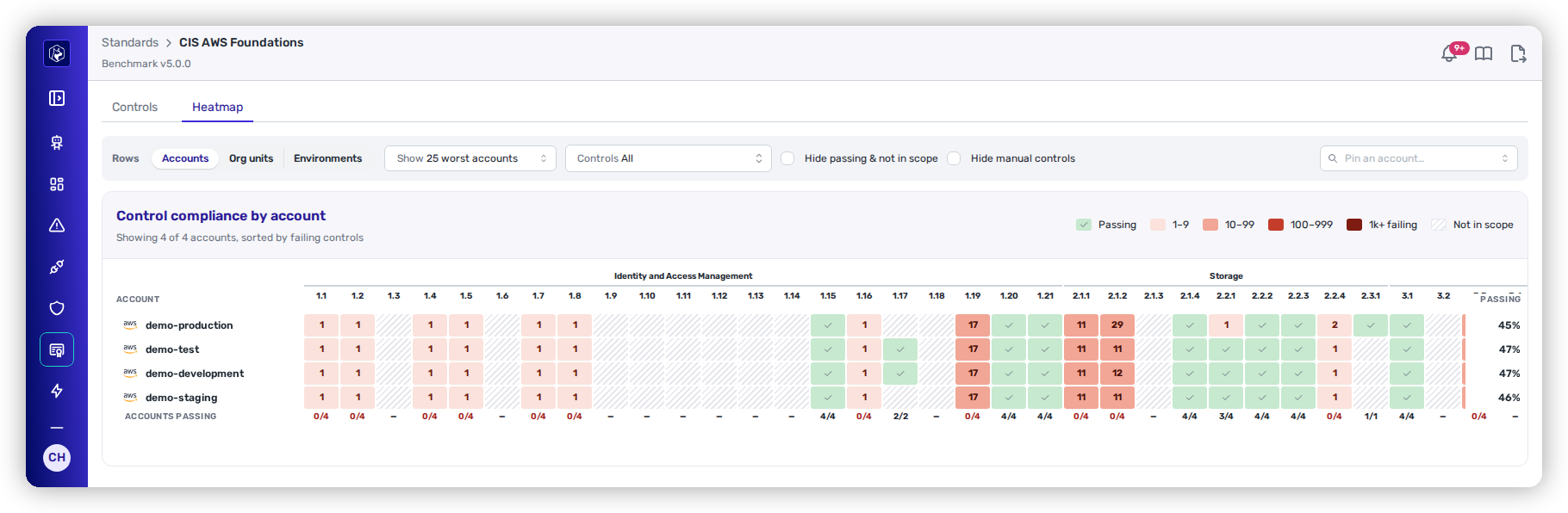
## Heatmap tab
**Heatmap** shows the framework's controls as columns and your accounts as rows, worst first.
The Heatmap tab — controls as columns, accounts as rows, worst first.
| Control | Options |
| ------------------------------- | ----------------------------------------------------------------------------------------------------------------------------------------------------------------------------------------------------------------------------------------------------- |
| **Group rows by** | **Accounts**, **Org units** (AWS organizational units, Google Cloud folders, and Oracle Cloud compartments that hold other compartments, counting every account below), or **Environments**. Accounts with no environment group under **Unassigned**. |
| **Accounts shown** | 10, 25, 50 or 100 worst accounts. In a grouped view, each expanded group shows 3, 5 or 10. The rest roll up into **All other N accounts**. |
| **Provider** | **All providers**, **AWS**, **Google Cloud**, **Azure**. |
| **Controls** | A whole family, or a single control. |
| **Hide passing & not in scope** | Hides controls with nothing to act on. |
| **Hide manual controls** | Hides controls that need evidence. |
| **Pin an account…** | Keeps an account at the top. |
Rows sort by the number of failing controls, then failing resources, then score.
| Cell | Meaning |
| ---------------- | -------------------------------------------------------------- |
| Passing | Every check of the control passes in the account. |
| Failing | Shaded by failing resources: 1–9, 10–99, 100–999, 1k+. |
| Errored | The control's checks errored on their last run in the account. |
| **Not in scope** | None of the control's checks examined anything in the account. |
| Manual | The control needs evidence. |
A rolled-up row shows **X of N accounts passing**. The tooltip on a failing cell links to **View failing resources →**, which opens [Cloud Findings](/mrecEO40m5D6bt7Pq5pE/findings/cloud/findings.md) filtered to that account and the control's checks.
## How scores are calculated
### Check status
| Status | Meaning |
| ----------------- | -------------------------------------------------------------------------------------------------------------- |
| **Failing** | At least one resource fails the check, after exemptions. A failure takes precedence over an error. |
| **Error** | No resource fails, but the latest run in an account raised an error. Counts come from the last successful run. |
| **Not evaluated** | The check is active but has not run yet. |
| **Passing** | Every evaluated resource passes. |
### Control status
| Status | Meaning |
| ------------------ | --------------------------------------------------------------------------- |
| **Needs evidence** | A manual control. No check decides it. |
| **Failing** | Any of the control's checks is failing. |
| **Not evaluated** | The control has no checks, or a check is in **Error** or **Not evaluated**. |
| **Passing** | Every check of the control passes. |
### Framework score
```
score = passing controls ÷ (passing controls + failing controls) × 100
```
Manual and not-evaluated controls do not count. The score shows **—** until at least one control is decided.
The trend recomputes the score from the latest daily snapshot that is at least 7 days old. Snapshots are kept for 180 days. Exemptions apply to current figures, not to snapshots.
### Control severity
A control's severity is either fixed by the framework, or the highest severity among its failing checks. When no check fails, it is the highest severity among all its checks. A custom framework can re-rate a check, with a reason.
Under **Failing Checks**, a check mapped by several controls counts once, at its highest severity.
### Scope
A built-in framework evaluates every account. A custom framework or control can be scoped to listed accounts, or to accounts with a tag (AWS account tags, Google Cloud project labels). The **Team** selector narrows the scope further.
Some checks examine only part of an account:
* **S3 buckets should have MFA Delete enabled** evaluates only buckets classified Confidential or Restricted once any bucket is classified. Until then, it evaluates every bucket. You classify buckets in [Infrastructure](/mrecEO40m5D6bt7Pq5pE/catalog/infrastructure.md#classify-data-stores).
* The checks on service control policies, resource control policies and the organization management account evaluate only accounts whose organization policies Heeler collects through an AWS Organization connection.
## Related
* [Cloud Checks](/mrecEO40m5D6bt7Pq5pE/findings/cloud/checks.md) — the checks behind every control.
* [Custom Frameworks](/mrecEO40m5D6bt7Pq5pE/standards-and-compliance/custom-frameworks.md) — build or customize a framework.
* [Cloud Exemptions](/mrecEO40m5D6bt7Pq5pE/findings/cloud/exemptions.md) — exclude resources from a framework's score.
* [Standards](/mrecEO40m5D6bt7Pq5pE/administer-and-monitor/program-policy/standards.md) — adopt and remove frameworks.
* [Standards and Compliance](/mrecEO40m5D6bt7Pq5pE/standards-and-compliance.md) — the application standards listed beside the cloud frameworks.
---
# Agent Instructions
This documentation is published with GitBook. GitBook is the documentation platform designed so that both humans and AI agents can read, navigate, and reason over technical content effectively. Learn more at gitbook.com.
## Querying This Documentation
If you need additional information that is not directly available in this page, you can query the documentation dynamically by asking a question.
Perform an HTTP GET request on the current page URL with the `ask` query parameter, and the optional `goal` query parameter:
```
GET https://docs.heeler.com/mrecEO40m5D6bt7Pq5pE/standards-and-compliance/cloud-frameworks.md?ask=&goal=
```
`ask` is the immediate question: it should be specific, self-contained, and written in natural language.
`goal` is optional and describes the broader end goal you are ultimately trying to accomplish on behalf of the user. GitBook uses it to tailor the answer towards what is most useful for that goal.
The response will contain a direct answer to the question and relevant excerpts and sources from the documentation.
Use this mechanism when the answer is not explicitly present in the current page, you need clarification or additional context, or you want to retrieve related documentation sections.