> For the complete documentation index, see [llms.txt](https://docs.heeler.com/mrecEO40m5D6bt7Pq5pE/llms.txt). Markdown versions of documentation pages are available by appending `.md` to page URLs; this page is available as [Markdown](https://docs.heeler.com/mrecEO40m5D6bt7Pq5pE/standards-and-compliance/guardrail-bundles.md).
# Guardrail Bundles
Apply the enforceable controls of an ASVS level as one set of pull-request guardrails, without duplicating the ones you already have.
An assessment tells you where you stand. A **bundle** does something about it: it turns the parts of an ASVS level Heeler *can* enforce into [pull-request guardrails](/mrecEO40m5D6bt7Pq5pE/prevent/pr-guardrails.md), applied as one set.
Not every requirement can be enforced at a pull request — most of ASVS asks about things a gate cannot check. A bundle is the enforceable subset, and it is honest about being a subset.
## Where you find it
On the **Guardrails** page, among the suggestion cards. A bundle suggestion is distinguishable from an ordinary one by its action: single-guardrail suggestions offer **Set Up Guardrail**, a bundle offers **Review Bundle**.
Two are available:
| Bundle | Controls |
| ------------------------ | ----------------------------------------------------------------------------------------------------------------------------- |
| **Enforce ASVS Level 1** | 4 — injection findings, cryptography findings, overdue vulnerability SLOs, and critical vulnerabilities with a fix available. |
| **Enforce ASVS Level 2** | 5 — everything in Level 1, plus blocking exposed secrets. |
## Reviewing before you apply
**Review Bundle** opens the plan. Nothing is created until you confirm.
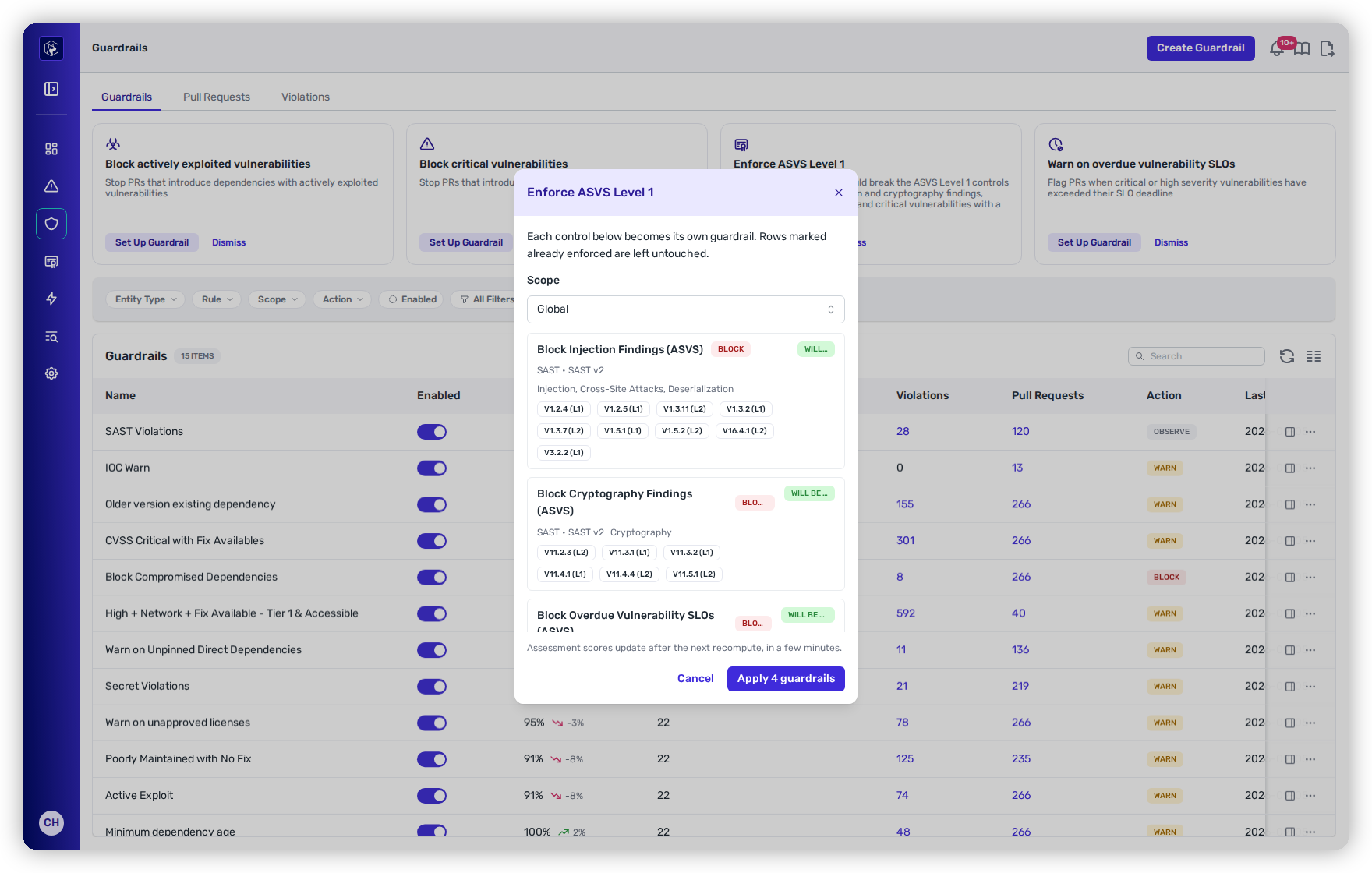
The bundle plan — every control it would create, with the requirements each one enforces.
Each control shows exactly what it would become:
* Its **action** — every ASVS control blocks.
* Its **rule type and parameters** — *SAST · SAST v2 · Injection, Cross-Site Attacks, Deserialization*, so there is no mystery about what will be caught.
* The **ASVS requirements it enforces**, as chips like **V1.2.4 (L1)**. This is the link back to the assessment: satisfying this control is what credits those requirements.
* A **status badge** saying what will happen to it.
**Scope** applies to the whole bundle — Global by default, or narrow it the way you would scope any guardrail.
## It will not duplicate what you have
The dialog's own words: *"Each control below becomes its own guardrail. Rows marked already enforced are left untouched."* Every control is planned independently against what your tenant already has:
| Plan | When |
| -------------------- | -------------------------------------------------------------------------------------------------------------------------- |
| **Will be created** | You have nothing that is this control. |
| **Will be enabled** | You already have this control but it is switched off. Applying re-enables it rather than making a second one. |
| **Already enforced** | You already have it, enabled. Left alone. |
| **Already covered** | You built the equivalent guardrail yourself, before bundles existed. Heeler recognises it and does not create a duplicate. |
That last case is the careful one. To count as *covered*, a guardrail you made by hand has to satisfy every requirement-level signal the control carries **and** share a rule sub-type with it. Without the second condition a hand-made SLO guardrail could suppress the separate critical-vulnerability control, because a single requirement will accept either as evidence — and "covered" has to mean *you already have this control*, not *something else earns similar credit*.
The practical upshot: **applying a bundle twice is safe**, and applying it after building some of it yourself is safe too.
## After you apply
Confirm with **Apply *****N***** guardrails**. The guardrails appear on the Guardrails list immediately and start evaluating pull requests as any other guardrail does.
{% hint style="info" %}
**Scores do not move immediately.** The dialog says it: *assessment scores update after the next recompute, in a few minutes.* The guardrails are live straight away; the credit for them appears on the assessment at the next run.
{% endhint %}
Bundle-created guardrails are ordinary guardrails from that point on — edit, scope, disable or delete them like any other. Disabling one costs you the assessment credit it was earning, which the next recompute will show.
## Related
* [PR Guardrails](/mrecEO40m5D6bt7Pq5pE/prevent/pr-guardrails.md) — how guardrails evaluate a pull request.
* [Assessments](/mrecEO40m5D6bt7Pq5pE/standards-and-compliance/assessments.md) — what applying a bundle changes, and when.
* [OWASP ASVS](/mrecEO40m5D6bt7Pq5pE/standards-and-compliance/owasp-asvs.md) — the requirements the chips refer to.
---
# Agent Instructions
This documentation is published with GitBook. GitBook is the documentation platform designed so that both humans and AI agents can read, navigate, and reason over technical content effectively. Learn more at gitbook.com.
## Querying This Documentation
If you need additional information that is not directly available in this page, you can query the documentation dynamically by asking a question.
Perform an HTTP GET request on the current page URL with the `ask` query parameter, and the optional `goal` query parameter:
```
GET https://docs.heeler.com/mrecEO40m5D6bt7Pq5pE/standards-and-compliance/guardrail-bundles.md?ask=&goal=
```
`ask` is the immediate question: it should be specific, self-contained, and written in natural language.
`goal` is optional and describes the broader end goal you are ultimately trying to accomplish on behalf of the user. GitBook uses it to tailor the answer towards what is most useful for that goal.
The response will contain a direct answer to the question and relevant excerpts and sources from the documentation.
Use this mechanism when the answer is not explicitly present in the current page, you need clarification or additional context, or you want to retrieve related documentation sections.