> For the complete documentation index, see [llms.txt](https://docs.heeler.com/mrecEO40m5D6bt7Pq5pE/llms.txt). Markdown versions of documentation pages are available by appending `.md` to page URLs; this page is available as [Markdown](https://docs.heeler.com/mrecEO40m5D6bt7Pq5pE/administer-and-monitor/connections-and-integrations/registries.md).

# Registries

Manage the package and container registries Heeler reads from — check health, understand the registry type, and add or remove feeds.

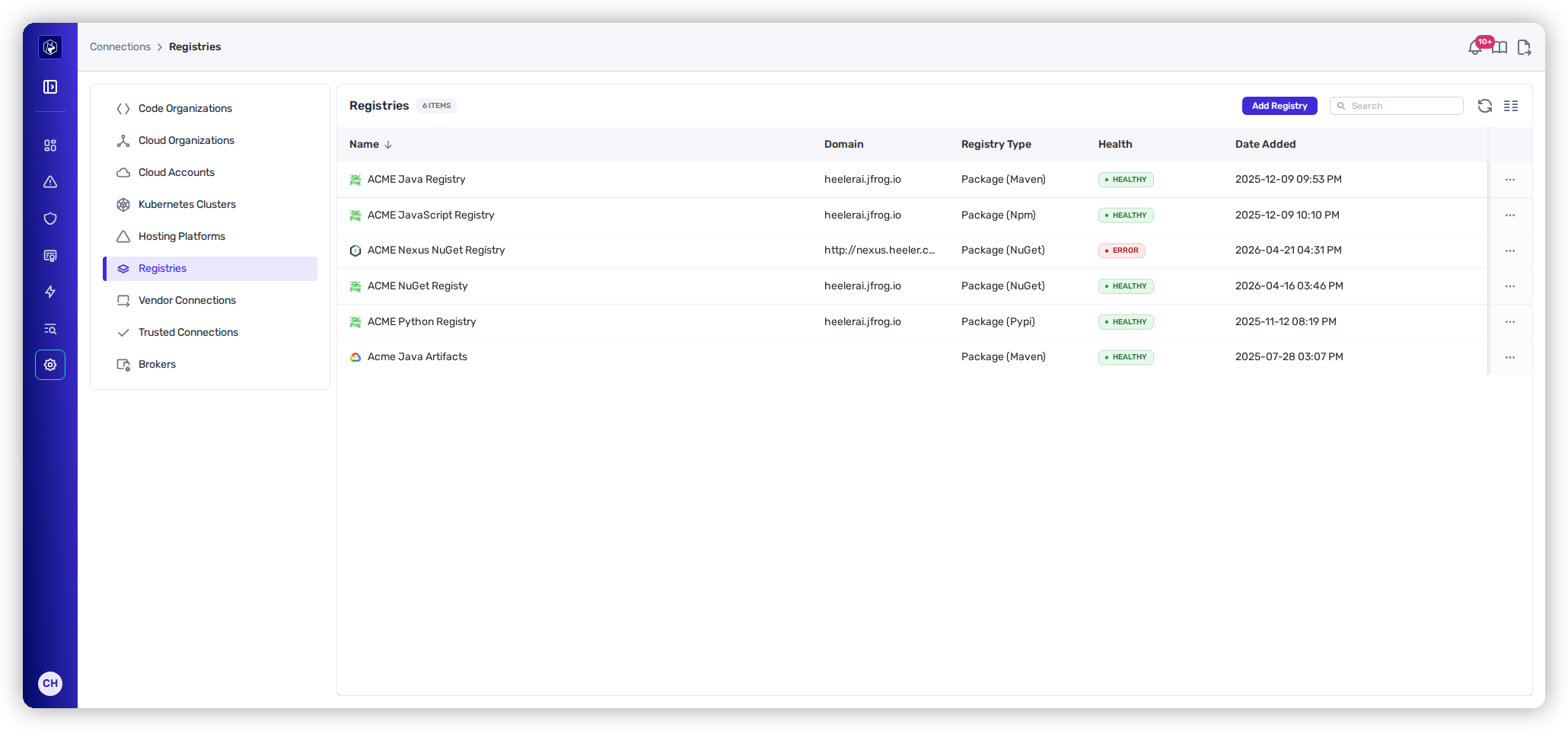
**Administration → Connections → Registries** lists the package and container registries Heeler reads from to resolve your dependencies and images. You connect these during [Get Started → Registries & Artifacts](/mrecEO40m5D6bt7Pq5pE/get-started/registries-and-artifacts.md); here you check their health and manage the set.

{% hint style="info" %}
Changing anything on this page requires the **Administrator** role. An **Administrator (read-only)** can view it but can't make changes.
{% endhint %}

<figure><img src="https://414480750-files.gitbook.io/~/files/v0/b/gitbook-x-prod.appspot.com/o/spaces%2FXP3dp2kecwKA2KvYkntz%2Fuploads%2Fgit-blob-e83ee17029eb852e47db7c233fe733e4a5d3da20%2Fam-connections-registries.png?alt=media" alt="The Registries list showing package registries (Maven, Npm, NuGet, Pypi) with their domain, registry type, and Health."><figcaption><p>Registries — each with its type and health.</p></figcaption></figure>

## What the list shows

<table><thead><tr><th width="180">Column</th><th>What it means</th></tr></thead><tbody><tr><td><strong>Name</strong></td><td>The label you gave the registry.</td></tr><tr><td><strong>Domain</strong></td><td>The host Heeler connects to.</td></tr><tr><td><strong>Registry Type</strong></td><td>Whether it serves packages or images — see below.</td></tr><tr><td><strong>Health</strong></td><td><a href="/mrecEO40m5D6bt7Pq5pE/administer-and-monitor/connections-and-integrations.md#reading-the-health-column">Standard connection health</a>. An <strong>Error</strong> is almost always an expired or under-scoped credential — re-enter it via <strong>Edit</strong>.</td></tr><tr><td><strong>Date Added</strong></td><td>When it was connected.</td></tr></tbody></table>

### Reading the Registry Type

The type tells you what Heeler pulls from the feed:

* **Package (Maven)**, **Package (Npm)**, **Package (NuGet)**, **Package (Pypi)**, **Package (Gradle)**, **Package (RubyGems)** — a language package feed, labeled with its ecosystem.
* **Package** (no suffix) — a polyglot package feed such as AWS CodeArtifact.
* **Image** — a container image registry.

## Add a registry

**Add Registry** offers the supported providers: **Google Cloud Platform, AWS CodeArtifact, GitHub, GitLab, JFrog, Docker Hub, Harbor,** and **Nexus**. Each opens that provider's connection form — follow its [Get Started page](/mrecEO40m5D6bt7Pq5pE/get-started/registries-and-artifacts.md) for the specifics.

## Edit or remove

Use the row's **⋯** menu to **Edit** (re-enter credentials or settings) or **Delete** a registry. Deleting stops Heeler from resolving against that feed, which can leave some dependencies unresolved.

## A related view

[Operational Health](/mrecEO40m5D6bt7Pq5pE/administer-and-monitor/operational-health.md) has a **First-Party Package Registries** panel that surfaces internal registries Heeler has *discovered* in your traffic but that aren't connected yet — a useful companion when you're chasing unresolved dependencies.

## Set it up

Connecting a registry for the first time is covered in Get Started:

{% content-ref url="/pages/zxQ4KGgCdA6lJaeNAiei" %}
[Connect Registries and Artifacts](/mrecEO40m5D6bt7Pq5pE/get-started/registries-and-artifacts.md)
{% endcontent-ref %}

## Related

* [Operational Health](/mrecEO40m5D6bt7Pq5pE/administer-and-monitor/operational-health.md#discovered-first-party-package-registries) — discovered-but-unconnected registries.


---

# Agent Instructions
This documentation is published with GitBook. GitBook is the documentation platform designed so that both humans and AI agents can read, navigate, and reason over technical content effectively. Learn more at gitbook.com.

## Querying This Documentation
If you need additional information that is not directly available in this page, you can query the documentation dynamically by asking a question.

Perform an HTTP GET request on the current page URL with the `ask` query parameter, and the optional `goal` query parameter:

```
GET https://docs.heeler.com/mrecEO40m5D6bt7Pq5pE/administer-and-monitor/connections-and-integrations/registries.md?ask=<question>&goal=<endgoal>
```

`ask` is the immediate question: it should be specific, self-contained, and written in natural language.
`goal` is optional and describes the broader end goal you are ultimately trying to accomplish on behalf of the user. GitBook uses it to tailor the answer towards what is most useful for that goal.

The response will contain a direct answer to the question and relevant excerpts and sources from the documentation.

Use this mechanism when the answer is not explicitly present in the current page, you need clarification or additional context, or you want to retrieve related documentation sections.
