> For the complete documentation index, see [llms.txt](https://docs.heeler.com/mrecEO40m5D6bt7Pq5pE/llms.txt). Markdown versions of documentation pages are available by appending `.md` to page URLs; this page is available as [Markdown](https://docs.heeler.com/mrecEO40m5D6bt7Pq5pE/administer-and-monitor/connections-and-integrations.md).

# Manage Connections and Integrations

Every source and tool Heeler connects to, and how to read the Health column so you catch a degraded connection before it costs you findings.

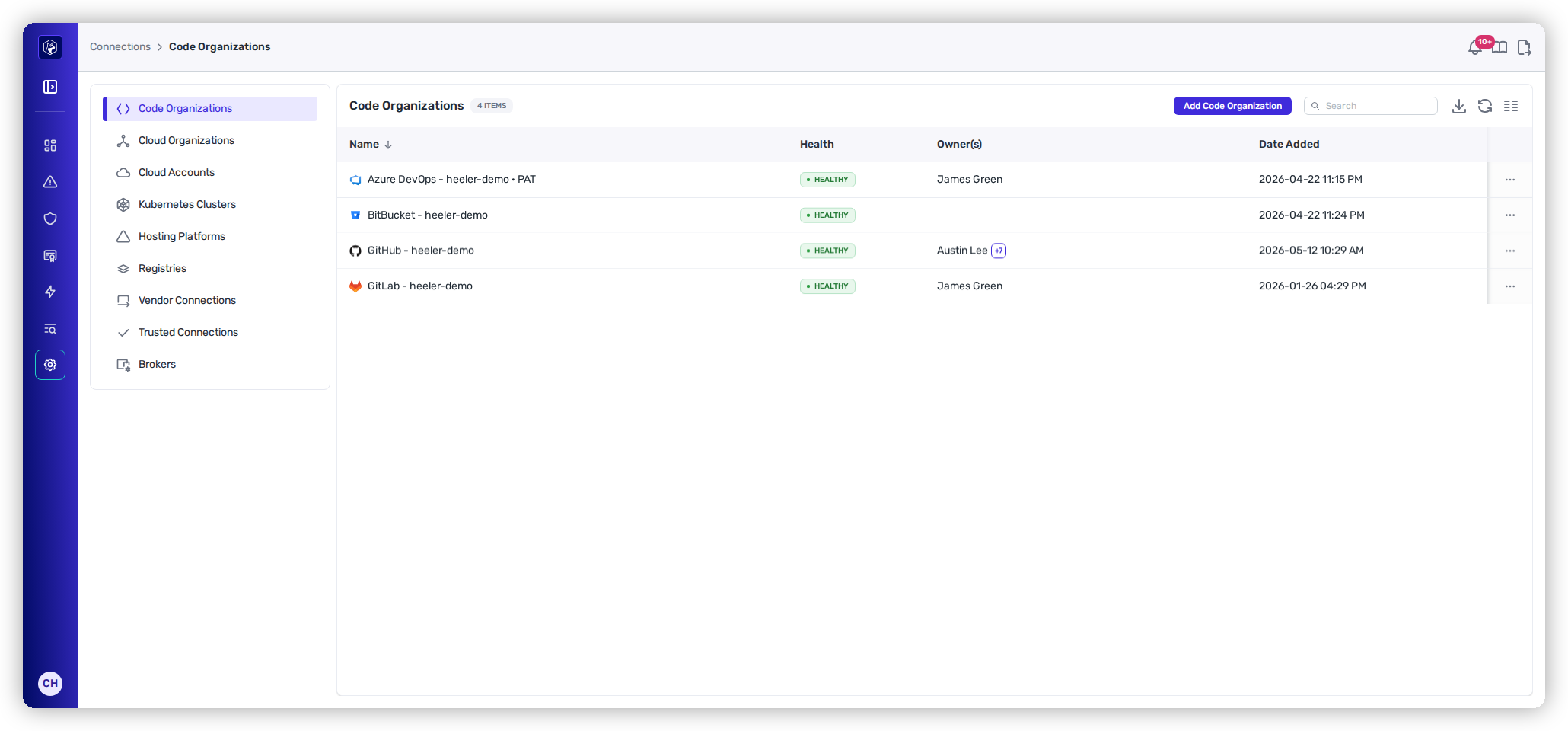
Heeler is only as accurate as the sources it can reach. **Administration → Connections** and **Administration → Integrations** are where every connected source and tool lives, each with a **Health** column. You wired these up during [Get Started](/mrecEO40m5D6bt7Pq5pE/get-started.md); this section is about keeping them healthy — spotting a degraded connection, re-authorizing an expired credential, and adding or removing sources as your footprint changes.

{% hint style="info" %}
Changing anything on this page requires the **Administrator** role. An **Administrator (read-only)** can view it but can't make changes.
{% endhint %}

<figure><img src="https://414480750-files.gitbook.io/~/files/v0/b/gitbook-x-prod.appspot.com/o/spaces%2FXP3dp2kecwKA2KvYkntz%2Fuploads%2Fgit-blob-040a0ec05b49a69f2468f1d3c66636acfd175863%2Fam-connections-code.png?alt=media" alt="The Connections area under Administration, showing the left rail of connection types and a list of code organizations each with a Health column."><figcaption><p>Every connection type has its own sub-tab, and every list carries a Health column.</p></figcaption></figure>

## In this section

<table data-view="cards"><thead><tr><th></th><th></th><th data-hidden data-card-target data-type="content-ref"></th></tr></thead><tbody><tr><td><strong>Source Connections</strong></td><td>Code organizations, cloud organizations and accounts, Kubernetes clusters, and hosting platforms.</td><td><a href="/mrecEO40m5D6bt7Pq5pE/administer-and-monitor/connections-and-integrations/source-connections.md">Source Connections</a></td></tr><tr><td><strong>Registries</strong></td><td>Package and container registries Heeler reads from.</td><td><a href="/mrecEO40m5D6bt7Pq5pE/administer-and-monitor/connections-and-integrations/registries.md">Registries</a></td></tr><tr><td><strong>Vendor and Trusted Connections</strong></td><td>Third parties with access to your cloud — discovered automatically, and the ones you approve.</td><td><a href="/mrecEO40m5D6bt7Pq5pE/administer-and-monitor/connections-and-integrations/vendor-and-trusted-connections.md">Vendor and Trusted Connections</a></td></tr><tr><td><strong>On-Premises Brokers</strong></td><td>The agents that let Heeler reach private, self-hosted resources.</td><td><a href="/mrecEO40m5D6bt7Pq5pE/administer-and-monitor/connections-and-integrations/brokers.md">On-Premises Brokers</a></td></tr><tr><td><strong>Integrations</strong></td><td>Ticketing, messaging, and developer-platform tools.</td><td><a href="/mrecEO40m5D6bt7Pq5pE/administer-and-monitor/connections-and-integrations/integrations.md">Integrations</a></td></tr></tbody></table>

## Reading the Health column

Every connection and integration reports a **Health** status. Heeler re-checks connections about once an hour (a failed one is re-probed less often, roughly every six hours), so health reflects the last successful check rather than the live instant.

<table><thead><tr><th width="230">Status</th><th>What it means and what to do</th></tr></thead><tbody><tr><td>✅ <strong>Healthy</strong></td><td>Authenticated and working. Nothing to do.</td></tr><tr><td>⚠️ <strong>Degraded</strong></td><td>Working, but with reduced permissions — for a GitHub App, some requested permissions haven't been granted yet. Approve the pending permissions to clear it.</td></tr><tr><td>⚠️ <strong>Impaired Accounts</strong></td><td>The organization is healthy, but one or more linked accounts can't be assumed or lack permissions. Open the connection to see which, and fix that account's access.</td></tr><tr><td>⚠️ <strong>Impaired Visibility</strong></td><td>Healthy overall, but specific projects or clusters have disabled APIs or missing permissions, so Heeler can't see everything. Enable the API or grant the permission on the named project.</td></tr><tr><td>❌ <strong>Error</strong></td><td>The connection failed — usually an expired, revoked, or under-scoped credential. Open it and re-authorize or refresh the credential. Analysis for the affected scope pauses until it's fixed.</td></tr><tr><td>❌ <strong>Inaccessible</strong></td><td>The host couldn't be reached at all (network or DNS). Confirm the endpoint is reachable — for private hosts, that a <a href="/mrecEO40m5D6bt7Pq5pE/administer-and-monitor/connections-and-integrations/brokers.md">broker</a> is running.</td></tr><tr><td>⏳ <strong>Created</strong> · <strong>Ready</strong></td><td>Provisioning states you'll mainly see on <a href="/mrecEO40m5D6bt7Pq5pE/administer-and-monitor/connections-and-integrations/brokers.md">brokers</a> — the record exists but isn't fully live yet. Give it a moment to finish its first check-in.</td></tr></tbody></table>

{% hint style="info" %}
A brand-new connection shows **no health badge at all** until Heeler's first hourly check runs. That's expected — give it up to an hour, then refresh.
{% endhint %}

When a connection is impaired or failed, the badge's hover card names exactly which accounts, projects, or clusters are affected, so you know precisely what to fix. For whether Heeler is *processing* what it connects to — scan success, errors — see [Operational Health](/mrecEO40m5D6bt7Pq5pE/administer-and-monitor/operational-health.md).

## Related

* [Get Started](/mrecEO40m5D6bt7Pq5pE/get-started.md) — first-time setup for every connection type.
* [Operational Health](/mrecEO40m5D6bt7Pq5pE/administer-and-monitor/operational-health.md) — scan success and processing status, one level deeper than connection health.


---

# Agent Instructions
This documentation is published with GitBook. GitBook is the documentation platform designed so that both humans and AI agents can read, navigate, and reason over technical content effectively. Learn more at gitbook.com.

## Querying This Documentation
If you need additional information that is not directly available in this page, you can query the documentation dynamically by asking a question.

Perform an HTTP GET request on the current page URL with the `ask` query parameter, and the optional `goal` query parameter:

```
GET https://docs.heeler.com/mrecEO40m5D6bt7Pq5pE/administer-and-monitor/connections-and-integrations.md?ask=<question>&goal=<endgoal>
```

`ask` is the immediate question: it should be specific, self-contained, and written in natural language.
`goal` is optional and describes the broader end goal you are ultimately trying to accomplish on behalf of the user. GitBook uses it to tailor the answer towards what is most useful for that goal.

The response will contain a direct answer to the question and relevant excerpts and sources from the documentation.

Use this mechanism when the answer is not explicitly present in the current page, you need clarification or additional context, or you want to retrieve related documentation sections.
