> For the complete documentation index, see [llms.txt](https://docs.heeler.com/mrecEO40m5D6bt7Pq5pE/llms.txt). Markdown versions of documentation pages are available by appending `.md` to page URLs; this page is available as [Markdown](https://docs.heeler.com/mrecEO40m5D6bt7Pq5pE/findings/secrets.md).

# Secrets

Find exposed secrets across your code and full git history, confirm which ones are actually live, and prioritize by real, validated risk.

Heeler scans your repositories on **GitHub, GitLab, Azure DevOps, and Bitbucket** for exposed secrets, then does something most scanners don't: it **validates** each one to see whether the credential still works. A leaked-but-dead key is noise; a leaked, *live* key is an incident.

{% hint style="info" %}
**For developers and security engineers** responding to exposed credentials. Depends on your **SCM** being connected; validation runs automatically. See [Set Up Agentic Remediation](/mrecEO40m5D6bt7Pq5pE/get-started/set-up-automated-remediation.md).
{% endhint %}

## Git history coverage

This is the part that matters most: Heeler doesn't just look at the files as they are today. It mirrors **every branch** and walks the **entire commit history**, so a secret that was committed months ago and later "removed" from the current code is **still caught** — because it's still sitting in history for anyone who clones the repo.

* **All branches, all commits.** Heeler scans a full mirror of the repository's history, not a single checkout — so nothing hides on an old branch or in a deleted line.
* **Still-live matters more than still-present.** Each finding is checked against your **default branch** and carries one of three states — **Visible in default branch**, **Not visible in default branch**, or **Visibility unknown** — which distinguishes "exposed in current code" from "exposed only in history", and both from "we could not establish which". All three are risks; they're handled differently. **Visibility unknown is not evidence a secret was removed** — it means presence at the branch tip could not be established.
* **One finding, many occurrences.** The same secret across many commits and files is rolled up into a single finding that carries its **occurrence, path, and commit counts** and the **environments** it was seen in (prod, staging, dev) — so you rotate one credential, not chase fifty duplicates.
* **At the pull request,** [secrets guardrails](/mrecEO40m5D6bt7Pq5pE/prevent/pr-guardrails/guardrail-types/secrets-guardrails.md) gate on two different things. **Secret Scanning** scans only the commits being added and flags secrets on **added lines**, so removing a secret is never blocked by the very PR that removes it. **Repository Secrets** gates on the repository's whole secret inventory — including history — whatever the pull request touches, so a pre-existing exposure can hold a merge until it is remediated or excepted.

## What Heeler detects

Heeler runs detection in **multiple layered passes** so coverage and accuracy don't trade off against each other:

* **Provider-specific detectors** *(High / Medium confidence)* — cloud keys (AWS, Azure, GCP), SaaS and AI tokens (Slack, Stripe, Datadog, OpenAI, Anthropic, …), database and connection strings (PostgreSQL, MySQL, MongoDB, JDBC/ODBC, Redis), private keys and PEM blocks, and JWTs. These match known provider formats and are **checksum-aware** where the token format carries one, so structurally invalid look-alikes are rejected before they ever become a finding.
* **Generic high-entropy detection** *(Low confidence)* — a fallback for credentials that match no known provider (`client_secret`, `api_key`, `secret_key`, and similar). Heeler applies **Shannon-entropy analysis** to keep values that statistically resemble real secrets and drop the obvious non-secrets (e.g. `PASSWORD=password`) — which is what stops a generic pass from burying you in noise.

Detection is **language- and context-aware**: Heeler parses the code and can tell a live configuration value from a commented-out line or dead code, cutting the false positives that plague regex-only scanners. The detection and validation ruleset spans **hundreds of provider-specific credential types** and is **refreshed continuously**. The full catalog lives in [Supported Secret Types](/mrecEO40m5D6bt7Pq5pE/reference/supported-secret-types.md).

## Validation

A pattern that *looks* like a secret and a credential that *actually works* are worlds apart. Heeler closes that gap with **two complementary layers** — together they strip out the dead and the fake so the list you work is real, exploitable risk.

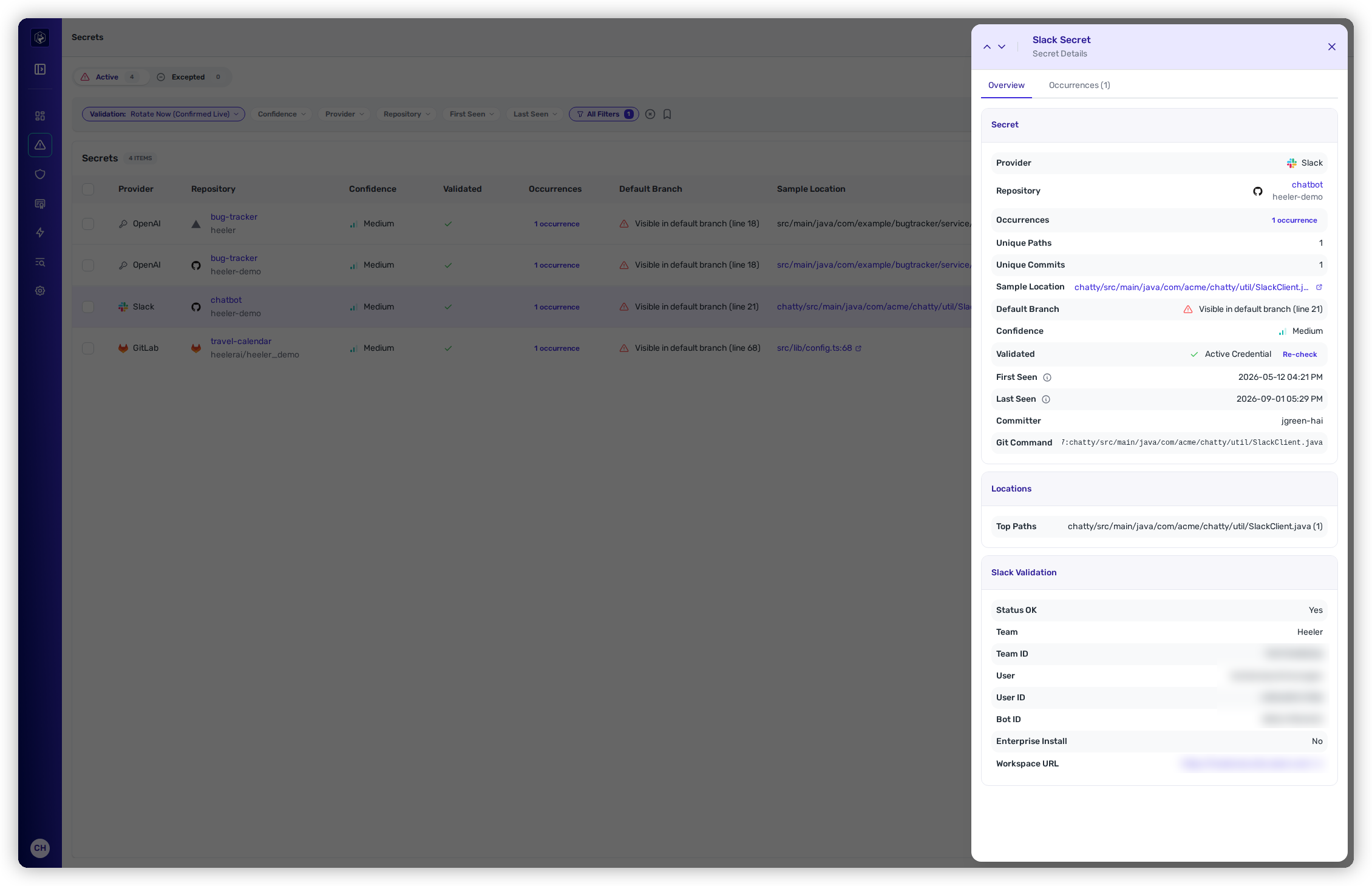
<figure><img src="https://414480750-files.gitbook.io/~/files/v0/b/gitbook-x-prod.appspot.com/o/spaces%2FXP3dp2kecwKA2KvYkntz%2Fuploads%2Fgit-blob-3dd28b2db648ba4443e5229dbee01d4a73c1070f%2Fcc-secrets-validation.png?alt=media" alt="A secret detail drawer showing the Secret panel (provider, repository, unique paths, unique commits, sample location, confidence) and a Slack Validation panel with a field-by-field breakdown of the provider&#x27;s response — Status OK, Team, Team ID, User, User ID, Bot ID, Workspace URL."><figcaption><p>Every validated secret carries evidence — the provider's own response, parsed field by field.</p></figcaption></figure>

### Offline structural validation

Many modern tokens carry a built-in **checksum**. For those, Heeler verifies the checksum **with no network call at all** and discards structurally invalid or fabricated tokens *before* any live check — rejecting most false positives offline, at scan speed, without ever transmitting a candidate secret.

### Active external validation

For a credential that survives the structural check, Heeler runs a **safe, read-only** live check using the method that fits the provider:

* **Cloud, SaaS, and AI APIs** — a read-only call to the provider (AWS, GCP, Azure, GitHub, Slack, OpenAI, Anthropic, Datadog, Google, and more).
* **Database connectivity** — for connection strings (PostgreSQL, MySQL, MongoDB), Heeler tests whether the credential actually connects. **Loopback and localhost database URIs are deliberately left untested.**

Some detections are **raw key material** — a private key, for example — where there is no provider endpoint to ask whether it still works. Because the key itself is verifiably real, the finding is marked **Assumed Valid (Not Live-Validated)** and treated as live until it's rotated. Key material Heeler can tell was generated locally is marked **Locally Derived**.

Other credential classes can't be safely or meaningfully checked live — for example JDBC/ODBC subprotocols without a validator, or HMAC-signed JWTs. Those record why no verdict was reached rather than being guessed at.

### The five action buckets

Start here when deciding what to do. Heeler folds each underlying validation status into exactly one **action bucket**, ordered by urgency:

| Bucket                             | Statuses it covers                                           | What it means                                                         |
| ---------------------------------- | ------------------------------------------------------------ | --------------------------------------------------------------------- |
| **Rotate Now (Confirmed Live)**    | Active Credential                                            | Confirmed live at the provider. Treat as an incident.                 |
| **Rotate (Presumed Live)**         | Assumed Valid (Not Live-Validated) · Locally Derived         | Real key material that cannot be probed. Treat as live until rotated. |
| **Triage (No Verdict)**            | Not Attempted · Inconclusive Validation · Validation Skipped | No verdict was reached. Decide by hand.                               |
| **No Action (Confirmed Inactive)** | Inactive Credential · Invalid Cryptographic Material         | Confirmed not to be a live risk.                                      |
| **Expected (Canary Token)**        | Canary Token (Skipped)                                       | Planted deliberately. Expected to be found.                           |

The same five buckets are the customer-facing vocabulary wherever secrets are filtered, prioritized, or acted on: the secrets inventory, the Priorities cards, [secrets guardrails](/mrecEO40m5D6bt7Pq5pE/prevent/pr-guardrails/guardrail-types/secrets-guardrails.md), [workflow conditions](/mrecEO40m5D6bt7Pq5pE/operate/workflows/conditions.md), MCP tools, and the public API. The underlying status remains visible on the finding as supporting evidence, but new filters and policies offer the five buckets rather than individual statuses.

If a finding ever has a missing or unrecognized status, Heeler puts it in **Triage (No Verdict)** rather than treating it as safe. This defensive **Unknown** fallback is not one of the scanner's nine normal outcomes.

### Validation statuses

The check records one of nine underlying statuses on the finding. The status explains what the validator observed; its action bucket tells you what to do:

| Status                                 | Meaning                                                           |
| -------------------------------------- | ----------------------------------------------------------------- |
| **Active Credential**                  | The credential worked — it's live.                                |
| **Assumed Valid (Not Live-Validated)** | Real key material with no live check to run against it.           |
| **Locally Derived**                    | Real key material Heeler can tell was generated locally.          |
| **Inactive Credential**                | Tested and no longer valid — already rotated or revoked.          |
| **Invalid Cryptographic Material**     | Structurally a key, but not valid material, so it cannot be live. |
| **Not Attempted**                      | No validator applies to this credential class.                    |
| **Inconclusive Validation**            | The check ran but the provider's answer did not settle it.        |
| **Validation Skipped**                 | The check was deliberately not run.                               |
| **Canary Token (Skipped)**             | A deliberately planted token. Not validated, and not a leak.      |

For the providers Heeler parses in depth, the finding shows a **field-by-field breakdown** of the provider's response (account, team, user, project, model, …); otherwise it shows the **raw response** — your proof the key is (or isn't) live. See [Findings](/mrecEO40m5D6bt7Pq5pE/findings/secrets/findings.md#reading-a-secret) for the per-provider detail.

### Verdicts stay current

A validation verdict is a fact about *now*, so Heeler doesn't let it go stale: every open secret is **re-checked on a cadence set by its underlying status**. A finding in **Rotate Now** (underlying status: **Active Credential**) is re-verified **daily** — the live badge is the finding you act on, so it has to reflect the provider today — while every other verdict is re-checked **weekly**. Re-checks are targeted at the individual secret rather than the whole repository, so they keep working even on repositories too large for a full-history rescan.

Two things follow from this in practice:

* **Rotation is confirmed automatically.** Once you rotate a leaked key at its provider, the next check changes its underlying status to **Inactive Credential** and moves it to **No Action** — for a live credential, within a day — so the list reflects the fix without anyone re-scanning by hand.
* **You can force the question.** A **Re-check** action on the finding runs the same targeted check on demand — see [Re-checking a credential](/mrecEO40m5D6bt7Pq5pE/findings/secrets/findings.md#re-checking-a-credential).

## How secrets are prioritized

Secrets don't use the Urgent/Plan/Defer bands. Triage uses two signals:

* **Action bucket** *(primary)* — the five buckets answer whether you need to act and how urgently. Work **Rotate Now** first, followed by **Rotate**, **Triage**, **No Action**, and **Expected**.
* **Detection confidence** *(secondary)* — **High / Medium / Low** describes how sure Heeler is that the detected value is a secret. Use it to focus manual review inside **Triage (No Verdict)**; it never downgrades a confirmed-live or presumed-live credential.

The underlying validation status explains *why* Heeler assigned the bucket; it is not a separate priority scale. Every secrets list opens in bucket order, newest first within each bucket. Detection confidence helps you decide where to spend review effort, but it does not change that default ordering. The Secrets tile and the Active view default to **Rotate Now**.

| Action bucket + confidence      | What to do                                                                                                             |
| ------------------------------- | ---------------------------------------------------------------------------------------------------------------------- |
| **Any confidence + Rotate Now** | Highest priority — a confirmed-live exposure. Rotate and revoke immediately.                                           |
| **Any confidence + Rotate**     | Treat as live — real key material that cannot be probed. Rotate it.                                                    |
| **High / Medium + Triage**      | Review first within the no-verdict queue — likely a real secret, but possibly already expired or revoked.              |
| **Low + Triage**                | Review after the higher-confidence no-verdict findings, or filter down.                                                |
| **Any confidence + No Action**  | No credential rotation is required; the credential is confirmed inactive or the material is invalid.                   |
| **Any confidence + Expected**   | No remediation is required for an intentionally planted canary token. Investigate only if its placement is unexpected. |

## Catch secrets early — and rotate the ones that land

Detection is the safety net, not the goal. The cheapest secret to deal with is one that's never committed, so push detection as far left as it goes:

* **Before the commit (recommended).** The [**Agent Skills**](/mrecEO40m5D6bt7Pq5pE/prevent/agent-skills.md) `heeler-secrets-scan` skill lets your coding agent check for secrets *as code is written*, and the [**CLI**](/mrecEO40m5D6bt7Pq5pE/prevent/cli.md) `heelercli secrets` runs as a **pre-commit hook** and a **CI step** — so a secret fails at the keyboard or in the pipeline, ahead of any pull request.
* **At the pull request.** [**Secrets Guardrails**](/mrecEO40m5D6bt7Pq5pE/prevent/pr-guardrails/guardrail-types/secrets-guardrails.md) come in two rules and, on **Warn** or **Block**, alert both the **developer and the reviewer** in real time (Block requires SCM branch protection).
  * **Secret Scanning** gates on the commits the PR adds. Be clear-eyed about what Block buys you here: it keeps the secret off the default branch, but **the credential is already exposed** — it entered git history the moment the branch was pushed. This rule is your fastest notice, not your containment.
  * **Repository Secrets** gates on secrets already in the repository's inventory, including history. It puts a pre-existing exposure in front of the next contributor to open a PR, and its violation clears only when the secret is remediated or excepted.

### Once a secret is pushed, rotate it

{% hint style="warning" %}
A pushed secret is exposed **even if the PR is blocked and never merges** — it's in git history for anyone who clones the repo, and removing the line doesn't remove the commit. The only real fix is to **rotate and revoke the credential at its provider.** Heeler confirms it worked: the secret validates as **Inactive** on its next scheduled check (within a day for a live credential) — or immediately, with a manual [**Re-check**](/mrecEO40m5D6bt7Pq5pE/findings/secrets/findings.md#re-checking-a-credential).
{% endhint %}

Pair a secrets guardrail with a [Workflow](/mrecEO40m5D6bt7Pq5pE/operate/workflows.md) on the **New Secret Detected** trigger. The guardrail reports the secret on the pull request; the workflow assigns it — **open a ticket and auto-assign it to the team that owns the repository** (resolved from Heeler's ownership model), and **message your security team** on Slack, Teams or email when the secret is detected. Each exposed credential then carries an owner and a deadline. The full response runbook is [Contain a leaked secret](/mrecEO40m5D6bt7Pq5pE/solutions-and-use-cases/contain-a-leaked-secret.md).

## In this section

<table data-view="cards"><thead><tr><th></th><th></th><th data-hidden data-card-target data-type="content-ref"></th></tr></thead><tbody><tr><td><strong>SAST Findings</strong></td><td>The Active/Excepted views, filters, the secret detail with validation proof, and exceptions.</td><td><a href="/mrecEO40m5D6bt7Pq5pE/findings/secrets/findings.md">Secrets Findings</a></td></tr></tbody></table>

## Worked example

See this inside the full secret-containment workflow:

{% content-ref url="/pages/Uob7OCZa5KdOTPEIOxnt" %}
[Contain a Leaked Secret](/mrecEO40m5D6bt7Pq5pE/solutions-and-use-cases/contain-a-leaked-secret.md)
{% endcontent-ref %}

## Related

* [Supported Secret Types](/mrecEO40m5D6bt7Pq5pE/reference/supported-secret-types.md) — the full catalog: every detected credential category, which are live-validated, and the validation verdicts.
* [Secrets Guardrails](/mrecEO40m5D6bt7Pq5pE/prevent/pr-guardrails/guardrail-types/secrets-guardrails.md) — catch secrets at the pull request, paired with a rotation workflow.


---

# Agent Instructions
This documentation is published with GitBook. GitBook is the documentation platform designed so that both humans and AI agents can read, navigate, and reason over technical content effectively. Learn more at gitbook.com.

## Querying This Documentation
If you need additional information that is not directly available in this page, you can query the documentation dynamically by asking a question.

Perform an HTTP GET request on the current page URL with the `ask` query parameter, and the optional `goal` query parameter:

```
GET https://docs.heeler.com/mrecEO40m5D6bt7Pq5pE/findings/secrets.md?ask=<question>&goal=<endgoal>
```

`ask` is the immediate question: it should be specific, self-contained, and written in natural language.
`goal` is optional and describes the broader end goal you are ultimately trying to accomplish on behalf of the user. GitBook uses it to tailor the answer towards what is most useful for that goal.

The response will contain a direct answer to the question and relevant excerpts and sources from the documentation.

Use this mechanism when the answer is not explicitly present in the current page, you need clarification or additional context, or you want to retrieve related documentation sections.
