> For the complete documentation index, see [llms.txt](https://docs.heeler.com/mrecEO40m5D6bt7Pq5pE/llms.txt). Markdown versions of documentation pages are available by appending `.md` to page URLs; this page is available as [Markdown](https://docs.heeler.com/mrecEO40m5D6bt7Pq5pE/get-started/cloud-and-runtime.md).

# Connect Your Cloud and Runtime

Connect your cloud and runtime so Heeler knows what's actually deployed, reachable, and internet-exposed — the context that makes prioritization real.

**What this unlocks:** the difference between a theoretical CVE and one that matters. With cloud and runtime context, Heeler builds the **code-to-cloud model** — which code is actually deployed, what's reachable, and what's internet-exposed — and prioritizes findings by real risk instead of raw severity.

{% hint style="success" %}
Heeler connects **read-only**. Its roles and policies grant visibility into configuration and metadata — never your application data (S3 objects, database rows, and the like are explicitly denied).
{% endhint %}

## Before you start

* **Administrator** in Heeler (see [Roles and Permissions](/mrecEO40m5D6bt7Pq5pE/get-started/users-and-access/roles-and-permissions.md)).
* Permission in your cloud to grant Heeler read-only access and run the setup template (CloudFormation/Terraform for AWS, `gcloud`/Terraform for GCP, an App Registration for Azure, an access token for Vercel).

{% hint style="info" %}
**AWS: choosing the permission model.** AWS onboarding offers **itemised least-privilege policies**, as both CloudFormation and Terraform, which grant only the permissions Heeler reads. Use these where your organisation does not permit attaching `ReadOnlyAccess`. Both are generated from the permission set the integration uses, and either can be applied through your own infrastructure pipeline.
{% endhint %}

## Where it lives

Open **Administration → Connections**. Cloud and runtime span four sub-sections:

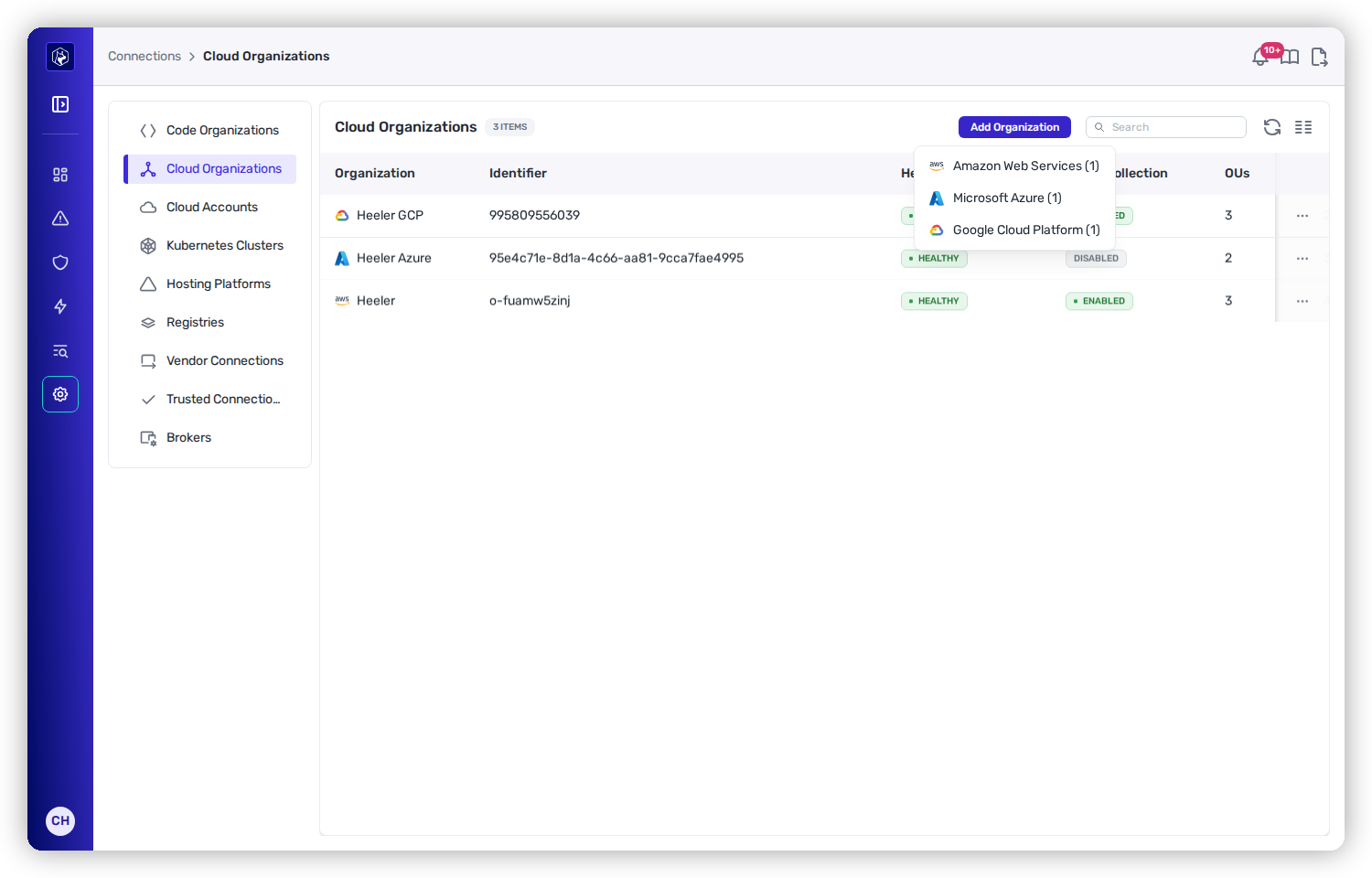
<table><thead><tr><th width="240">Section</th><th>What it's for</th></tr></thead><tbody><tr><td><strong>Cloud Organizations</strong></td><td>Connect an entire AWS/Azure/GCP organization; Heeler discovers the accounts beneath it. Columns show <strong>Health</strong>, <strong>Event Collection</strong>, <strong>OUs</strong>, and <strong>Accounts</strong>.</td></tr><tr><td><strong>Cloud Accounts</strong></td><td>Connect an individual account/project.</td></tr><tr><td><strong>Kubernetes Clusters</strong></td><td>Connect clusters for workload context. Cloud-hosted clusters (EKS/GKE) are discovered from the cloud connection; native clusters are added here.</td></tr><tr><td><strong>Hosting Platforms</strong></td><td>Connect a managed hosting platform such as Vercel, where Heeler reads deployments and their commits straight from the platform's API.</td></tr></tbody></table>

<figure><img src="https://414480750-files.gitbook.io/~/files/v0/b/gitbook-x-prod.appspot.com/o/spaces%2FXP3dp2kecwKA2KvYkntz%2Fuploads%2Fgit-blob-e699fdcd7dbfecb2bb89fe7afa5d52bbd3648e46%2Fcc-gs-cloud.png?alt=media" alt="Cloud Organizations under Administration → Connections, listing connected AWS, Azure, and GCP organizations, with the Add Organization menu open showing Amazon Web Services, Microsoft Azure, Microsoft Azure — federated identity (no secret), and Google Cloud Platform."><figcaption><p>Administration → Connections → Cloud Organizations. <strong>Add Organization</strong> offers Amazon Web Services, Microsoft Azure, Microsoft Azure — federated identity (no secret), and Google Cloud Platform.</p></figcaption></figure>

## Supported providers

Connect at the **organization** level to cover every account at once (recommended), or add an individual **account**. Choose your provider for exact steps and screenshots:

<table data-view="cards"><thead><tr><th></th><th></th><th data-type="content-ref"></th></tr></thead><tbody><tr><td><strong>Amazon Web Services</strong></td><td>CloudFormation/Terraform, org or single account.</td><td><a href="/mrecEO40m5D6bt7Pq5pE/get-started/cloud-and-runtime/amazon-web-services.md">Amazon Web Services</a></td></tr><tr><td><strong>Google Cloud Platform</strong></td><td>Workload Identity Federation, org or project.</td><td><a href="/mrecEO40m5D6bt7Pq5pE/get-started/cloud-and-runtime/google-cloud-platform.md">Google Cloud Platform</a></td></tr><tr><td><strong>Microsoft Azure</strong></td><td>An Entra App Registration with Reader access.</td><td><a href="/mrecEO40m5D6bt7Pq5pE/get-started/cloud-and-runtime/microsoft-azure.md">Microsoft Azure</a></td></tr><tr><td><strong>Kubernetes (native)</strong></td><td>A read-only ServiceAccount + token.</td><td><a href="/mrecEO40m5D6bt7Pq5pE/get-started/cloud-and-runtime/kubernetes-native-setup.md">Kubernetes (native) Setup</a></td></tr><tr><td><strong>Vercel</strong></td><td>An access token scoped to your team. Lineage comes straight from Vercel's API.</td><td><a href="/mrecEO40m5D6bt7Pq5pE/get-started/cloud-and-runtime/vercel.md">Vercel</a></td></tr></tbody></table>

See [Supported Technologies](/mrecEO40m5D6bt7Pq5pE/supported-technologies.md#cloud-providers) for the authoritative provider list.

## Inventory vs. event collection

Every connection does two things you should understand:

<table><thead><tr><th width="220">Capability</th><th>What it gives you</th></tr></thead><tbody><tr><td><strong>Inventory harvesting</strong></td><td>Turned on the moment you connect. Heeler polls each service on a per-service cadence and builds the code-to-cloud model.</td></tr><tr><td><strong>Event collection</strong> (optional)</td><td>Near-real-time change detection, set up separately per organization. Until you enable it, the org's <strong>Event Collection</strong> column reads <code>DISABLED</code>. AWS uses CloudTrail → SQS; GCP uses a log sink → Pub/Sub. Azure, Kubernetes, and hosting platforms are inventory-only.</td></tr></tbody></table>

## You're done when…

* [ ] The organization or account shows **Healthy** (it saves only after preflight checks pass).
* [ ] Deployments and infrastructure appear in the [Catalog](/mrecEO40m5D6bt7Pq5pE/catalog/deployments.md).
* [ ] Findings start reflecting reachability and exposure in their prioritization.

## Related

* [Connect Registries and Artifacts](/mrecEO40m5D6bt7Pq5pE/get-started/registries-and-artifacts.md) — link built images back to source.
* [Map Your Organization](/mrecEO40m5D6bt7Pq5pE/get-started/map-your-organization.md) — assign environments, teams, and tiers.


---

# Agent Instructions
This documentation is published with GitBook. GitBook is the documentation platform designed so that both humans and AI agents can read, navigate, and reason over technical content effectively. Learn more at gitbook.com.

## Querying This Documentation
If you need additional information that is not directly available in this page, you can query the documentation dynamically by asking a question.

Perform an HTTP GET request on the current page URL with the `ask` query parameter, and the optional `goal` query parameter:

```
GET https://docs.heeler.com/mrecEO40m5D6bt7Pq5pE/get-started/cloud-and-runtime.md?ask=<question>&goal=<endgoal>
```

`ask` is the immediate question: it should be specific, self-contained, and written in natural language.
`goal` is optional and describes the broader end goal you are ultimately trying to accomplish on behalf of the user. GitBook uses it to tailor the answer towards what is most useful for that goal.

The response will contain a direct answer to the question and relevant excerpts and sources from the documentation.

Use this mechanism when the answer is not explicitly present in the current page, you need clarification or additional context, or you want to retrieve related documentation sections.
