> For the complete documentation index, see [llms.txt](https://docs.heeler.com/mrecEO40m5D6bt7Pq5pE/llms.txt). Markdown versions of documentation pages are available by appending `.md` to page URLs; this page is available as [Markdown](https://docs.heeler.com/mrecEO40m5D6bt7Pq5pE/operate/workflows/actions.md).

# Actions

What a workflow does once its conditions are met — message a channel, open a ticket, extend an SLO, fix the finding, or POST to a webhook. Up to three actions per workflow.

Actions are what the workflow *does*. Once an event clears the [conditions](/mrecEO40m5D6bt7Pq5pE/operate/workflows/conditions.md), the workflow runs its actions in order — up to **three** per workflow, so one rule can both fix a finding *and* announce it in Slack. Which action types you can pick depends on the trigger; a deployment-only action like Generate SBOM won't appear on a secret trigger, for instance.

Because they run in order and share a context, actions can **hand off to each other** — open a ticket, then post *that ticket's* link to Slack; or fix a finding, then announce *that PR*. That's [chaining actions](#chaining-actions), covered in depth below.

<figure><img src="https://414480750-files.gitbook.io/~/files/v0/b/gitbook-x-prod.appspot.com/o/spaces%2FXP3dp2kecwKA2KvYkntz%2Fuploads%2Fgit-blob-271f594695e27f47664b59c3e342c0eea8450f03%2Fcc-wf-action-types.png?alt=media" alt="The Action step with the Type dropdown open, listing Send Email, Create Jira Issue, Create Linear Issue, Send Webhook, Send Slack Message, Send Teams Message, Send Google Chat Message, Fix with Heeler Agent, and Update SLO Override."><figcaption><p>Pick an action Type, fill in its fields, and use Add Action to chain up to three.</p></figcaption></figure>

Actions fall into three families:

<table><thead><tr><th width="200">Family</th><th>Actions</th></tr></thead><tbody><tr><td><strong>Messaging</strong></td><td>Send Slack Message · Send Teams Message · Send Google Chat Message · Send Email</td></tr><tr><td><strong>Ticketing</strong></td><td>Create Jira Issue · Create Linear Issue · Create Shortcut Story · Create GitHub Issue</td></tr><tr><td><strong>Domain</strong></td><td>Send Webhook · Update SLO Override · Fix with Heeler Agent · Generate SBOM</td></tr></tbody></table>

## Messaging

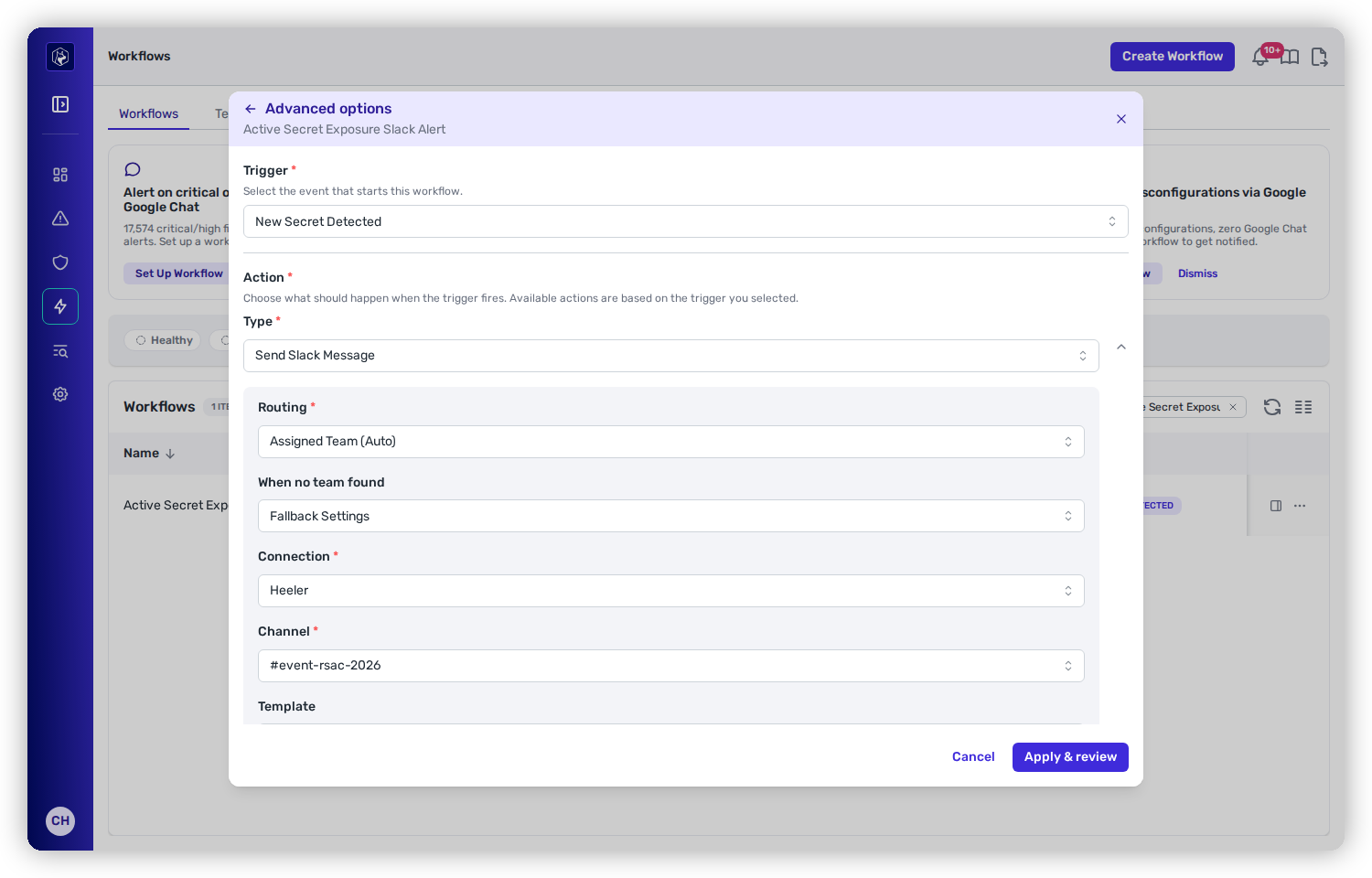
Messaging actions post to a channel. All of them take a **Message** you compose as a [template](/mrecEO40m5D6bt7Pq5pE/operate/workflows/routing-and-templates.md) — start from a Heeler default or write your own, with [variables](/mrecEO40m5D6bt7Pq5pE/reference/workflow-template-variables.md) that fill in the finding's details.

<figure><img src="https://414480750-files.gitbook.io/~/files/v0/b/gitbook-x-prod.appspot.com/o/spaces%2FXP3dp2kecwKA2KvYkntz%2Fuploads%2Fgit-blob-73bed42d456eeefbb40dbaa488c1a536e7d72a0a%2Fcc-wf-action-slack.png?alt=media" alt="A Send Slack Message action with a Routing dropdown set to Assigned Team (Auto) and a When no team found dropdown set to Fallback Settings."><figcaption><p>Messaging (and ticketing) actions route to the owning team by default — see Routing &#x26; templates.</p></figcaption></figure>

<table><thead><tr><th width="200">Action</th><th>Notes</th></tr></thead><tbody><tr><td><strong>Send Slack Message</strong></td><td>Posts to a Slack channel. Channel and connection come from the owning team by default, or set them explicitly. See <a href="/mrecEO40m5D6bt7Pq5pE/operate/workflows/routing-and-templates.md">Routing &#x26; templates</a>.</td></tr><tr><td><strong>Send Teams Message</strong></td><td>Posts an Adaptive Card to a Microsoft Teams channel via an <strong>incoming webhook URL</strong> stored on the connection (resolved per channel) — not a bot token like Slack.</td></tr><tr><td><strong>Send Google Chat Message</strong></td><td>Posts a card to a Google Chat space via its <strong>incoming webhook URL</strong> (same webhook-based model as Teams).</td></tr><tr><td><strong>Send Email</strong></td><td>Sends an HTML email to one or more recipients, with a templated subject and body. Email always comes from <code>Heeler Security &#x3C;noreply@heeler.com></code>.</td></tr></tbody></table>

## Ticketing

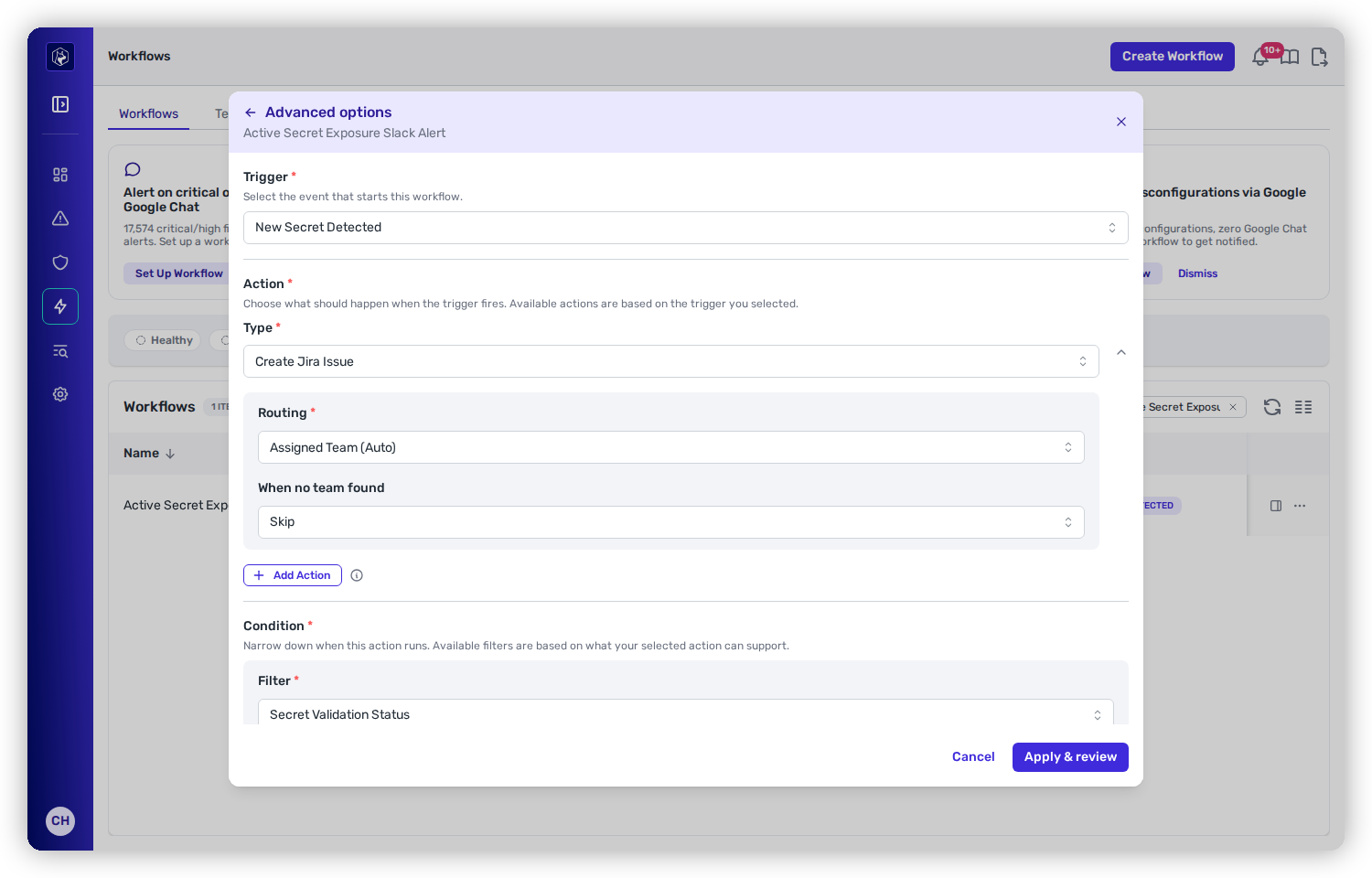
Ticketing actions open a work item in your tracker and keep it in sync. They share a useful safety net: **deduplication** — a second ticket won't be opened for the same workflow-and-finding pair, so a flapping finding doesn't spam your backlog.

<figure><img src="https://414480750-files.gitbook.io/~/files/v0/b/gitbook-x-prod.appspot.com/o/spaces%2FXP3dp2kecwKA2KvYkntz%2Fuploads%2Fgit-blob-788846cfbcb614df906b2cc13c1c926339165f0e%2Fcc-wf-action-jira.png?alt=media" alt="A Create Jira Issue action with Routing set to Assigned Team (Auto) and When no team found set to Skip."><figcaption><p>Ticketing actions route to the owning team's project by default, and can carry field defaults, mappings, and a template.</p></figcaption></figure>

<table><thead><tr><th width="210">Action</th><th>Notes</th></tr></thead><tbody><tr><td><strong>Create Jira Issue</strong></td><td>Creates a Jira issue. Carries field defaults, field mappings, and a template. Routes by team or explicitly.</td></tr><tr><td><strong>Create Linear Issue</strong></td><td>Creates a Linear issue in a chosen team.</td></tr><tr><td><strong>Create GitHub Issue</strong></td><td>Creates a GitHub issue, with state synced back to Heeler and optional labels.</td></tr><tr><td><strong>Create Shortcut Story</strong></td><td>Creates a Shortcut story. Requires <strong>Group</strong>, <strong>Story Name</strong>, <strong>Story Type</strong> (feature / bug / chore), <strong>Owner IDs</strong>, and a <strong>Description</strong>.</td></tr></tbody></table>

{% hint style="info" %}
**Shortcut is the exception to dedup** — it doesn't currently de-duplicate, so a Shortcut story can be created more than once for the same finding.
{% endhint %}

## Domain actions

These act on Heeler itself rather than notifying a person.

<table><thead><tr><th width="230">Action</th><th>What it does</th></tr></thead><tbody><tr><td><strong>Fix with Heeler Agent</strong></td><td>Turns Heeler's agent loose to remediate the finding — generate the fix and validate it through your CI, then either open the pull request or hold it for an administrator. This is the auto-fix action.</td></tr><tr><td><strong>Update SLO Override</strong></td><td>Extends a finding's SLO due date (works for both dependency and SAST findings).</td></tr><tr><td><strong>Send Webhook</strong></td><td>POSTs the full event payload as JSON to any URL, with optional custom headers.</td></tr><tr><td><strong>Generate SBOM</strong></td><td>Generates a CycloneDX SBOM for the deployment in context. No configuration.</td></tr></tbody></table>

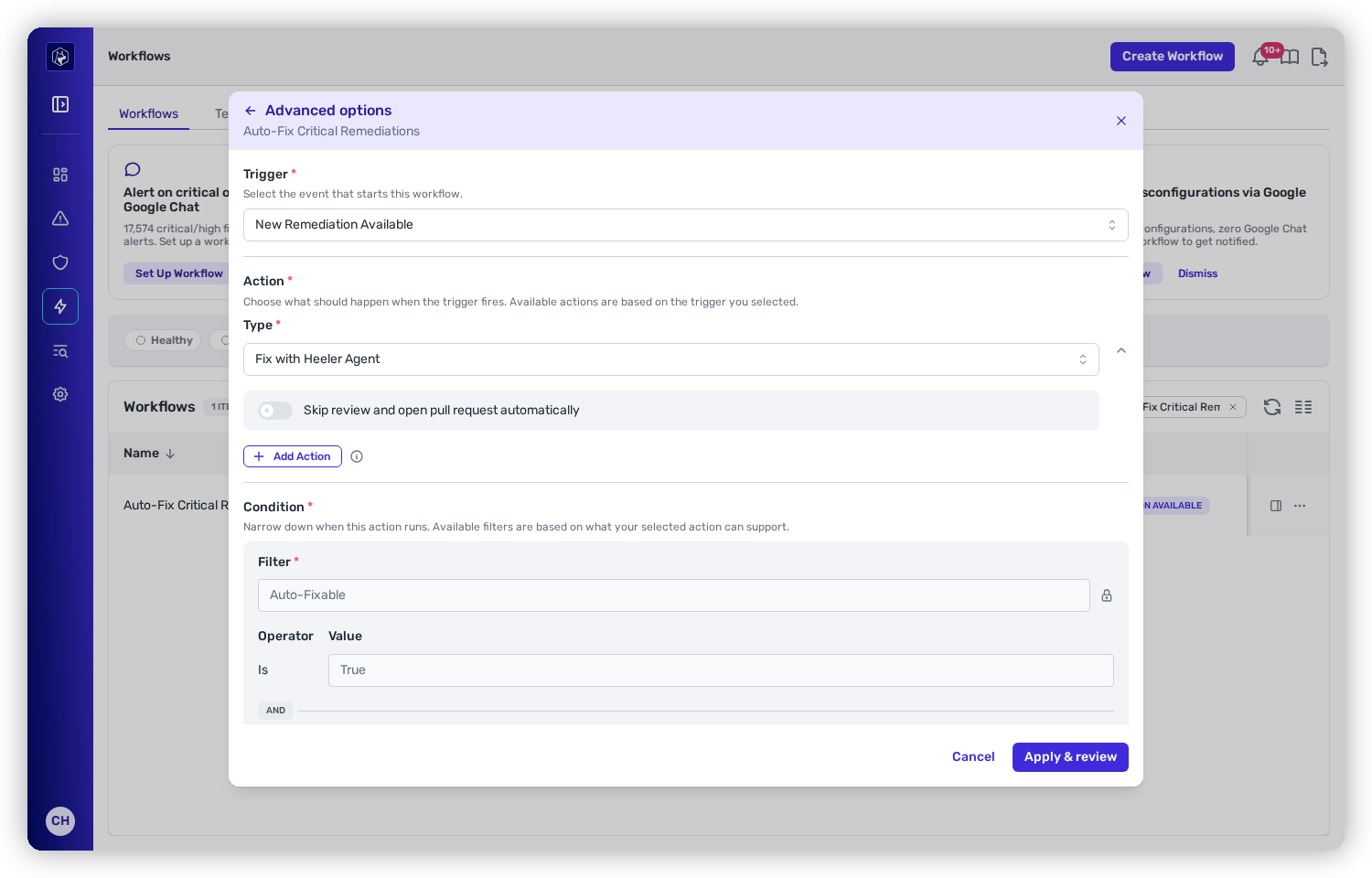
### Fix with Heeler Agent

The auto-fix action has a single option — **Open the pull request automatically**, pre-set from your tenant's [pull request default](/mrecEO40m5D6bt7Pq5pE/administer-and-monitor/program-policy/remediation-agent.md#pull-request-defaults-for-sca-and-sast-autofix) — and, as noted under [conditions](/mrecEO40m5D6bt7Pq5pE/operate/workflows/conditions.md#conditions-an-action-sets-for-you), it locks an **Auto-Fixable** condition on for you. The agent only runs when the finding is auto-fixable and a remediation exists; it then works the [CI validation loop](/mrecEO40m5D6bt7Pq5pE/fix/validate-and-merge-ready.md). With the option on, each run opens a ready-to-review PR; with it off, runs hold at **Awaiting Approval** for an administrator. The full recipe is on [Automate Remediation](/mrecEO40m5D6bt7Pq5pE/fix/automate-remediation.md).

<figure><img src="https://414480750-files.gitbook.io/~/files/v0/b/gitbook-x-prod.appspot.com/o/spaces%2FXP3dp2kecwKA2KvYkntz%2Fuploads%2Fgit-blob-1cb9bf361aea6b903e6bcf4dd1713e156451b76b%2Fcc-wf-action-fixagent.png?alt=media" alt="A Fix with Heeler Agent action showing its pull-request toggle."><figcaption><p>Fix with Heeler Agent — the action and its pull-request toggle.</p></figcaption></figure>

### Update SLO Override

Extend a due date automatically — useful, for example, to give teams breathing room on findings that have no fix yet. You control how many days to extend (or let Heeler compute it from the SLO policy), the reason recorded, and whether the extension counts from the original due date or from today. The action is idempotent: if the new due date matches the current one, nothing is written.

### Send Webhook

The URL is validated before and after the template renders (private, loopback, and metadata addresses are rejected). If the endpoint returns a non-2xx response, Heeler records the error, notifies administrators, and stops the remaining steps in that workflow rather than retrying.

## Chaining actions

A workflow's actions aren't independent — they run **in sequence and share one context**, so a later action can use what an earlier one produced. This is what turns a workflow from a single reflex into a small pipeline: *do the thing, then tell the right people about the thing you just did,* with the real ticket number or pull-request link filled in.

{% hint style="success" %}
**The pattern to reach for:** put a **create** action first (open a ticket, or fix with the agent) and a **notify** action second. The notification carries the live result — the Jira key, the PR URL — instead of a generic "something happened."
{% endhint %}

### What each action publishes

Every **create-style** action writes its result into the workflow's shared context for later steps to read. Side-effect actions — messaging, webhook, and SLO override — don't publish anything (they're usually the *last* step in a chain, not something a later step needs to reference).

<table><thead><tr><th width="230">Action</th><th>What it publishes</th></tr></thead><tbody><tr><td><strong>Create Jira / Linear / GitHub Issue</strong></td><td>The created ticket: its <strong>provider</strong>, <strong>id</strong>, <strong>key</strong> (e.g. <code>PROJ-123</code>, <code>ENG-123</code>, <code>acme/api-service#123</code>), and <strong>url</strong>. Also mirrored to the <code>created_ticket</code> / <code>created_tickets</code> aliases below.</td></tr><tr><td><strong>Fix with Heeler Agent</strong></td><td>The remediation's <strong>status</strong> and <strong>remediation_id</strong> — and, once the agent finishes, a nested <strong>pr</strong> object with the pull request's <code>url</code>, <code>title</code>, and <code>branch_name</code>.</td></tr><tr><td><strong>Generate SBOM</strong></td><td>The generated SBOM, available to a following step.</td></tr><tr><td>Messaging · Webhook · Update SLO Override</td><td>Nothing — these don't publish an output.</td></tr></tbody></table>

### Referencing an earlier action

There are two ways to reach a previous step's output from a [template](/mrecEO40m5D6bt7Pq5pE/operate/workflows/routing-and-templates.md):

* **By convenience alias** — the most recent ticket is always at `created_ticket`, and every ticket created in the run is in the `created_tickets` list:

  ```jinja
  Filed {{ created_ticket.key }} → {{ created_ticket.url }}
  ```
* **By step** — each action is addressable by its position (`action_0`, `action_1`, …). Use **bracket access**, since step ids aren't valid dotted names:

  ```jinja
  {{ actions['action_0'].pr.url }}
  ```

### Two worked examples

{% tabs %}
{% tab title="Open a ticket, then post it" %}
**Trigger:** New Finding Detected · **Action 1:** Create Jira Issue · **Action 2:** Send Slack Message.

The Slack message references the ticket the first step just opened:

```jinja
🚨 {{ data.finding.severity }} in {{ data.finding.package_name }}
Tracked in {{ created_ticket.key }} → {{ created_ticket.url }}
```

Because ticketing actions [de-duplicate](#ticketing), this still works on a re-triggered event: if the ticket already exists, that existing ticket is surfaced to the Slack step rather than a blank.
{% endtab %}

{% tab title="Fix it, then announce the PR" %}
**Trigger:** New Remediation Available · **Action 1:** Fix with Heeler Agent · **Action 2:** Send Slack Message.

The workflow **pauses after the fix action until the pull request reaches an outcome**, then runs the Slack step — so the notification can carry the real PR link:

```jinja
✅ Auto-fix opened for {{ remediation.package_name }}
{{ actions['action_0'].pr.title }}
{{ actions['action_0'].pr.url }}
```

{% endtab %}
{% endtabs %}

The full variable reference — every field these outputs expose and the exact syntax — is on [Workflow Template Variables](/mrecEO40m5D6bt7Pq5pE/reference/workflow-template-variables.md#referring-to-an-earlier-step).

## Related

* [Routing and Templates](/mrecEO40m5D6bt7Pq5pE/operate/workflows/routing-and-templates.md) — where messages and tickets go, and how to shape their content.
* [Conditions](/mrecEO40m5D6bt7Pq5pE/operate/workflows/conditions.md) — narrow what an action runs on.
* [Automate Remediation](/mrecEO40m5D6bt7Pq5pE/fix/automate-remediation.md) — the Fix with Heeler Agent action in practice.


---

# Agent Instructions
This documentation is published with GitBook. GitBook is the documentation platform designed so that both humans and AI agents can read, navigate, and reason over technical content effectively. Learn more at gitbook.com.

## Querying This Documentation
If you need additional information that is not directly available in this page, you can query the documentation dynamically by asking a question.

Perform an HTTP GET request on the current page URL with the `ask` query parameter, and the optional `goal` query parameter:

```
GET https://docs.heeler.com/mrecEO40m5D6bt7Pq5pE/operate/workflows/actions.md?ask=<question>&goal=<endgoal>
```

`ask` is the immediate question: it should be specific, self-contained, and written in natural language.
`goal` is optional and describes the broader end goal you are ultimately trying to accomplish on behalf of the user. GitBook uses it to tailor the answer towards what is most useful for that goal.

The response will contain a direct answer to the question and relevant excerpts and sources from the documentation.

Use this mechanism when the answer is not explicitly present in the current page, you need clarification or additional context, or you want to retrieve related documentation sections.