> For the complete documentation index, see [llms.txt](https://docs.heeler.com/mrecEO40m5D6bt7Pq5pE/llms.txt). Markdown versions of documentation pages are available by appending `.md` to page URLs; this page is available as [Markdown](https://docs.heeler.com/mrecEO40m5D6bt7Pq5pE/findings/code-security-sast.md).

# Code Security (SAST)

Context-aware static analysis that finds real, reachable code weaknesses with data-flow analysis — and ranks them by exposure, not just pattern matches.

Heeler analyzes your source code for security weaknesses using **path-aware, interprocedural data-flow (taint) analysis** — tracing untrusted input from where it enters (a **source**), **across functions and files**, to where it can do harm (a **sink**). It also **discovers and models your APIs** — the routes, handlers, frameworks, and authentication behind each endpoint — so every weakness is tied to the endpoint that can actually reach it. Findings are then ranked by real-world risk, giving you a short list of *reachable, exposed* issues instead of a wall of pattern matches.

```mermaid
%%{init: {'theme':'base','themeVariables':{'lineColor':'#9aa0b5','primaryColor':'#eef1f8','primaryTextColor':'#10163a','primaryBorderColor':'#c2c7de','fontSize':'14px'}}}%%
flowchart LR
    S["Source<br/>untrusted input<br/>e.g. request parameter"] --> F1[Function A] --> F2[Function B] --> SK["Sink<br/>dangerous operation<br/>e.g. SQL query"]
    SK --> R["Reachable, exposed<br/>finding"]:::anchor
    classDef anchor fill:#5A3FFF,color:#ffffff,stroke:#3a2ad0,stroke-width:1px;
```

{% hint style="info" %}
**For developers and security engineers** working through code weaknesses. Depends on your **SCM** being connected; **runtime and API/endpoint context** sharpen the exposure ranking. See [Set Up Agentic Remediation](/mrecEO40m5D6bt7Pq5pE/get-started/set-up-automated-remediation.md).
{% endhint %}

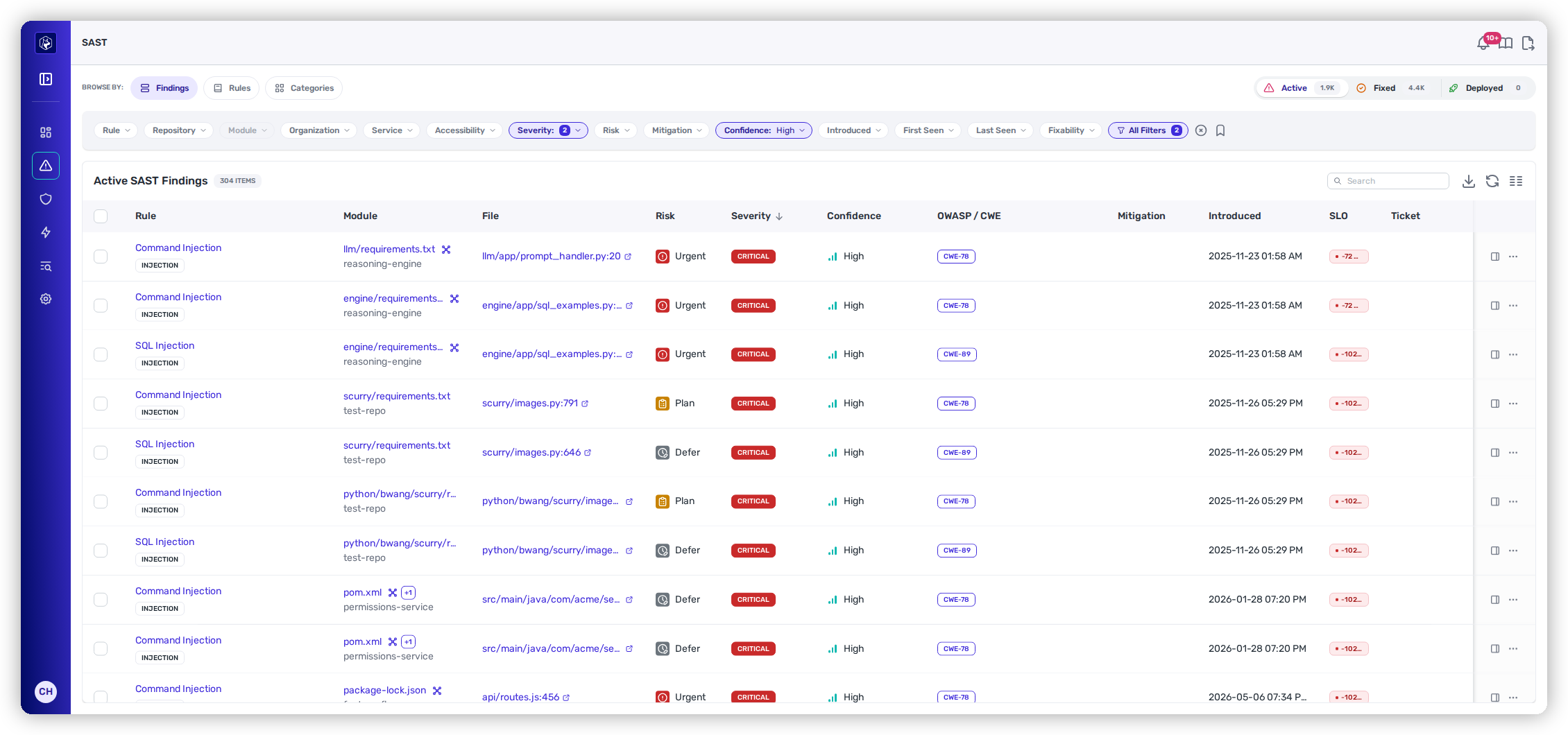
<figure><img src="https://414480750-files.gitbook.io/~/files/v0/b/gitbook-x-prod.appspot.com/o/spaces%2FXP3dp2kecwKA2KvYkntz%2Fuploads%2Fgit-blob-b6ed9633f5541e727c718aff6605ad87b83f757c%2Fcc-sast-list.png?alt=media" alt="The Active SAST Findings view: a Browse By rail (Findings / Rules / Categories), filters for rule, severity, risk, and confidence, and a table of findings with rule, module, file, risk, severity, and confidence."><figcaption><p>The SAST <strong>SAST Findings</strong> view — code weaknesses ranked by risk, opening on High confidence.</p></figcaption></figure>

## What Heeler detects

Findings span the common weakness classes — **Injection** (SQL, command, argument, code, SSTI), **Cross-Site Attacks**, **Access Control**, **Cryptography**, **Data Exposure**, **Deserialization**, **Supply Chain**, and **Transport Security** — plus CI/CD workflow weaknesses (see [GitHub Actions Supply Chain](/mrecEO40m5D6bt7Pq5pE/findings/open-source-sca/github-actions.md)). Heeler applies three detection methods, shown as a rule's **Type**:

| Method        | What it means                                                                                                   |
| ------------- | --------------------------------------------------------------------------------------------------------------- |
| **Taint**     | Interprocedural data-flow analysis tracing an untrusted source to a dangerous sink, across functions and files. |
| **Graphscan** | Structural/configuration analysis over the code and its graph (e.g. framework and CI/CD config issues).         |
| **Heuristic** | Targeted pattern checks for specific risky constructs.                                                          |

## Detection that adapts to your code

Heeler doesn't run a fixed, one-size-fits-all rule pack. It starts from a framework of detection capabilities and uses an agentic analysis of each codebase — its **structure, framework usage, language patterns, and architecture** — to generate **detection rules specific to how your application is built**. The [Rules](/mrecEO40m5D6bt7Pq5pE/findings/code-security-sast/rules-and-categories.md) view therefore lists rules generated for your code.

## Automatic triage

Heeler also triages findings for you before you ever see them, weighing contextual signals — **data-flow validity, reachability, runtime deployment context, and exposure/service mapping** — to:

* eliminate common false positives,
* rank low-impact or unreachable findings below the rest, and
* surface the high-confidence, exploitable ones first.

The [SAST Findings](/mrecEO40m5D6bt7Pq5pE/findings/code-security-sast/findings.md) list opens on **High confidence** for this reason. Lower-confidence findings remain in the list behind the filter.

## Ways to look at findings

The left **Browse By** rail switches between three lenses on the same data — **Findings** (every individual weakness), **Rules** (grouped by the detection rule that fired), and **Categories** (grouped by weakness class). Those lenses are documented across two pages:

<table data-view="cards"><thead><tr><th></th><th></th><th data-hidden data-card-target data-type="content-ref"></th></tr></thead><tbody><tr><td><strong>SAST Findings</strong></td><td>Every individual finding — filter, inspect the data flow, and act.</td><td><a href="/mrecEO40m5D6bt7Pq5pE/findings/code-security-sast/findings.md">SAST Findings</a></td></tr><tr><td><strong>Rules &#x26; Categories</strong></td><td>Findings aggregated by detection rule and by weakness category.</td><td><a href="/mrecEO40m5D6bt7Pq5pE/findings/code-security-sast/rules-and-categories.md">Rules and Categories</a></td></tr></tbody></table>

How each finding earns its **Urgent / Plan / Defer** band is explained in [Prioritization](/mrecEO40m5D6bt7Pq5pE/findings/code-security-sast/prioritization.md).

## The findings lifecycle

SAST findings move through **Active → Fixed → Deployed** like every finding type — see [the findings lifecycle](/mrecEO40m5D6bt7Pq5pE/findings.md#the-findings-lifecycle) for what each state means. What's specific to SAST: Heeler compares a branch's results against the repository's **default-branch baseline**, so only findings a change actually introduces are new.

## Prevent and fix

* Gate new weaknesses at the PR with [SAST Guardrails](/mrecEO40m5D6bt7Pq5pE/prevent/pr-guardrails/guardrail-types/sast-guardrails.md).
* Resolve them with [SAST Auto-Fix](/mrecEO40m5D6bt7Pq5pE/fix/sast-auto-fix.md).

## Related

* [Infrastructure as Code (IaC)](/mrecEO40m5D6bt7Pq5pE/findings/iac.md) — misconfigurations in the infrastructure your code *defines* live in their own section. Same finding model, same detail view, separate list — because a misconfigured security group and an injection flaw are different people's work. Nothing appears in both.


---

# Agent Instructions
This documentation is published with GitBook. GitBook is the documentation platform designed so that both humans and AI agents can read, navigate, and reason over technical content effectively. Learn more at gitbook.com.

## Querying This Documentation
If you need additional information that is not directly available in this page, you can query the documentation dynamically by asking a question.

Perform an HTTP GET request on the current page URL with the `ask` query parameter, and the optional `goal` query parameter:

```
GET https://docs.heeler.com/mrecEO40m5D6bt7Pq5pE/findings/code-security-sast.md?ask=<question>&goal=<endgoal>
```

`ask` is the immediate question: it should be specific, self-contained, and written in natural language.
`goal` is optional and describes the broader end goal you are ultimately trying to accomplish on behalf of the user. GitBook uses it to tailor the answer towards what is most useful for that goal.

The response will contain a direct answer to the question and relevant excerpts and sources from the documentation.

Use this mechanism when the answer is not explicitly present in the current page, you need clarification or additional context, or you want to retrieve related documentation sections.
