> For the complete documentation index, see [llms.txt](https://docs.heeler.com/mrecEO40m5D6bt7Pq5pE/llms.txt). Markdown versions of documentation pages are available by appending `.md` to page URLs; this page is available as [Markdown](https://docs.heeler.com/mrecEO40m5D6bt7Pq5pE/findings/iac.md).

# Infrastructure as Code (IaC)

Misconfigurations in the infrastructure your code defines — Terraform, OpenTofu, CloudFormation, Pulumi, and Kubernetes — found in source and scored against the environment they actually build.

Your infrastructure is code, and it carries security defects the same way application code does — a bucket left public, a security group open to the world, a container running as root, an unencrypted volume. Heeler analyzes the **infrastructure definitions in your repositories** and reports each misconfiguration as a finding, tied to the **resource** it configures and scored against the service and environment that definition actually builds.

{% hint style="info" %}
**For developers, platform engineers, and security engineers** reviewing infrastructure definitions. Depends on your **SCM** being connected; analysis runs automatically on the IaC files Heeler finds. Connecting **cloud & runtime** sharpens prioritization, because it's what sets the tier and environment of the service a definition belongs to. See [Set Up Agentic Remediation](/mrecEO40m5D6bt7Pq5pE/get-started/set-up-automated-remediation.md).
{% endhint %}

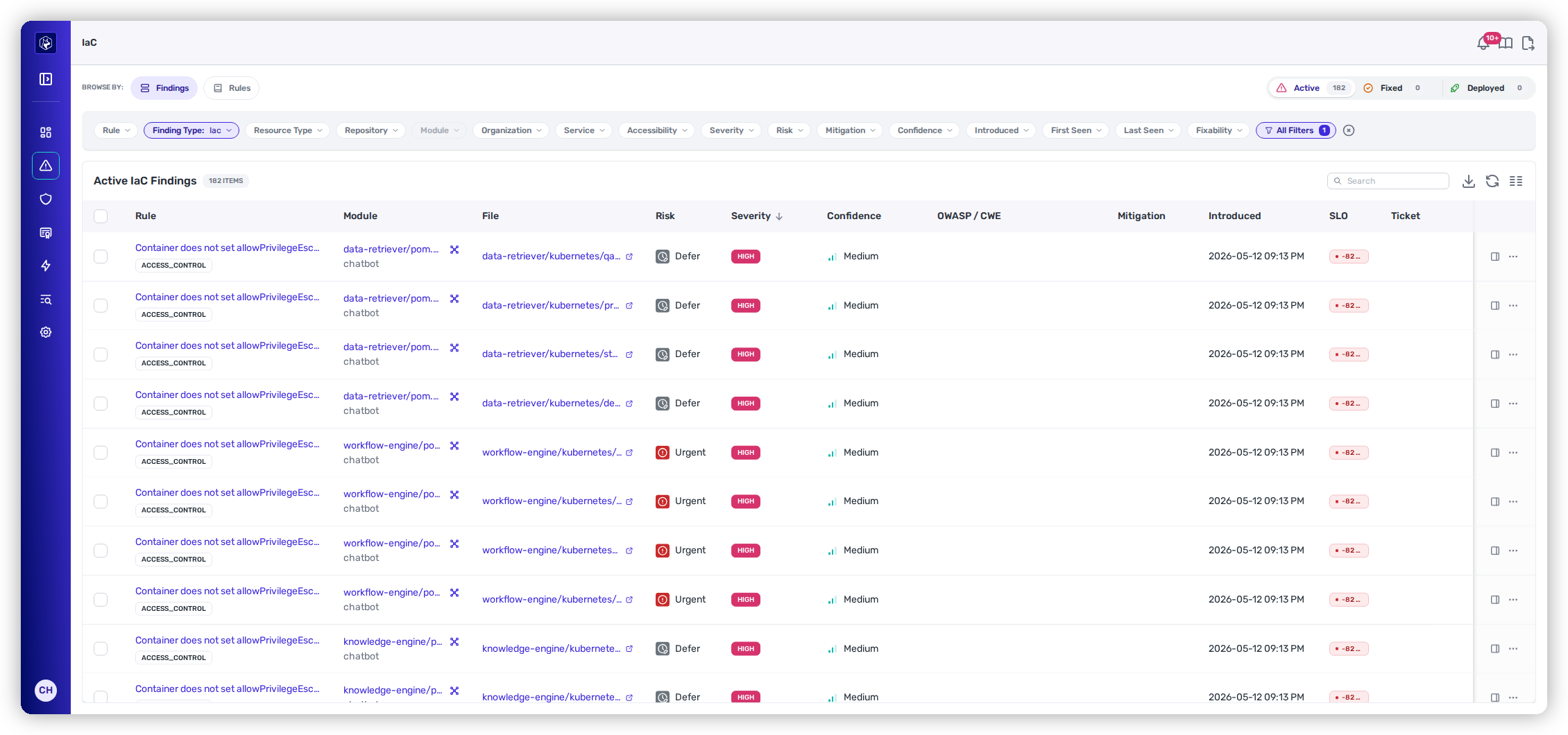
<figure><img src="https://414480750-files.gitbook.io/~/files/v0/b/gitbook-x-prod.appspot.com/o/spaces%2FXP3dp2kecwKA2KvYkntz%2Fuploads%2Fgit-blob-3084e0c706e091cb1834c5d4ffcd171617aeac23%2Fcc-iac-findings.png?alt=media" alt="The Active IaC Findings view, with the Browse By pills, the lifecycle counts, the filter toolbar, and one row per misconfiguration."><figcaption><p>Security → IaC → Findings — each row is one misconfiguration, with the resource it configures and the definition file it came from.</p></figcaption></figure>

## What Heeler analyzes

IaC analysis covers the definition formats teams actually ship infrastructure in:

| Framework          | What it covers                                        |
| ------------------ | ----------------------------------------------------- |
| **Terraform**      | `.tf` configuration and the resources it declares.    |
| **OpenTofu**       | The Terraform-compatible fork, analyzed the same way. |
| **CloudFormation** | AWS stack templates.                                  |
| **Pulumi**         | Infrastructure defined in a general-purpose language. |
| **Kubernetes**     | Workload, Service, Ingress, and RBAC manifests.       |

Findings are **misconfigurations**, not application weaknesses: the defect is in what the definition *declares*, so the fix is a change to the definition rather than to application logic.

### Kubernetes manifests

Each part of a workload is evaluated on its own terms rather than as one flat document. A pod spec, each container and init container, each mounted volume, each RBAC rule, and Service and Ingress specs are all assessed separately, so two containers in the same file that differ only in their security context produce two findings rather than one. Workload kinds are normalized first — a Pod, a Deployment, and a CronJob all resolve to the same pod-spec shape — so one check applies across every kind that carries a workload.

{% hint style="info" %}
**Helm charts.** Values supplied by templating — inline `{{ ... }}` placeholders and subtrees injected by `toYaml` — are treated as **unknown** rather than absent. A chart is not reported as missing a setting the template supplies at install time, so rendering a chart is not a prerequisite for useful results.
{% endhint %}

## The resource behind a finding

Every IaC finding records the **resource type** it evaluated — the concrete thing the definition builds, such as an S3 bucket, a security group, or a Kubernetes deployment. That's the difference between "a Terraform file has a High finding" and "this bucket is public," and it's why **Resource Type** is a filter you'll reach for constantly: it turns the list into "every misconfiguration on the resource class I'm responsible for," across every repository that declares one.

## Where IaC sits alongside SAST

IaC findings and [code findings (SAST)](/mrecEO40m5D6bt7Pq5pE/findings/code-security-sast.md) come from the same source analysis and share the same finding model — the same lifecycle, the same Risk bands, the same detail view, the same override and ticketing actions. They're kept in **separate sections** because they're separate work: a misconfigured security group belongs to whoever owns the infrastructure, and an injection flaw belongs to whoever owns the handler.

The split is complete, not cosmetic. **Every SAST surface excludes IaC findings** — the findings list, its filter facets, the dashboard cards, and exports — and the IaC section shows only IaC. A SAST export therefore contains only code findings, and an IaC count is never inflated by application weaknesses.

One practical consequence: the **Severity** and **Confidence** filters that SAST pre-applies are **not** pre-applied here. The IaC list opens **unfiltered**, showing everything at every severity, because an IaC estate is usually small enough to read whole — and a Low-severity misconfiguration on a production resource is often more actionable than a High one on a sandbox.

## Ways to look at findings

The left **Browse By** rail switches between two lenses on the same data:

<table data-view="cards"><thead><tr><th></th><th></th><th data-hidden data-card-target data-type="content-ref"></th></tr></thead><tbody><tr><td><strong>SAST Findings</strong></td><td>Every individual misconfiguration — filter by resource type, inspect, and act.</td><td><a href="/mrecEO40m5D6bt7Pq5pE/findings/iac/findings.md">IaC Findings</a></td></tr><tr><td><strong>IaC Rules</strong></td><td>Misconfigurations grouped by the rule that fired, to see which policy is failing most widely.</td><td><a href="/mrecEO40m5D6bt7Pq5pE/findings/iac/rules.md">IaC Rules</a></td></tr></tbody></table>

## The findings lifecycle

IaC findings move through **Active → Fixed → Deployed** like every finding type — see [the findings lifecycle](/mrecEO40m5D6bt7Pq5pE/findings.md#the-findings-lifecycle) for what each state means. A finding that stops appearing in analysis is closed automatically; one that reappears picks up its history rather than starting over, so triage decisions and notes survive a fix-then-regress cycle.

## How findings are prioritized

Every IaC finding carries a **Heeler Risk** band — **Urgent**, **Plan**, or **Defer** — and that band, not the rule's severity, is how the list ranks. It's why the IaC list opens unfiltered: a Low-severity rule on a public production resource outranks a High-severity one in a sandbox, and the band already says so.

The band comes from three impacts:

| Impact          | The question it answers                                | Where it comes from                                                                                       |
| --------------- | ------------------------------------------------------ | --------------------------------------------------------------------------------------------------------- |
| **Business**    | How much does the thing this definition builds matter? | The service's **tier** and the **environment** it deploys to.                                             |
| **Environment** | Is what it builds actually exposed?                    | What the **definition itself declares** about exposure, and whether it can **pivot** to a Tier-1 service. |
| **Threat**      | How dangerous is this class of misconfiguration?       | Threat intelligence for the rule's weakness class, falling back to the rule's severity.                   |

### Business impact — the service the definition builds

Tier and deployment environment together:

| Service tier        | Production, corporate, DR, or unassigned | Staging, test, development, or sandbox |
| ------------------- | ---------------------------------------- | -------------------------------------- |
| **Tier 1 / Tier 2** | High                                     | Low                                    |
| **Tier 3 / Tier 4** | Medium                                   | Low                                    |

Two consequences worth knowing:

* **Non-production caps business impact at Low, whatever the tier.** A Tier-1 service's sandbox definitions don't inherit Tier-1 weight.
* **Low business impact never reaches Urgent.** It's clamped to **Plan** at most — so a real, exposed misconfiguration in a staging definition still gets scheduled, but it never pages anyone.

### Environment impact — what the definition declares about exposure

An IaC finding belongs to a service, and that service is where its tier, its environment, and the pivot check below come from. What the service cannot answer is the exposure question: a misconfiguration has no endpoint and no data-flow path, and the resource the definition declares is not something Heeler has observed running. Exposure therefore comes from what the definition itself declares:

| Factor                     | What Heeler checks                                                                                                                         | Effect                      |
| -------------------------- | ------------------------------------------------------------------------------------------------------------------------------------------ | --------------------------- |
| **Internet accessibility** | Does the rule that fired **assert** exposure — a public bucket ACL, an ingress rule open to `0.0.0.0/0`, an internet-facing load balancer? | ↑ Raises to Medium          |
| **Chaining**               | Can it reach a **Tier-1 service** — a pivot from here into something that matters more?                                                    | ↑ Raises the internal cases |
| **Mitigation**             | Is the finding **suppressed**, judged a **false positive**, or **dismissed** by a user?                                                    | ↓ Collapses to Low          |

Where the declared resource can be matched to a live cloud resource, the finding is scored on what that resource actually looks like rather than on the definition alone. Heeler matches an IaC finding's declared resource against the cloud inventory using the name-bearing attributes in the definition — a bucket name, a cluster identifier — and re-derives the match on every run, so a renamed or deleted resource clears itself rather than freezing a stale verdict.

The accessibility row on the finding's Risk panel reads one of five states:

| State              | Meaning                                                                                                                                                                                               |
| ------------------ | ----------------------------------------------------------------------------------------------------------------------------------------------------------------------------------------------------- |
| **Confirmed**      | The matched live resource is observed to be reachable.                                                                                                                                                |
| **Infrastructure** | Infrastructure around the matched resource places it in an exposed position.                                                                                                                          |
| **Code evidence**  | No live resource was matched, so the claim rests on what the definition declares. Environment impact stops at **Medium**, and the band is held at **Plan** wherever that assertion is what raised it. |
| **Not accessible** | The resource is asserted to be unreachable.                                                                                                                                                           |
| **Unknown**        | Nothing asserts exposure, and nothing has observed it. Environment impact stays **Low**.                                                                                                              |

**Unknown means no evidence either way.** A rule that reports a missing guardrail — no public-access block on a bucket, no TLS on an Ingress — says nothing about whether the resource is reachable, so Heeler records the absence of a signal rather than a resource it has observed to be dark. Only a rule that matched an insecure value credits exposure.

The scanner marks its own exposure-asserting rules, so a new or custom rule carries the signal without a product release.

Which gives three outcomes:

| The finding…                                                       | Environment impact                                          |
| ------------------------------------------------------------------ | ----------------------------------------------------------- |
| Has a rule that **asserts exposure**                               | **Medium** — held at **Plan** where the assertion raised it |
| Asserts nothing, but its service can **pivot to a Tier-1 service** | **Medium**                                                  |
| Neither                                                            | **Low**                                                     |

{% hint style="info" %}
**Coming: exposure read from the running resource.** Where the resource a definition declares matches one discovered in your connected cloud accounts, Heeler will read that resource's observed exposure directly, at the same **Confirmed** / **Infrastructure** grade a code finding gets — uncapped, so a bucket that is actually public can band **Urgent**. Not shipped yet.
{% endhint %}

### Threat — how dangerous the misconfiguration class is

Where an IaC rule maps to a weakness class (CWE), threat is set from intelligence about that class:

* **Known-exploited** (on the KEV list) → **High**.
* **CWE Top 25**, or a **high/medium CAPEC likelihood** or an **OWASP category** → **Medium**.
* Otherwise → falls through to the severity rule below.

An **active campaign** targeting that weakness class promotes the result one level.

Many infrastructure checks don't carry a CWE at all — "bucket is public" isn't a code-weakness class. Those fall back to the **rule's own severity**:

| Rule severity    | Threat |
| ---------------- | ------ |
| Critical or High | High   |
| Medium           | Medium |
| Low or Info      | Low    |

This is where severity re-enters the picture: it isn't the ranking, but it is what carries the threat dimension when no intelligence applies to the check.

### Putting it together

| Finding                                                                                  | Business | Environment | Threat   | Band      |
| ---------------------------------------------------------------------------------------- | -------- | ----------- | -------- | --------- |
| Security group with `0.0.0.0/0` ingress on a Tier-1 **production** service               | High     | Medium      | High/Med | **Plan**  |
| **Missing public-access block** on a bucket in the same repository                       | High     | Low         | High/Med | **Defer** |
| Unencrypted volume on a Tier-3 production service that can **pivot to a Tier-1 service** | Medium   | Medium      | Low      | **Plan**  |

The first two rows are the point of the model: same repository, same service, different answer — because one rule matched an insecure value and the other only reports a guardrail it didn't find.

### When a finding re-scores

The band isn't set once at scan time:

* **On ingest** — a new finding is scored immediately, so it arrives ranked rather than unranked.
* **When the ground moves** — changing a service's tier or environment re-scores the findings already on it. No rescan needed.
* **On a twice-daily reconciliation pass** — which catches anything the event-driven path missed.
* **When you dismiss or override** — a mitigation collapses environment impact to Low straight away, rather than waiting for the next sweep.

For the full matrix the three impacts combine through, see [Prioritization](/mrecEO40m5D6bt7Pq5pE/findings/code-security-sast/prioritization.md).

## Prevent and fix

* Gate new misconfigurations at the pull request with [IaC Guardrails](/mrecEO40m5D6bt7Pq5pE/prevent/pr-guardrails/guardrail-types/iac-guardrails.md).
* Track remediation against your deadlines with [SLOs](/mrecEO40m5D6bt7Pq5pE/operate/service-level-objectives-slos.md) and record exceptions through [Exceptions and Overrides](/mrecEO40m5D6bt7Pq5pE/operate/exceptions-and-overrides.md).

## Related

* [Catalog → Infrastructure](/mrecEO40m5D6bt7Pq5pE/catalog/infrastructure.md) — the running resources these definitions produce, discovered from your cloud accounts. An IaC finding is the defect in the definition; the Infrastructure catalog is what's actually standing.
* [Supported Technologies](/mrecEO40m5D6bt7Pq5pE/supported-technologies.md) — the full list of languages, frameworks, and clouds Heeler analyzes.


---

# Agent Instructions
This documentation is published with GitBook. GitBook is the documentation platform designed so that both humans and AI agents can read, navigate, and reason over technical content effectively. Learn more at gitbook.com.

## Querying This Documentation
If you need additional information that is not directly available in this page, you can query the documentation dynamically by asking a question.

Perform an HTTP GET request on the current page URL with the `ask` query parameter, and the optional `goal` query parameter:

```
GET https://docs.heeler.com/mrecEO40m5D6bt7Pq5pE/findings/iac.md?ask=<question>&goal=<endgoal>
```

`ask` is the immediate question: it should be specific, self-contained, and written in natural language.
`goal` is optional and describes the broader end goal you are ultimately trying to accomplish on behalf of the user. GitBook uses it to tailor the answer towards what is most useful for that goal.

The response will contain a direct answer to the question and relevant excerpts and sources from the documentation.

Use this mechanism when the answer is not explicitly present in the current page, you need clarification or additional context, or you want to retrieve related documentation sections.
