> For the complete documentation index, see [llms.txt](https://docs.heeler.com/mrecEO40m5D6bt7Pq5pE/llms.txt). Markdown versions of documentation pages are available by appending `.md` to page URLs; this page is available as [Markdown](https://docs.heeler.com/mrecEO40m5D6bt7Pq5pE/prevent/pr-guardrails.md).

# PR Guardrails

Enforce your security policy on every pull request — as a native status check that can observe, warn, or block.

Guardrails are Heeler's enforcement layer. Every time a developer opens or updates a pull request, Heeler evaluates the change against your security policy and reports back as a **native status check** — the same green check or red X your team already gates merges on. The result lands on the pull request itself — no separate dashboard or CLI step.

Because Heeler evaluates with full context, a guardrail can be precise: block a *reachable, internet-exposed* critical vulnerability while only warning on the same CVE in an internal, unreachable service.

{% hint style="info" %}
**Where to find it.** Guardrails live under **Guardrails** in the top navigation, with three tabs: **Guardrails** (your policies), **Pull Requests** (every PR Heeler has evaluated), and **Violations** (individual rule hits).
{% endhint %}

{% hint style="info" %}
**Who can create and enable guardrails.** Creating, editing, and enabling guardrails requires the **Administrator** role. An **Administrator (read-only)** can view guardrail activity but can't change a policy — see [Roles and Permissions](/mrecEO40m5D6bt7Pq5pE/get-started/users-and-access/roles-and-permissions.md).
{% endhint %}

## How a guardrail evaluates a PR

```mermaid
flowchart LR
    A[PR opened or updated] --> B[Heeler evaluates the change<br/>with full context]
    B --> C{Guardrail<br/>matched?}
    C -->|No| P([✓ Check passes])
    C -->|Yes| D{Configured<br/>action}
    D -->|Observe| O([Recorded only])
    D -->|Warn| W([⚠ Warning · merge allowed])
    D -->|Block| BL([✗ Check fails · merge blocked])
    BL --> X[Fix w/ Heeler, or push a fix] --> B
```

## The three actions

Every guardrail takes one of three actions when it matches. They form a natural rollout path — start safe, tighten as you gain confidence.

| Action      | On the PR                              | Merge                    | Use it for                                  |
| ----------- | -------------------------------------- | ------------------------ | ------------------------------------------- |
| **Observe** | Silently recorded for visibility       | ✅ Allowed                | Measuring impact before you enforce         |
| **Warn**    | A warning is surfaced to the developer | ✅ Allowed                | Policies you want visible, not yet blocking |
| **Block**   | The status check fails                 | ⛔ Blocked until resolved | Policies you're ready to enforce            |

{% hint style="success" %}
**Roll out Observe → Warn → Block.** Start a new guardrail in **Observe** and watch the **Pull Requests** and **Violations** tabs. When the volume looks right, promote it to **Warn**, then **Block**.
{% endhint %}

{% hint style="warning" %}
**Block needs enforcement on the SCM side.** Heeler reports a failed status check, but your source control decides whether that check actually prevents a merge. For Block to hold, turn on the matching setting in your platform:

* **GitHub** — [branch protection rules](https://docs.github.com/en/repositories/configuring-branches-and-merges-in-your-repository/managing-protected-branches/managing-a-branch-protection-rule)
* **GitLab** — [external status checks](https://docs.gitlab.com/user/project/merge_requests/status_checks/#block-merges-of-merge-requests-unless-all-status-checks-have-passed)
* **Bitbucket** — [branch restrictions](https://support.atlassian.com/bitbucket-cloud/docs/pull-request-and-merge-settings/)
  {% endhint %}

## What a guardrail can enforce

Heeler enforces twelve kinds of check. Dependency Vulnerability and Dependency Hygiene share the `Dependency` entity and can be combined in one guardrail; every other check is dedicated (see [Guardrail Types](/mrecEO40m5D6bt7Pq5pE/prevent/pr-guardrails/guardrail-types.md)).

| Guardrail                      | What it checks                                                                                 | Evaluated against                                                | Combine?                |
| ------------------------------ | ---------------------------------------------------------------------------------------------- | ---------------------------------------------------------------- | ----------------------- |
| **Dependency Vulnerabilities** | Known-vulnerable dependencies the PR adds or changes                                           | Dependencies the PR introduces/modifies (re-checked each commit) | ✅ with Dependency rules |
| **Dependency Hygiene**         | Supply-chain & maintenance quality                                                             | Dependencies the PR introduces/modifies                          | ✅ with Dependency rules |
| **Source Code (SAST)**         | New code-security findings the branch adds                                                     | Branch vs. default-branch baseline; once per repo                | ⛔ dedicated             |
| **IaC Misconfigurations**      | Infrastructure misconfigurations the branch adds                                               | Branch vs. default-branch baseline; once per repo                | ⛔ dedicated             |
| **Malicious Files (IOC)**      | Known-malicious files the branch adds — exfiltration scripts, web shells, persistence implants | Branch vs. default-branch baseline; once per repo                | ⛔ dedicated             |
| **Secret Scanning**            | Secrets committed anywhere in the PR history                                                   | Every commit in the PR window                                    | ⛔ dedicated             |
| **Repository Secrets**         | Secrets anywhere in the repository's secret inventory, including git history                   | Entire repository state                                          | ⛔ dedicated             |
| **SLO Violations**             | Remediation overdue against your SLOs                                                          | Entire repository state                                          | ⛔ dedicated             |
| **Agent File Static Findings** | New static findings on agent files the PR touches                                              | Agent files the PR introduces/modifies; once per repo            | ⛔ dedicated             |
| **Agent File Change**          | The fact that an agent file was introduced or modified                                         | Agent files the PR introduces/modifies; once per repo            | ⛔ dedicated             |
| **Agent File LLM Risk Rating** | The risk rating a review gives an agent file the PR changes                                    | Agent files the PR introduces/modifies; once per repo            | ⛔ dedicated             |
| **Agent File LLM Findings**    | New reviewed risk findings on a changed agent file                                             | Agent files the PR introduces/modifies; once per repo            | ⛔ dedicated             |

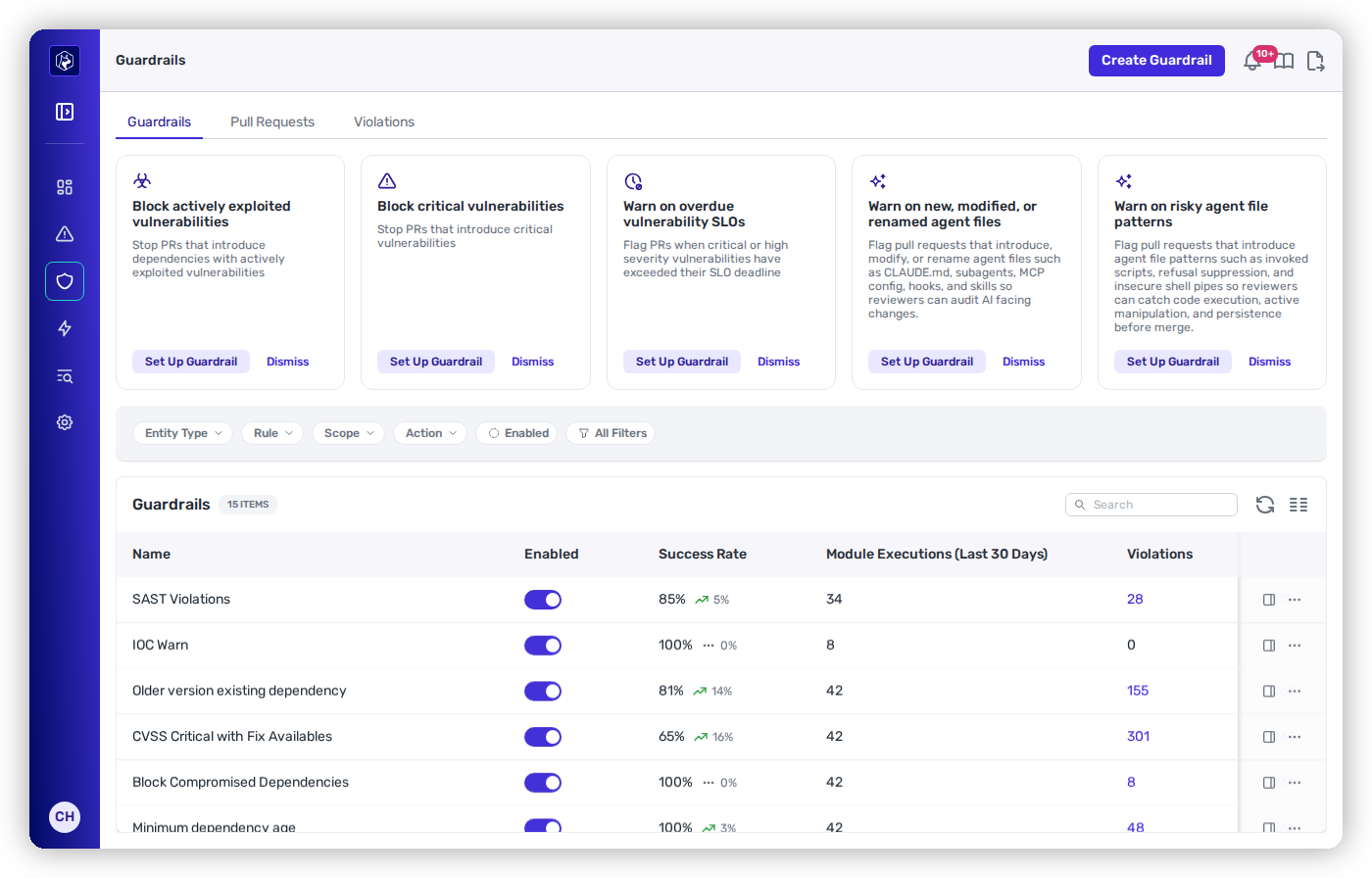
<figure><img src="https://414480750-files.gitbook.io/~/files/v0/b/gitbook-x-prod.appspot.com/o/spaces%2FXP3dp2kecwKA2KvYkntz%2Fuploads%2Fgit-blob-b3fdd7a5f67dcc0623530e2d0095cca10c81a5f7%2Fguardrails-list.png?alt=media" alt="The Guardrails list with its Guardrails, Pull Requests, and Violations tabs."><figcaption><p>The Guardrails area — each row is a policy, with its live success rate, violations, and action.</p></figcaption></figure>

{% hint style="info" %}
**Rules within one guardrail are ANDed** — a dependency must match *every* rule for the guardrail to fire. To get **OR** behavior (fire when *any* rule matches), create a separate guardrail per rule. OR-within-a-single-guardrail is on the roadmap.
{% endhint %}

## Scope: where each guardrail applies

Guardrails are scoped, and scopes combine on a single guardrail for precise targeting — for example, *Block* on production, internet-accessible services and *Warn* everywhere else.

{% columns %}
{% column %}

* **All Repositories (Global)** — every repo and service (the default).
* **Repository** — by name, source, or org/group.
  {% endcolumn %}

{% column %}

* **Service Runtime Context** — by tier, application, or internet accessibility.
* **Branch** — by branch type (all / default only / all except main).
  {% endcolumn %}
  {% endcolumns %}

## Execution results

Each time a guardrail evaluates a pull request it records an **execution** with one of four results. A guardrail with rules on several code modules records one execution per module.

| Result            | What it means                                                                                                                        |
| ----------------- | ------------------------------------------------------------------------------------------------------------------------------------ |
| **Pass**          | The guardrail evaluated the change and nothing matched.                                                                              |
| **Fail**          | The guardrail evaluated the change and its rules matched, raising a violation. Under **Block**, this is what fails the status check. |
| **Error**         | The evaluation broke. No violation is raised.                                                                                        |
| **Not Evaluated** | The input the guardrail needed never arrived, so it reached no verdict.                                                              |

**Error** and **Not Evaluated** are different states: Error means the evaluation broke, Not Evaluated means the input never arrived. Neither fails the status check, and both are recorded against the pull request. A **Not Evaluated** execution also carries the reason — see [when the pull-request scan does not run](/mrecEO40m5D6bt7Pq5pE/prevent/pr-guardrails/guardrail-types/secrets-guardrails.md#when-the-pull-request-scan-does-not-run).

A check run rolls its executions up **worst-first**: **Error**, then **Fail**, then **Not Evaluated**, then **Pass**. One leg without a verdict is therefore not reported as a clean run.

## Monitoring guardrails

Three tabs at the top of the **Guardrails** area answer three different questions — *which policies exist*, *what happened on each PR*, and *every individual rule hit*.

### Guardrails tab

Every guardrail you have configured, one row per policy.

| Column                               | What it shows                                                            |
| ------------------------------------ | ------------------------------------------------------------------------ |
| **Name**                             | The guardrail's name.                                                    |
| **Enabled**                          | A toggle. Off means the guardrail stays configured but is not evaluated. |
| **Success Rate**                     | The share of recent executions that passed, with the change beside it.   |
| **Module Executions (Last 30 Days)** | How many code modules it ran against in the last 30 days.                |
| **Violations**                       | How many violations it has raised.                                       |
| **Pull Requests**                    | How many pull requests it has evaluated.                                 |
| **Action**                           | Its enforcement action — **Observe**, **Warn** or **Block**.             |
| **Last Active**                      | When it last evaluated a pull request.                                   |

Filter by **Entity Type**, **Rule**, **Scope**, **Action** or **Enabled**, and use **All Filters** for the rest. **Create Guardrail** is above the table.

### Pull Requests tab

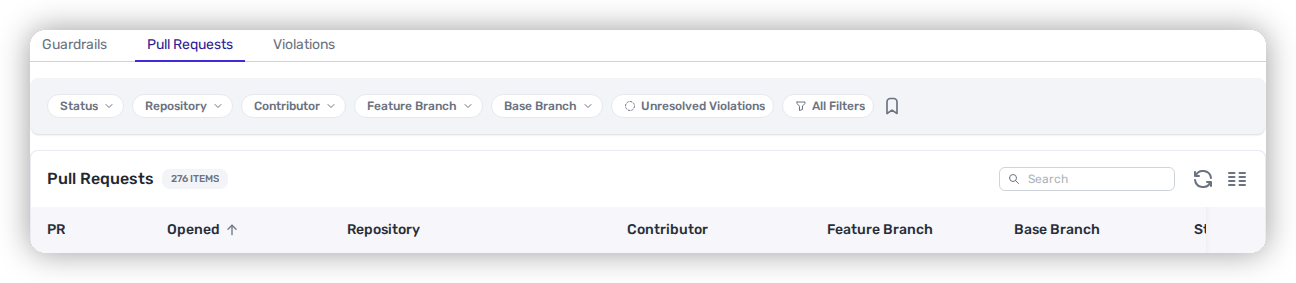
Every pull request Heeler has evaluated, one row per PR. It's how you watch impact while rolling a guardrail from Observe → Warn → Block.

<figure><img src="https://414480750-files.gitbook.io/~/files/v0/b/gitbook-x-prod.appspot.com/o/spaces%2FXP3dp2kecwKA2KvYkntz%2Fuploads%2Fgit-blob-b802f166d2bd6775e73bfd70bf286c54e1bc6dea%2Fcc-gr-pr-tab.png?alt=media" alt="The Pull Requests tab with its Status, Repository, Contributor, and branch filters."><figcaption><p>The Pull Requests tab — every evaluated PR, filterable by status, repository, contributor, and branch.</p></figcaption></figure>

| Column                                   | What it shows                                                                                                                                    |
| ---------------------------------------- | ------------------------------------------------------------------------------------------------------------------------------------------------ |
| **PR** / **Opened**                      | The pull request (linked to the SCM) and when it opened.                                                                                         |
| **Repository**                           | The repo the PR targets.                                                                                                                         |
| **Contributor**                          | Who authored the PR.                                                                                                                             |
| **Feature Branch** / **Base Branch**     | The source and target branches.                                                                                                                  |
| **Status**                               | The guardrail check outcome — **Passing**, **Passed with warnings** (a Warn-only guardrail matched but doesn't block the merge), or **Blocked**. |
| **Guardrails**                           | Which guardrails evaluated the PR.                                                                                                               |
| **Violations** / **Resolved Violations** | How many violations were found, and how many were resolved *within* the PR as later commits fixed them.                                          |

Filter by **Status**, **Repository**, **Contributor**, **Feature/Base Branch**, or **Unresolved Violations**. Open a PR to see its execution detail — which guardrails fired and the specific violations.

### Violations tab

Every individual violation across your environment, which surfaces **patterns** — one dependency tripping guardrails across many repositories — and allows them to be acted on together.

| Column                                  | What it shows                                                     |
| --------------------------------------- | ----------------------------------------------------------------- |
| **Executed At**                         | When the violation was recorded.                                  |
| **Guardrail** / **Action**              | The guardrail that fired and its action (Observe / Warn / Block). |
| **Violations**                          | What was violated (e.g. the offending dependency and version).    |
| **PR** / **Repository** / **Code Root** | Where it occurred.                                                |
| **Contributor**                         | Who authored the change.                                          |

A violation's status is **active**, **resolved**, or **merged unresolved** (the PR merged with the violation still open — the case to review).

### The guardrail detail drawer

Click a guardrail (on the **Guardrails** tab) to open its detail drawer. Four sub-tabs break down everything about that one policy:

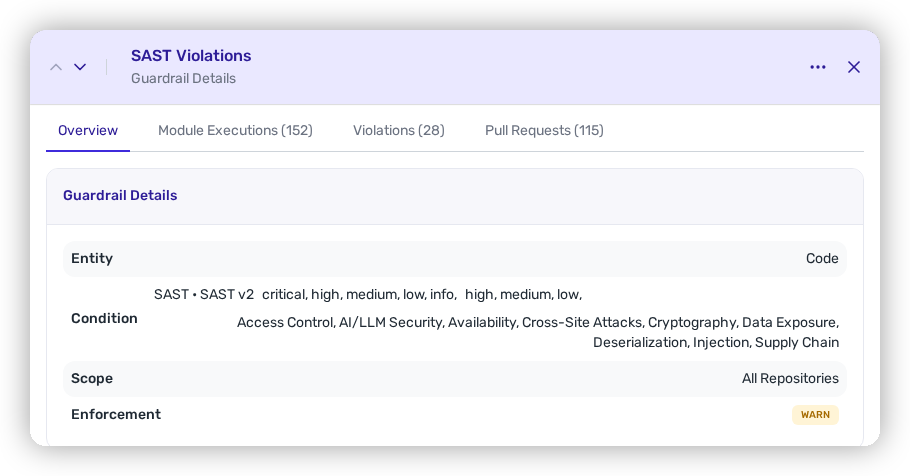
<figure><img src="https://414480750-files.gitbook.io/~/files/v0/b/gitbook-x-prod.appspot.com/o/spaces%2FXP3dp2kecwKA2KvYkntz%2Fuploads%2Fgit-blob-f02d8fcbb23ef8f71f071f2c019c8360edcd87c4%2Fcc-gr-drawer.png?alt=media" alt="A guardrail&#x27;s detail drawer showing the Overview, Module Executions, Violations, and Pull Requests sub-tabs."><figcaption><p>The guardrail detail drawer — its definition plus every execution, violation, and PR it touched.</p></figcaption></figure>

* **Overview** — the guardrail's definition: **Entity**, **Condition** (its rules), **Scope**, and **Enforcement** action.
* **Module Executions** — every code module the guardrail ran against, with counts.
* **Violations** — the violations this specific guardrail has raised.
* **Pull Requests** — the PRs this guardrail has evaluated.

{% hint style="info" %}
For a repository-scoped view of guardrail activity, open **Catalog → the repository → a module → Guardrail Executions** — the per-module execution history for everything that ran against that code.
{% endhint %}

## Supported source control

Guardrails run as native PR/MR status checks on **GitHub**, **GitLab**, **Bitbucket**, and **Azure DevOps**. The check you'll look for in the PR's checks list is named as follows, and it reports a passing (`Guardrail Scan Passed`) or failing (`Guardrail Violation`) result with a link to `app.heeler.com/guardrails/violations`:

{% tabs %}
{% tab title="GitHub" %}
The check is named **Heeler**. Status checks on the PR, with an inline **Fix w/Heeler** action (or one-click **Apply suggestion**) when an auto-fix is available.
{% endtab %}

{% tab title="GitLab" %}
The external status check is named **Heeler Security Guardrail Scan**. Merge-request status checks; an available auto-fix is committed directly to the branch.
{% endtab %}

{% tab title="Bitbucket" %}
The build status is named **Heeler Security Guardrail Scan** (key `heeler-guardrails`). Native PR status checks; an available auto-fix is committed directly to the branch.
{% endtab %}

{% tab title="Azure DevOps" %}
The status is named **Heeler Security Guardrail Scan**. Native PR status checks.
{% endtab %}
{% endtabs %}

## In this section

<table data-view="cards"><thead><tr><th></th><th></th><th data-hidden data-card-target data-type="content-ref"></th></tr></thead><tbody><tr><td><strong>Guardrail Types</strong></td><td>What each check enforces, and their rule catalogs.</td><td><a href="/mrecEO40m5D6bt7Pq5pE/prevent/pr-guardrails/guardrail-types.md">Guardrail Types</a></td></tr><tr><td><strong>Building Guardrails</strong></td><td>Recommended baselines, the AI assistant, and the manual builder.</td><td><a href="/mrecEO40m5D6bt7Pq5pE/prevent/pr-guardrails/building-guardrails.md">Building Guardrails</a></td></tr><tr><td><strong>Guardrail Auto-Fix</strong></td><td>Resolve an eligible violation directly in the pull request.</td><td><a href="/mrecEO40m5D6bt7Pq5pE/prevent/pr-guardrails/guardrail-auto-fix.md">Guardrail Auto-Fix</a></td></tr><tr><td><strong>Guardrail Bundles</strong></td><td>Apply the enforceable controls of an ASVS level as one set.</td><td><a href="/mrecEO40m5D6bt7Pq5pE/standards-and-compliance/guardrail-bundles.md">Guardrail Bundles</a></td></tr></tbody></table>


---

# Agent Instructions
This documentation is published with GitBook. GitBook is the documentation platform designed so that both humans and AI agents can read, navigate, and reason over technical content effectively. Learn more at gitbook.com.

## Querying This Documentation
If you need additional information that is not directly available in this page, you can query the documentation dynamically by asking a question.

Perform an HTTP GET request on the current page URL with the `ask` query parameter, and the optional `goal` query parameter:

```
GET https://docs.heeler.com/mrecEO40m5D6bt7Pq5pE/prevent/pr-guardrails.md?ask=<question>&goal=<endgoal>
```

`ask` is the immediate question: it should be specific, self-contained, and written in natural language.
`goal` is optional and describes the broader end goal you are ultimately trying to accomplish on behalf of the user. GitBook uses it to tailor the answer towards what is most useful for that goal.

The response will contain a direct answer to the question and relevant excerpts and sources from the documentation.

Use this mechanism when the answer is not explicitly present in the current page, you need clarification or additional context, or you want to retrieve related documentation sections.