> For the complete documentation index, see [llms.txt](https://docs.heeler.com/mrecEO40m5D6bt7Pq5pE/llms.txt). Markdown versions of documentation pages are available by appending `.md` to page URLs; this page is available as [Markdown](https://docs.heeler.com/mrecEO40m5D6bt7Pq5pE/administer-and-monitor/program-policy/remediation-agent.md).

# Remediation Agent

Shape how Heeler's remediation agent opens pull requests, decide whether a fix opens one straight away or waits for approval, configure which pull-request comments trigger an execution, give it durabl

**Administration → Program → Agent** controls how Heeler's remediation agent behaves when it fixes findings — what its pull requests look like, whether a fix opens its pull request straight away or waits for approval, which pull-request comments start an execution, whether a fix needs a ticket behind it first, and what it knows about your repositories before it starts. The page contains five cards: **Agent**, **Ticket Enforcement**, **Pull Request Defaults for SCA and SAST Autofix**, **Comment Triggers**, and **Memories**.

{% hint style="info" %}
Changing anything on this page requires the **Administrator** role. An **Administrator (read-only)** can view it but can't make changes.
{% endhint %}

## The pull-request template

The template decides what a Heeler pull request looks like when it lands in your repository. The agent writes the fix; this card decides the shape of the pull request that carries it — your sections, your checklists, and how much of Heeler's own context travels with it.

Paste the contents of your repository's `pull_request_template.md` into the template field, up to 5,000 characters. The counter beneath the field tracks how much you've used.

The agent reads your template as the **structure** for the pull-request body it writes. It isn't a fill-in-the-blanks form: the agent doesn't substitute values into placeholders or tick your checkboxes for you. It writes a genuine description of the change it made, laid out in the sections your template defines — so a Heeler pull request arrives looking like every other pull request in the repository, and your reviewers read it the way they always do.

Leave the field empty and the agent uses Heeler's own structure instead:

<table><thead><tr><th width="260">Fix type</th><th>Default sections</th></tr></thead><tbody><tr><td>Dependency (SCA) fix</td><td>Impact · Changes Made · Validation · Vulnerabilities Fixed · Jira or Linear ticket</td></tr><tr><td>Code (SAST) fix</td><td>Vulnerabilities Fixed · Changes Made</td></tr></tbody></table>

### What the template does and doesn't control

<table><thead><tr><th width="240">Part of the pull request</th><th>Controlled by your template?</th></tr></thead><tbody><tr><td>Body</td><td><strong>Yes</strong> — your sections replace Heeler's defaults.</td></tr><tr><td>Title</td><td>No. Titles stay in Heeler's format so they're recognisable and searchable: <code>[Heeler] ENG-123: Upgrade &#x3C;package> from &#x3C;old> to &#x3C;new></code> for a dependency fix (the ticket ID appears when one is linked), <code>[Heeler] Fix &#x3C;rule name> in &#x3C;file>(&#x3C;line>)</code> for a code fix.</td></tr><tr><td>Commit message</td><td>No.</td></tr><tr><td>Branch name</td><td>No.</td></tr><tr><td>Heeler footer and conversation history</td><td>No — those are the two checkboxes below, appended after your body.</td></tr></tbody></table>

{% hint style="info" %}
**Where the template applies today.** The template shapes pull requests from the dependency (SCA) remediation agent. Code (SAST) fixes and fixes made by [PR Guardrails](/mrecEO40m5D6bt7Pq5pE/prevent/pr-guardrails/guardrail-auto-fix.md) on an existing branch use Heeler's default structure. The two checkboxes below apply to both agents.
{% endhint %}

### Your template can't give the agent instructions

Anything in the template is treated strictly as formatting guidance. If a line reads like a directive to the agent — *"ignore the tests"*, *"also update the deploy config"* — the agent won't act on it. That's deliberate: the template is content destined for a pull-request body, so it can't become a side channel into the agent's behaviour.

To change how the agent works, use [Memories](#memories) instead.

### Append agent conversation history

Turn this on and Heeler adds a collapsed **Agent Conversation History** section at the bottom of the pull request, so a reviewer who wants to see how the fix was reached can expand it without it dominating the page.

It's an abbreviated transcript, not a raw log: the agent's own messages, the name of each tool it called, and any instructions a person gave it during the run. Tool output and arguments are left out. The section opens with a pointer back to Heeler for the complete record — the full run is always available under [Agent Executions](/mrecEO40m5D6bt7Pq5pE/fix/agent-executions.md).

{% hint style="warning" %}
The conversation history is appended as part of the Heeler footer, so it appears only when **Append Heeler footer** is also on. Turn the footer off and the history goes with it.
{% endhint %}

If a run is long enough that the resulting body exceeds what your source-code manager accepts, Heeler opens the pull request without the conversation history rather than failing. The fix still lands; the transcript stays in Heeler.

### Append Heeler footer

This adds a short **Heeler Information** block beneath the body with a link to the finding — the remediation for a dependency fix, the SAST finding for a code fix: what was vulnerable, how Heeler found it, and what the fix resolves.

The links are shareable and work for reviewers who don't have a Heeler account. They expire **seven days** after the pull request is created, which is worth knowing if your pull requests sit in review for a while. After that, reviewers with Heeler access can still find the finding in the app, and the body itself remains complete.

### What a finished pull request looks like

Top to bottom, Heeler assembles the body in this order:

1. **Who asked for it** — a one-line credit, *Remediation Requested By: Ada Lovelace*, when a person triggered the fix with **Fix Now**. Scheduled and automated runs have no credit line.
2. **The body** — your template's structure, or Heeler's default sections.
3. **The Heeler footer** — the link back to the finding, when the toggle is on.
4. **The conversation history** — collapsed, inside the footer, when both toggles are on.

Fixes the agent couldn't validate open as **draft** pull requests, so a change that didn't get all the way to green never looks ready to merge.

Click **Save** to apply changes to the Agent card. Changes affect pull requests opened from that point on — pull requests already open aren't rewritten.

## Ticket enforcement

The **Ticket Enforcement** card has one switch — **Require ticket for Fix Now**. Turn it on and no finding can be remediated with **Fix Now** until it has a linked ticket. It reaches workflow autofix too: a workflow's fix step is skipped for any finding with no ticket behind it. Use it when your process requires a tracked, approved ticket before any code change, so automated fixes still follow change control. Off (the default), anyone with permission can trigger a fix directly.

## Pull request defaults for SCA and SAST autofix

The **Pull Request Defaults for SCA and SAST Autofix** card decides what happens the moment the agent finishes a fix: the pull request opens straight away, or the fix waits for an administrator to approve it first. It is the starting position for every autofix Heeler creates.

The card has one switch — **Open pull requests automatically** — and it is **on** by default.

<table><thead><tr><th width="180">Switch position</th><th>What happens once the agent has a fix</th></tr></thead><tbody><tr><td><strong>On</strong> (the default)</td><td>Fix ready → pull request → developer. The fix arrives in the repository as any other pull request would.</td></tr><tr><td><strong>Off</strong></td><td>Fix ready → <strong>an administrator approves</strong> → pull request → developer. The fix is built and waits under <strong>Awaiting Approval</strong> in <a href="/mrecEO40m5D6bt7Pq5pE/fix/agent-executions.md">Agent Executions</a>.</td></tr></tbody></table>

The off position is the on position with one step inserted. The agent does the same work either way — it writes the fix, validates it, and prepares the pull request. The switch only decides whether a person sees the result before the developer does.

### What the hold is for

Turning the switch off puts your security team between Heeler's automation and your developers. It is the answer to *"I would like to see what the agent produces before my engineers do"* — which matters most where nobody is watching each run: workflows firing unattended, and bulk fixes generating changes faster than anyone reads them.

Held fixes collect in [Agent Executions](/mrecEO40m5D6bt7Pq5pE/fix/agent-executions.md), where an administrator can:

* **Approve** — the pull request opens and reaches the developer, exactly as it would have with the switch on.
* **Discard** — the fix is dropped and the developer never learns it existed.

Anything left unactioned for **21 days** is cancelled automatically, and nothing notifies anyone when that happens. So the queue is work, not an inbox: if you turn this switch off, give someone the job of clearing it. A cancelled fix can be started again with **Re-run** — it cannot be un-cancelled.

### It sets a default; it does not lock anything down

This card sits beside **Ticket Enforcement** and looks like the same kind of control. It is not, and the difference is the one on this page worth being sure about.

<table><thead><tr><th width="260">Card</th><th>What it does</th></tr></thead><tbody><tr><td><strong>Ticket Enforcement</strong></td><td><strong>Blocks, everywhere.</strong> With it on, a finding with no linked ticket cannot be fixed with <strong>Fix Now</strong> at all, and a workflow's autofix step is skipped rather than run. Nobody can proceed without one.</td></tr><tr><td><strong>Pull Request Defaults</strong></td><td><strong>Sets a starting position.</strong> Every fix begins where this switch says, and anyone running a fix can say otherwise for that fix.</td></tr></tbody></table>

Turning **Open pull requests automatically** off therefore does not mean nothing can auto-open a pull request. It means nothing does *unless someone chooses it for that particular fix, batch, or workflow*. There is no setting that makes the hold binding, so if your process needs "no automated pull request may reach a repository without review", this card is not where that is enforced.

Every surface that starts a fix carries its own copy of the control, pre-set from this card and changeable for that one invocation:

<table><thead><tr><th width="330">Where the fix starts</th><th>What an override there covers</th></tr></thead><tbody><tr><td><a href="/mrecEO40m5D6bt7Pq5pE/fix/sca-auto-fix.md">Fix Now</a> on a single remediation or SAST finding</td><td>That one fix.</td></tr><tr><td>Bulk <strong>Fix Now</strong></td><td>The whole batch, as a single decision.</td></tr><tr><td><strong>Re-run</strong> of an existing execution</td><td>That re-run.</td></tr><tr><td>A <a href="/mrecEO40m5D6bt7Pq5pE/fix/automate-remediation.md"><strong>Fix with Heeler Agent</strong></a> workflow action</td><td>That workflow, on every run.</td></tr><tr><td>The API, MCP, and <a href="/mrecEO40m5D6bt7Pq5pE/prevent/cli.md"><code>heelercli</code></a></td><td>That call. A caller that sends no value gets this card's setting.</td></tr></tbody></table>

### Who it applies to

Only three roles can start a remediation at all, and the card applies to one of them.

<table><thead><tr><th width="220">Role</th><th>Behaviour</th><th width="160">Override</th></tr></thead><tbody><tr><td><strong>Administrator</strong></td><td>The default for individual fixes, bulk fixes, and workflows.</td><td>Can override</td></tr><tr><td><strong>Team contributor</strong></td><td>Fixes always open a pull request.</td><td>No override</td></tr><tr><td><strong>Organization contributor</strong></td><td>Fixes always open a pull request.</td><td>No override</td></tr></tbody></table>

A **Team contributor**'s or **Organization contributor**'s fix opens its pull request whatever this card says. The approval queue lives in Administration, which they cannot reach, so a fix held for them would be invisible to the person who asked for it. A developer fixing their own finding is standing right there and will see their own pull request — there is nothing waiting to be caught.

### What it covers

The card governs the two agents that open pull requests of their own — **dependency (SCA) autofix** and **code (SAST) autofix** — which is the scope its name states.

Fixes from [PR Guardrails](/mrecEO40m5D6bt7Pq5pE/prevent/pr-guardrails/guardrail-auto-fix.md), from CI, and from [comments on a Heeler pull request](/mrecEO40m5D6bt7Pq5pE/fix/validate-and-merge-ready.md) commit to a branch that already exists rather than opening a pull request, so this setting does not apply to them.

## Comment triggers

The **Comment Triggers** card runs an agent execution when a comment on a Heeler pull request matches a rule in the table. Rules can match comment text or the GitHub account that posted the comment.

The table shows each rule's **Type**, **Match**, and **Status**. Use the status switch to enable or pause a rule. The pencil and trash icons edit or delete it.

### Add a keyword trigger

Use a keyword trigger when a word or command in the comment should start an execution.

1. Click **Add Trigger**.
2. Under **Trigger Type**, choose **Keyword — Match comment text**.
3. Choose a **Match Mode**:
   * **Starts with** — the beginning of the comment must match the value.
   * **Contains** — the value can appear anywhere in the comment.
4. Enter the **Value**, such as `/heeler`. Matching is case-insensitive.
5. Leave **Enabled** on if new matching comments should trigger an execution immediately.
6. Click **Save**.

Enabled rules are evaluated for new comments. Disabled rules remain in the table without starting executions.

### Listen to a bot or another GitHub account

Use a user trigger when every comment from a particular GitHub account should start an execution. This is how you configure Heeler to listen to a review bot such as CodeRabbit, Cursor Bugbot, or Dependabot; there is no bot-selection dropdown on the current page.

1. Click **Add Trigger**.
2. Under **Trigger Type**, choose **User — Match any comment they post**.
3. Enter the account's login in **GitHub Username**, for example `dependabot[bot]` or `coderabbitai[bot]`.
4. Leave **Enabled** on.
5. Click **Save**.

The account does not need to mention `@heeler`. A new comment from an enabled user rule is treated as a request to run the agent on that pull request.

{% hint style="info" %}
Copy the login from GitHub, including a suffix such as `[bot]` when the account uses one.
{% endhint %}

### Manage triggers

Use the **Status** switch in the table to pause or resume a trigger without deleting it. Click the pencil icon to change its type, match value, match mode, or enabled state. Click the trash icon and confirm to delete it.

If the table has no enabled triggers, comments do not start an agent execution through this feature.

When a comment starts an execution, the agent works on the Heeler pull request's branch. If it produces a change, it pushes the change to that branch rather than opening a second pull request. The execution is recorded under [Agent Executions](/mrecEO40m5D6bt7Pq5pE/fix/agent-executions.md).

## Memories

Every repository has knowledge that isn't in the code: dependencies are pinned a particular way, a lockfile is regenerated by CI rather than committed, the integration tests need an environment variable before they'll pass. Without that context, each remediation run starts cold and rediscovers it — or gets it wrong.

**Memories** are the curated facts you give the agent so it doesn't have to. Each one is a short, titled note the agent carries from one run to the next, and the agent adds its own as it learns your repositories. You curate the result.

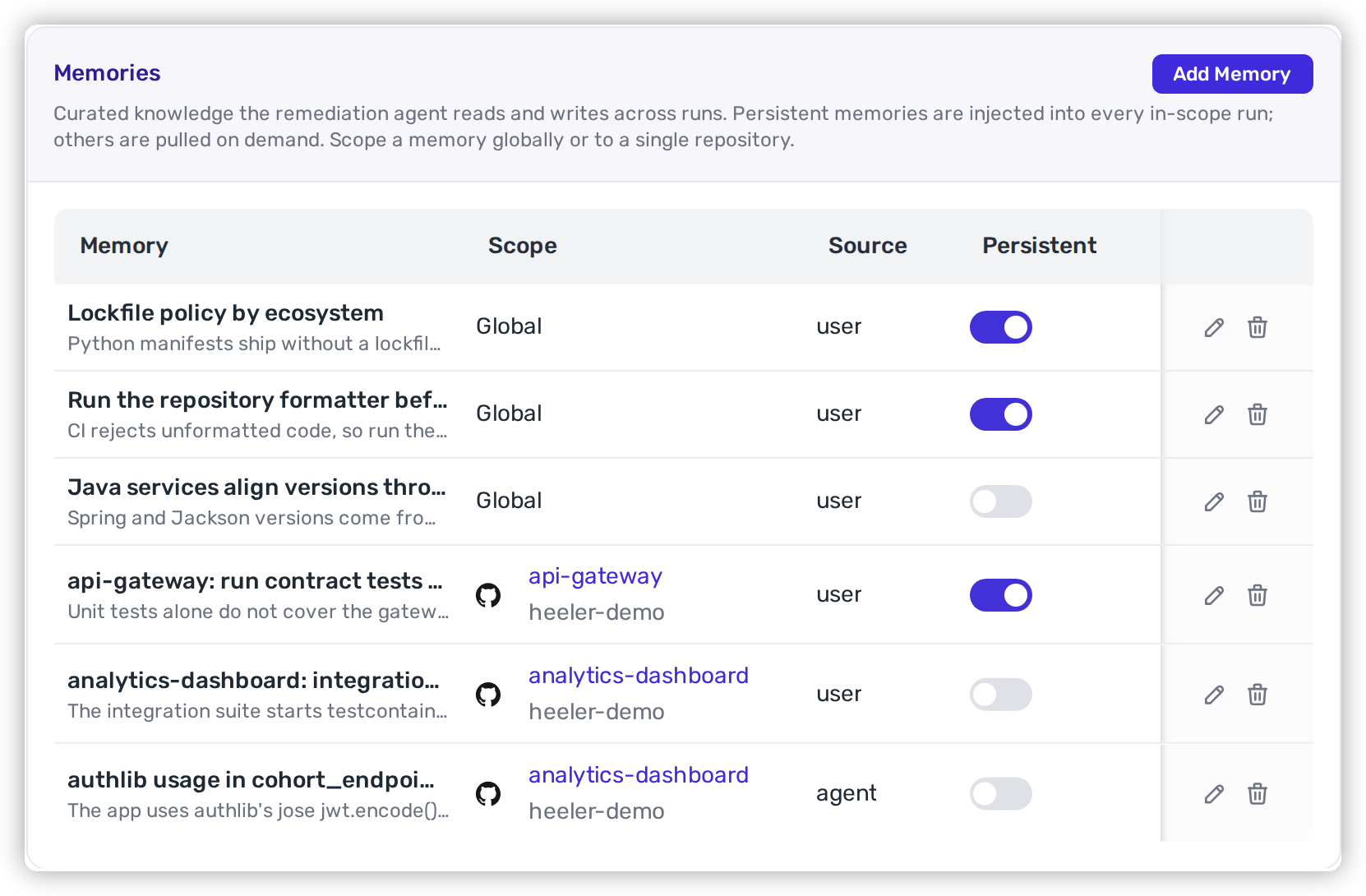
<figure><img src="https://414480750-files.gitbook.io/~/files/v0/b/gitbook-x-prod.appspot.com/o/spaces%2FXP3dp2kecwKA2KvYkntz%2Fuploads%2Fgit-blob-0d2a86e91e7fc0410b9b29508813405b9f90f7fa%2Fam-program-agent-memories.png?alt=media" alt="The Memories card with its Memory, Scope, Source, and Persistent columns, listing memories scoped both globally and to named repositories with their provider icons, some written by a person and some by the agent. Each row ends in a pencil and a trash icon, and an Add Memory button sits in the card header."><figcaption><p>The Memories table — a mix of global and repository-scoped memories, with Persistent flipped per row.</p></figcaption></figure>

The table lists every memory in your tenant:

<table><thead><tr><th width="150">Column</th><th>What it shows</th></tr></thead><tbody><tr><td><strong>Memory</strong></td><td>The title, with the description beneath it.</td></tr><tr><td><strong>Scope</strong></td><td><strong>Global</strong>, or the repository the memory is limited to.</td></tr><tr><td><strong>Source</strong></td><td><code>user</code> for memories a person wrote, <code>agent</code> for ones the agent wrote during a run.</td></tr><tr><td><strong>Persistent</strong></td><td>A toggle you can flip directly in the table — no need to open the memory.</td></tr><tr><td>Row actions</td><td>A pencil icon to edit the memory and a trash icon to delete it.</td></tr></tbody></table>

Memories are shared across your whole tenant: every run, for every user, reads the same set. Both remediation agents use them — the dependency (SCA) agent and the code (SAST) agent.

### Add or edit a memory

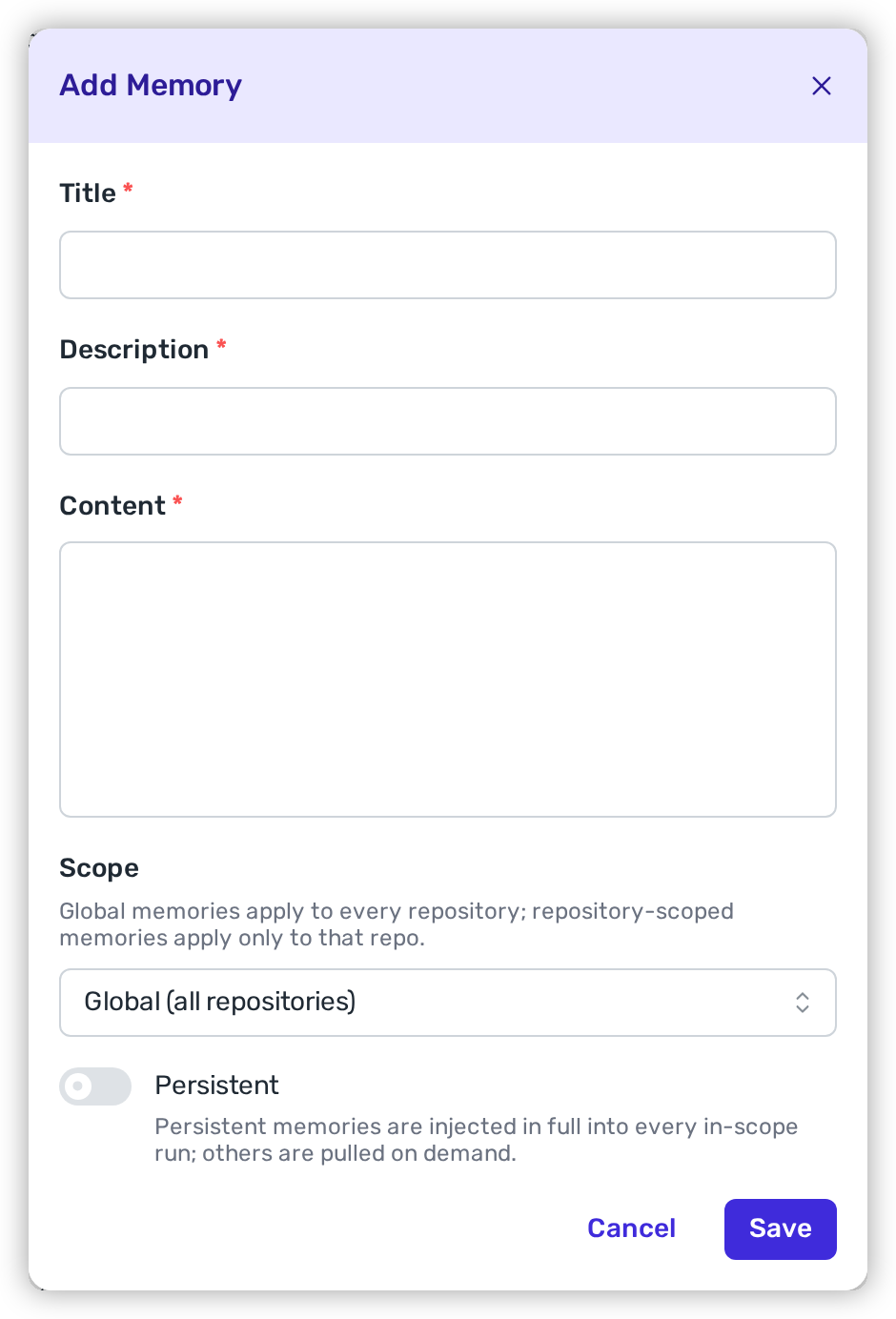
Click **Add Memory** in the card header, or click the pencil icon at the end of a row to change one you already have. Both open the same form. Title, description, and content are all required.

<figure><img src="https://414480750-files.gitbook.io/~/files/v0/b/gitbook-x-prod.appspot.com/o/spaces%2FXP3dp2kecwKA2KvYkntz%2Fuploads%2Fgit-blob-c01b7965c451c4a55eb6207d3c1c9a29934dcdb4%2Fam-program-agent-memory-add.png?alt=media" alt="The Add Memory modal with required Title, Description, and Content fields, a Scope select showing Global (all repositories), and a Persistent switch turned off with helper text beneath it, above Cancel and Save buttons."><figcaption><p>Add Memory — title, description, and content are required; scope and persistence decide how the agent reads it.</p></figcaption></figure>

<table><thead><tr><th width="150">Field</th><th>What to put in it</th></tr></thead><tbody><tr><td><strong>Title</strong></td><td>A short label for the fact, up to 120 characters. It's the heading the agent reads, so make it descriptive: <em>Lockfile policy for Python services</em>, not <em>Note 3</em>.</td></tr><tr><td><strong>Description</strong></td><td>One line summarising the memory, up to 300 characters. For a non-persistent memory this is how the agent decides whether the memory is worth reading — write it so the relevance is obvious.</td></tr><tr><td><strong>Content</strong></td><td>The memory itself, up to 4,096 characters. Plain text or Markdown.</td></tr><tr><td><strong>Scope</strong></td><td><strong>Global (all repositories)</strong> or a single repository, chosen from the searchable list.</td></tr><tr><td><strong>Persistent</strong></td><td>Whether the agent always has the full memory in front of it, or fetches it when it's relevant. See below.</td></tr></tbody></table>

Click **Save**. The memory applies to the next run in its scope.

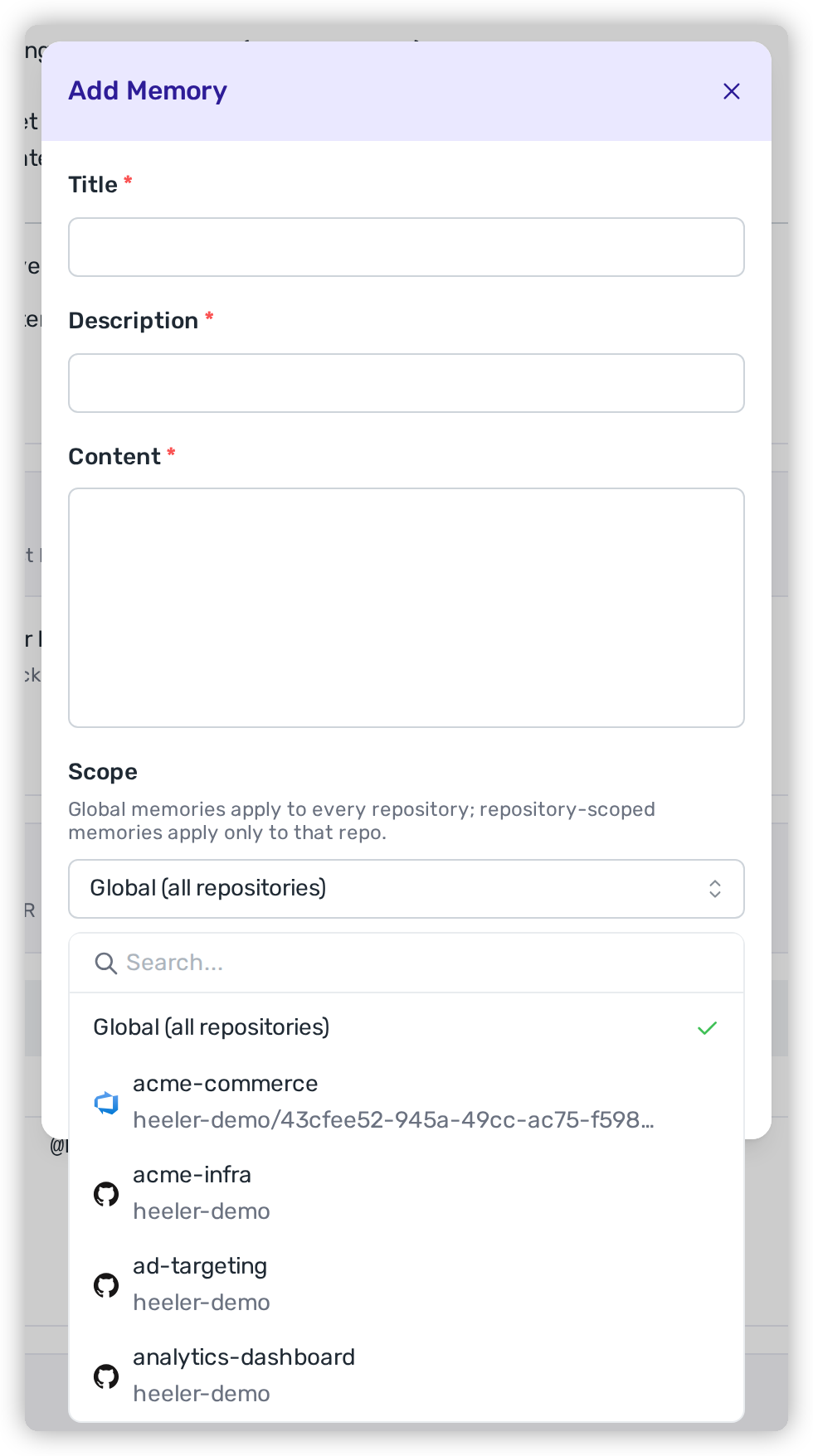
### Scope — everywhere, or one repository

A **global** memory applies to every run. A **repository-scoped** memory applies only to runs against that repository. Each run loads your global memories plus the ones scoped to the repository it's working in — so a repository-scoped memory never affects anything else.

Scope by repository when the fact is local to it: a build quirk, a suite only that repository needs to run. Keep policy that should hold everywhere — how you want PRs structured, how lockfiles are handled — global.

<figure><img src="https://414480750-files.gitbook.io/~/files/v0/b/gitbook-x-prod.appspot.com/o/spaces%2FXP3dp2kecwKA2KvYkntz%2Fuploads%2Fgit-blob-87447c34fcd25e8074f756954e55a8d553f15bc7%2Fam-program-agent-memory-scope.png?alt=media" alt="The Scope select open inside the Add Memory modal, showing a search box, Global (all repositories) checked at the top of the list, then repository options each with its provider icon and owning organisation."><figcaption><p>Scope — Global sits at the top of the searchable list, followed by every connected repository.</p></figcaption></figure>

{% hint style="info" %}
Scope is per repository, not per language or per service. If one repository contains several ecosystems, write the condition into the memory's content instead — for example, *"For `pyproject.toml` changes, edit the manifest only; for `package.json`, also commit the regenerated lockfile."*
{% endhint %}

### Persistent — always-on, or on demand

The **Persistent** toggle decides how a memory reaches the agent:

<table><thead><tr><th width="130">Persistent</th><th>How the agent sees it</th><th>Use it for</th></tr></thead><tbody><tr><td><strong>On</strong></td><td>The full memory is in the agent's instructions on every run in its scope.</td><td>Rules that must never be missed — a lockfile policy, a mandatory test command, a required build step.</td></tr><tr><td><strong>Off</strong> (the default)</td><td>The agent sees only the title and description, and reads the full memory when it looks relevant to the change being made.</td><td>Reference material that matters sometimes — a module's history, a workaround for one framework.</td></tr></tbody></table>

Keeping the persistent set small is what makes it effective: the fewer always-on memories there are, the more weight each one carries. Reach for persistent when a run getting the rule wrong would produce a bad pull request.

### Source — what the agent writes for itself

When a run learns something durable about a repository, it saves that as a memory so later runs don't have to rediscover it — how dependencies are pinned, which suite has to pass before a change counts as done, a build or test quirk. Those rows show a **Source** of `agent`. It's steered away from saving one-off details like the specific vulnerability it just fixed, which would only be noise later.

You stay in control of everything it writes:

* The agent can only add, edit, or delete its **own** memories — repository-scoped and non-persistent.
* It can't create a global memory, and it can't mark anything persistent. Those two reach further than a single run, so they're yours to decide.
* It can't change or delete a memory a person wrote.

Everything the agent saves appears in the table for you to review. A good agent memory is worth promoting: open it and turn on **Persistent**, or change its scope to **Global** to apply it everywhere.

### Limits

Each scope has a cap:

<table><thead><tr><th width="260">Scope</th><th>Maximum memories</th></tr></thead><tbody><tr><td>Global</td><td>75</td></tr><tr><td>Per repository</td><td>30</td></tr></tbody></table>

The caps are deliberate — memories work because they're curated, not because there are lots of them. When a repository is at its limit, the agent has to consolidate related memories or delete one of its own before it can save another, so the set stays sharp instead of sprawling.

### Delete a memory

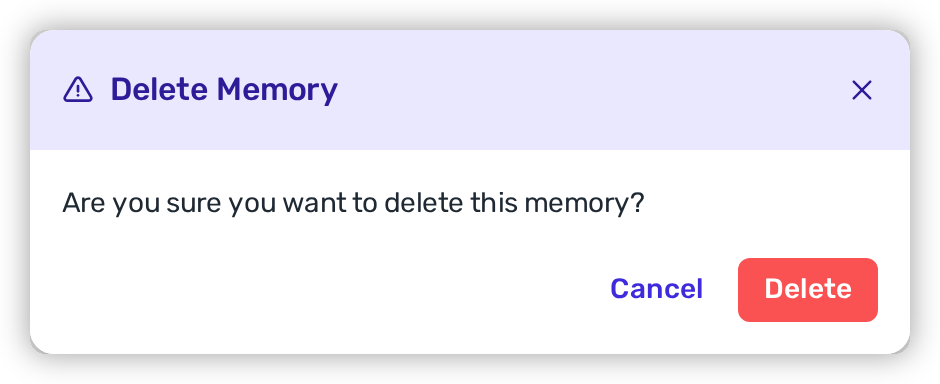
Click the trash icon at the end of the row, then **Delete** to confirm. Deletion is permanent — there's no restore — and takes effect on the next run.

<figure><img src="https://414480750-files.gitbook.io/~/files/v0/b/gitbook-x-prod.appspot.com/o/spaces%2FXP3dp2kecwKA2KvYkntz%2Fuploads%2Fgit-blob-26ea7eb33773474c36180a0178125b062183b61c%2Fam-program-agent-memory-delete.png?alt=media" alt="The Delete Memory confirmation dialog asking whether you are sure you want to delete this memory, with Cancel and Delete buttons."><figcaption><p>Deleting a memory is permanent — there's no restore.</p></figcaption></figure>

### Writing a memory the agent can act on

The agent treats memories as authoritative guidance, so precision pays off:

* **State the condition first.** *"When editing `pyproject.toml` in this repository…"* tells the agent when the rule applies before it tells it what to do.
* **Be specific about the prohibition.** "Don't commit the lockfile" leaves room for interpretation; naming the files — `requirements.txt`, `poetry.lock`, `uv.lock` — doesn't.
* **Say what "finished" looks like.** A run tries hard to produce a complete change. If a manifest-only pull request is correct for you, say so, or the agent may add more than you wanted.
* **Give the exact command.** Write out the script or command to run rather than describing it.
* **Leave out anything that changes run to run.** Ticket numbers, specific CVEs, and file paths from a past fix age badly. Keep memories to the stable shape of the repository.

## Related

* [Fix → the remediation agent](/mrecEO40m5D6bt7Pq5pE/fix.md) — what the agent does with these settings.
* [Remediation Assignment and Routing](/mrecEO40m5D6bt7Pq5pE/administer-and-monitor/program-policy/remediation-assignment-and-routing.md) — who each remediation goes to.
* [Agent Executions](/mrecEO40m5D6bt7Pq5pE/fix/agent-executions.md) — the record of every agent run.


---

# Agent Instructions
This documentation is published with GitBook. GitBook is the documentation platform designed so that both humans and AI agents can read, navigate, and reason over technical content effectively. Learn more at gitbook.com.

## Querying This Documentation
If you need additional information that is not directly available in this page, you can query the documentation dynamically by asking a question.

Perform an HTTP GET request on the current page URL with the `ask` query parameter, and the optional `goal` query parameter:

```
GET https://docs.heeler.com/mrecEO40m5D6bt7Pq5pE/administer-and-monitor/program-policy/remediation-agent.md?ask=<question>&goal=<endgoal>
```

`ask` is the immediate question: it should be specific, self-contained, and written in natural language.
`goal` is optional and describes the broader end goal you are ultimately trying to accomplish on behalf of the user. GitBook uses it to tailor the answer towards what is most useful for that goal.

The response will contain a direct answer to the question and relevant excerpts and sources from the documentation.

Use this mechanism when the answer is not explicitly present in the current page, you need clarification or additional context, or you want to retrieve related documentation sections.