> For the complete documentation index, see [llms.txt](https://docs.heeler.com/mrecEO40m5D6bt7Pq5pE/llms.txt). Markdown versions of documentation pages are available by appending `.md` to page URLs; this page is available as [Markdown](https://docs.heeler.com/mrecEO40m5D6bt7Pq5pE/get-started/map-your-organization.md).

# Map Your Organization

Mirror your real team, application, and environment structure into Heeler so findings route to the right owners and prioritize by business impact.

**What this unlocks:** the right context for every finding. When Heeler knows your **teams**, **applications**, and **environments**, findings route to the owner who can fix them and prioritize by real business impact — a vulnerability in a Production, customer-facing service outranks the same one in a sandbox.

Rather than rebuild that structure by hand, **Connection Mapping** reads it from the tools you already use — team structures in GitHub/GitLab/Port.io, application groupings via custom properties or blueprints, environment boundaries in your clouds — and keeps Heeler in sync automatically as your org evolves.

## Before you start

* **Administrator** in Heeler (see [Roles and Permissions](/mrecEO40m5D6bt7Pq5pE/get-started/users-and-access/roles-and-permissions.md)).
* At least one active connection — Connection Mapping only offers sources you've already connected.

## Where it lives

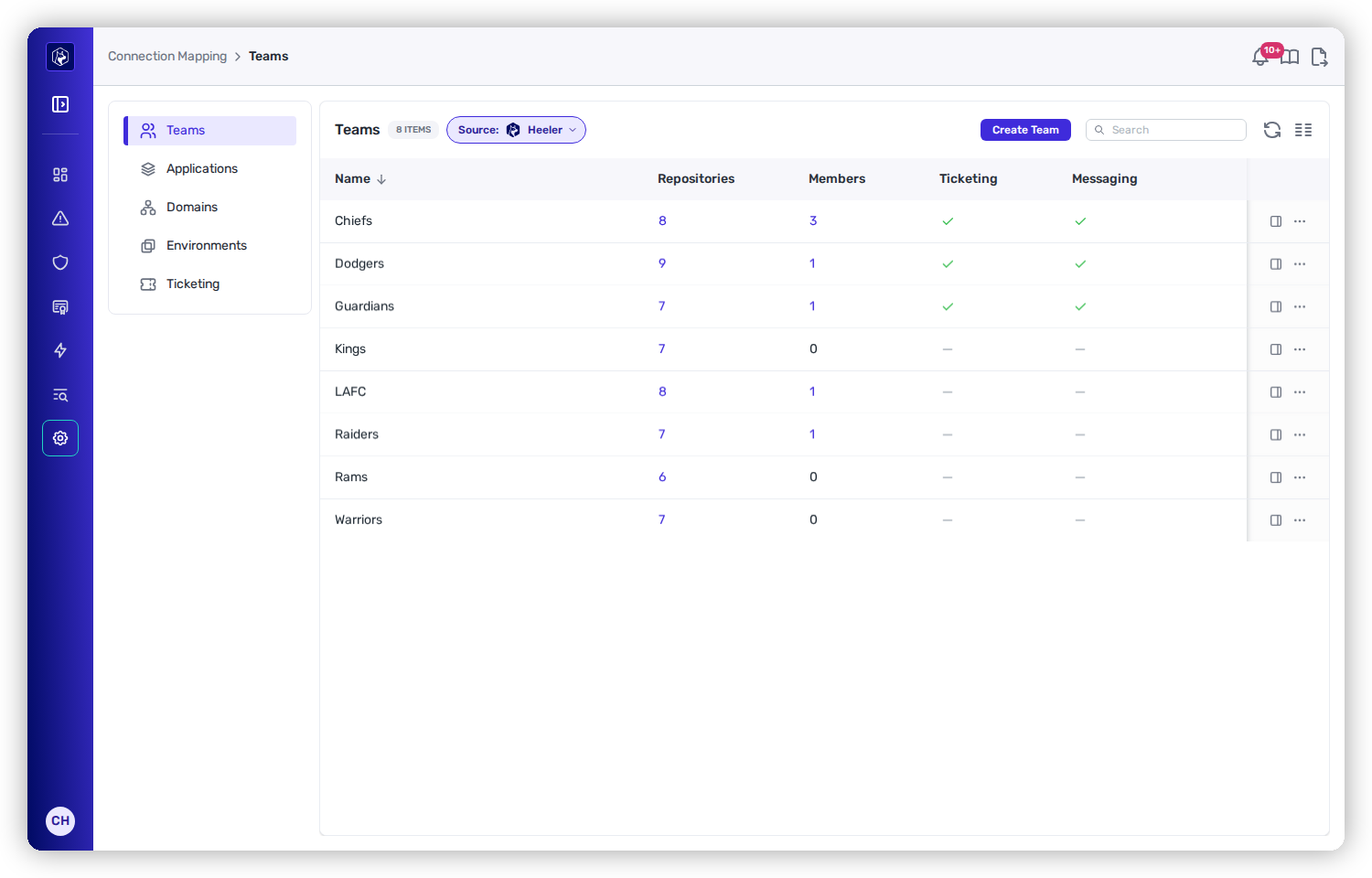
Open **Administration → Connection Mapping**. It has four tabs — **Teams**, **Applications**, **Environments**, and **Ticketing**:

<table data-view="cards"><thead><tr><th></th><th></th><th data-type="content-ref"></th></tr></thead><tbody><tr><td><strong>Teams</strong></td><td>Organize repositories by team ownership (GitHub, GitLab, Port.io, or Heeler); each team also carries its own ticket/message routing via <a href="/mrecEO40m5D6bt7Pq5pE/get-started/map-your-organization/team-ticket-settings.md">Team Ticket Settings</a>.</td><td><a href="/mrecEO40m5D6bt7Pq5pE/get-started/map-your-organization/teams.md">Teams</a></td></tr><tr><td><strong>Applications</strong></td><td>Group repositories into applications for aggregated visibility.</td><td><a href="/mrecEO40m5D6bt7Pq5pE/get-started/map-your-organization/applications.md">Applications</a></td></tr><tr><td><strong>Environments</strong></td><td>Map cloud accounts and clusters to environment boundaries with business impact.</td><td><a href="/mrecEO40m5D6bt7Pq5pE/get-started/map-your-organization/environments.md">Environments</a></td></tr><tr><td><strong>Ticketing</strong> (Ticket Closing)</td><td>Control whether and when Heeler closes its Jira/Linear tickets as findings are fixed.</td><td><a href="/mrecEO40m5D6bt7Pq5pE/get-started/map-your-organization/ticket-closing.md">Ticket Closing</a></td></tr></tbody></table>

## Available sources

The **Source** for Teams and Applications comes from a platform you've already connected — no new connection is needed for GitHub, GitLab, or Heeler:

<table><thead><tr><th width="150">Source</th><th>Teams from…</th><th>Applications from…</th></tr></thead><tbody><tr><td><strong>GitHub</strong></td><td>GitHub Teams</td><td>Repository custom properties</td></tr><tr><td><strong>GitLab</strong></td><td>GitLab Groups (name or path)</td><td>Path-prefix matching</td></tr><tr><td><strong>Port.io</strong></td><td>Port.io team entities</td><td>Blueprint entities</td></tr><tr><td><strong>Heeler</strong></td><td>Manual creation</td><td>Manual creation</td></tr></tbody></table>

Only **Port.io** needs a separate [integration](/mrecEO40m5D6bt7Pq5pE/get-started/developer-platform/port-io.md); GitHub/GitLab reuse your [code connection](/mrecEO40m5D6bt7Pq5pE/get-started/source-code-scm.md), and Heeler is manual.

<figure><img src="https://414480750-files.gitbook.io/~/files/v0/b/gitbook-x-prod.appspot.com/o/spaces%2FXP3dp2kecwKA2KvYkntz%2Fuploads%2Fgit-blob-3966e3570fde1e80e39b49307e0aa3cad49fd8eb%2Fcc-gs-map-teams.png?alt=media" alt="Connection Mapping → Teams, listing each team with its repository and member counts and a tick or dash for whether ticketing and messaging are configured."><figcaption><p>The team list, with repositories, members, and whether routing destinations are set.</p></figcaption></figure>

## Setup sequence

{% stepper %}
{% step %}

### Connect your platforms

Under **Administration → Connections**, connect the sources you'll map from — SCM, Port.io, and your clouds.
{% endstep %}

{% step %}

### Configure the mappings

Choose a **Source** for Teams and Applications, set each team's [ticket settings](/mrecEO40m5D6bt7Pq5pE/get-started/map-your-organization/team-ticket-settings.md), and assign accounts to [Environments](/mrecEO40m5D6bt7Pq5pE/get-started/map-your-organization/environments.md).
{% endstep %}

{% step %}

### Heeler keeps it in sync

As repositories, teams, and cloud resources change, Heeler re-applies your mappings automatically — no spreadsheets, no tickets to engineering.
{% endstep %}
{% endstepper %}

{% hint style="info" %}
Get this right early and everything downstream benefits: new repositories and resources are auto-assigned to the correct team, application, and environment, so findings arrive with the right owner and business impact from day one.
{% endhint %}

## You're done when…

* [ ] Teams and Applications show a source and are populated.
* [ ] Cloud accounts are assigned to environment boundaries (nothing left **Unassigned**).
* [ ] Findings show the owning team and business impact in the [Catalog](/mrecEO40m5D6bt7Pq5pE/catalog.md) and dashboards.

## Related

* [Ticket Closing](/mrecEO40m5D6bt7Pq5pE/get-started/map-your-organization/ticket-closing.md) — control whether and when Heeler closes the tickets it opens.
* [Users and Access](/mrecEO40m5D6bt7Pq5pE/get-started/users-and-access.md) — bring the owners you just mapped into Heeler.


---

# Agent Instructions
This documentation is published with GitBook. GitBook is the documentation platform designed so that both humans and AI agents can read, navigate, and reason over technical content effectively. Learn more at gitbook.com.

## Querying This Documentation
If you need additional information that is not directly available in this page, you can query the documentation dynamically by asking a question.

Perform an HTTP GET request on the current page URL with the `ask` query parameter, and the optional `goal` query parameter:

```
GET https://docs.heeler.com/mrecEO40m5D6bt7Pq5pE/get-started/map-your-organization.md?ask=<question>&goal=<endgoal>
```

`ask` is the immediate question: it should be specific, self-contained, and written in natural language.
`goal` is optional and describes the broader end goal you are ultimately trying to accomplish on behalf of the user. GitBook uses it to tailor the answer towards what is most useful for that goal.

The response will contain a direct answer to the question and relevant excerpts and sources from the documentation.

Use this mechanism when the answer is not explicitly present in the current page, you need clarification or additional context, or you want to retrieve related documentation sections.
