> For the complete documentation index, see [llms.txt](https://docs.heeler.com/mrecEO40m5D6bt7Pq5pE/llms.txt). Markdown versions of documentation pages are available by appending `.md` to page URLs; this page is available as [Markdown](https://docs.heeler.com/mrecEO40m5D6bt7Pq5pE/findings/open-source-sca.md).

# Open Source (SCA)

Detect vulnerable and risky open-source dependencies — direct, transitive, and in your CI/CD — and drive them to closure by real-world risk.

Heeler analyzes your open-source dependencies for security and supply-chain risk across every repository and the services those repositories deploy to. Because Heeler knows where each dependency actually runs, it separates the theoretical from the exploitable.

{% hint style="info" %}
**For developers and security engineers** triaging dependency risk. Depends on your **SCM** being connected; **registries and runtime environments** add the reachability and deployment context that makes prioritization real. See [Set Up Agentic Remediation](/mrecEO40m5D6bt7Pq5pE/get-started/set-up-automated-remediation.md).
{% endhint %}

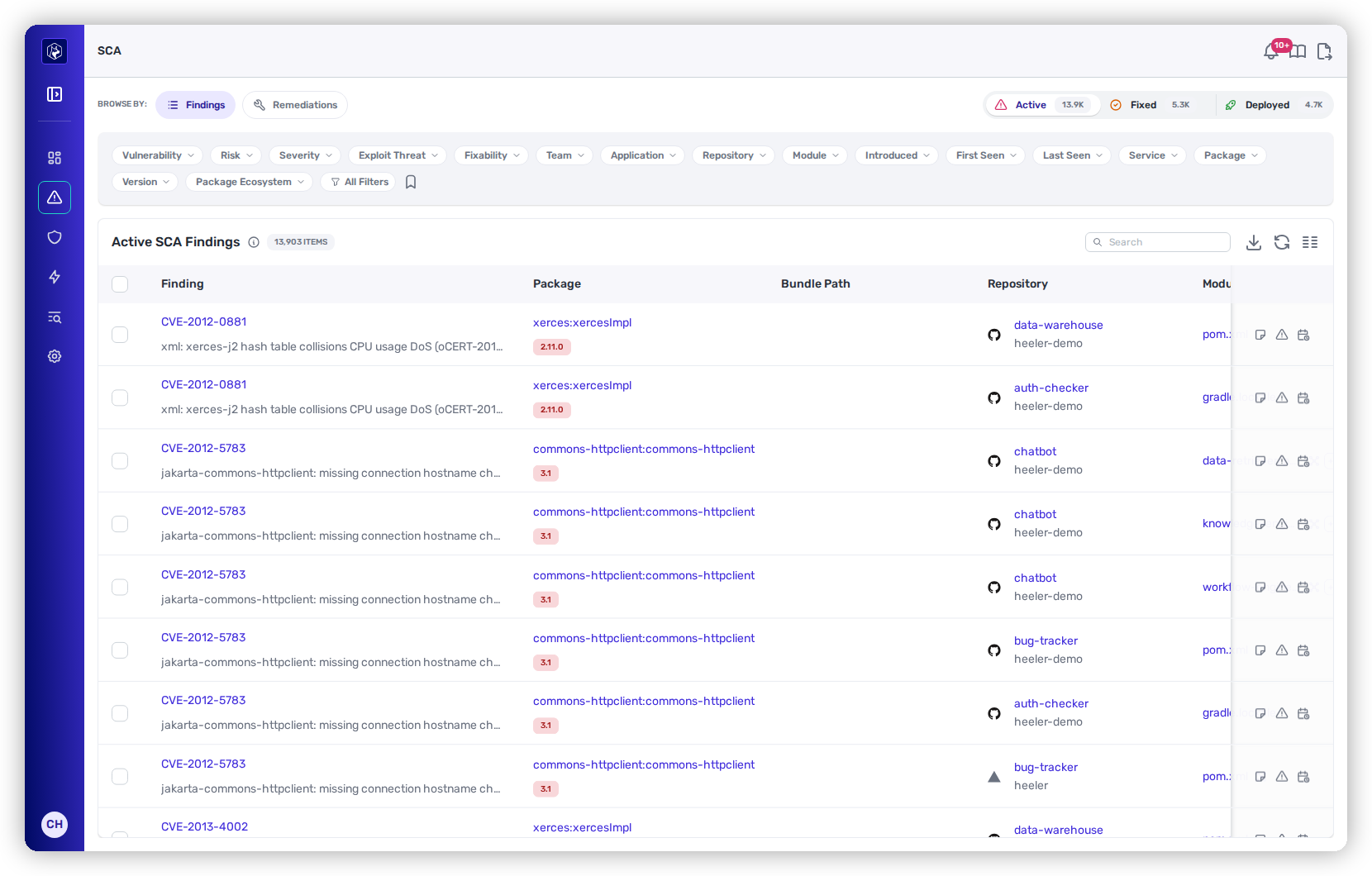
<figure><img src="https://414480750-files.gitbook.io/~/files/v0/b/gitbook-x-prod.appspot.com/o/spaces%2FXP3dp2kecwKA2KvYkntz%2Fuploads%2Fgit-blob-270a015d14f434ed3358ee424088105fadd6067b%2Fcc-sca-findings.png?alt=media" alt="The Active SCA Findings view: a Browse By rail (Findings / Remediations), filters for vulnerability, risk, severity, exploit threat, and fixability, and a table of CVE findings with package, bundle path, and repository."><figcaption><p>The SCA <strong>SAST Findings</strong> view — every vulnerability instance, filterable by real-world risk (reachability, exposure, exploit threat).</p></figcaption></figure>

## What Heeler detects

* **Known vulnerabilities** — CVEs in **direct and transitive** dependencies, matched from advisory data with CVSS, EPSS, and known-exploited signals.
* **Supply-chain hygiene** — compromised/malicious packages, unmaintained projects (OSSF Scorecard), too-new versions (minimum-age), unpinned versions, and downgrades.
* **License risk** — dependencies whose license falls outside your policy.
* **CI/CD supply chain** — the GitHub Actions and reusable workflows your repositories use, as a first-class dependency ecosystem. See [GitHub Actions Supply Chain](/mrecEO40m5D6bt7Pq5pE/findings/open-source-sca/github-actions.md).

## How detection works

Heeler builds a live dependency graph without changing your build:

* **From your SCM** — it parses manifests and lockfiles (`pom.xml`, `package-lock.json`, `go.mod`, `requirements.txt`, …) to resolve direct and transitive dependencies.
* **From your registries and runtime** — it ties each dependency to the artifacts and **running deployments** that use it, which is what makes reachability and exposure real rather than theoretical.
* **Across ecosystems** — Maven, npm, PyPI, Go, NuGet, RubyGems, Cargo, and GitHub Actions.

Reachability is established two ways — whether your code **reaches** the vulnerable function (call graph) and whether it's **loaded in a running deployment**. Both feed prioritization.

**Function Reachability** is a filter in its own right on the SCA and Finding views, so a list can be narrowed to findings whose vulnerable symbol your code actually reaches. On the repository listing, a separate filter reports whether reachability has been computed for a repository at all, which distinguishes a repository with no reachable findings from one that was never analysed for reachability.

## Two ways to work: Remediations and Findings

The SCA area has two toggled views (in the left **Browse By** rail), for two jobs — it opens on **Remediations** by default:

<table data-view="cards"><thead><tr><th></th><th></th><th data-hidden data-card-target data-type="content-ref"></th></tr></thead><tbody><tr><td><strong>Remediations</strong></td><td>Plan and assign fix work — findings grouped into one fix unit per package, with bulk auto-fix.</td><td><a href="/mrecEO40m5D6bt7Pq5pE/findings/open-source-sca/remediations.md">Remediations</a></td></tr><tr><td><strong>SAST Findings</strong></td><td>The full CVE inventory — one row per vulnerability instance, with detail and overrides.</td><td><a href="/mrecEO40m5D6bt7Pq5pE/findings/open-source-sca/findings.md">SCA Findings</a></td></tr></tbody></table>

## The findings lifecycle

Every SCA finding moves through **Active → Fixed → Deployed**, and Heeler confirms that last step from runtime so "fixed" never hides risk that's still running. See [the findings lifecycle](/mrecEO40m5D6bt7Pq5pE/findings.md#the-findings-lifecycle) for what each state means.

## In this section

<table data-view="cards"><thead><tr><th></th><th></th><th data-hidden data-card-target data-type="content-ref"></th></tr></thead><tbody><tr><td><strong>Prioritization</strong></td><td>How Heeler Risk is scored for dependencies.</td><td><a href="/mrecEO40m5D6bt7Pq5pE/findings/open-source-sca/prioritization.md">SCA Prioritization</a></td></tr><tr><td><strong>SAST Findings</strong></td><td>The CVE inventory, finding detail, and overrides.</td><td><a href="/mrecEO40m5D6bt7Pq5pE/findings/open-source-sca/findings.md">SCA Findings</a></td></tr><tr><td><strong>Remediations</strong></td><td>Grouped fixes, bulk auto-fix, and agent executions.</td><td><a href="/mrecEO40m5D6bt7Pq5pE/findings/open-source-sca/remediations.md">Remediations</a></td></tr><tr><td><strong>GitHub Actions Supply Chain</strong></td><td>CI/CD inventory, risk signals, and enforcement.</td><td><a href="/mrecEO40m5D6bt7Pq5pE/findings/open-source-sca/github-actions.md">GitHub Actions Supply Chain</a></td></tr></tbody></table>

## Worked example

The same capability inside a full triage workflow:

{% content-ref url="/pages/2ucJQI28WyhzhNQvs51Y" %}
[Determine Exploitability in Production](/mrecEO40m5D6bt7Pq5pE/solutions-and-use-cases/determine-exploitability-in-production.md)
{% endcontent-ref %}


---

# Agent Instructions
This documentation is published with GitBook. GitBook is the documentation platform designed so that both humans and AI agents can read, navigate, and reason over technical content effectively. Learn more at gitbook.com.

## Querying This Documentation
If you need additional information that is not directly available in this page, you can query the documentation dynamically by asking a question.

Perform an HTTP GET request on the current page URL with the `ask` query parameter, and the optional `goal` query parameter:

```
GET https://docs.heeler.com/mrecEO40m5D6bt7Pq5pE/findings/open-source-sca.md?ask=<question>&goal=<endgoal>
```

`ask` is the immediate question: it should be specific, self-contained, and written in natural language.
`goal` is optional and describes the broader end goal you are ultimately trying to accomplish on behalf of the user. GitBook uses it to tailor the answer towards what is most useful for that goal.

The response will contain a direct answer to the question and relevant excerpts and sources from the documentation.

Use this mechanism when the answer is not explicitly present in the current page, you need clarification or additional context, or you want to retrieve related documentation sections.
