> For the complete documentation index, see [llms.txt](https://docs.heeler.com/mrecEO40m5D6bt7Pq5pE/llms.txt). Markdown versions of documentation pages are available by appending `.md` to page URLs; this page is available as [Markdown](https://docs.heeler.com/mrecEO40m5D6bt7Pq5pE/operate/dashboards.md).

# Dashboards

The operational view of your whole program — the dashboards that track priorities, remediation planning, coverage, and trends over time.

Most of Heeler is about a single finding — triaging it, fixing it, exempting it. The **Dashboards** are about the *whole program*: what needs attention right now, how much of your estate is covered, and how the trends are moving week over week and month over month.

The five dashboards live under **Dashboards** in the top nav and share one global filter bar: scope it to a team, a tier or one application and every card and chart follows.

{% hint style="info" %}
**For:** AppSec teams, engineering leaders, and anyone reporting on program health. Dashboard numbers only populate once the [operating loop is connected](/mrecEO40m5D6bt7Pq5pE/get-started.md) — code for findings, plus cloud & runtime for exposure-based prioritization.
{% endhint %}

## Choosing a dashboard

Pick the one that matches the question you're asking:

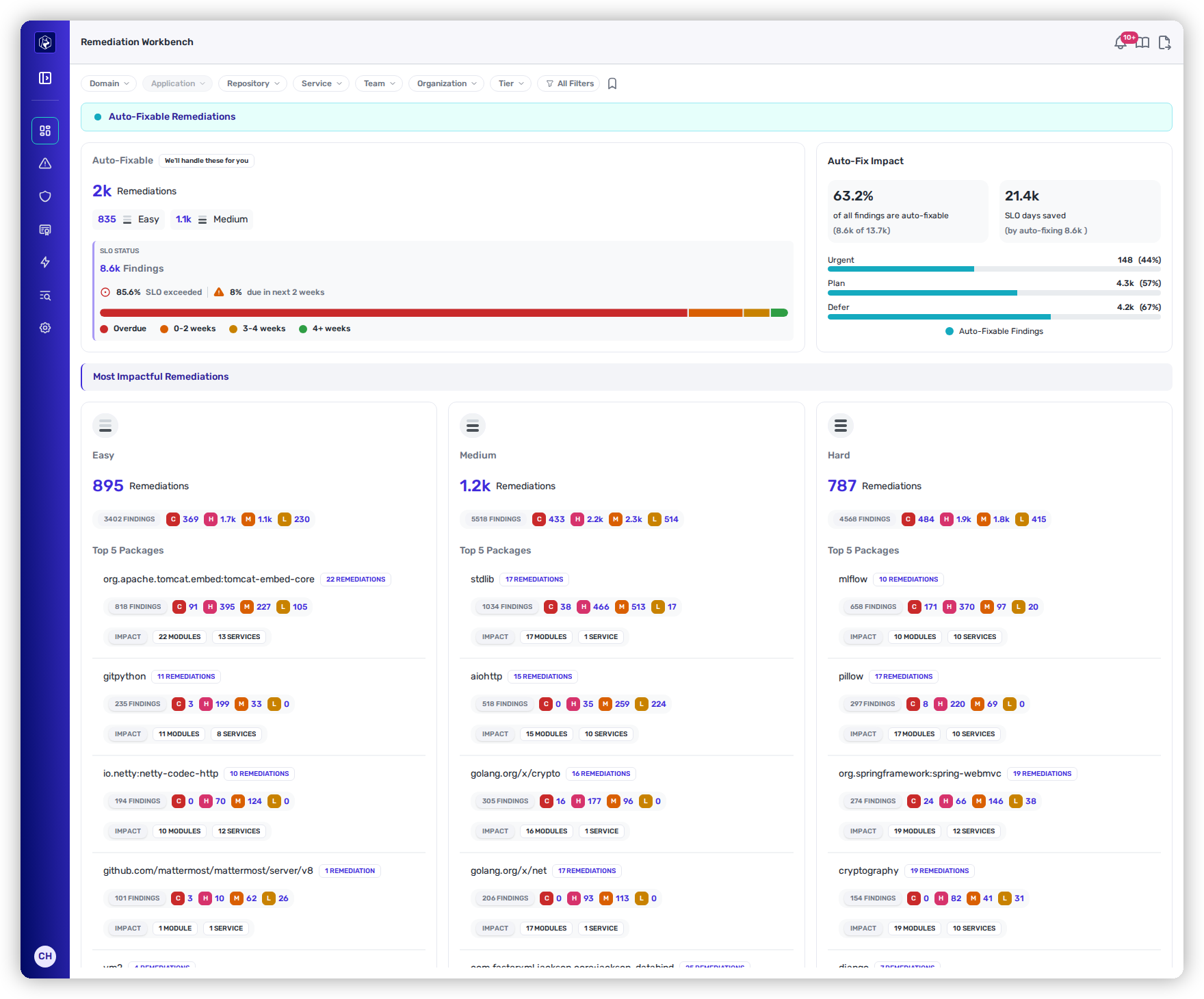
<table><thead><tr><th width="220">Dashboard</th><th>Best for</th><th width="150">Time horizon</th></tr></thead><tbody><tr><td><a href="/mrecEO40m5D6bt7Pq5pE/operate/dashboards/priorities.md"><strong>Priorities</strong></a></td><td>The day-to-day command center — what's new, what's critical, what's approaching SLO, and what needs a decision.</td><td>Right now</td></tr><tr><td><a href="/mrecEO40m5D6bt7Pq5pE/operate/dashboards/remediation-workbench.md"><strong>Remediation Workbench</strong></a></td><td>Planning the burn-down — what Heeler can auto-fix, the SLO days you'd save, and the highest-impact packages to tackle by hand.</td><td>Right now</td></tr><tr><td><a href="/mrecEO40m5D6bt7Pq5pE/operate/dashboards/coverage.md"><strong>Coverage</strong></a></td><td>Proving completeness — what's being analyzed, how deeply, whether scanning keeps pace with engineering, and what threats just emerged.</td><td>This week + live</td></tr><tr><td><a href="/mrecEO40m5D6bt7Pq5pE/operate/dashboards/weekly-and-monthly-overviews.md"><strong>Weekly Overview</strong></a></td><td>Weekly security reviews and team reporting — intake, fixes, SLO performance, and velocity.</td><td>Rolling 4 weeks</td></tr><tr><td><a href="/mrecEO40m5D6bt7Pq5pE/operate/dashboards/weekly-and-monthly-overviews.md"><strong>Monthly Overview</strong></a></td><td>Monthly business reviews and board reporting — long-range posture, prevention value, and systemic package risk.</td><td>Rolling 6–12 months</td></tr></tbody></table>

<figure><img src="https://414480750-files.gitbook.io/~/files/v0/b/gitbook-x-prod.appspot.com/o/spaces%2FXP3dp2kecwKA2KvYkntz%2Fuploads%2Fgit-blob-a134a6bba477de3938edf87592bb4a51805888ab%2Fcc-vis-workbench.png?alt=media" alt="The Remediation Workbench dashboard — auto-fixable remediations and the most impactful work by complexity."><figcaption><p>The <a href="/mrecEO40m5D6bt7Pq5pE/operate/dashboards/remediation-workbench.md">Remediation Workbench</a> — what Heeler can auto-fix, the SLO days you'd save, and the highest-impact packages to tackle by hand.</p></figcaption></figure>

## Filtering and exports work the same everywhere

Every dashboard shares the same controls — a global filter bar, an **All Filters** drawer, saved views, search, column management, and export — and so does every [Catalog](/mrecEO40m5D6bt7Pq5pE/catalog.md) list. Rather than repeat them on each page, they're documented once in [**Filtering and Exports**](/mrecEO40m5D6bt7Pq5pE/operate/dashboards/filtering-and-exports.md).

{% hint style="info" %}
Looking for the **inventory** of your repositories, dependencies, services, and more — not the program metrics? That's the [**Catalog**](/mrecEO40m5D6bt7Pq5pE/catalog.md), now its own top-level section.
{% endhint %}

## In this section

<table data-view="cards"><thead><tr><th></th><th></th><th data-hidden data-card-target data-type="content-ref"></th></tr></thead><tbody><tr><td><strong>Priorities</strong></td><td>What needs attention right now, across SCA, SAST, and Secrets.</td><td><a href="/mrecEO40m5D6bt7Pq5pE/operate/dashboards/priorities.md">Priorities</a></td></tr><tr><td><strong>Remediation Workbench</strong></td><td>Plan the burn-down — what's auto-fixable and the highest-impact work by hand.</td><td><a href="/mrecEO40m5D6bt7Pq5pE/operate/dashboards/remediation-workbench.md">Remediation Workbench</a></td></tr><tr><td><strong>Coverage</strong></td><td>How complete and current your analysis is.</td><td><a href="/mrecEO40m5D6bt7Pq5pE/operate/dashboards/coverage.md">Coverage</a></td></tr><tr><td><strong>Weekly &#x26; Monthly Overviews</strong></td><td>Trend reporting for weekly reviews and business reviews.</td><td><a href="/mrecEO40m5D6bt7Pq5pE/operate/dashboards/weekly-and-monthly-overviews.md">Weekly and Monthly Overviews</a></td></tr><tr><td><strong>Filtering &#x26; Exports</strong></td><td>The shared controls for scoping and exporting any view.</td><td><a href="/mrecEO40m5D6bt7Pq5pE/operate/dashboards/filtering-and-exports.md">Filtering and Exports</a></td></tr></tbody></table>

## Worked example

See how this feeds an audit-ready evidence pack:

{% content-ref url="/pages/PjsYwV0vEThhl6wY14LV" %}
[Evidence for a Security Audit](/mrecEO40m5D6bt7Pq5pE/solutions-and-use-cases/prove-your-security-posture.md)
{% endcontent-ref %}


---

# Agent Instructions
This documentation is published with GitBook. GitBook is the documentation platform designed so that both humans and AI agents can read, navigate, and reason over technical content effectively. Learn more at gitbook.com.

## Querying This Documentation
If you need additional information that is not directly available in this page, you can query the documentation dynamically by asking a question.

Perform an HTTP GET request on the current page URL with the `ask` query parameter, and the optional `goal` query parameter:

```
GET https://docs.heeler.com/mrecEO40m5D6bt7Pq5pE/operate/dashboards.md?ask=<question>&goal=<endgoal>
```

`ask` is the immediate question: it should be specific, self-contained, and written in natural language.
`goal` is optional and describes the broader end goal you are ultimately trying to accomplish on behalf of the user. GitBook uses it to tailor the answer towards what is most useful for that goal.

The response will contain a direct answer to the question and relevant excerpts and sources from the documentation.

Use this mechanism when the answer is not explicitly present in the current page, you need clarification or additional context, or you want to retrieve related documentation sections.
