> For the complete documentation index, see [llms.txt](https://docs.heeler.com/mrecEO40m5D6bt7Pq5pE/llms.txt). Markdown versions of documentation pages are available by appending `.md` to page URLs; this page is available as [Markdown](https://docs.heeler.com/mrecEO40m5D6bt7Pq5pE/operate/workflows/triggers.md).

# Triggers

Every event that can start a workflow, grouped by what it watches — findings, SAST, secrets, licenses, agent files, overrides and SLOs, repositories, and guardrails.

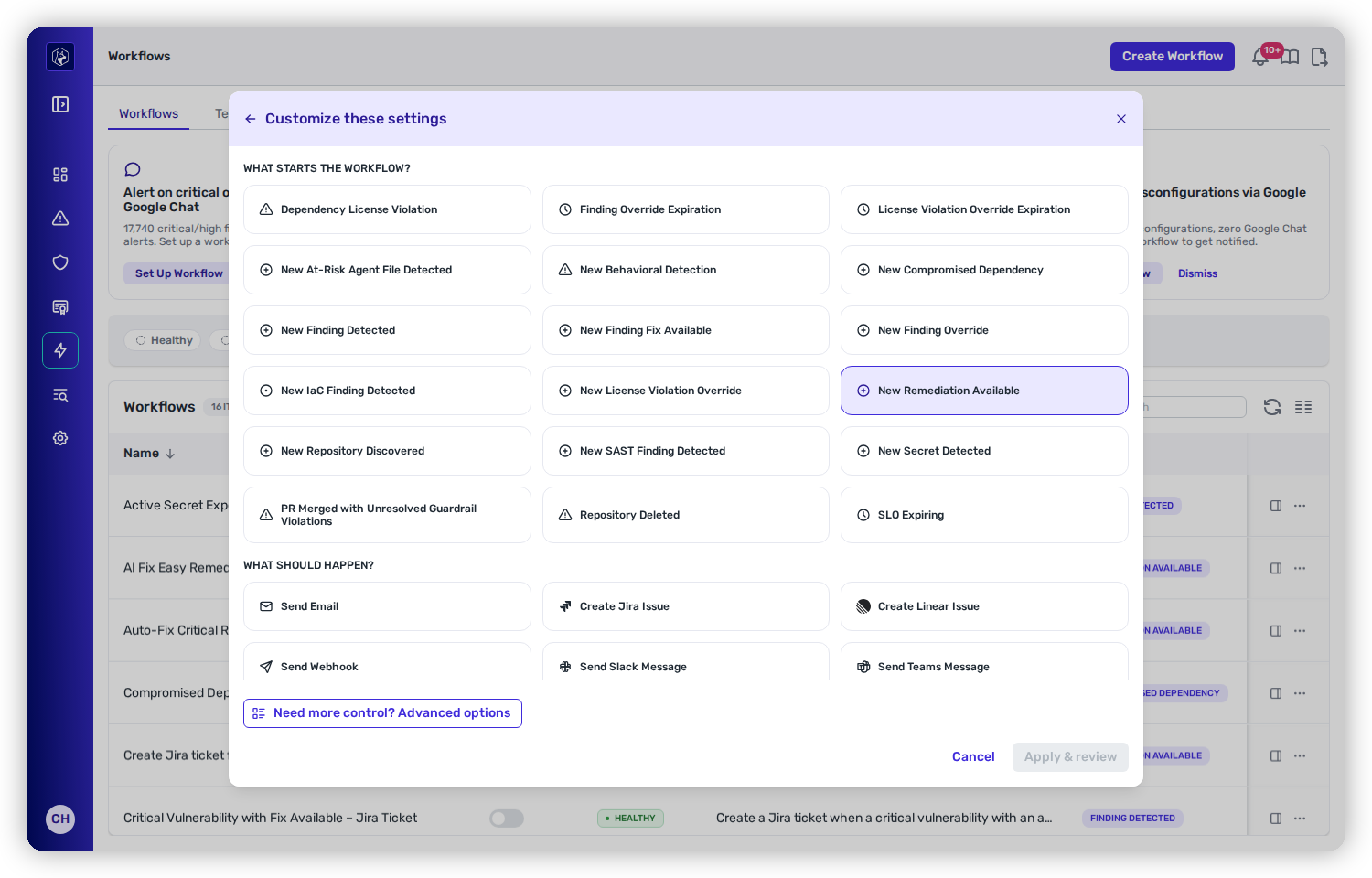
A **trigger** is the event that starts a workflow. You pick exactly one, and it's the first thing the builder asks for once you leave the [quick-start templates](/mrecEO40m5D6bt7Pq5pE/operate/workflows/building-a-workflow.md) behind — **Customize settings** opens on the trigger grid, and **Advanced options** leads with it. Every trigger watches activity across your connected repositories, so a single workflow covers your whole estate — not one repo at a time.

<figure><img src="https://414480750-files.gitbook.io/~/files/v0/b/gitbook-x-prod.appspot.com/o/spaces%2FXP3dp2kecwKA2KvYkntz%2Fuploads%2Fgit-blob-9955ee3d1271b0768977c4c5696b24651d987f0c%2Fcc-wf-customize.png?alt=media" alt="The trigger grid under &#x22;What starts the workflow?&#x22;, listing triggers like Dependency License Violation, New At-Risk Agent File Detected and New Compromised Dependency, with New Remediation Available selected."><figcaption><p>Choosing a trigger. The event you pick here determines which conditions and actions become available.</p></figcaption></figure>

The trigger you choose shapes the rest of the workflow: it decides which [conditions](/mrecEO40m5D6bt7Pq5pE/operate/workflows/conditions.md) you can filter on and which [actions](/mrecEO40m5D6bt7Pq5pE/operate/workflows/actions.md) are offered.

## Findings and vulnerabilities

<table><thead><tr><th width="290">Trigger</th><th>When it fires</th></tr></thead><tbody><tr><td><strong>New Finding Detected</strong></td><td>A new open-source (SCA) vulnerability is detected in a repository.</td></tr><tr><td><strong>New Finding Fix Available</strong></td><td>A patched version becomes available for a finding that previously had no fix.</td></tr><tr><td><strong>New Remediation Available</strong></td><td>Heeler computes a new remediation — an upgrade recommendation that resolves one or more findings. This is the trigger behind <a href="/mrecEO40m5D6bt7Pq5pE/fix/automate-remediation.md">unattended auto-fixing</a>.</td></tr><tr><td><strong>New Compromised Dependency</strong></td><td>A known-malicious or compromised package is detected in a repository.</td></tr></tbody></table>

## Code security (SAST)

<table><thead><tr><th width="290">Trigger</th><th>When it fires</th></tr></thead><tbody><tr><td><strong>New SAST Finding Detected</strong></td><td>A new static-analysis finding is detected in a repository's source code.</td></tr></tbody></table>

## Infrastructure as Code

<table><thead><tr><th width="290">Trigger</th><th>When it fires</th></tr></thead><tbody><tr><td><strong>New IaC Finding Detected</strong></td><td>A new misconfiguration is detected in an infrastructure-as-code template — Terraform, OpenTofu, CloudFormation, Kubernetes, or Pulumi. See <a href="/mrecEO40m5D6bt7Pq5pE/findings/iac.md">IaC findings</a>.</td></tr></tbody></table>

## Secrets

<table><thead><tr><th width="290">Trigger</th><th>When it fires</th></tr></thead><tbody><tr><td><strong>New Secret Detected</strong></td><td>A new exposed secret or credential is detected in a repository.</td></tr></tbody></table>

## Licenses

<table><thead><tr><th width="290">Trigger</th><th>When it fires</th></tr></thead><tbody><tr><td><strong>Dependency License Violation</strong></td><td>A dependency with a disallowed license is detected in a repository.</td></tr></tbody></table>

## Agent files

<table><thead><tr><th width="290">Trigger</th><th>When it fires</th></tr></thead><tbody><tr><td><strong>New At-Risk Agent File Detected</strong></td><td>An AI agent instruction or configuration file (for example a <code>CLAUDE.md</code>, a skill, or a subagent definition) is flagged as at-risk.</td></tr></tbody></table>

## Behavioral checks

<table><thead><tr><th width="290">Trigger</th><th>When it fires</th></tr></thead><tbody><tr><td><strong>New Behavioral Detection</strong></td><td>A new <a href="/mrecEO40m5D6bt7Pq5pE/findings/behavioral-checks.md">behavioral check</a> is raised from your SCM audit activity — a token used from two countries, a burst of repository clones, a weakened branch protection, activity from a country you have not approved. Filter it by severity, informational included, so a workflow can carry only what you want to hear about.</td></tr></tbody></table>

## Overrides and SLOs

These triggers watch the lifecycle of the decisions your team makes — accepting risk, extending a due date — and the clocks attached to them.

<table><thead><tr><th width="290">Trigger</th><th>When it fires</th></tr></thead><tbody><tr><td><strong>New Finding Override</strong></td><td>A risk-mitigation or SLO override is applied to a finding.</td></tr><tr><td><strong>New License Violation Override</strong></td><td>A license-violation override is applied or removed.</td></tr><tr><td><strong>Finding Override Expiration</strong></td><td>A finding's override is approaching or past its expiry date. <a href="/mrecEO40m5D6bt7Pq5pE/operate/workflows/conditions.md#required-conditions">Requires a condition</a> that says how close to expiry to fire.</td></tr><tr><td><strong>License Violation Override Expiration</strong></td><td>A license-violation override is approaching or past its expiry date.</td></tr><tr><td><strong>SLO Expiring</strong></td><td>A finding's own SLO due date is approaching or past due (covers both dependency and SAST SLOs). <a href="/mrecEO40m5D6bt7Pq5pE/operate/workflows/conditions.md#required-conditions">Requires a condition</a> that says how close to the due date to fire.</td></tr></tbody></table>

## Repository lifecycle

<table><thead><tr><th width="290">Trigger</th><th>When it fires</th></tr></thead><tbody><tr><td><strong>New Repository Discovered</strong></td><td>A new repository is discovered in a connected SCM organization.</td></tr><tr><td><strong>Repository Deleted</strong></td><td>A tracked repository is deleted.</td></tr><tr><td><strong>Repository Renamed</strong></td><td>A tracked repository is renamed, or moves to another organization or group. The event carries the previous name alongside the current one, so a message or ticket can show both.</td></tr></tbody></table>

{% hint style="info" %}
All three repository-lifecycle triggers filter by **Source** and **Organization / Group**. **New Repository Discovered** and **Repository Deleted** do not offer the **Repository** filter; the repository does not exist yet, or no longer exists, when they fire.
{% endhint %}

## Guardrails

<table><thead><tr><th width="290">Trigger</th><th>When it fires</th></tr></thead><tbody><tr><td><strong>PR Merged with Unresolved Guardrail Violations</strong></td><td>A pull request was merged while block- or warn-level <a href="/mrecEO40m5D6bt7Pq5pE/prevent/pr-guardrails.md">guardrail</a> violations were still unresolved. When a block-level violation was present, this escalates to a "branch protection circumvented" case you can filter on.</td></tr></tbody></table>

## Related

* [Conditions](/mrecEO40m5D6bt7Pq5pE/operate/workflows/conditions.md) — narrow which of a trigger's events actually proceed.
* [Actions](/mrecEO40m5D6bt7Pq5pE/operate/workflows/actions.md) — what a workflow does once its conditions are met.
* [Workflow Trigger Data Elements](/mrecEO40m5D6bt7Pq5pE/reference/workflow-trigger-data-elements.md) — the exact data each trigger makes available to templates and webhooks.


---

# Agent Instructions
This documentation is published with GitBook. GitBook is the documentation platform designed so that both humans and AI agents can read, navigate, and reason over technical content effectively. Learn more at gitbook.com.

## Querying This Documentation
If you need additional information that is not directly available in this page, you can query the documentation dynamically by asking a question.

Perform an HTTP GET request on the current page URL with the `ask` query parameter, and the optional `goal` query parameter:

```
GET https://docs.heeler.com/mrecEO40m5D6bt7Pq5pE/operate/workflows/triggers.md?ask=<question>&goal=<endgoal>
```

`ask` is the immediate question: it should be specific, self-contained, and written in natural language.
`goal` is optional and describes the broader end goal you are ultimately trying to accomplish on behalf of the user. GitBook uses it to tailor the answer towards what is most useful for that goal.

The response will contain a direct answer to the question and relevant excerpts and sources from the documentation.

Use this mechanism when the answer is not explicitly present in the current page, you need clarification or additional context, or you want to retrieve related documentation sections.
