> For the complete documentation index, see [llms.txt](https://docs.heeler.com/mrecEO40m5D6bt7Pq5pE/llms.txt). Markdown versions of documentation pages are available by appending `.md` to page URLs; this page is available as [Markdown](https://docs.heeler.com/mrecEO40m5D6bt7Pq5pE/catalog/data-inventory.md).

# Data Inventory

The personal and sensitive data your code handles — discovered from the code itself, classified by category and sensitivity, and mapped to the regulations that apply to it.

The **Data Inventory** answers a question most organizations can only answer by survey: *what personal and sensitive data does our software actually handle, and where?*

Heeler builds it from your code. Every time a repository is analyzed, Heeler extracts the **data entities** your code persists — the models, tables, and schemas it declares — reads the **fields** on each one, and classifies those fields against a data taxonomy. The result is an inventory you can query by entity, by attribute, by category, by regulation, or by repository.

{% hint style="info" %}
**Discovered, not declared.** Nothing here is tagged by hand. Entities come from the ORM models and schema definitions already in your code, and from the API contracts you publish. A new model in a pull request appears in the inventory once that code is analyzed.
{% endhint %}

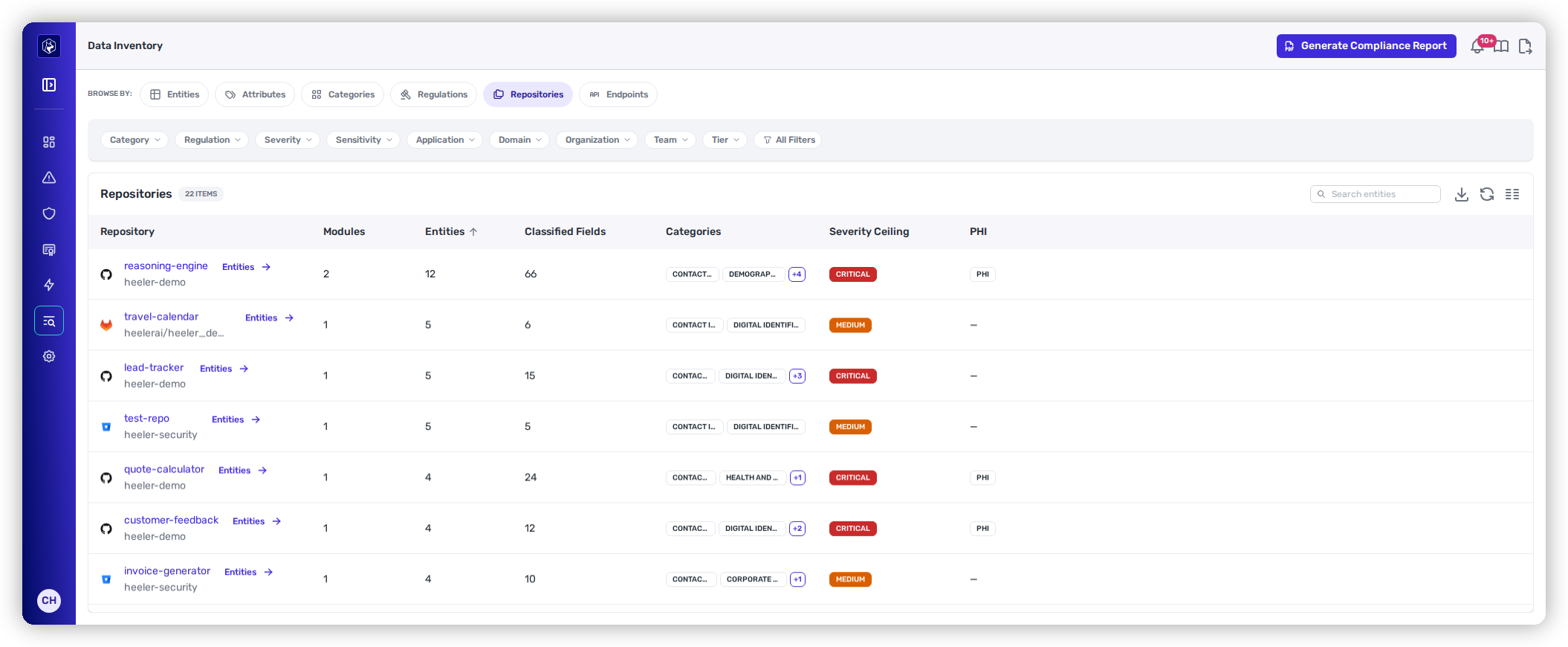
<figure><img src="https://414480750-files.gitbook.io/~/files/v0/b/gitbook-x-prod.appspot.com/o/spaces%2FXP3dp2kecwKA2KvYkntz%2Fuploads%2Fgit-blob-e74ccdcc5815aa68e6104516546b8f9ca1f3d37a%2Fcc-di-repositories.png?alt=media" alt="The Data Inventory Repositories view, showing classified fields, data categories, severity ceiling, and PHI flags for each repository."><figcaption><p>Data Inventory — classified data per repository, including whether it handles health data.</p></figcaption></figure>

## Where entities come from

Heeler recognizes persisted entities from the framework that declares them, and interface schemas from the contract that defines them.

| Source                      | What Heeler reads                                                                                              |
| --------------------------- | -------------------------------------------------------------------------------------------------------------- |
| **Python**                  | SQLAlchemy models and Django models.                                                                           |
| **TypeScript / JavaScript** | TypeORM entities, Prisma schemas, and Sequelize models.                                                        |
| **Java**                    | JPA entities — `@Entity` types, with column names and nullability from `@Column`.                              |
| **Go**                      | GORM models.                                                                                                   |
| **C# / .NET**               | Entity Framework Core models.                                                                                  |
| **Rust**                    | Diesel, SeaORM, and SQLx row structs — recognized from the derive that marks them as mapping to database rows. |
| **API contracts**           | OpenAPI, GraphQL SDL, protobuf, and JSON Schema definitions.                                                   |

The **Framework** and **Language** columns on the [Entities](/mrecEO40m5D6bt7Pq5pE/catalog/data-inventory/entities.md) view record which of these produced each entity — a database model or a published interface.

## How classification works

Each field on an entity is matched against a data taxonomy that Heeler maintains and refreshes for your tenant. A matched field becomes a **classification** carrying:

| Property        | What it means                                                                                                       |
| --------------- | ------------------------------------------------------------------------------------------------------------------- |
| **Attribute**   | The specific kind of data — an email address, a government identifier, a username.                                  |
| **Category**    | The group the attribute belongs to, such as Contact Information, Individual Identifiers, or Digital Identifiers.    |
| **Sensitivity** | What class of data it is — for example **PII**.                                                                     |
| **Severity**    | How serious holding it is, shown as a badge and rolled up to the entity and the repository as a ceiling.            |
| **Regulations** | Every regulation that treats the attribute as in scope. One attribute commonly maps to several.                     |
| **PHI**         | A separate flag. Data subject to health-information rules is marked as such rather than inferred from its category. |

Fields that match nothing stay unclassified and are counted but not categorized — the **Fields** column reads *classified / total*, so `2 / 12` means two of twelve fields carry a classification.

## Data state

Entities carry a state badge describing where the data sits. **At rest** covers data persisted in a store — a database table, a collection, or a document. The state is derived from the declaration Heeler read, not configured by you.

## Browse by

The left rail switches between six views of the same underlying data. Pick the one that matches the question you're asking.

<table data-view="cards"><thead><tr><th></th><th></th><th data-hidden data-card-target data-type="content-ref"></th></tr></thead><tbody><tr><td><strong>Entities</strong></td><td>Every discovered entity, its module, framework, fields, and categories.</td><td><a href="/mrecEO40m5D6bt7Pq5pE/catalog/data-inventory/entities.md">Entities</a></td></tr><tr><td><strong>Attributes</strong></td><td>The specific kinds of data found, and where each one appears.</td><td><a href="/mrecEO40m5D6bt7Pq5pE/catalog/data-inventory/attributes.md">Attributes</a></td></tr><tr><td><strong>Categories</strong></td><td>Data categories with their attributes and severity ceiling.</td><td><a href="/mrecEO40m5D6bt7Pq5pE/catalog/data-inventory/categories.md">Categories</a></td></tr><tr><td><strong>Regulations</strong></td><td>Which regulations apply to the data you hold, and what pulls them in.</td><td><a href="/mrecEO40m5D6bt7Pq5pE/catalog/data-inventory/regulations.md">Regulations</a></td></tr><tr><td><strong>Repositories</strong></td><td>Classified data per repository, including the health-data flag.</td><td><a href="/mrecEO40m5D6bt7Pq5pE/catalog/data-inventory/repositories.md">Repositories</a></td></tr><tr><td><strong>Endpoints</strong></td><td>Which API endpoints consume or transmit personal data, and under which regulations.</td><td><a href="/mrecEO40m5D6bt7Pq5pE/catalog/data-inventory/endpoints.md">Endpoints</a></td></tr></tbody></table>

## Scoping the inventory

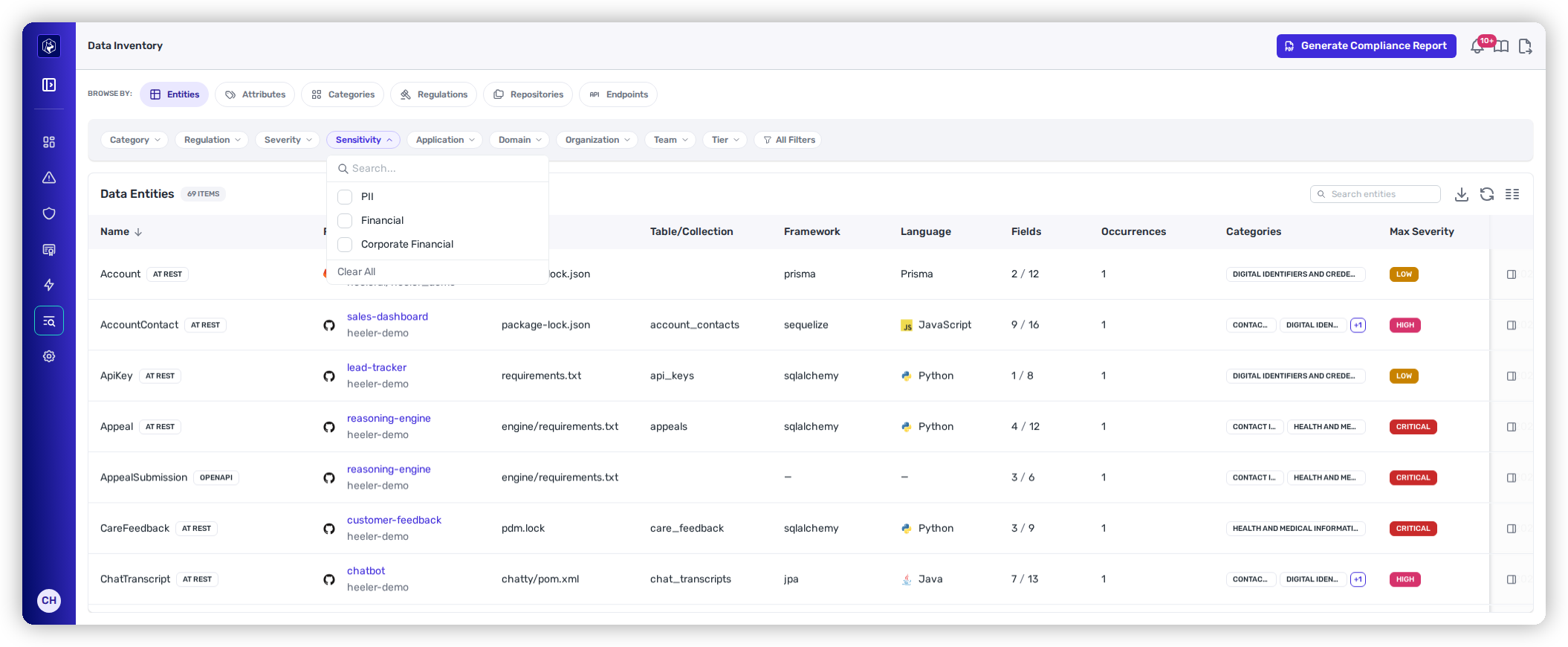
Every view carries the same filter chips — **Category**, **Regulation**, **Sensitivity**, **Severity**, **Application**, **Organization**, **Team**, **Tier** — plus an **All Filters** drawer and a search box. **Sensitivity** is the one to reach for when the question is about a kind of data rather than a rule that governs it: scoping to **financial** data isolates it directly, where a regulation facet only approximates it — PCI-DSS, for instance, covers part of the financial attributes and none of the rest. It applies on every tab, on the scoped **Data** tabs of a repository, service or application, in CSV exports, and on the [API endpoints](/mrecEO40m5D6bt7Pq5pE/catalog/data-inventory/endpoints.md) view. Filters apply to the view you're on and persist as you switch tabs, so a regulation can be traced to the repositories behind it.

<figure><img src="https://414480750-files.gitbook.io/~/files/v0/b/gitbook-x-prod.appspot.com/o/spaces%2FXP3dp2kecwKA2KvYkntz%2Fuploads%2Fgit-blob-f49553585a14666ada3c048aa6df23ded47d8344%2Fcc-di-sensitivity-facet.png?alt=media" alt="The Data Entities view with filter chips for Category, Regulation, Severity, Sensitivity, Application, Organization, Team, and Tier above the entity list."><figcaption><p>The <strong>Sensitivity</strong> chip sits with the other facets, on every Data Inventory view.</p></figcaption></figure>

The listing controls behave exactly as they do elsewhere in the Catalog; see [Filtering and Exports](/mrecEO40m5D6bt7Pq5pE/operate/dashboards/filtering-and-exports.md).

## Per-asset data

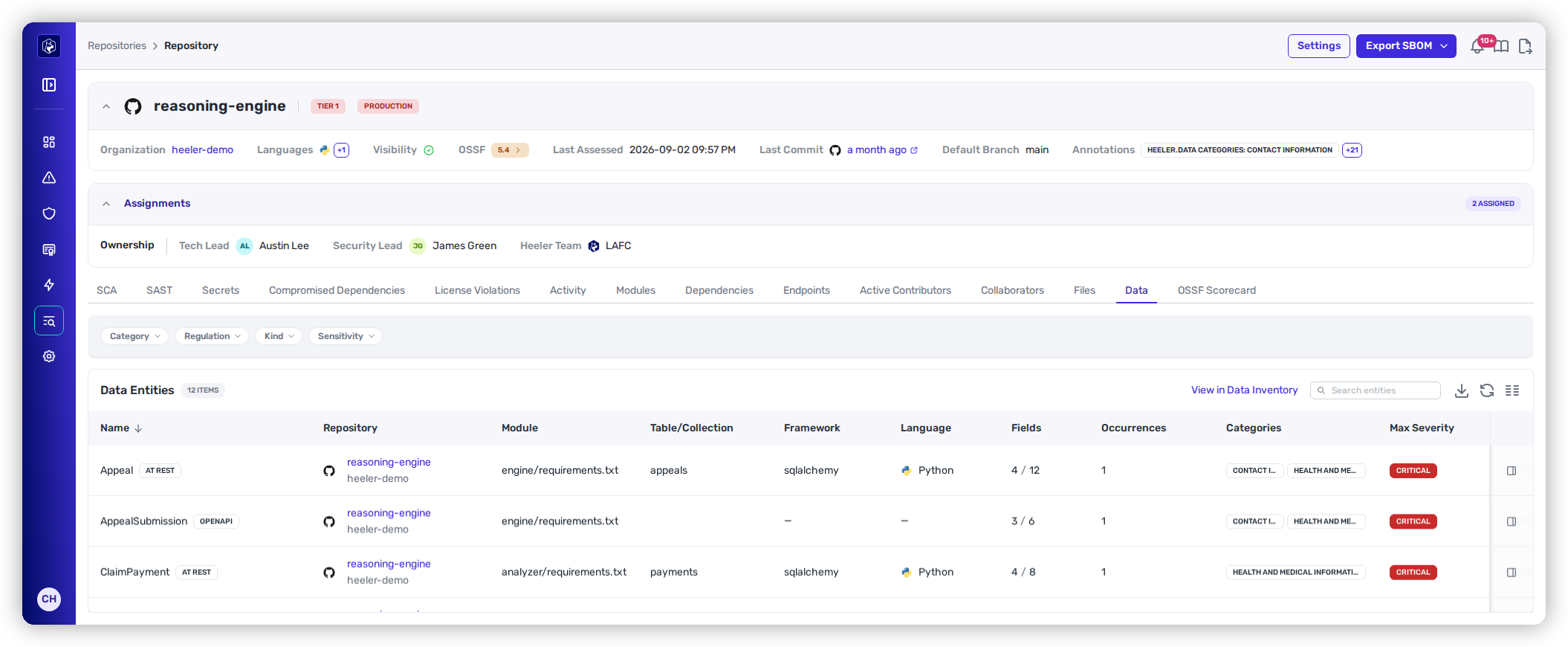
You don't have to start portfolio-wide. **Repositories**, **services**, and **applications** each carry a **Data** tab showing only the entities that belong to that asset — useful when you're reviewing one service and want to know what it holds before you decide how to treat a finding against it.

<figure><img src="https://414480750-files.gitbook.io/~/files/v0/b/gitbook-x-prod.appspot.com/o/spaces%2FXP3dp2kecwKA2KvYkntz%2Fuploads%2Fgit-blob-151f1366bf0a314a0388dc5e2ddc3a880bf7154a%2Fcc-di-entity-tab.png?alt=media" alt="The Data tab on a repository, with Category, Regulation, Kind and Sensitivity filters above a Data Entities table listing each entity&#x27;s module, table, framework, classified fields, categories and max severity."><figcaption><p>The <strong>Data</strong> tab on a repository — the same inventory, scoped to one asset.</p></figcaption></figure>

It is the [Entities](/mrecEO40m5D6bt7Pq5pE/catalog/data-inventory/entities.md) view narrowed to that asset, so the table reads the same way:

| Column                       | What it shows                                                                                                                                                  |
| ---------------------------- | -------------------------------------------------------------------------------------------------------------------------------------------------------------- |
| **Name**                     | The entity, badged with its **kind** — **At Rest** for something persisted (a model or table), **OpenAPI** for something declared in a published API contract. |
| **Repository** · **Module**  | Where in your code the entity was found.                                                                                                                       |
| **Table/Collection**         | The backing table or collection, where the entity declares one.                                                                                                |
| **Framework** · **Language** | What Heeler read it from — `sqlalchemy`, `Python`, and so on.                                                                                                  |
| **Fields**                   | Classified fields out of total fields, as **4 / 12**. The gap is the point: it tells you how much of the entity is regulated.                                  |
| **Occurrences**              | How many times the entity appears in the code.                                                                                                                 |
| **Categories**               | The data categories its fields classified into.                                                                                                                |
| **Max Severity**             | The most sensitive classification anything on the entity carries.                                                                                              |

Four filters narrow it — **Category**, **Regulation**, **Kind**, and **Sensitivity** — and **View in Data Inventory** opens the same set in the full inventory, where the rest of the facets and the [Compliance Report](#compliance-report) are available.

{% hint style="info" %}
An asset with no classified entities shows an empty Data tab. That is a real answer, not a gap: it means nothing in that repository or service declared data Heeler could classify.
{% endhint %}

## Compliance report

**Compliance Report** generates a point-in-time report of the classified data in the current scope, for the regulations it falls under. Use it when someone needs the answer as a document rather than as a view. See [Compliance Reports](/mrecEO40m5D6bt7Pq5pE/standards-and-compliance/compliance-reports.md) for how to scope one and what the two content exclusions do.

A report is scoped by **environment** and by **match confidence**, and the scope it was generated under is stated on the report itself. Restricting to production environments and confident matches keeps sandbox and test repositories, and low-confidence classifications, out of the reported coverage.

**Corporate accounting records** are classified as financial data, so ledger and transaction attributes are counted in a Sarbanes-Oxley scope alongside the payment-card and account attributes already recognised.

## Related

* [Supported Technologies](/mrecEO40m5D6bt7Pq5pE/supported-technologies.md) — the languages and frameworks Heeler analyzes.
* [Repositories](/mrecEO40m5D6bt7Pq5pE/catalog/repositories.md) — the repository inventory the Data tab hangs off.
* [Filtering and Exports](/mrecEO40m5D6bt7Pq5pE/operate/dashboards/filtering-and-exports.md) — how the listing controls work.


---

# Agent Instructions
This documentation is published with GitBook. GitBook is the documentation platform designed so that both humans and AI agents can read, navigate, and reason over technical content effectively. Learn more at gitbook.com.

## Querying This Documentation
If you need additional information that is not directly available in this page, you can query the documentation dynamically by asking a question.

Perform an HTTP GET request on the current page URL with the `ask` query parameter, and the optional `goal` query parameter:

```
GET https://docs.heeler.com/mrecEO40m5D6bt7Pq5pE/catalog/data-inventory.md?ask=<question>&goal=<endgoal>
```

`ask` is the immediate question: it should be specific, self-contained, and written in natural language.
`goal` is optional and describes the broader end goal you are ultimately trying to accomplish on behalf of the user. GitBook uses it to tailor the answer towards what is most useful for that goal.

The response will contain a direct answer to the question and relevant excerpts and sources from the documentation.

Use this mechanism when the answer is not explicitly present in the current page, you need clarification or additional context, or you want to retrieve related documentation sections.