> For the complete documentation index, see [llms.txt](https://docs.heeler.com/mrecEO40m5D6bt7Pq5pE/llms.txt). Markdown versions of documentation pages are available by appending `.md` to page URLs; this page is available as [Markdown](https://docs.heeler.com/mrecEO40m5D6bt7Pq5pE/findings/cloud.md).

# Cloud

Configuration checks evaluated against your AWS, Google Cloud and Oracle Cloud accounts, mapped to compliance frameworks, with the cloud inventory and exemptions behind them.

**Cloud Security** evaluates the configuration of the resources in your connected cloud accounts against a catalog of checks, maps each check to the controls of the compliance frameworks you adopt, and scores your posture per framework and per account.

{% hint style="info" %}
**Who this is for:** cloud security, platform and compliance teams who own the configuration of your cloud accounts.
{% endhint %}

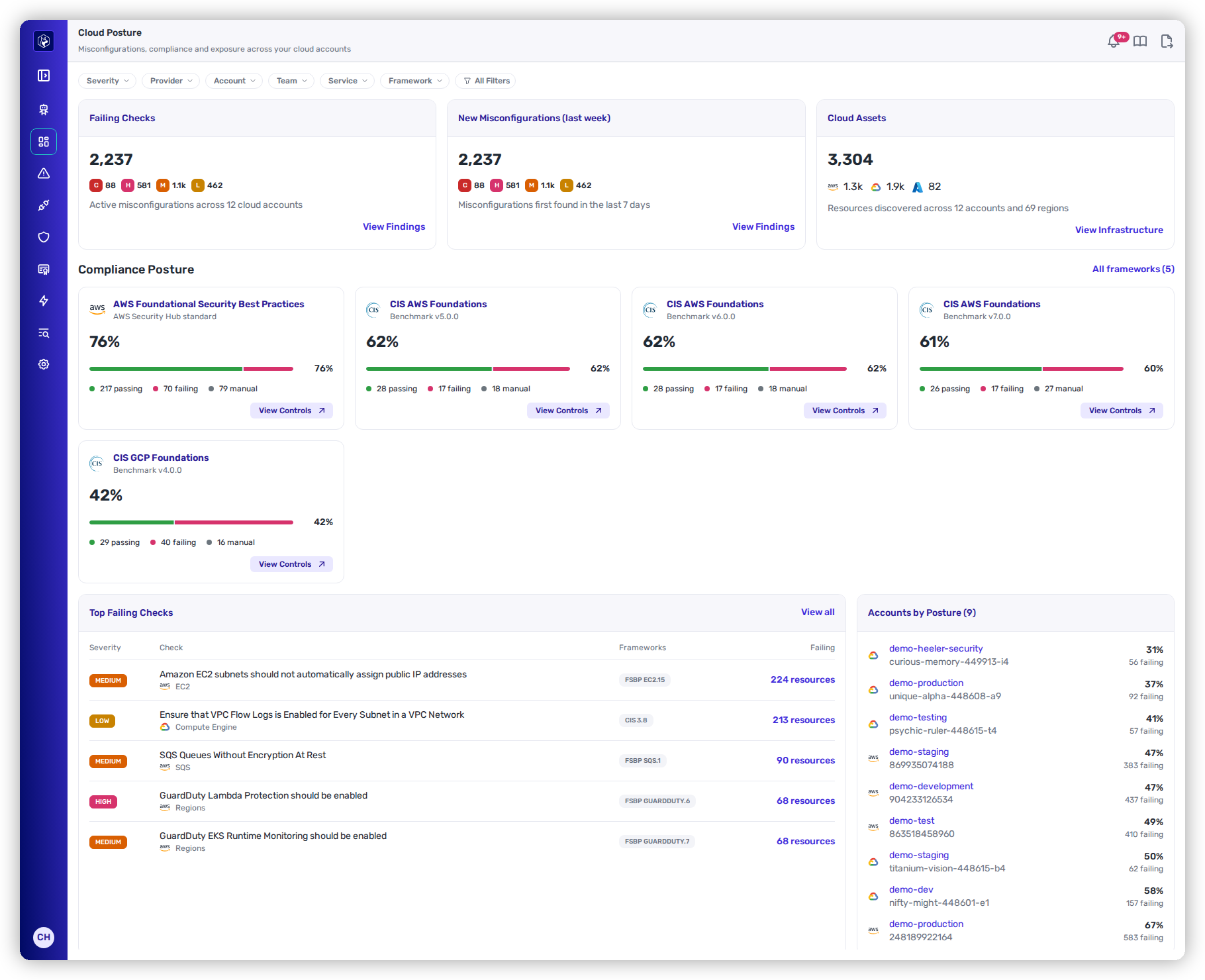
<figure><img src="https://414480750-files.gitbook.io/~/files/v0/b/gitbook-x-prod.appspot.com/o/spaces%2FXP3dp2kecwKA2KvYkntz%2Fuploads%2Fgit-blob-2fbaa46430a35b4361ed56a32f75b8dc2a44e98d%2Fcc-cs-overview.png?alt=media" alt="The Cloud Posture page with the Severity, Provider, Account, Team, Service and Framework filters and All Filters; the Failing Checks, New Misconfigurations (last week) and Cloud Assets cards, with cloud assets split across AWS, Google Cloud and Azure; five Compliance Posture framework cards scoring from 42% to 76%; and the Top Failing Checks list with Severity, Check, Frameworks and Failing columns beside Accounts by Posture (9)."><figcaption><p>Dashboards → Cloud Posture.</p></figcaption></figure>

## Where it is

Cloud Security pages sit in four sidebar groups:

| Page                                                                                   | Where                                                                                     | What it shows                                                                                                                                                              |
| -------------------------------------------------------------------------------------- | ----------------------------------------------------------------------------------------- | -------------------------------------------------------------------------------------------------------------------------------------------------------------------------- |
| [Cloud Posture](/mrecEO40m5D6bt7Pq5pE/operate/dashboards/cloud-posture.md)             | **Dashboards → Cloud Posture**                                                            | Failing checks, new misconfigurations, cloud assets, framework scores and the accounts with the lowest posture.                                                            |
| [Cloud Frameworks](/mrecEO40m5D6bt7Pq5pE/standards-and-compliance/cloud-frameworks.md) | **Standards**, in the **Cloud** section                                                   | The cloud frameworks you adopted, each with its score, controls and heatmap.                                                                                               |
| [Cloud Checks](/mrecEO40m5D6bt7Pq5pE/findings/cloud/checks.md)                         | **Security → Cloud**, the **Checks** tab                                                  | Every check with its status and failing resources.                                                                                                                         |
| [Cloud Findings](/mrecEO40m5D6bt7Pq5pE/findings/cloud/findings.md)                     | **Security → Cloud**, the **Findings by Resource** tab                                    | One row per failing resource, with the checks it fails.                                                                                                                    |
| [Cloud Exemptions](/mrecEO40m5D6bt7Pq5pE/findings/cloud/exemptions.md)                 | **Security → Cloud**, the **Exemptions** tab                                              | Resources excluded from a check, each with a reason, an approver and an end date.                                                                                          |
| [Cloud Events](/mrecEO40m5D6bt7Pq5pE/findings/cloud-events.md)                         | **Security → Cloud Events**                                                               | Write activity and suspicious events from your cloud audit logs, and the rules that flag them. Appears while at least one cloud connection has event collection turned on. |
| [Infrastructure](/mrecEO40m5D6bt7Pq5pE/catalog/infrastructure.md)                      | **Catalog → Infrastructure**, and the **Infrastructure** tab of an application or service | Every resource Heeler discovered in your cloud accounts, by type.                                                                                                          |

**Security → Cloud** opens on the **Checks** tab.

## What is evaluated

| Cloud                           | Checks in the catalog                                                       | Built-in frameworks                                                                                                |
| ------------------------------- | --------------------------------------------------------------------------- | ------------------------------------------------------------------------------------------------------------------ |
| **AWS**                         | 340 (338 evaluated; 2 duplicate CloudTrail S3 checks show as not evaluated) | AWS Foundational Security Best Practices 1.0.0; CIS AWS Foundations Benchmark 3.0.0, 4.0.0, 5.0.0, 6.0.0 and 7.0.0 |
| **Google Cloud**                | 69                                                                          | CIS GCP Foundation Benchmark 4.0.0                                                                                 |
| **Oracle Cloud Infrastructure** | 47                                                                          | CIS Oracle Cloud Infrastructure Foundations Benchmark 3.1.1                                                        |
| **Azure**                       | —                                                                           | —                                                                                                                  |

Azure resources appear in [Infrastructure](/mrecEO40m5D6bt7Pq5pE/catalog/infrastructure.md) and in the **Cloud Assets** count; no checks evaluate them. AWS, Google Cloud and Oracle Cloud resources appear in Infrastructure alongside their checks.

A check runs when a framework maps it. Every AWS, Google Cloud and Oracle Cloud check that a built-in framework maps is active from the start, whether or not you adopt that framework. Some AWS checks are mapped by no built-in framework; they run once a [custom framework](/mrecEO40m5D6bt7Pq5pE/standards-and-compliance/custom-frameworks.md) maps them.

## Before you start

* At least one cloud connection: [AWS](/mrecEO40m5D6bt7Pq5pE/get-started/cloud-and-runtime/amazon-web-services.md), [Google Cloud](/mrecEO40m5D6bt7Pq5pE/get-started/cloud-and-runtime/google-cloud-platform.md) or [Oracle Cloud Infrastructure](/mrecEO40m5D6bt7Pq5pE/get-started/cloud-and-runtime/oracle-cloud-infrastructure.md).
* For the AWS checks on service control policies, resource control policies and the organization management account: an AWS Organization connection from the management account.

The checks read the inventory Heeler already collects. They make no calls to your cloud provider and need no permissions beyond those of the cloud connection.

## When results update

| Step                 | Cadence                                              |
| -------------------- | ---------------------------------------------------- |
| Inventory collection | Every 2 to 24 hours, depending on the resource type. |
| Check evaluation     | Every 12 hours.                                      |
| Score history        | One snapshot a day, kept for 180 days.               |

Results appear after the first collection and the first evaluation finish. Every list shows when its checks were last evaluated. A check whose latest run failed in an account shows the **Error** status, and its counts come from the last successful run.

## Who sees what

Every role can open every Cloud Security page, including **Catalog → Infrastructure**. What a person sees depends on their role's visibility:

| Role                                                                                                    | Cloud accounts visible                                                                        |
| ------------------------------------------------------------------------------------------------------- | --------------------------------------------------------------------------------------------- |
| **Administrator**, **Administrator (read-only)**, **Organization contributor**, **Organization viewer** | Every cloud account.                                                                          |
| **Team contributor**, **Team viewer**                                                                   | Only the cloud accounts their teams own. An account that no team owns is not visible to them. |

The visible accounts decide every count, score, heatmap row, inventory figure and exemption a person sees.

Only an **Administrator** can add or remove a framework, build a custom framework, and request, approve or revoke an exemption.

### Assign cloud accounts to teams

An Administrator assigns accounts in either of two places:

* **Administration → Connection Mapping → Teams** — the team's **Cloud** count, or the row action **Manage Cloud Accounts**.
* **Administration → Connections → Cloud Accounts** — the **Teams** column, or the row action **Assign Teams**.

An account can belong to several teams. A change applies the next time a page loads.

On the team, you can also assign an AWS OU, a Google Cloud folder or an OCI compartment. It covers every account beneath it, including accounts added later. Accounts moved into or out of an assigned OU, folder or compartment follow within an hour of the next harvest. An account covered this way shows the team as *Team* (via *name*) in the **Teams** column. See [Teams → Cloud accounts](/mrecEO40m5D6bt7Pq5pE/administer-and-monitor/organization-model/teams.md#cloud-accounts).

The **Team** filter and selector on Cloud Security pages list the teams that own at least one cloud account, plus **No team** for the accounts no team owns. On **Catalog → Infrastructure** and the **Infrastructure** tabs, the **Team** selector is hidden when no team you can see owns a cloud account.

## In this section

<table data-view="cards"><thead><tr><th></th><th></th><th data-hidden data-card-target data-type="content-ref"></th></tr></thead><tbody><tr><td><strong>Cloud Posture</strong></td><td>Dashboards → Cloud Posture: failing checks, new misconfigurations, assets, scores and accounts by posture.</td><td><a href="/mrecEO40m5D6bt7Pq5pE/operate/dashboards/cloud-posture.md">Cloud Posture</a></td></tr><tr><td><strong>Cloud Frameworks</strong></td><td>Adopted frameworks, their controls, the heatmap and how scores are calculated.</td><td><a href="/mrecEO40m5D6bt7Pq5pE/standards-and-compliance/cloud-frameworks.md">Cloud Frameworks</a></td></tr><tr><td><strong>Custom Frameworks</strong></td><td>Build a framework from checks, or clone and customize a built-in one.</td><td><a href="/mrecEO40m5D6bt7Pq5pE/standards-and-compliance/custom-frameworks.md">Custom Frameworks</a></td></tr><tr><td><strong>Cloud Checks</strong></td><td>Every check, its status, its guidance and the resources failing it.</td><td><a href="/mrecEO40m5D6bt7Pq5pE/findings/cloud/checks.md">Cloud Checks</a></td></tr><tr><td><strong>Cloud Findings</strong></td><td>One row per failing resource, with the checks it fails.</td><td><a href="/mrecEO40m5D6bt7Pq5pE/findings/cloud/findings.md">Cloud Findings</a></td></tr><tr><td><strong>Cloud Events</strong></td><td>Security → Cloud Events: write activity and suspicious events from your cloud audit logs, and the rules that flag them.</td><td><a href="/mrecEO40m5D6bt7Pq5pE/findings/cloud-events.md">Cloud Events</a></td></tr><tr><td><strong>Infrastructure</strong></td><td>Catalog → Infrastructure: every discovered cloud resource, by type.</td><td><a href="/mrecEO40m5D6bt7Pq5pE/catalog/infrastructure.md">Infrastructure</a></td></tr><tr><td><strong>Cloud Exemptions</strong></td><td>Exclude resources from a check, with approval and an end date.</td><td><a href="/mrecEO40m5D6bt7Pq5pE/findings/cloud/exemptions.md">Cloud Exemptions</a></td></tr></tbody></table>

## Related

* [Third-Party Access](/mrecEO40m5D6bt7Pq5pE/third-party-access.md) — the vendors that can reach your GitHub organization, GitLab groups and cloud accounts.
* [Resource Detail](/mrecEO40m5D6bt7Pq5pE/catalog/infrastructure/resource-detail.md) — the resource drawer that opens from every Cloud Security list.
* [Connect Your Cloud and Runtime](/mrecEO40m5D6bt7Pq5pE/get-started/cloud-and-runtime.md) — the cloud connections Cloud Security reads.
* [Standards and Compliance](/mrecEO40m5D6bt7Pq5pE/standards-and-compliance.md) — application-level frameworks such as DORA and the EU Cyber Resilience Act.


---

# Agent Instructions
This documentation is published with GitBook. GitBook is the documentation platform designed so that both humans and AI agents can read, navigate, and reason over technical content effectively. Learn more at gitbook.com.

## Querying This Documentation
If you need additional information that is not directly available in this page, you can query the documentation dynamically by asking a question.

Perform an HTTP GET request on the current page URL with the `ask` query parameter, and the optional `goal` query parameter:

```
GET https://docs.heeler.com/mrecEO40m5D6bt7Pq5pE/findings/cloud.md?ask=<question>&goal=<endgoal>
```

`ask` is the immediate question: it should be specific, self-contained, and written in natural language.
`goal` is optional and describes the broader end goal you are ultimately trying to accomplish on behalf of the user. GitBook uses it to tailor the answer towards what is most useful for that goal.

The response will contain a direct answer to the question and relevant excerpts and sources from the documentation.

Use this mechanism when the answer is not explicitly present in the current page, you need clarification or additional context, or you want to retrieve related documentation sections.
