> For the complete documentation index, see [llms.txt](https://docs.heeler.com/mrecEO40m5D6bt7Pq5pE/llms.txt). Markdown versions of documentation pages are available by appending `.md` to page URLs; this page is available as [Markdown](https://docs.heeler.com/mrecEO40m5D6bt7Pq5pE/get-started/source-code-scm.md).

# Connect Your Code

Connect your source control so Heeler starts finding vulnerabilities, code weaknesses, and secrets across every repository — and can gate new risk on pull requests.

**What this unlocks:** the highest-value first step. Connect your source control and Heeler immediately begins producing dependency (SCA), code-security (SAST), and secret findings across your repositories — and makes [PR guardrails](/mrecEO40m5D6bt7Pq5pE/prevent/pr-guardrails.md) available to gate new risk before it merges. Everything else in Heeler builds on the code graph this creates.

{% hint style="info" %}
This page is the **spine** — it covers what's common to every provider and routes you to the exact setup guide for yours. Pick your provider in the table below.
{% endhint %}

## Before you start

<table><thead><tr><th width="260">Requirement</th><th>Why</th></tr></thead><tbody><tr><td><strong>Administrator</strong> in Heeler</td><td>Connecting code is an admin capability — see <a href="/mrecEO40m5D6bt7Pq5pE/get-started/users-and-access/roles-and-permissions.md">Roles &#x26; Permissions</a>.</td></tr><tr><td><strong>Admin rights on the SCM organization</strong></td><td>You need to be able to authorize Heeler (install its app / sign in) or issue an access token with the required scopes.</td></tr><tr><td><strong>Network reachability</strong> (self-hosted only)</td><td>For GitHub Enterprise Server, GitLab self-managed, or Bitbucket Data Center, Heeler reaches your instance directly — allow its <a href="#network-access-and-ip-allow-list">outbound IPs</a>.</td></tr></tbody></table>

## Where it lives

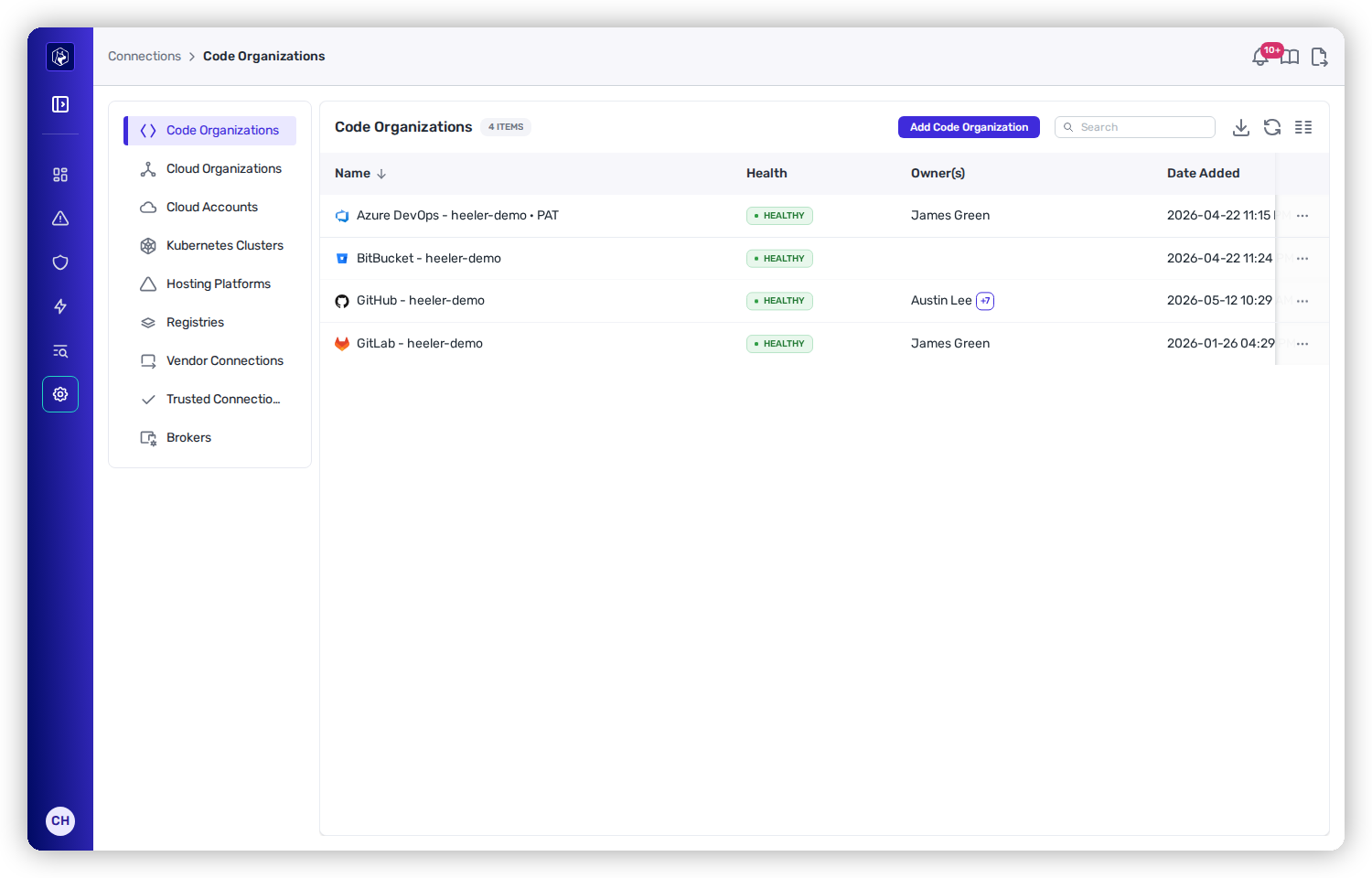
Open **Administration → Connections → Code Organizations**. Each row is a connected SCM organization with its **Health**, **Owner(s)**, and the date it was added. Click **Add Code Organization** to connect a new one — the menu lists every supported provider and connection method.

<figure><img src="https://414480750-files.gitbook.io/~/files/v0/b/gitbook-x-prod.appspot.com/o/spaces%2FXP3dp2kecwKA2KvYkntz%2Fuploads%2Fgit-blob-e179a6be44cf5ffb709456389565aee116b43010%2Fcc-gs-scm-orgs.png?alt=media" alt="The Code Organizations page under Administration → Connections, listing connected GitHub, GitLab, Azure DevOps, and Bitbucket organizations, each showing a Healthy status."><figcaption><p>Administration → Connections → Code Organizations — each connected provider with its health, owners, and date added. <strong>Add Code Organization</strong> lists every supported provider and connection method.</p></figcaption></figure>

## Supported providers

Each provider connects a little differently — an app you install, a token you issue, or an app registration you federate. Choose yours for the exact steps, scopes, and screenshots:

<table data-view="cards"><thead><tr><th></th><th></th><th data-type="content-ref"></th></tr></thead><tbody><tr><td><strong>GitHub</strong></td><td>Install the Heeler GitHub App on your organization.</td><td><a href="/mrecEO40m5D6bt7Pq5pE/get-started/source-code-scm/github.md">GitHub</a></td></tr><tr><td><strong>GitHub Enterprise Server</strong></td><td>Self-hosted — create a GitHub App on your instance and point Heeler at it.</td><td><a href="/mrecEO40m5D6bt7Pq5pE/get-started/source-code-scm/github-enterprise-server.md">GitHub Enterprise Server</a></td></tr><tr><td><strong>GitLab</strong></td><td>Cloud or self-managed — a group access token plus a group hook.</td><td><a href="/mrecEO40m5D6bt7Pq5pE/get-started/source-code-scm/gitlab.md">GitLab</a></td></tr><tr><td><strong>Azure DevOps (App registration / federated)</strong></td><td>Recommended — an app-only Microsoft Entra Service Principal with workload identity federation; no human-user dependency and no stored secret.</td><td><a href="/mrecEO40m5D6bt7Pq5pE/get-started/source-code-scm/azure-devops-app-registration.md">Azure DevOps (App registration / federated)</a></td></tr><tr><td><strong>Azure DevOps (PAT)</strong></td><td>A personal access token you create and rotate yourself; prefer app registration.</td><td><a href="/mrecEO40m5D6bt7Pq5pE/get-started/source-code-scm/azure-devops.md">Azure DevOps (PAT)</a></td></tr><tr><td><strong>Bitbucket Cloud</strong></td><td>Connect with an Atlassian API token.</td><td><a href="/mrecEO40m5D6bt7Pq5pE/get-started/source-code-scm/bitbucket-cloud.md">Bitbucket Cloud</a></td></tr><tr><td><strong>Bitbucket Data Center</strong></td><td>Self-hosted — connect to your server URL with an HTTP access token.</td><td><a href="/mrecEO40m5D6bt7Pq5pE/get-started/source-code-scm/bitbucket-data-center.md">Bitbucket Data Center</a></td></tr></tbody></table>

See [Supported Technologies](/mrecEO40m5D6bt7Pq5pE/supported-technologies.md#source-control) for the authoritative provider list.

## How a connection works

However you authorize it, every connection follows the same shape and gives Heeler the same three things:

{% stepper %}
{% step %}

### Authorize Heeler

Install the app, sign in, or supply a scoped access token — enough for Heeler to **read your code** (for SCA, SAST, and secret analysis) and **write pull requests and status checks** (for guardrails and automated fixes).
{% endstep %}

{% step %}

### Register a webhook

Heeler sets up a webhook (or service hook / group hook) so it sees **new commits, pull requests, and releases** in near real time — keeping your catalog current and letting guardrails evaluate PRs as they open.
{% endstep %}

{% step %}

### Discover and analyze

Heeler harvests repositories, contributors, teams, and pipelines, then begins analyzing. First discovery can take up to an hour depending on the size of your organization.
{% endstep %}
{% endstepper %}

{% hint style="success" %}
**Least privilege by design.** Read access powers scanning and context; write access is scoped to checks, pull requests, and status so Heeler can post guardrail results and open fix PRs — never force-push or alter your history.
{% endhint %}

## Network access and IP allow list

Heeler reaches your SCM from two outbound IP addresses. If your organization or self-hosted instance restricts inbound traffic with an **IP allow list**, allow both:

| Outbound IP     | Ports      |
| --------------- | ---------- |
| `44.221.229.40` | 443 and 22 |
| `52.73.231.96`  | 443 and 22 |

Port **443** carries API access and **22** carries git over SSH. **Azure DevOps** uses **443 only**. For **GitHub (cloud)**, these IPs are attached to the Heeler GitHub App and you'll be prompted to accept them during install.

## Self-hosted instances

Self-hosted source control connects **directly** — Heeler reaches your instance over the network (add the outbound IPs above if you restrict inbound traffic). It does **not** use the [On-Premises Broker](/mrecEO40m5D6bt7Pq5pE/get-started/registries-and-artifacts/on-premises-broker.md), which is for artifact registries and Kubernetes inventory only.

<table><thead><tr><th width="260">Instance</th><th>How it connects</th></tr></thead><tbody><tr><td><a href="/mrecEO40m5D6bt7Pq5pE/get-started/source-code-scm/github-enterprise-server.md"><strong>GitHub Enterprise Server</strong></a></td><td>Create the Heeler GitHub App on your enterprise host, then register it in Heeler with its App ID, Installation ID, org, hostname, and private key.</td></tr><tr><td><a href="/mrecEO40m5D6bt7Pq5pE/get-started/source-code-scm/gitlab.md"><strong>GitLab self-managed</strong></a></td><td>Choose <strong>On-Prem</strong> when adding the organization, enter your server URL and a group access token, and add a group hook pointing at Heeler's events endpoint.</td></tr><tr><td><a href="/mrecEO40m5D6bt7Pq5pE/get-started/source-code-scm/bitbucket-data-center.md"><strong>Bitbucket Data Center</strong></a></td><td>Connect to your Bitbucket Server URL with an HTTP access token.</td></tr></tbody></table>

For a fully air-gapped instance with no route to Heeler, talk to the Heeler team about options.

## You're done when…

* [ ] The organization appears under **Code Organizations** with a **Healthy** status.
* [ ] Repositories show up in the [Catalog](/mrecEO40m5D6bt7Pq5pE/catalog/repositories.md).
* [ ] Findings begin populating — head to [Quickstart](/mrecEO40m5D6bt7Pq5pE/get-started/quickstart.md).

## Related

* [Connect Your Cloud and Runtime](/mrecEO40m5D6bt7Pq5pE/get-started/cloud-and-runtime.md) — add the runtime context that makes prioritization real.
* [Map Your Organization](/mrecEO40m5D6bt7Pq5pE/get-started/map-your-organization.md) — teams, applications, and environments so findings route and rank.

{% hint style="warning" %}
**Connection shows Unhealthy?** It usually means an access token is missing a required scope or has expired, or the webhook can't reach Heeler. Re-check the token against the scopes on your provider's page, and confirm the webhook was created. See [Setup and Connection Issues](/mrecEO40m5D6bt7Pq5pE/troubleshooting-and-faq/setup-and-connection-issues.md).
{% endhint %}


---

# Agent Instructions
This documentation is published with GitBook. GitBook is the documentation platform designed so that both humans and AI agents can read, navigate, and reason over technical content effectively. Learn more at gitbook.com.

## Querying This Documentation
If you need additional information that is not directly available in this page, you can query the documentation dynamically by asking a question.

Perform an HTTP GET request on the current page URL with the `ask` query parameter, and the optional `goal` query parameter:

```
GET https://docs.heeler.com/mrecEO40m5D6bt7Pq5pE/get-started/source-code-scm.md?ask=<question>&goal=<endgoal>
```

`ask` is the immediate question: it should be specific, self-contained, and written in natural language.
`goal` is optional and describes the broader end goal you are ultimately trying to accomplish on behalf of the user. GitBook uses it to tailor the answer towards what is most useful for that goal.

The response will contain a direct answer to the question and relevant excerpts and sources from the documentation.

Use this mechanism when the answer is not explicitly present in the current page, you need clarification or additional context, or you want to retrieve related documentation sections.
