> For the complete documentation index, see [llms.txt](https://docs.heeler.com/mrecEO40m5D6bt7Pq5pE/llms.txt). Markdown versions of documentation pages are available by appending `.md` to page URLs; this page is available as [Markdown](https://docs.heeler.com/mrecEO40m5D6bt7Pq5pE/get-started/registries-and-artifacts.md).

# Connect Registries and Artifacts

Connect your container and artifact registries so Heeler can analyze the images you run and treat the packages you publish as first-party code.

**What this unlocks:** two things Heeler can't see from source alone.

* **Container images** you run — Heeler pulls and analyzes images from your registry, then ties each one back to the repository and deployment that use it.
* **First-party packages** you publish — the libraries your own teams build and consume are treated as first-party code: correlated with your inventory and evaluated for vulnerabilities, secrets, and policy drift, just like the repositories they came from.

{% hint style="info" %}
This page is the **spine** — the common flow and where registries live. Pick your registry below for exact fields, credentials, and screenshots.
{% endhint %}

## Before you start

* **Administrator** in Heeler (see [Roles and Permissions](/mrecEO40m5D6bt7Pq5pE/get-started/users-and-access/roles-and-permissions.md)).
* The registry's **domain/URL** and **read-only credentials** so Heeler can pull image and package metadata.
* For a registry **inside your network** that Heeler's cloud can't reach, deploy the [On-Premises Broker](/mrecEO40m5D6bt7Pq5pE/get-started/registries-and-artifacts/on-premises-broker.md) first (Artifactory, Nexus, and Harbor commonly need it).

## Where it lives

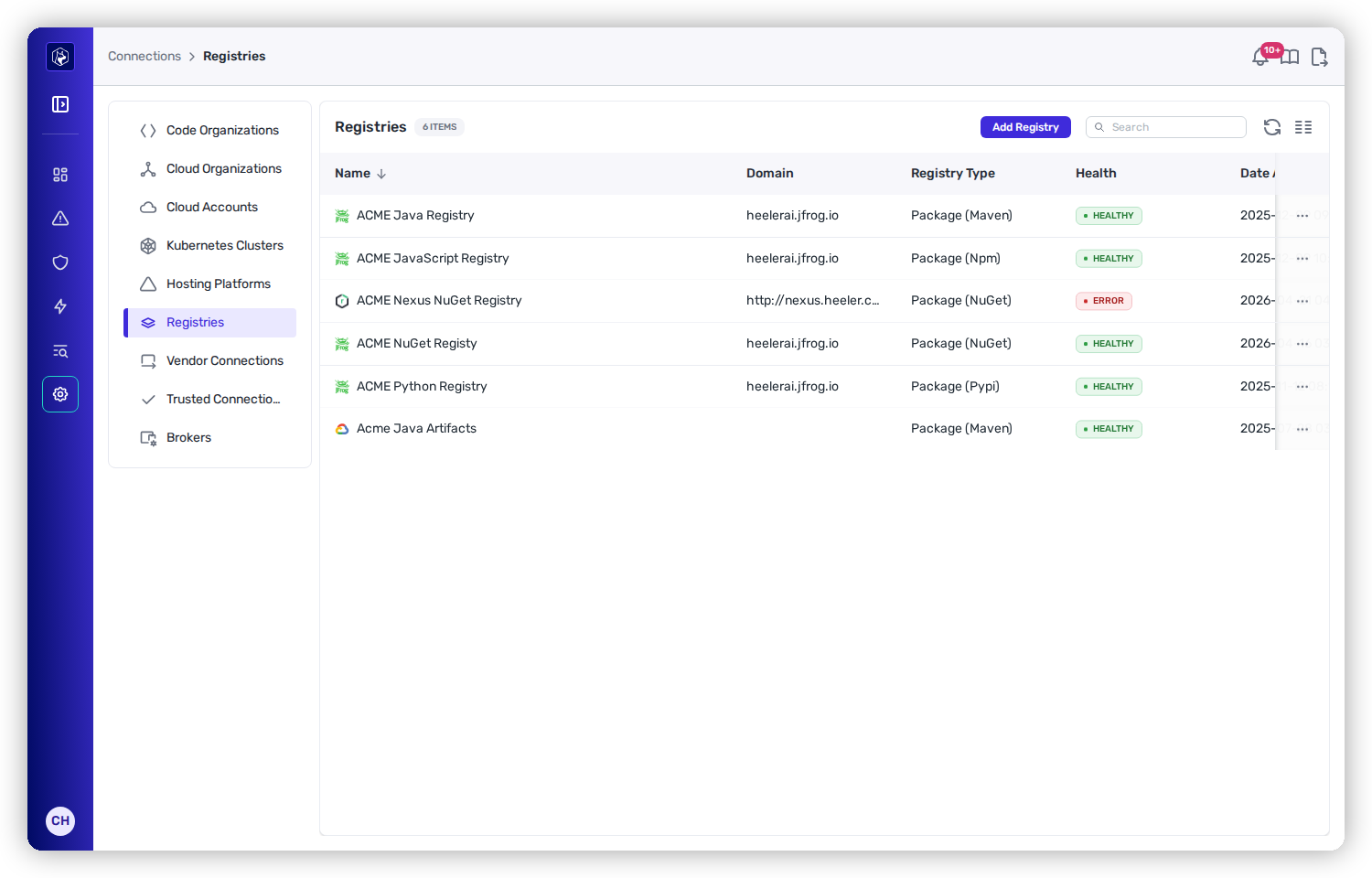
Open **Administration → Connections → Registries**. Each row shows the registry **Name**, **Domain**, **Registry Type**, and **Health**. Click **Add Registry** and choose the type.

<figure><img src="https://414480750-files.gitbook.io/~/files/v0/b/gitbook-x-prod.appspot.com/o/spaces%2FXP3dp2kecwKA2KvYkntz%2Fuploads%2Fgit-blob-b066a7ac49077df74dcf3b3ac64815fb86edc92c%2Fcc-gs-registries.png?alt=media" alt="The Registries page under Administration → Connections, listing connected registries with their Domain, Registry Type, and Health status."><figcaption><p>Administration → Connections → Registries — each connected registry with its domain, type, and health. <strong>Add Registry</strong> lists the supported registry types.</p></figcaption></figure>

## Supported registries

<table data-view="cards"><thead><tr><th></th><th></th><th data-type="content-ref"></th></tr></thead><tbody><tr><td><strong>AWS CodeArtifact</strong></td><td>First-party packages, via cross-account IAM roles.</td><td><a href="/mrecEO40m5D6bt7Pq5pE/get-started/registries-and-artifacts/aws-codeartifact.md">AWS CodeArtifact</a></td></tr><tr><td><strong>GCP Artifact Registry</strong></td><td>First-party packages, reusing your GCP cloud credential.</td><td><a href="/mrecEO40m5D6bt7Pq5pE/get-started/registries-and-artifacts/gcp-artifact-registry.md">GCP Artifact Registry</a></td></tr><tr><td><strong>GitHub Container Registry</strong></td><td>Container images from <code>ghcr.io</code>.</td><td><a href="/mrecEO40m5D6bt7Pq5pE/get-started/registries-and-artifacts/github-container-registry.md">GitHub Container Registry</a></td></tr><tr><td><strong>GitHub Packages</strong></td><td>First-party packages from GitHub Packages.</td><td><a href="/mrecEO40m5D6bt7Pq5pE/get-started/registries-and-artifacts/github-packages.md">GitHub Packages</a></td></tr><tr><td><strong>GitLab Package Registry</strong></td><td>First-party packages, reusing your GitLab connection.</td><td><a href="/mrecEO40m5D6bt7Pq5pE/get-started/registries-and-artifacts/gitlab-package-registry.md">GitLab Package Registry</a></td></tr><tr><td><strong>JFrog Artifactory</strong></td><td>Images or artifacts; Broker for on-prem.</td><td><a href="/mrecEO40m5D6bt7Pq5pE/get-started/registries-and-artifacts/artifactory.md">Artifactory</a></td></tr><tr><td><strong>Sonatype Nexus</strong></td><td>Images or first-party artifacts; Broker for on-prem.</td><td><a href="/mrecEO40m5D6bt7Pq5pE/get-started/registries-and-artifacts/nexus.md">Nexus</a></td></tr><tr><td><strong>Harbor</strong></td><td>Container images; Broker for on-prem.</td><td><a href="/mrecEO40m5D6bt7Pq5pE/get-started/registries-and-artifacts/harbor.md">Harbor</a></td></tr><tr><td><strong>Docker Hub</strong></td><td>Container images from Docker Hub.</td><td><a href="/mrecEO40m5D6bt7Pq5pE/get-started/registries-and-artifacts/docker-hub.md">Docker Hub</a></td></tr></tbody></table>

See [Supported Technologies](/mrecEO40m5D6bt7Pq5pE/supported-technologies.md#container-and-artifact-registries) for the authoritative list.

## Image vs. artifact analysis

Some registries can do both jobs; when you add one, you'll pick which:

<table><thead><tr><th width="180">Mode</th><th>What Heeler does</th><th>Typical registries</th></tr></thead><tbody><tr><td><strong>Image</strong></td><td>Pulls and analyzes <strong>container images</strong> you run.</td><td>Docker Hub, Harbor, GitHub Container Registry, Artifactory (Image), Nexus (Image)</td></tr><tr><td><strong>Artifact / Package</strong></td><td>Analyzes <strong>first-party libraries</strong> you publish, scoped to one ecosystem (Maven, NPM, NuGet, PyPI) per connection.</td><td>AWS CodeArtifact, GCP Artifact Registry, GitHub Packages, GitLab Package Registry, Nexus (Artifact), Artifactory (Artifact)</td></tr></tbody></table>

## The common flow

{% stepper %}
{% step %}

### Add the registry

On **Registries**, click **Add Registry** and choose the type.
{% endstep %}

{% step %}

### Enter its details

Provide the domain/URL and read credentials (and, for package registries, the ecosystem and repositories). Your provider's page lists the exact fields.
{% endstep %}

{% step %}

### Link the Broker (on-prem only)

If the registry lives inside your network, link the connection to your [On-Premises Broker](/mrecEO40m5D6bt7Pq5pE/get-started/registries-and-artifacts/on-premises-broker.md) so analysis runs in your environment.
{% endstep %}

{% step %}

### Save and verify

Heeler validates the connection and begins pulling. The registry shows **Healthy** once it's reachable and its credentials check out.
{% endstep %}
{% endstepper %}

## You're done when…

* [ ] The registry appears under **Registries** with **Healthy** status.
* [ ] Images and packages correlate to their source repositories in the [Catalog](/mrecEO40m5D6bt7Pq5pE/catalog.md).

## Related

* [Connect Ticketing](/mrecEO40m5D6bt7Pq5pE/get-started/ticketing.md) and [Messaging](/mrecEO40m5D6bt7Pq5pE/get-started/messaging.md) — where findings open tickets and post notifications.
* [Map Your Organization](/mrecEO40m5D6bt7Pq5pE/get-started/map-your-organization.md) — teams, applications, and environments so findings route and rank.


---

# Agent Instructions
This documentation is published with GitBook. GitBook is the documentation platform designed so that both humans and AI agents can read, navigate, and reason over technical content effectively. Learn more at gitbook.com.

## Querying This Documentation
If you need additional information that is not directly available in this page, you can query the documentation dynamically by asking a question.

Perform an HTTP GET request on the current page URL with the `ask` query parameter, and the optional `goal` query parameter:

```
GET https://docs.heeler.com/mrecEO40m5D6bt7Pq5pE/get-started/registries-and-artifacts.md?ask=<question>&goal=<endgoal>
```

`ask` is the immediate question: it should be specific, self-contained, and written in natural language.
`goal` is optional and describes the broader end goal you are ultimately trying to accomplish on behalf of the user. GitBook uses it to tailor the answer towards what is most useful for that goal.

The response will contain a direct answer to the question and relevant excerpts and sources from the documentation.

Use this mechanism when the answer is not explicitly present in the current page, you need clarification or additional context, or you want to retrieve related documentation sections.
