> For the complete documentation index, see [llms.txt](https://docs.heeler.com/mrecEO40m5D6bt7Pq5pE/llms.txt). Markdown versions of documentation pages are available by appending `.md` to page URLs; this page is available as [Markdown](https://docs.heeler.com/mrecEO40m5D6bt7Pq5pE/catalog.md).

# Catalog

Heeler's live, automatically-built inventory of your whole software environment — repositories, dependencies, endpoints, applications, services, deployments, infrastructure, contributors, and files. T

The **Catalog** is Heeler's live inventory of your entire software environment — code, dependencies, endpoints, services, deployments, cloud infrastructure, the people who own it, and the notable files that shape it. It's the foundation of your **ProductDNA**: the connected model that maps code to cloud and ownership down to the dependency level, and that every finding in the platform is scored against.

{% hint style="info" %}
**Built automatically — no agents, no tagging.** Connect your source-code (SCM) and cloud (CSP) providers (see [Get Started](/mrecEO40m5D6bt7Pq5pE/get-started.md)) and the inventory populates and stays current on its own — no sensors to deploy, nothing to tag, no build-pipeline changes. Cloud changes are picked up within about 60 seconds; code is re-analyzed on every push.
{% endhint %}

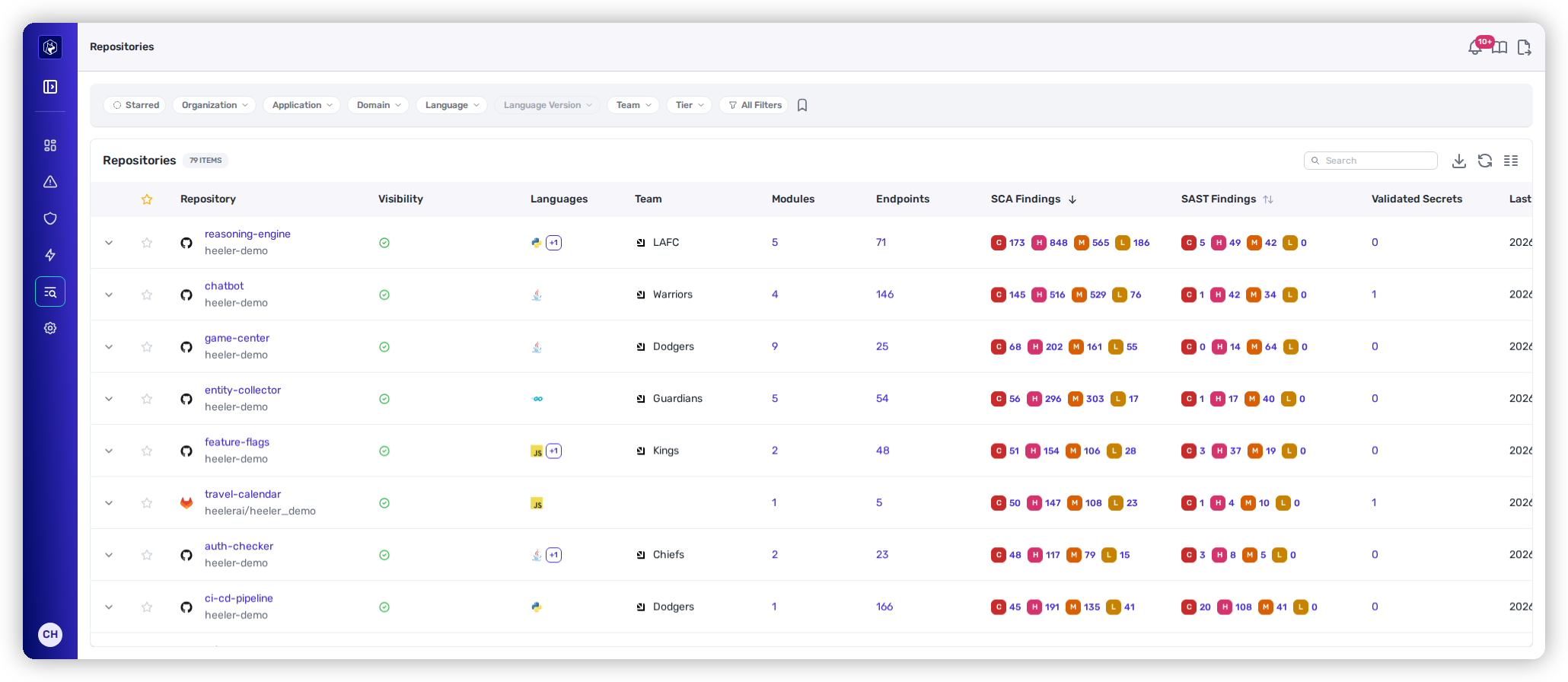
<figure><img src="https://414480750-files.gitbook.io/~/files/v0/b/gitbook-x-prod.appspot.com/o/spaces%2FXP3dp2kecwKA2KvYkntz%2Fuploads%2Fgit-blob-02e7da028084d707874a1b677fa469785c98411a%2Fcc-vis-catalog.png?alt=media" alt="The Repositories inventory, the first list the Catalog opens on."><figcaption><p>The Catalog opens on the Repositories inventory — switch to any other inventory from the navigation rail on the left.</p></figcaption></figure>

## The inventories

Selecting **Catalog** opens the **Repositories** inventory. Every other inventory is one click away in the navigation rail down the left of the screen: select **Expand navigation** at the top of the rail to see the names alongside the icons, then choose the inventory you want.

| Category           | What it counts                                                                                  |
| ------------------ | ----------------------------------------------------------------------------------------------- |
| **Repositories**   | Monitored source-code repositories.                                                             |
| **Dependencies**   | Unique packages across all repositories.                                                        |
| **Endpoints**      | API endpoints (and MCP tools, GraphQL/gRPC services, actuator routes) detected across all code. |
| **Applications**   | Logical groupings of repositories and services that deliver a business outcome.                 |
| **Domains**        | Business groupings of applications, each with its own business impact and tier.                 |
| **Services**       | Runtime services mapped from cloud back to code.                                                |
| **Deployments**    | Running instances across all environments.                                                      |
| **Infrastructure** | Cloud resources across every connected provider (shown as **Resources**).                       |
| **Contributors**   | Individuals contributing to monitored repositories.                                             |
| **Files**          | Notable repository files analyzed for risk (e.g. AI-agent instruction files).                   |
| **Data Inventory** | Data entities classified across your code and API endpoints.                                    |

## How every inventory works

Each entity page follows the same shape, so once you know one you know them all:

* **The listing** — the full inventory as a table: the columns that matter for that entity, quick-filter chips, an **All Filters** drawer, search, saved views, column management, and export.
* **The detail** — click any row to drill in: a header with identity, ownership, and posture, then tabbed views for every analysis Heeler runs against that entity.

The listing controls — filtering, saved views, columns, and export — work identically here and on the [dashboards](/mrecEO40m5D6bt7Pq5pE/operate/dashboards.md), so they're documented once in [**Filtering and Exports**](/mrecEO40m5D6bt7Pq5pE/operate/dashboards/filtering-and-exports.md). Several inventories also export a **CycloneDX SBOM** (globally from Dependencies, and per-repository, per-service, or per-deployment from their detail views).

## In this section

<table data-view="cards"><thead><tr><th></th><th></th><th data-hidden data-card-target data-type="content-ref"></th></tr></thead><tbody><tr><td><strong>Repositories</strong></td><td>Every monitored repo, with modules, findings, secrets, endpoints, and ownership.</td><td><a href="/mrecEO40m5D6bt7Pq5pE/catalog/repositories.md">Repositories</a></td></tr><tr><td><strong>Dependencies</strong></td><td>Every third-party package, with license, hygiene, and classification.</td><td><a href="/mrecEO40m5D6bt7Pq5pE/catalog/dependencies.md">Dependencies</a></td></tr><tr><td><strong>Endpoints</strong></td><td>Your API attack surface — auth posture, accessibility, and framework context.</td><td><a href="/mrecEO40m5D6bt7Pq5pE/catalog/endpoints.md">Endpoints</a></td></tr><tr><td><strong>Applications</strong></td><td>Business-level groupings of services, with propagating ownership and tier.</td><td><a href="/mrecEO40m5D6bt7Pq5pE/catalog/applications.md">Applications</a></td></tr><tr><td><strong>Services</strong></td><td>Runtime services mapped from cloud to code, with the model graph.</td><td><a href="/mrecEO40m5D6bt7Pq5pE/catalog/services.md">Services</a></td></tr><tr><td><strong>Deployments</strong></td><td>Every running instance, by environment, changeset, and exposure.</td><td><a href="/mrecEO40m5D6bt7Pq5pE/catalog/deployments.md">Deployments</a></td></tr><tr><td><strong>Infrastructure</strong></td><td>Cloud resources by category, linked to the services they support.</td><td><a href="/mrecEO40m5D6bt7Pq5pE/catalog/infrastructure.md">Infrastructure</a></td></tr><tr><td><strong>Contributors</strong></td><td>Everyone who contributes, de-duplicated and mapped to ownership.</td><td><a href="/mrecEO40m5D6bt7Pq5pE/catalog/contributors.md">Contributors</a></td></tr><tr><td><strong>Agent &#x26; Instruction Files</strong></td><td>AI-agent instruction files and other notable files, scored for risk.</td><td><a href="/mrecEO40m5D6bt7Pq5pE/catalog/files.md">Agent and Instruction Files</a></td></tr><tr><td><strong>Data Inventory</strong></td><td>The personal and sensitive data your code handles, classified and mapped to regulations.</td><td><a href="/mrecEO40m5D6bt7Pq5pE/catalog/data-inventory.md">Data Inventory</a></td></tr><tr><td><strong>Software Bill of Materials (SBOM)</strong></td><td>Export a CycloneDX SBOM at five scopes — deployment, service, application, repository, or module.</td><td><a href="/mrecEO40m5D6bt7Pq5pE/catalog/sbom.md">Software Bill of Materials (SBOM)</a></td></tr></tbody></table>

## Related

* [The Context Engine & ProductDNA](/mrecEO40m5D6bt7Pq5pE/overview/the-context-model.md) — how this inventory becomes the model findings are scored against.
* [Get Started](/mrecEO40m5D6bt7Pq5pE/get-started.md) — the SCM and cloud connections that populate the Catalog.
* [Coverage](/mrecEO40m5D6bt7Pq5pE/operate/dashboards/coverage.md) — the dashboard that reports how complete this inventory is.


---

# Agent Instructions
This documentation is published with GitBook. GitBook is the documentation platform designed so that both humans and AI agents can read, navigate, and reason over technical content effectively. Learn more at gitbook.com.

## Querying This Documentation
If you need additional information that is not directly available in this page, you can query the documentation dynamically by asking a question.

Perform an HTTP GET request on the current page URL with the `ask` query parameter, and the optional `goal` query parameter:

```
GET https://docs.heeler.com/mrecEO40m5D6bt7Pq5pE/catalog.md?ask=<question>&goal=<endgoal>
```

`ask` is the immediate question: it should be specific, self-contained, and written in natural language.
`goal` is optional and describes the broader end goal you are ultimately trying to accomplish on behalf of the user. GitBook uses it to tailor the answer towards what is most useful for that goal.

The response will contain a direct answer to the question and relevant excerpts and sources from the documentation.

Use this mechanism when the answer is not explicitly present in the current page, you need clarification or additional context, or you want to retrieve related documentation sections.
