> For the complete documentation index, see [llms.txt](https://docs.heeler.com/mrecEO40m5D6bt7Pq5pE/llms.txt). Markdown versions of documentation pages are available by appending `.md` to page URLs; this page is available as [Markdown](https://docs.heeler.com/mrecEO40m5D6bt7Pq5pE/findings.md).

# Findings

Everything Heeler detects across your software — dependency, code, secret, and agent-file risk — scored by real-world context and tracked from detection to fully deployed.

**Findings** is everything Heeler detects across your software — **open-source dependencies (SCA)**, **your own code (SAST)**, **the infrastructure your code defines (IaC)**, **exposed secrets**, **AI agent files**, **GitHub activity**, **compromised packages**, and **license policy breaks**. Each is scored by the real-world context of where and how your code runs, and tracked through the same lifecycle from detection to fully rolled out. This section is where you go to understand *what Heeler found and what it means*; [Prevent](/mrecEO40m5D6bt7Pq5pE/prevent.md), [Fix](/mrecEO40m5D6bt7Pq5pE/fix.md), and [Operate](/mrecEO40m5D6bt7Pq5pE/operate.md) are how you act on it.

{% hint style="info" %}
**Who this is for:** developers and security practitioners triaging and investigating risk. Findings appear automatically once your **source code** is connected; connecting **cloud & runtime** sharpens their prioritization (that's what makes exposure and reachability real). See [Set Up Agentic Remediation](/mrecEO40m5D6bt7Pq5pE/get-started/set-up-automated-remediation.md).
{% endhint %}

## The findings lifecycle

Every finding moves through the same shape, from detection to fully rolled out:

| State        | Meaning                                                                                            |
| ------------ | -------------------------------------------------------------------------------------------------- |
| **Active**   | The finding exists and hasn't been fixed.                                                          |
| **Fixed**    | The fix is merged in code, not yet confirmed running everywhere.                                   |
| **Deployed** | The fix is **rolled out to all running deployments** — confirmed from runtime, not just the merge. |

A merged fix is not confirmed until it reaches every running deployment. Heeler tracks that rollout, so a finding marked **Fixed** in code is reported separately from one confirmed **Deployed**.

## How Heeler triages findings

Severity isn't risk. Heeler scores every finding on the **context** of where and how your code runs, so the same issue can be urgent on one service and negligible on another. Three impacts feed the score:

* **Business impact** — how much the affected service matters (its tier and environment).
* **Environment impact** — how exposed it is right now (reachability, internet accessibility, mitigation, and more).
* **Threat** — real-world exploitation signals.

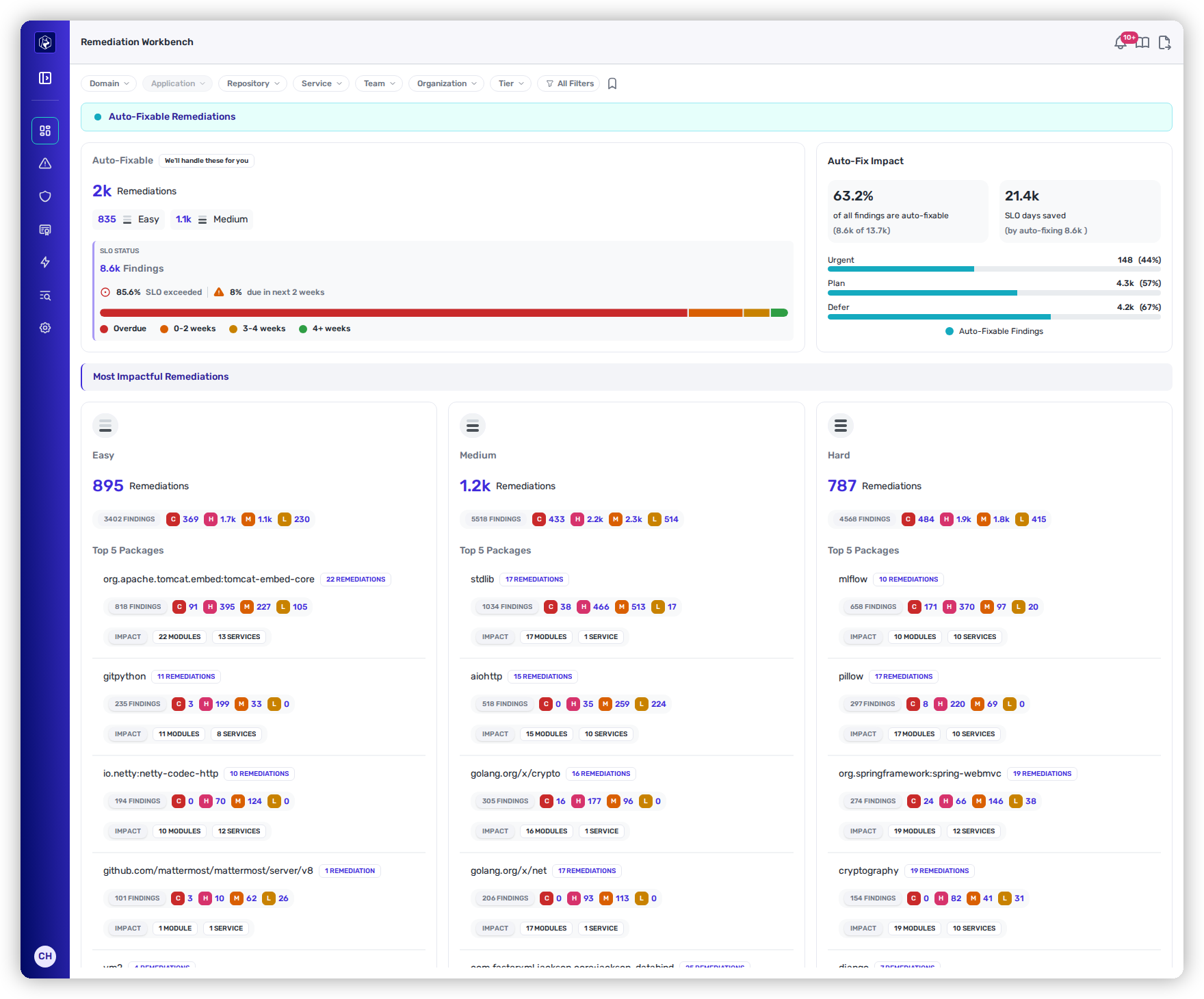
For **dependencies (SCA)**, **code (SAST)**, and **infrastructure definitions (IaC)**, these resolve to a **Heeler Risk band** — **Urgent** (fix now), **Plan** (schedule it), or **Defer** (track it):

<figure><img src="https://414480750-files.gitbook.io/~/files/v0/b/gitbook-x-prod.appspot.com/o/spaces%2FXP3dp2kecwKA2KvYkntz%2Fuploads%2Fgit-blob-a134a6bba477de3938edf87592bb4a51805888ab%2Fcc-vis-workbench.png?alt=media" alt="The Remediation Workbench, with the Auto-Fix Impact panel breaking auto-fixable findings down by Heeler Risk band — Urgent, Plan and Defer."><figcaption><p>Every finding carries a band. On the Remediation Workbench, <strong>Auto-Fix Impact</strong> reports how much of each band Heeler can fix for you.</p></figcaption></figure>

**Secrets** and **Agent Files** are triaged differently (by live-credential validation and by a 0–100 safety score, respectively). **Behavioral Checks** carry their own severity from the check that raised them. **License Violations** aren't scored at all — a license is allowed or it isn't — and **Compromised Dependencies** aren't either, because malicious code isn't something to rank. The exact signals for each domain live on its page — that's where you'll be when the question comes up.

## In this section

Each domain has its own prioritization model, findings views, and remediation paths.

<table data-view="cards"><thead><tr><th></th><th></th><th data-hidden data-card-target data-type="content-ref"></th></tr></thead><tbody><tr><td><strong>Open Source (SCA)</strong></td><td>Dependency vulnerabilities &#x26; supply-chain risk, prioritized by reachability and exploitation.</td><td><a href="/mrecEO40m5D6bt7Pq5pE/findings/open-source-sca.md">Open Source (SCA)</a></td></tr><tr><td><strong>Code Security (SAST)</strong></td><td>Source-code weaknesses, prioritized by exposure and weakness class.</td><td><a href="/mrecEO40m5D6bt7Pq5pE/findings/code-security-sast.md">Code Security (SAST)</a></td></tr><tr><td><strong>Infrastructure as Code (IaC)</strong></td><td>Misconfigurations in Terraform, OpenTofu, CloudFormation, Pulumi, and Kubernetes definitions.</td><td><a href="/mrecEO40m5D6bt7Pq5pE/findings/iac.md">Infrastructure as Code (IaC)</a></td></tr><tr><td><strong>CI/CD Config</strong></td><td>Build-pipeline configuration weaknesses in your GitHub Actions workflows, kept out of the SAST rollup.</td><td><a href="/mrecEO40m5D6bt7Pq5pE/findings/cicd-config.md">CI/CD Config</a></td></tr><tr><td><strong>Secrets</strong></td><td>Exposed credentials, prioritized by live validation.</td><td><a href="/mrecEO40m5D6bt7Pq5pE/findings/secrets.md">Secrets</a></td></tr><tr><td><strong>Agent Files</strong></td><td>AI-agent instruction files, scored for safety.</td><td><a href="/mrecEO40m5D6bt7Pq5pE/findings/agentic-supply-chain-agent-files.md">Agent Files</a></td></tr><tr><td><strong>Behavioral Checks</strong></td><td>Security checks raised from your GitHub audit activity rather than from code.</td><td><a href="/mrecEO40m5D6bt7Pq5pE/findings/behavioral-checks.md">Behavioral Checks</a></td></tr><tr><td><strong>Compromised Dependencies</strong></td><td>Packages matching Heeler's malicious-package intelligence — remove, don't triage.</td><td><a href="/mrecEO40m5D6bt7Pq5pE/findings/compromised-dependencies.md">Compromised Dependencies</a></td></tr><tr><td><strong>License Violations</strong></td><td>Dependencies carrying a license your policy doesn't allow.</td><td><a href="/mrecEO40m5D6bt7Pq5pE/findings/license-violations.md">License Violations</a></td></tr><tr><td><strong>Containers</strong></td><td>Vulnerabilities, packages and secrets in your container images, with the workloads running them.</td><td><a href="/mrecEO40m5D6bt7Pq5pE/findings/containers.md">Containers</a></td></tr></tbody></table>

## Related

* [Fix → Prioritize](/mrecEO40m5D6bt7Pq5pE/fix/prioritize-heeler-risk.md) — work the backlog in the right order using Heeler Risk.
* [Operate → Dashboards](/mrecEO40m5D6bt7Pq5pE/operate/dashboards.md) — see where risk concentrates and what's on the clock.
* [Catalog](/mrecEO40m5D6bt7Pq5pE/catalog.md) — the inventory these findings are scored against.


---

# Agent Instructions
This documentation is published with GitBook. GitBook is the documentation platform designed so that both humans and AI agents can read, navigate, and reason over technical content effectively. Learn more at gitbook.com.

## Querying This Documentation
If you need additional information that is not directly available in this page, you can query the documentation dynamically by asking a question.

Perform an HTTP GET request on the current page URL with the `ask` query parameter, and the optional `goal` query parameter:

```
GET https://docs.heeler.com/mrecEO40m5D6bt7Pq5pE/findings.md?ask=<question>&goal=<endgoal>
```

`ask` is the immediate question: it should be specific, self-contained, and written in natural language.
`goal` is optional and describes the broader end goal you are ultimately trying to accomplish on behalf of the user. GitBook uses it to tailor the answer towards what is most useful for that goal.

The response will contain a direct answer to the question and relevant excerpts and sources from the documentation.

Use this mechanism when the answer is not explicitly present in the current page, you need clarification or additional context, or you want to retrieve related documentation sections.
